
pengenalan
This instruction manual provides detailed information for the safe and effective use of your NBD S205D 8K 64MP Digital Camera. Please read this manual thoroughly before operating the device and retain it for future reference. The NBD S205D is designed for high-quality photo and video capture, featuring 8K video recording, a 64MP sensor, autofocus, 16x digital zoom, and Wi-Fi connectivity.
Maklumat Keselamatan
- Jangan dedahkan kamera kepada air atau kelembapan berlebihan.
- Elakkan daripada menjatuhkan kamera atau mendedahkannya kepada hentaman yang kuat.
- Jauhkan kamera daripada medan magnet yang kuat.
- Jangan cuba membuka atau mengubah suai kamera. Ini akan membatalkan jaminan.
- Use only NBD-approved accessories and power adapters.
- Simpan kamera di tempat yang sejuk dan kering apabila tidak digunakan.
- Jauhkan daripada kanak-kanak.
Kandungan Pakej
Sahkan bahawa semua item terdapat dalam pakej anda:
- NBD S205D Digital Camera
- 2 x Lithium-ion Batteries (2000 mAh each)
- Kad Micro SD 64GB
- Kabel Pengecas USB
- Manual Pengguna (dokumen ini)
- Tali kamera
- Microphone (if included in kit)
Produk Selesaiview
Biasakan diri anda dengan komponen kamera.
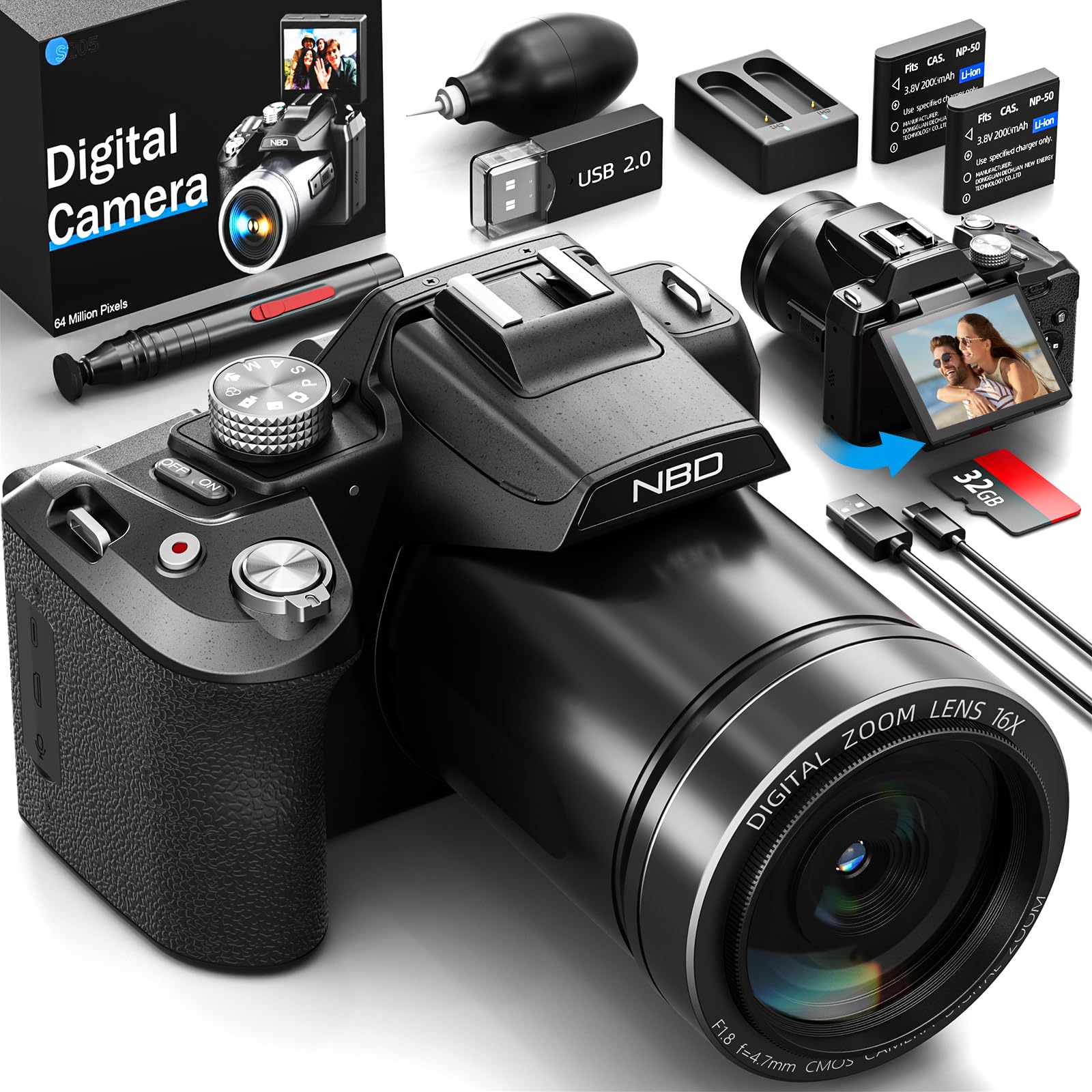
Imej: Depan view of the NBD S205D Digital Camera, showing the lens, flash, and the 3-inch 180-degree rotatable screen in an open position. The camera body is deep black.
Komponen Utama:
- Kanta: Captures images and videos. Features F1.8 night vision.
- kilat: Menyediakan pencahayaan dalam keadaan cahaya malap.
- 3" 180° Rotatable Screen: For framing shots, reviewing content, and vlogging.
- Butang Kuasa: Menghidupkan/mematikan kamera.
- Butang Pengatup: Press halfway to focus, fully to capture a photo.
- Mod Dail: Selects shooting modes (e.g., Photo, Video, Playback).
- Tuas Zum: Controls digital zoom (up to 16x).
- Butang Navigasi: For menu navigation and setting adjustments.
- Input Mikrofon: Untuk sambungan mikrofon luaran.
- Port USB: Untuk pengecasan dan pemindahan data.
- Slot Kad SD: For inserting the Micro SD card.
- Petak Bateri: Houses the Lithium-ion batteries.
Persediaan
1. Mengecas Bateri
- Buka penutup petak bateri.
- Insert the two provided Lithium-ion batteries, ensuring correct polarity.
- Tutup penutup petak bateri.
- Connect the camera to a power source using the USB charging cable. The charging indicator will illuminate.
- Charge until the indicator light changes or turns off, indicating a full charge.
2. Memasukkan Kad Mikro SD
- Cari slot kad SD di sisi kamera.
- Insert the 64GB Micro SD card with the gold contacts facing down, until it clicks into place.
- Untuk mengeluarkannya, tekan kad dengan lembut sehingga ia terkeluar.
- Nota: Ensure the camera is powered off before inserting or removing the SD card to prevent data corruption.
3. Kuasa Awal Hidup
- Tekan dan tahan butang Kuasa sehingga skrin menyala.
- Follow the on-screen prompts to set the language, date, and time.
Arahan Operasi
1. Mengambil Foto
- Turn the Mode Dial to Mod Foto.
- Frame your shot using the rotatable screen.
- Press the Shutter button halfway down to activate autofocus. The focus frame will turn green when focused.
- Press the Shutter button fully to capture the photo.
- Use the Zoom Lever to adjust the 16x digital zoom.
2. Merakam Video
- Turn the Mode Dial to Mod Video.
- Press the Shutter button to start recording. A red indicator will appear on the screen.
- Tekan butang Shutter sekali lagi untuk menghentikan rakaman.
- The camera supports resolutions up to 8K/30FPS and 4K/60FPS. Adjust video resolution in the camera settings menu.
3. Mod Main balik
- Turn the Mode Dial to Mod Main Semula.
- Use the Navigation buttons to browse through your photos and videos.
- Press the OK/Enter button to view foto atau mainkan video.
4. Kesambungan Wi-Fi
- Dayakan Wi-Fi dalam menu tetapan kamera.
- Download the NBD camera app on your smartphone or tablet.
- Connect your smart device to the camera's Wi-Fi network (SSID and password displayed on camera screen).
- Use the app to remotely control the camera, transfer files, and share content.
5. Night Vision (F1.8 Lens)
The camera's F1.8 lens is designed to capture significantly more light in low-light conditions, enhancing image clarity and detail without requiring additional settings. Simply use the camera as normal in dim environments.
Penyelenggaraan
- Membersihkan Lensa: Gunakan kain lembut dan bebas serat yang direka khusus untuk kanta kamera. Jangan gunakan bahan yang melelas atau bahan kimia yang keras.
- Membersihkan Skrin: Wipe the screen gently with a microfiber cloth.
- Pembersihan Badan: Gunakan kain lembut dan kering untuk mengelap badan kamera. Untuk kotoran degil, sedikit dampen kain dengan air.
- Storan: When not in use for extended periods, remove the batteries and store the camera in a dry, dust-free environment.
- Penjagaan Bateri: Recharge batteries regularly, even if not fully depleted, to maintain battery health.
Menyelesaikan masalah
| Masalah | Kemungkinan Punca | Penyelesaian |
|---|---|---|
| Kamera tidak dihidupkan. | Bateri habis atau salah dimasukkan. | Charge the batteries fully. Ensure batteries are inserted with correct polarity. |
| Tidak boleh mengambil gambar/video. | Kad SD penuh, dikunci atau tidak dimasukkan. | Insert a formatted SD card. Check if the SD card's write-protect switch is off. Delete unnecessary files atau gantikan kad tersebut. |
| Imej adalah kabur. | Lens is dirty, camera shake, or focus issue. | Clean the lens. Hold the camera steady or use a tripod. Ensure autofocus locks before shooting. |
| Sambungan Wi-Fi gagal. | Incorrect password, camera Wi-Fi not enabled, or app issue. | Verify Wi-Fi is enabled on the camera. Re-enter password. Restart camera and smart device. Reinstall the app if necessary. |
| Hayat bateri pendek. | Frequent use of flash, Wi-Fi, or high-resolution recording. | Reduce use of power-intensive features. Carry spare charged batteries. |
Spesifikasi
| Nombor Model | NBD-EU-S205D (S205D) |
| Teknologi Sensor | CMOS, 1/2-inch |
| Max Image Resolution | 64 Megapixels (via interpolation) |
| Resolusi Tangkapan Video | 8K/30FPS, 5K, 4K/60FPS, 2K, 1080P, 720P |
| Lens Aperture | F1.8 (Night Vision) |
| Jenis Zum | Zum Digital 16x |
| Paparan | 3-inch 180° Rotatable OLED Screen (360 x 640 resolution) |
| Jenis Fokus | Automatik, Manual |
| Penstabilan Imej | digital |
| Ketersambungan | Wi-Fi, USB |
| Media Storan | Kad Mikro SD (sehingga 128GB, 64GB disertakan) |
| File Format | MP4 (Video), JPEG (Photo) |
| Jenis Bateri | Lithium-ion (2 x 2000 mAh included) |
| Dimensi (L x W x H) | 12.7 x 12.5 x 8.5 cm |
| Berat badan | lebih kurang 500g |
| warna | Hitam pekat |
Waranti dan Sokongan
The NBD S205D Digital Camera comes with a waranti seumur hidup, covering manufacturing defects and malfunctions under normal use. For warranty claims or technical assistance, please contact NBD customer support.
NBD offers Sokongan pelanggan 24/7 to assist you with any questions or issues you may encounter. Please refer to the contact information provided on the NBD official website or your product packaging for support channels.
Nota: Waranti tidak meliputi kerosakan yang disebabkan oleh salah guna, kemalangan, pembaikan tanpa kebenaran atau haus dan lusuh biasa.