1. Lebihview
This manual provides instructions for the Generic Replacement Remote Control, model vietRM#070909433, designed for use with specific LG TV models including 39LA613V-ZF, 39LA613V-ZG, and 39LA6154-ZB. This remote is a replacement unit and may not offer all functions present on the original equipment manufacturer (OEM) remote control. Please review this manual thoroughly before use.
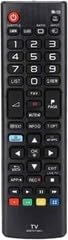
Rajah 1: belakang view of the replacement remote control. This image displays the rear side of the replacement remote control, highlighting the battery compartment cover. Ensure batteries are inserted correctly for proper operation.
2. Persediaan
2.1 Pemasangan Bateri
- Cari petak bateri di belakang alat kawalan jauh.
- Luncurkan penutup petak bateri ke bawah atau tekan selak dan angkat untuk membuka.
- Insert two AAA batteries (not included), ensuring the positive (+) and negative (-) terminals align with the markings inside the compartment.
- Gantikan penutup petak bateri, pastikan ia terpasang dengan selamat pada tempatnya.
2.2 Penggunaan Awal
This replacement remote control is pre-programmed for the specified LG TV models. No additional programming is typically required. Point the remote directly at your LG TV and press the KUASA button to test functionality.
Nota: If the remote does not respond, ensure batteries are correctly installed and have sufficient charge. Verify that your TV model is listed as compatible.
3. Arahan Operasi
The remote control features standard buttons for common TV functions. Refer to your LG TV's original user manual for detailed information on specific TV features and menu navigation.
3.1 Fungsi Asas
- KUASA: Menghidupkan atau mematikan TV.
- VOL +/-: Melaraskan tahap kelantangan.
- CH +/-: Menukar saluran TV.
- MATI: Membisukan atau menyahredamkan bunyi TV.
- INPUT/SUMBER: Selects the input source (e.g., HDMI, AV).
- MENU/SETTINGS: Mengakses menu atau tetapan utama TV.
- NAVIGATION (Arrow buttons): Moves the cursor within menus.
- OK/MASUK: Mengesahkan pilihan.
- KELUAR/BELAKANG: Kembali ke skrin sebelumnya atau keluar dari menu.
- Tombol NOMBOR (0-9): Terus memasukkan nombor saluran.
Nota: Some advanced features or smart TV functions may require the original remote or specific TV settings not supported by this replacement unit.
4. Penyelenggaraan
4.1 Pembersihan
Untuk membersihkan alat kawalan jauh, lap permukaannya dengan lembut dengan kain kering yang lembut. Untuk kotoran degil, sedikit dampen kain dengan air atau pembersih yang lembut dan tidak melelas. Elakkan daripada menggunakan bahan kimia, pelarut atau bahan yang kasar, kerana ini boleh merosakkan kemasan alat kawalan jauh atau komponen dalaman.
4.2 Penggantian Bateri
Replace batteries when the remote's response becomes sluggish or stops working. Always replace both batteries simultaneously with new ones of the same type (AAA). Do not mix old and new batteries, or different types of batteries. Dispose of used batteries according to local regulations.
4.3 Penyimpanan
When not in use for extended periods, remove the batteries to prevent leakage and potential damage to the remote control. Store the remote in a cool, dry place away from direct sunlight and extreme temperatures.
5. Penyelesaian masalah
| Masalah | Kemungkinan Punca | Penyelesaian |
|---|---|---|
| Alat jauh tidak berfungsi. |
|
|
| Sesetengah fungsi tidak berfungsi. |
|
|
| Butang melekit atau tidak bertindak balas. |
|
|
6. Spesifikasi
- Nombor Model: vietRM#070909433
- Model TV yang Serasi: LG 39LA613V-ZF, 39LA613V-ZG, 39LA6154-ZB
- Jenama: Generik
- Sumber Kuasa: 2 x Bateri AAA (tidak termasuk)
- Ciri Khas: Reka bentuk ergonomik
- warna: Black/White (as per product variant)
- Bilangan Maks Peranti yang Disokong: 1
- Peranti Serasi: Televisyen
- Pengeluar: VieRemote
7. Waranti dan Sokongan
As a replacement remote control, this product is typically covered by the seller's return policy. Please refer to the purchase platform or contact the seller directly for information regarding warranty, returns, or technical support. Keep your purchase receipt or order number handy when contacting support.
Nota: This is not an original LG product. Any warranty or support for the original LG TV should be directed to LG Electronics.