
1. Pengenalan
The Radioddity X1 Walkie Talkies are designed for reliable two-way communication in various environments. Featuring an IP67 waterproof and dustproof rating, durable construction, and advanced noise reduction, these FRS radios are suitable for outdoor adventures, professional use, and emergency situations. They offer a long communication range and include essential features like NOAA weather alerts and voice-activated transmission (VOX).

Image: The Radioddity X1 Walkie Talkie, showcasing reka bentuknya yang mantap.
2. Apa yang ada di dalam Kotak
Upon opening your Radioddity X1 package, you should find the following items:
- 2 x Radioddity X1 Walkie Talkies
- 2 x Bateri Boleh Dicas Semula
- 1 x 2-in-1 USB-C Charging Cable
- 2 x Klip Tali Pinggang
- 2 x Tali Tangan
- 1 x Penyesuai
- 1 x Manual Pengguna (dokumen ini)

Image: All components included in the Radioddity X1 package, including two radios, batteries, charging cable, belt clips, hand straps, and adapters.
3. Persediaan
3.1. Pemasangan Bateri
- Pastikan walkie talkie dimatikan.
- Cari petak bateri di bahagian belakang unit.
- Align the battery with the contacts and gently push it into the compartment until it clicks into place.
3.2. Mengecas Bateri
The Radioddity X1 features a 2500mAh rechargeable lithium battery. For optimal performance, fully charge the battery before first use.
- Connect the provided USB-C charging cable to the charging port on the walkie talkie.
- Connect the other end of the USB-C cable to the adapter, and then plug the adapter into a standard power outlet. Alternatively, you can connect the USB-C cable to a compatible USB power source (e.g., computer, power bank).
- Penunjuk bateri pada paparan akan menunjukkan status pengecasan. Pengecasan penuh biasanya mengambil masa beberapa jam.
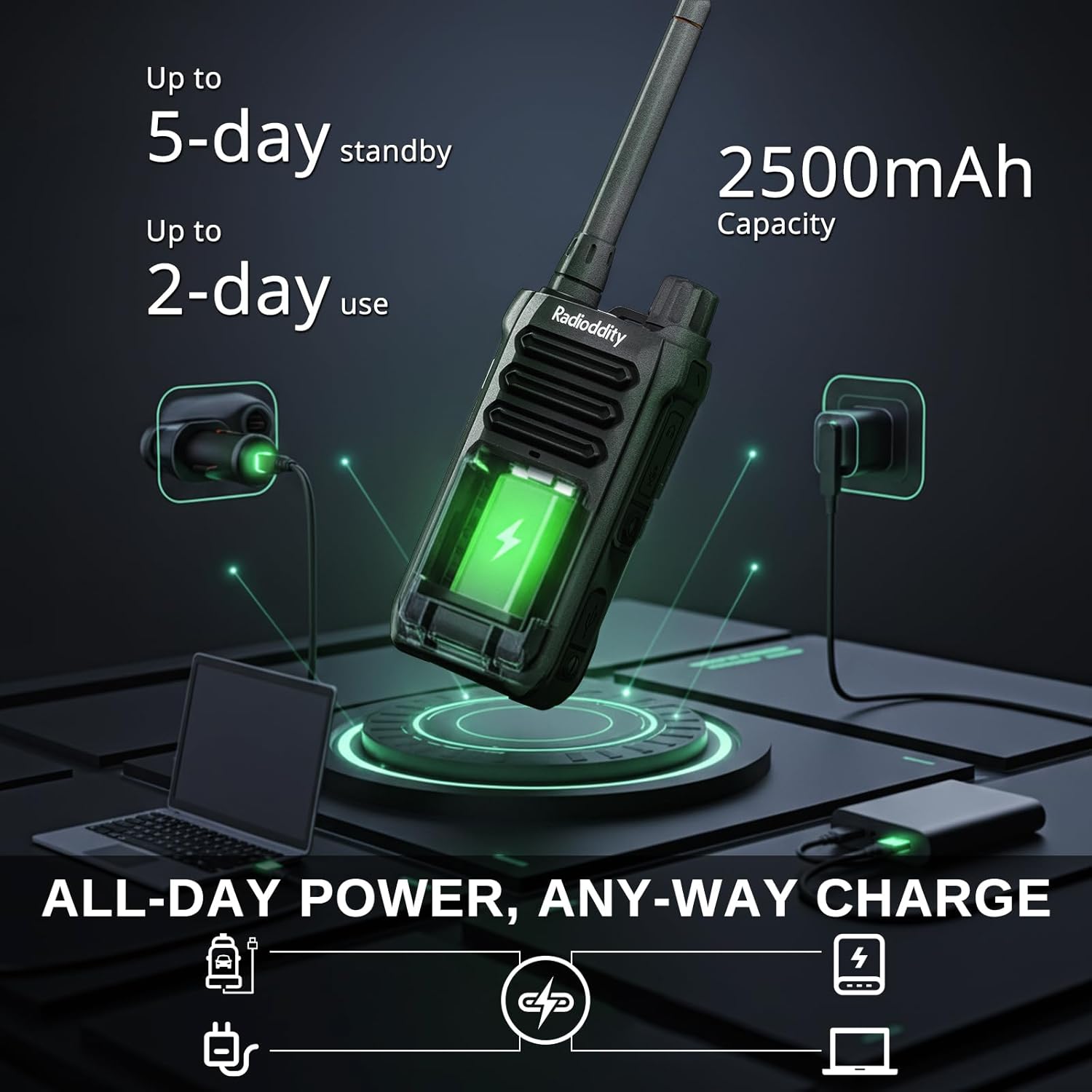
Image: The Radioddity X1 Walkie Talkie connected to a USB-C charger, illustrating the charging process.
3.3. Memasang Aksesori
- Klip tali pinggang: Secure the belt clip to the designated slot on the back of the walkie talkie.
- Tali Tangan: Thread the hand strap through the loop on the top or side of the walkie talkie for added security.
3.4. Menghidupkan/Mematikan
To power on or off the device, rotate the power/volume knob located on the top of the unit clockwise to turn on, and counter-clockwise until it clicks to turn off.
4. Arahan Operasi
4.1. Pemilihan Saluran
The Radioddity X1 comes pre-programmed with 22 FRS channels. To select a channel:
- Tekan ke MENU butang untuk masuk ke menu.
- Gunakan Anak panah atas/bawah butang untuk menavigasi ke tetapan saluran.
- Tekan OK untuk mengesahkan, kemudian gunakan Anak panah atas/bawah butang untuk memilih saluran yang anda inginkan (1-22).
- Tekan OK again to save the selection and MENU untuk keluar.
4.2. Kod Privasi (CTCSS/DCS)
The radio supports 155 privacy codes (CTCSS/DCS) to filter out unwanted conversations on a channel. While not providing true privacy, these codes ensure you only hear transmissions from radios set to the same channel and code.
- Tekan ke MENU butang.
- Navigate to the CTCSS or DCS setting using the Anak panah atas/bawah butang.
- Tekan OK, then select your desired code.
- Tekan OK untuk menyimpan dan MENU to exit. Ensure all radios in your group use the same channel and privacy code.
4.3. Push-to-Talk (PTT)
Untuk menghantar, tekan dan tahan yang besar PTT butang di sisi radio. Bercakap dengan jelas ke dalam mikrofon. Lepaskan PTT butang untuk mendengar.
4.4. Fungsi VOX (Transmisi Dikendalikan Suara)
The VOX function allows for hands-free operation. When activated, the radio transmits automatically when it detects your voice.
- Tekan ke MENU butang.
- Navigasi ke VOX tetapan.
- Tekan OK, then select an appropriate sensitivity level (higher numbers for lower sensitivity).
- Tekan OK untuk menyimpan dan MENU untuk keluar.

Image: Icon representing the Voice Operated Transmission (VOX) function.
4.5. Amaran Cuaca NOAA
Stay informed with 10 built-in NOAA weather channels providing real-time alerts.
- Tekan ke MENU butang.
- Navigasi ke NOAA tetapan.
- Tekan OK, then select the desired NOAA channel or activate weather alerts.
- Tekan OK untuk menyimpan dan MENU untuk keluar.

Image: Icon representing the NOAA Scan & Alert feature.
4.6. Recording Playback
The Radioddity X1 features a unique recording playback function for up to 20 messages.
- To record, press and hold the dedicated REKOD button (if available, or refer to specific menu options).
- To play back recorded messages, press the MAIN SEMULA butang.

Image: The Radioddity X1 display showing the recording and replay functions, highlighting its audio safety net capability.

Image: Icon representing the Recording function.
4.7. Pengurangan Bunyi
The dual-way noise reduction feature ensures clear communication even in noisy environments.

Image: The Radioddity X1 in a construction setting, illustrating its noise reduction capabilities for clear communication.
5. Penyelenggaraan
5.1. Penjagaan Kalis Air dan Habuk IP67
The Radioddity X1 is rated IP67, meaning it is dustproof and can withstand submersion in up to 1 meter of water for 30 minutes. To maintain its integrity:
- Ensure all port covers (e.g., charging port, accessory port) are securely closed before exposure to water or dust.
- After exposure to water, wipe the radio dry with a clean cloth. Do not charge the radio if the charging port is wet.
- Elakkan penenggelaman berpanjangan melebihi kedalaman dan masa yang ditetapkan.

Image: The Radioddity X1 Walkie Talkie submerged in clear water, demonstrating its IP67 waterproof capability.

Image: The Radioddity X1 Walkie Talkie partially covered in sand, highlighting its dustproof design.
5.2. Penjagaan Bateri
The 2500mAh battery provides up to 48 hours of average use. To prolong battery life:
- Elakkan menyahcas sepenuhnya bateri dengan kerap.
- Simpan radio di tempat yang sejuk dan kering apabila tidak digunakan.
- Gunakan hanya kabel pengecasan dan penyesuai yang disediakan.
5.3. Pembersihan
Lap radio dengan lembut, damp kain. Jangan gunakan bahan kimia yang keras atau pembersih yang kasar.
6. Penyelesaian masalah
| Masalah | Kemungkinan Punca | Penyelesaian |
|---|---|---|
| Tiada kuasa | Bateri lemah atau tidak dipasang dengan betul. | Cas bateri atau pasang semula. |
| Tidak boleh menghantar atau menerima | Incorrect channel or privacy code. Out of range. | Verify channel and privacy code settings. Move closer to the other radio. |
| Kualiti audio yang lemah | Weak signal, interference, or volume too low. | Adjust volume. Move to an area with less obstruction. Check for interference sources. |
| Julat komunikasi pendek | Obstructions (buildings, terrain), low power channel. | Move to an open area. Use channels 1-7 or 15-22 for higher power output. |
7. Spesifikasi
| Ciri | Perincian |
|---|---|
| Jenama | Radiodditi |
| Nombor Model | X1 |
| warna | Hitam |
| Bilangan Saluran | 22 (FRS) |
| Julat Kekerapan | FRS |
| Julat Percakapan Maksimum | 5 Miles (open areas), 2 Miles (urban settings) |
| Tahap Ketahanan Air | IP67 Kalis Air |
| Ciri Khas | Dust Proof, Emergency Alarm (SOS), Long Range, Shockproof, Voice Operated Transmission (VOX), Noise Reduction, NOAA Weather Alerts, Recording Playback |
| Kapasiti Bateri | Lithium 2500mAh |
| Purata Hayat Bateri | 48 Jam |
| Mengecas | USB-C |
| Dimensi Produk (D x W x H) | 1.1" x 2.4" x 7.1" |
| ID FCC | 2AN62-X1 |

Image: Visual representation of the Radioddity X1's communication range, showing up to 5 miles in open areas and 2 miles in urban settings.

Image: The Radioddity X1 Walkie Talkie on the ground at a construction site, illustrating its durability and shockproof design after 1,000+ drop tests.
8. Waranti & Sokongan
8.1. Maklumat Waranti
The Radioddity X1 Walkie Talkies come with an Waranti 18 bulan from the date of purchase. This warranty covers manufacturing defects and ensures your product is free from material and workmanship flaws under normal use. Please retain your proof of purchase for warranty claims.
8.2. Sokongan Pelanggan
For technical assistance, troubleshooting, or warranty inquiries, please visit the official Radioddity website or contact their customer support team. You can find contact information and additional resources on their webtapak: www.radioddity.com.
9. Video Produk
Radioddity X1 | Built for Harsh Conditions
Video: This official Radioddity video demonstrates the X1's robust features, including its IP67 dustproof and waterproof capabilities, drop resistance, car-crush resistance, long-range communication, and noise-cancelling audio, highlighting its suitability for challenging environments.