
Kinpthy W400-B25
Kinpthy W400-B25 1920P HD Dual-Lens Endoscope Camera Instruction Manual
Model: W400-B25 | Brand: Kinpthy
pengenalan
This manual provides detailed instructions for the safe and effective use of your Kinpthy W400-B25 1920P HD Dual-Lens Endoscope Camera. Please read this manual thoroughly before operation and retain it for future reference.

Image: Kinpthy W400-B25 Dual-Lens Endoscope Camera with its components, including the camera probe, control unit, USB, Type-C, and Lightning connectors, and various attachments like a hook, magnet, and mirror. A smartphone screen displays an inspection view.
Komponen Produk
The Kinpthy W400-B25 Endoscope Camera package includes the following items:
- Endoscope Camera with 16.4ft Semi-rigid Cable
- Android connector (Micro-USB)
- Lightning Port connector (for iOS devices)
- Penyambung jenis-C
- Accessories: Magnet, Hook, Mirror, Protective Cap
- Manual Pengguna

Image: A detailed diagram illustrating the key components of the endoscope camera, including the Lightning port, brightness adjustment control, photo capture button, dual cameras at the probe tip, and the semi-rigid cable.
Panduan Persediaan
1. Pemasangan Apl
To operate the endoscope, you need to install the "SUP-ANESOK" application on your mobile device (iOS 9.0+ or Android 7+).
- Cari untuk "SUP-ANESOK" in your device's App Store (for iOS) or Google Play Store (for Android).
- Alternatively, scan the QR code below to download the application.
- Pasang aplikasi pada peranti anda.
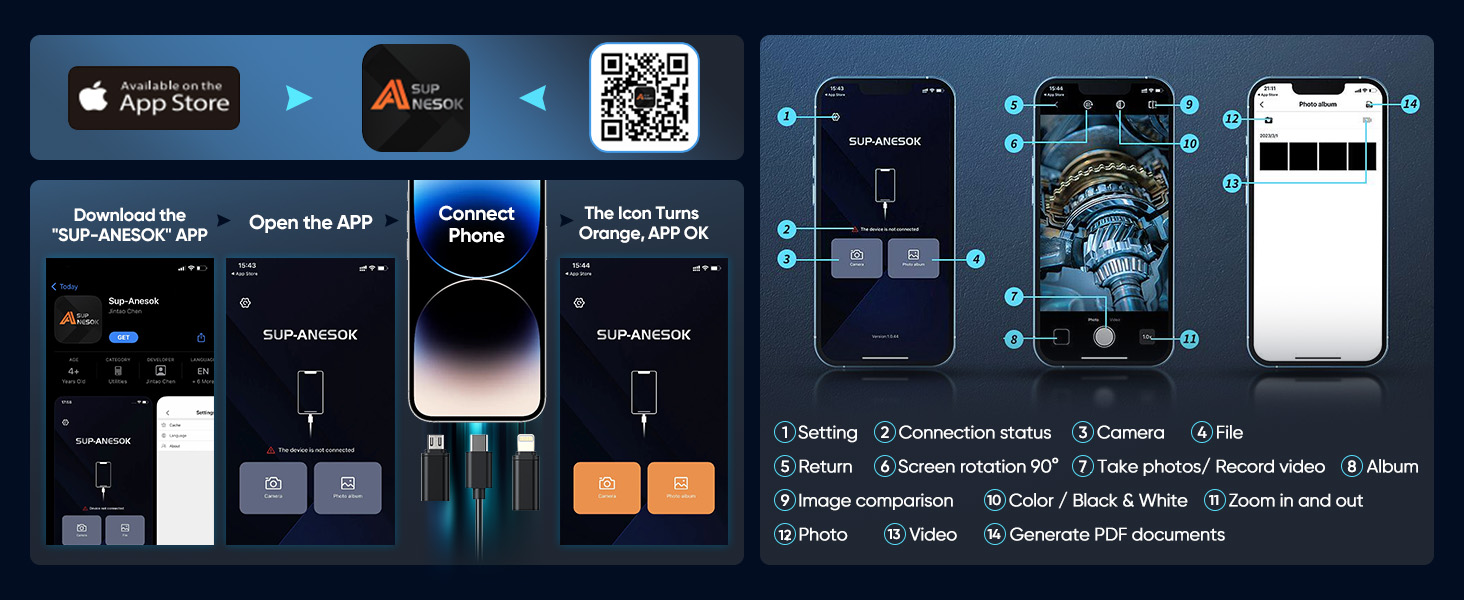
Image: A visual guide for downloading the "SUP-ANESOK" app from the App Store or via QR code, and the steps to connect the endoscope to a smartphone, showing the app interface and connection status indicator.
Scan this QR code to download the SUP-ANESOK App: QR Code Link
2. Sambungan Peranti
Connect the endoscope to your smartphone or tablet using the appropriate connector.
- Open the "SUP-ANESOK" app on your device.
- Connect the endoscope cable to your device using the Micro-USB, Type-C, or Lightning connector.
- Ensure the connection is secure. The app's connection status icon should turn orange, indicating a successful connection.
- If prompted, grant the app necessary permissions for storage to save images and videos. The app does not require internet access and cannot upload personal information.

Image: An illustration demonstrating the endoscope's compatibility with various mobile devices (iPhone, Android, iPad) and the different connector types (Micro-USB, Lightning, Type-C) used for connection.
Arahan Operasi
1. Viewing dan Rakaman
Once connected, the app will display a real-time view from the endoscope camera. You can capture images and record videos directly from the app interface.
- Tangkap Imej: Press the dedicated photo button on the control unit or tap the camera icon within the app to take a snapshot.
- Rakam Video: Tap the video icon within the app to start and stop video recording.
- Resolusi: The camera captures images and videos at 1920x1440 resolution.
2. Adjusting Brightness and Switching Lenses
The endoscope features 8 adjustable LED lights and a dual-lens system for enhanced visibility.
- Kecerahan LED: Use the "LED+" and "LED-" buttons on the control unit to adjust the brightness of the LED lights. This is crucial for clear imaging in dark environments.
- Dual-Lens Switching: For models with dual lenses, long press the camera button on the control unit to switch between the front and side cameras.

Imej: Dari dekat view of the endoscope probe demonstrating the adjustable LED lights and the dual camera setup. The image also indicates the optimal focal length range of 2-10cm (0.8-3.9 inches).
3. Menggunakan Aksesori
The included accessories can be attached to the camera tip to assist with various inspection tasks.
- Magnet: For retrieving small metallic objects from hard-to-reach areas.
- cangkuk: For pulling or maneuvering objects.
- Cermin: Untuk viewing at a 90-degree angle, useful in very tight spaces.
- Topi Pelindung: To protect the lens when not in use or in harsh environments.

Image: The endoscope camera submerged in water, highlighting its IP67 waterproof rating, alongside illustrations of the hook, magnet, and mirror accessories.
Penyelenggaraan
- Pembersihan Kanta: Before and after each use, gently wipe the camera lenses with a clean, soft microfiber cloth to remove any dust, debris, or moisture. This ensures optimal image clarity.
- Tahan Air: The camera probe is IP67 waterproof, allowing it to be submerged in water up to 3.28 feet (1 meter) for up to 1 hour. Ensure the connectors are dry before connecting to your device.
- Storan: Store the endoscope in a dry, cool place, away from direct sunlight and extreme temperatures. Coil the semi-rigid cable loosely to prevent damage.
Menyelesaikan masalah

Image: A frequently asked questions section addressing common issues such as app permissions, image display problems, camera heating, connection lag, and unclear images.
| Masalah | Penyelesaian |
|---|---|
| App requires device information. | The app only requires device storage permissions to save images and videos. It does not access the internet or upload personal information. |
| App not displaying images. | Check if the camera indicator light is on. If not, or if the connector is loose, reconnect it. |
| Kamera menjadi panas. | It is normal for the camera to warm up, especially when the LED light is at full brightness. This does not affect normal use or lifespan. |
| No response or lag after connecting. | Keep your phone's battery level above 20%. Check if the phone is connected properly by unplugging and plugging it in several times, especially if it has OTG functionality. Uninstall and reinstall the app. If issues persist, contact customer service. |
| Imej tidak jelas. |
|
Spesifikasi
| Ciri | Perincian |
|---|---|
| Nombor Model | W400-B25 |
| Resolusi Kamera | 1920x1440P (2.0MP) |
| Diameter Probe | 7.9mm |
| Panjang Kabel | 16.4 kaki (5 meter) |
| Jenis Kabel | Semi-Rigid Snake Cable |
| Lampu LED | 8 Lampu LED yang boleh dilaraskan |
| Panjang Fokus | 2-10 sm (0.8-3.9 inci) |
| Bidang View (FOV) | 70° |
| Penilaian Kalis Air | IP67 (probe only) |
| Keserasian | iOS 9.0+ / Android 7+ |
| Penyambung | Micro-USB, Type-C, Lightning |
| Dimensi Pakej | 7.13 x 4.8 x 1.54 inci |
| Berat Barang | 5.93 auns |
| Pengeluar | Kinpthy |

Image: A diagram illustrating the physical dimensions of the endoscope camera, including the probe diameter (0.35in), probe length (1.85in), cable length (16.4ft), and control unit dimensions (1.89in x 0.67in).
Waranti dan Sokongan
Kinpthy is committed to providing high-quality products and excellent customer service.
- Perkhidmatan Selepas Jualan Sepanjang Hayat: Kinpthy offers a "One Choice Lifelong Companionship" after-sales service for this product.
- Hubungi Sokongan: For any technical assistance, troubleshooting not covered in this manual, or warranty inquiries, please contact Kinpthy customer service through your purchase platform or the official Kinpthy webtapak.
Image: An illustration highlighting Kinpthy's commitment to customer satisfaction, including over 10 years of experience, global presence in over 100 countries, and lifetime after-sales service.