
1. Pengenalan
The Caytail DK201 is a 2K wireless outdoor PTZ security camera designed for comprehensive surveillance. Featuring a high-capacity 5200 mAh battery and a 3W high-efficiency solar panel, it offers an eco-friendly and economical power solution, ensuring continuous operation. With a 360° ultra-wide field of view and IP65 certification, it is suitable for various outdoor environments.
This camera provides clear and precise 2K HD images, including color night vision. It is equipped with intelligent PIR motion detection and two-way audio for communication and immediate alerts.
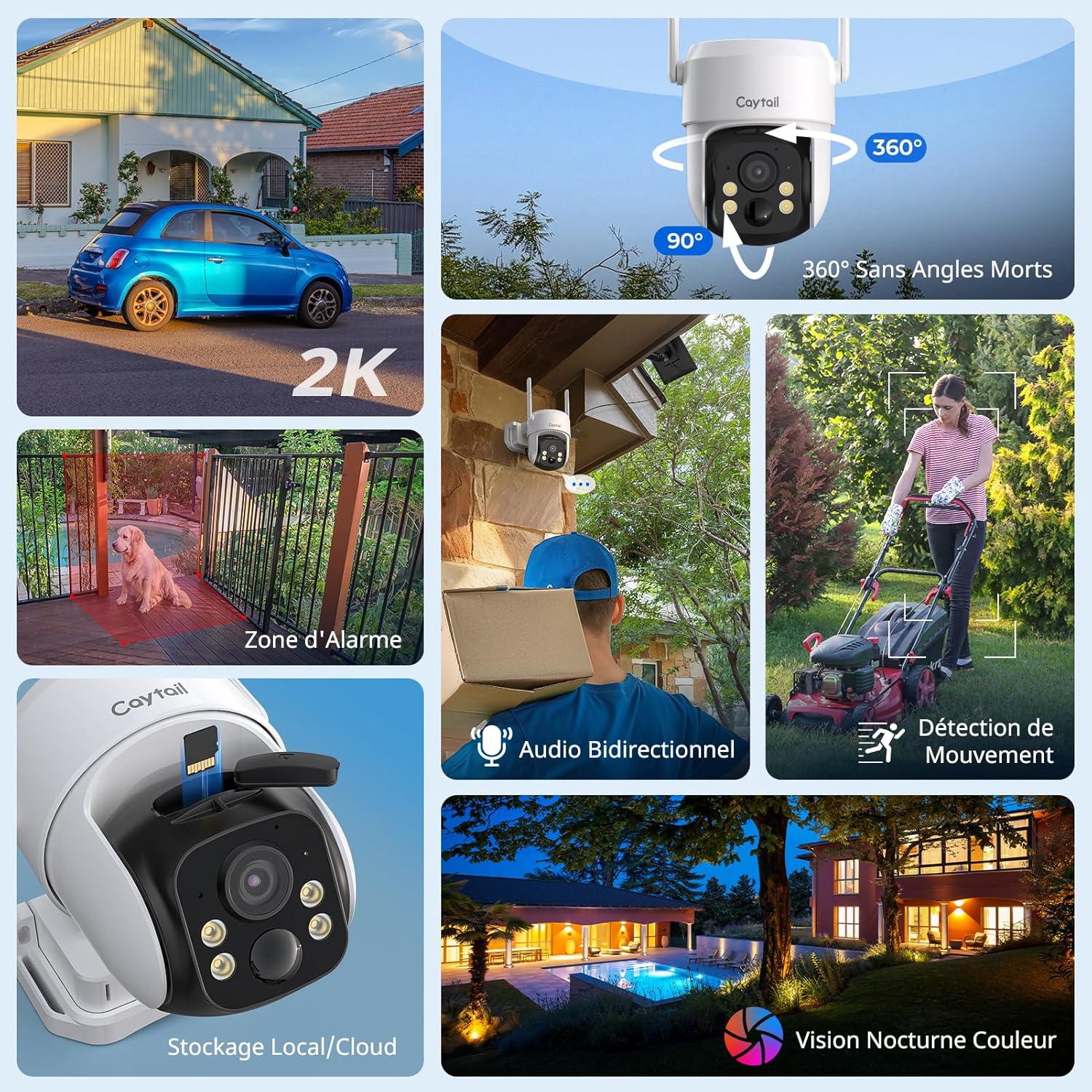
Figure 1: Caytail DK201 Camera Key Features Overview
2. Kandungan Produk
Sila sahkan bahawa semua item terdapat dalam pakej:
- Caytail 2K Wireless Outdoor PTZ Security Camera
- Panel Suria (3W)
- Pendakap Pemasangan
- Panduan Pemasangan
- Screws and Wall Plugs for Installation
3. Persediaan dan Pemasangan
3.1 Pemasangan Fizikal
The camera is designed for outdoor use and can be mounted on walls, trees, or roofs. Use the provided screws and mounting bracket for secure installation. Ensure the solar panel is positioned to receive maximum direct sunlight throughout the day for optimal charging.

Figure 2: Outdoor Installation with Solar Panel
3.2 App Configuration (Ubox App)
Follow these steps to connect your camera to the Ubox app:
- Download the Ubox App: Cari untuk "Ubox" on the App Store (iOS) or Google Play Store (Android) and install it.
- Buat Akaun: Open the Ubox app and register for a new account, then log in.
- Tetapkan Semula Kamera: Press and hold the reset button on the camera for more than 3 seconds until it enters pairing mode.
- Tambah Peranti: In the app, click the "+" icon to add a new device and select "Configure Wi-Fi Device".
- Sambung ke Wi-Fi: Select your 2.4 GHz Wi-Fi network and enter the password to complete the connection. (Note: The camera only supports 2.4 GHz Wi-Fi networks).

Figure 3: Ubox App Connection Steps
4. Arahan Operasi
4.1 Langsung View dan Kawalan PTZ
Access the live video feed through the Ubox app. Use the on-screen controls to pan (360° horizontally) and tilt (90° vertically) the camera to adjust the viewsudut ing. Ini membolehkan liputan komprehensif tanpa titik buta.

Figure 4: 360° Pan and 90° Tilt Functionality
4.2 Pengesanan Gerakan dan Makluman
The camera features intelligent PIR motion detection. When motion is detected, you will receive immediate alarm notifications on your phone via the Ubox app. The camera can also trigger a sound alarm to deter intruders.

Rajah 5: Pengesanan Gerakan PIR dalam Tindakan
4.3 Audio Dua Hala
Utilize the built-in microphone and speaker for two-way communication. This allows you to speak with visitors or deter unwanted individuals remotely through the app.

Rajah 6: Komunikasi Audio Dua Hala
4.4 Penglihatan Malam
The camera provides 2K HD color night vision. In low-light conditions, the camera will activate a warm light to capture clear, full-color images up to 10 meters.

Figure 7: 2K HD Color Night Vision
4.5 Pilihan Storan
Kamera menyokong dua kaedah penyimpanan:
- Kad MicroSD: Compatible with microSD cards up to 128 GB for local storage and loop recording.
- Storan Awan: A 30-day free trial of cloud storage is available. Choose the storage method that best suits your needs.

Figure 8: MicroSD and Cloud Storage Options
5. Penyelenggaraan
The Caytail DK201 camera is IP65 certified, making it resistant to dust and water. This ensures reliable operation in various weather conditions.
- Pembersihan: Lap kanta kamera dan panel solar secara berkala dengan lembut, damp kain untuk memastikan penglihatan yang jelas dan pengecasan solar yang cekap.
- Peletakan Panel Suria: Ensure the solar panel remains free from obstructions (e.g., leaves, dirt) that could reduce its charging efficiency.
- Kemas kini Firmware: Check the Ubox app regularly for firmware updates to ensure your camera has the latest features and security enhancements.

Rajah 9: Rintangan Cuaca IP65
6. Penyelesaian masalah
If you encounter issues with your Caytail DK201 camera, please refer to the following common solutions:
- Kamera Tidak Menyambung ke Wi-Fi:
- Pastikan rangkaian Wi-Fi anda ialah 2.4 GHz. Kamera tidak menyokong rangkaian 5 GHz.
- Sahkan kata laluan Wi-Fi adalah betul.
- Place the camera closer to your Wi-Fi router to improve signal strength. Thick walls can reduce signal range.
- Restart your router and the camera, then attempt to reconnect.
- Kualiti Imej Lemah:
- Bersihkan lensa kamera untuk menghilangkan sebarang kotoran atau kesan.
- Pastikan tiada halangan dalam bidang kamera view.
- Check your internet connection speed. A stable connection is required for high-quality streaming.
- Bateri Tidak Dicas:
- Ensure the solar panel is clean and receives direct sunlight for several hours daily.
- Sahkan kabel sambungan antara panel solar dan kamera adalah kukuh.
- In prolonged cloudy weather, the battery may drain. Consider temporarily charging the camera via USB if available.
- Pengesanan Pergerakan Tidak Berfungsi:
- Check the motion detection settings in the Ubox app to ensure it is enabled and sensitivity is adjusted correctly.
- Ensure there are no objects (e.g., tree branches, flags) that might cause false alarms due to movement.
For further assistance, please contact Caytail customer support.
7. Spesifikasi
| Ciri | Spesifikasi |
|---|---|
| Nama Model | DK201 |
| Jenama | Caytail |
| Teknologi Ketersambungan | Wireless, Wi-Fi (2.4 GHz) |
| Resolusi | 2K (3 Megapixels effective) |
| Pan/Tilt (PTZ) | 360° Mendatar, 90° Menegak |
| Penglihatan Malam | Color Night Vision (up to 10 meters) |
| Pengesanan Pergerakan | Pengesan Gerak PIR |
| Audio | Audio Dua Hala |
| Sumber Kuasa | Solar Panel (3W) / Built-in 5200 mAh Battery |
| Penyimpanan | MicroSD (up to 128 GB), Cloud Storage |
| Rintangan Cuaca | IP65 Kalis Air |
| Peranti Serasi | Smartphone (Ubox App) |
| Dimensi | 15 x 12 x 12 cm |
| Berat badan | 300 Gram |
8. Waranti dan Sokongan
For warranty information and technical support, please refer to the documentation included with your product or contact Caytail customer service directly. Amazon's return policy allows for returns within 30 days of purchase.
Maklumat Hubungan: Please visit the official Caytail website or refer to your purchase receipt for customer support details.