
1. Pengenalan
This manual provides detailed instructions for the safe and effective use of your MESTEK Pinless Wood Moisture Meter, model WM710-001. This device is designed for non-destructive measurement of moisture content in various materials including wood, drywall, masonry, and other building materials. Please read this manual thoroughly before operation and retain it for future reference.
2. Maklumat Keselamatan
- Always operate the device within its specified temperature and humidity ranges.
- Do not expose the meter to extreme temperatures, direct sunlight, or high humidity.
- Elakkan daripada menjatuhkan peranti atau terkena impak yang kuat.
- Jauhkan peranti daripada air dan cecair lain.
- Jangan cuba membuka atau mengubah suai peranti ini. Pembaikan hanya boleh dilakukan oleh kakitangan yang berkelayakan.
- Dispose of batteries according to local regulations. Do not mix old and new batteries or different types of batteries.
- Peranti ini bukan mainan. Jauhi dari kanak-kanak.
3. Produk Lebihview
3.1 Komponen
The MESTEK WM710-001 Pinless Wood Moisture Meter features a robust design for reliable moisture detection.
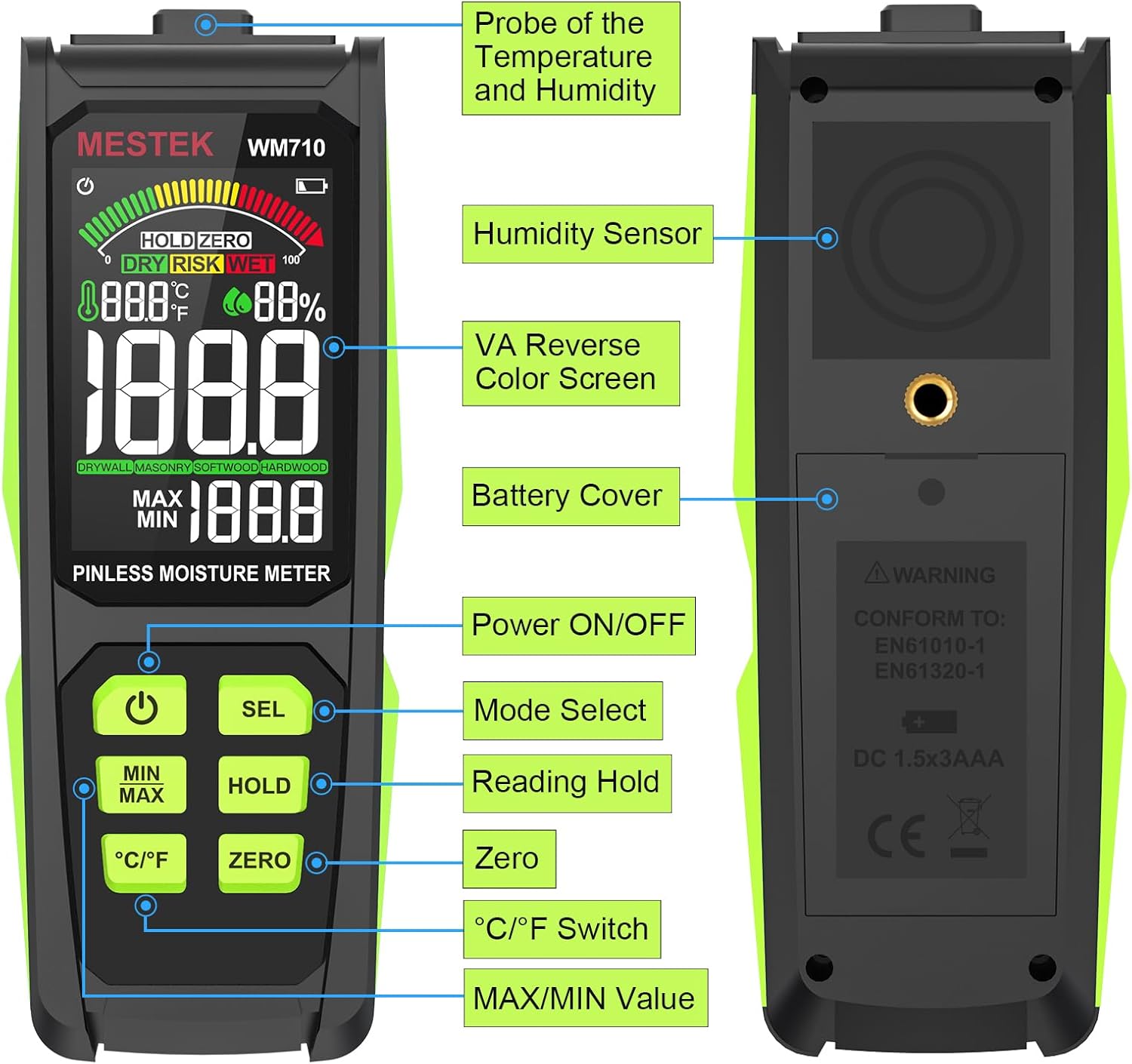
Imej: Berakhirview of the MESTEK WM710-001 Pinless Moisture Meter, highlighting its key components such as the probe, display, and control buttons.
- Probe of Temperature and Humidity: Terletak di bahagian atas peranti.
- Sensor Kelembapan: Terletak di bahagian belakang peranti.
- VA Reverse Color Screen: Paparan definisi tinggi untuk bacaan yang jelas.
- Penutup bateri: Located on the back for battery access.
- Butang ON / OFF Kuasa: Untuk menghidupkan atau mematikan peranti.
- Mode Select (SEL) Button: To switch between material modes.
- Reading Hold (HOLD) Button: To freeze the current measurement on the display.
- Butang Sifar: For zero calibration.
- Butang Suis °C/°F: To toggle between Celsius and Fahrenheit for temperature display.
- MAX/MIN Value Button: Kepada view maximum and minimum recorded measurements.
3.2 Ciri Paparan
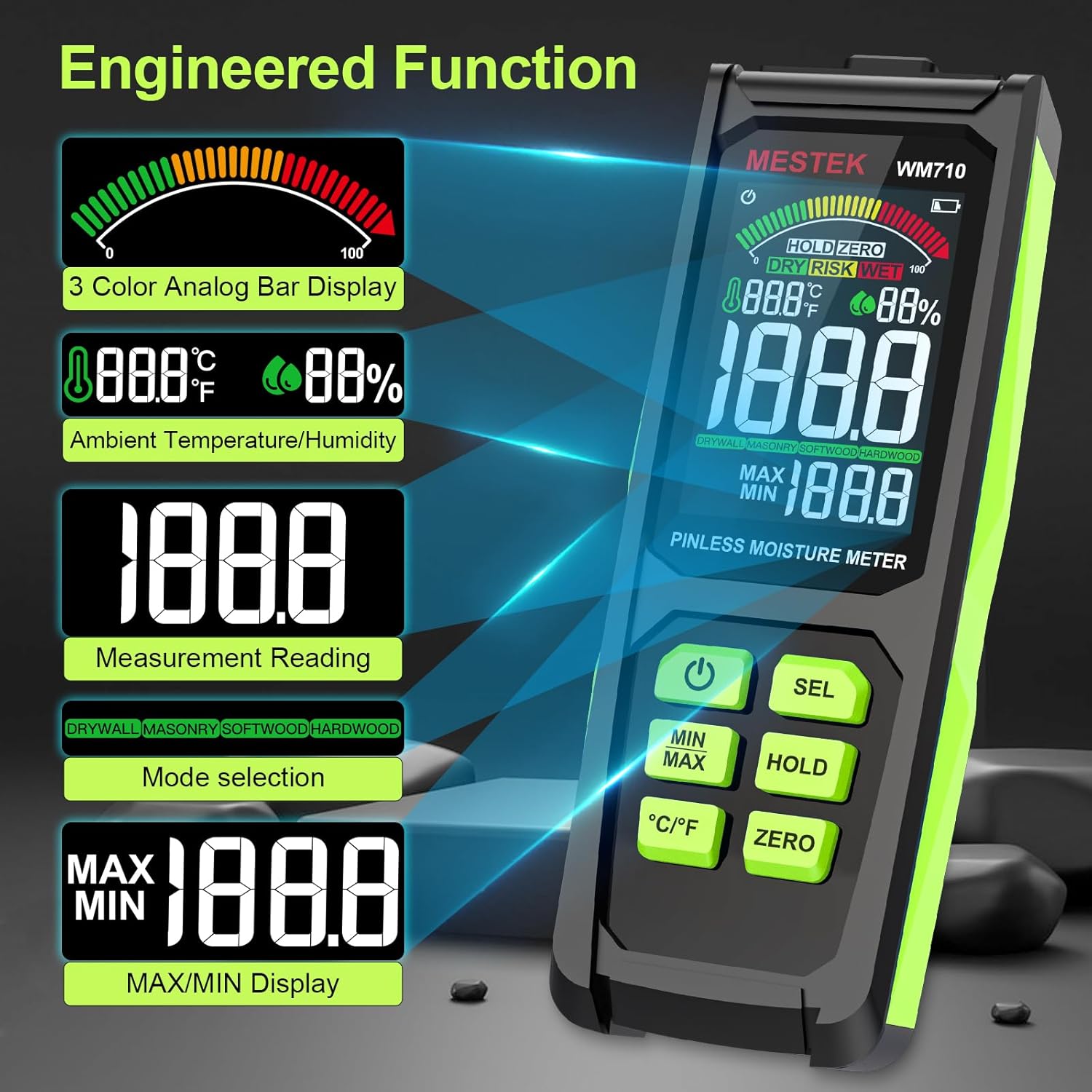
The meter is equipped with a 3-inch HD color screen that provides clear and intuitive information.

Imej: The MESTEK WM710-001 display illustrating various engineered functions including the 3-color analog bar, ambient temperature/humidity, measurement reading, mode selection, and MAX/MIN display.
- 3-Color Analog Bar Display: Visually indicates moisture levels as DRY (Green), RISK (Yellow), or WET (Red).
- Ambient Temperature/Humidity: Displays current environmental temperature and humidity.
- Measurement Reading: Shows the numerical moisture content.
- Mode Selection Indicator: Displays the currently selected material mode (Drywall, Masonry, Softwood, Hardwood).
- MAX/MIN Display: Shows the highest and lowest recorded moisture values.
- Penunjuk Bateri: Menunjukkan tahap bateri semasa.
- HOLD Indicator: Appears when the HOLD function is active.
- ZERO Indicator: Appears when zero calibration is active.
4. Persediaan
4.1 Pemasangan Bateri
The MESTEK WM710-001 requires three (3) AAA batteries for operation.
- Cari penutup bateri di bahagian belakang peranti.
- Use a small screwdriver (often included) to loosen the screw securing the battery cover.
- Tanggalkan penutup bateri.
- Insert three new AAA batteries, ensuring correct polarity (+/-) as indicated inside the battery compartment.
- Pasang semula penutup bateri dan ketatkan skru.
Nota: A low battery indicator will appear on the display when batteries need replacement.

Imej: The MESTEK WM710-001 Pinless Moisture Meter shown with its included accessories: a carrying case, user manual, three AAA batteries, and a small screwdriver for battery compartment access.
5. Arahan Operasi
5.1 Hidupkan/Mati Kuasa
Tekan ke Kuasa HIDUP/MATI button to turn the meter on. The device will perform a self-test and be ready for measurement within approximately 3 seconds. Press and hold the Kuasa HIDUP/MATI button again to turn the meter off. The device also features an auto power-off function to conserve battery life after a period of inactivity.

Imej: Satu jarak dekat view of the power button on the MESTEK WM710-001, indicating its function for turning the device on and off.
5.2 Pemilihan Mod
The meter offers different modes for various materials to ensure accurate readings.
- Hidupkan meter.
- Tekan pendek SEL button to cycle through the available material modes: Drywall, Masonry, Softwood, and Hardwood.
- Select the mode that corresponds to the material you are testing. The selected mode will be indicated on the display.
Imej: The MESTEK WM710-001 display demonstrating non-invasive detection and the process of switching between Drywall, Masonry, Softwood, and Hardwood modes using the "SEL" button.
5.3 Performing a Measurement
The WM710-001 uses a non-destructive induction method to measure moisture.
- Ensure the correct material mode is selected (refer to Section 5.2).
- Place the back of the meter (where the sensor is located) flat against the surface of the material you wish to measure.
- The meter will display the moisture content reading. The maximum measuring depth is approximately 0.78 inches (20 mm).
- Observe the 3-color analog bar for a quick visual indication of moisture levels (Green for DRY, Yellow for RISK, Red for WET). An audible alarm will sound if the "WET" threshold is exceeded.

Imej: The MESTEK WM710-001 in use, demonstrating accurate moisture measurement on wood logs, showing the digital reading and the analog bar.

Imej: The MESTEK WM710-001 being used to measure moisture in various materials, including drywall, masonry, softwood, and hardwood, illustrating its wide range of applications.
5.4 Fungsi HOLD
Tekan ke TAHAN button to freeze the current measurement on the display. This is useful when taking readings in hard-to-reach areas where the display cannot be easily viewed. Press the TAHAN butang sekali lagi untuk melepaskan bacaan dan menyambung semula pengukuran langsung.

Imej: Satu jarak dekat view of the HOLD button and the "HOLD ZERO" indicator on the MESTEK WM710-001 display, showing how to retain a measurement reading.
5.5 ZERO Calibration
The SIFAR function allows for calibration to ensure accuracy.
- Hold the meter in the air, away from any materials.
- Tekan ke SIFAR button. The display should show a reading close to 0.0.
- This calibrates the meter for ambient conditions before taking measurements.
5.6 MAX/MIN Value
Tekan ke MIN / MAX button to display the maximum or minimum moisture reading recorded during a measurement session. Pressing it repeatedly will cycle between MAX, MIN, and current readings.
5.7 Paparan Suhu dan Kelembapan
The meter also displays ambient temperature and humidity. Press the ° C / ° F button to switch between Celsius and Fahrenheit temperature units.

Imej: Satu jarak dekat view of the °C/°F button on the MESTEK WM710-001, illustrating the ability to switch between Celsius and Fahrenheit temperature units.
6. Measurement Modes and Ranges
The MESTEK WM710-001 provides specific moisture content ranges for different material types, categorized by visual and audible indicators.

Imej: The MESTEK WM710-001 Humidity Alarm comparison table, showing the moisture percentage ranges for DRY (Green), RISK (Yellow), and WET (Red) conditions across different measurement modes: Drywall, Masonry, Softwood, and Hardwood.
| Mod Pengukuran | Green / DRY | Yellow / RISK | Red / WET |
|---|---|---|---|
| KERANGKA KERING | 0.0 ~ 17.9 | 18.0 ~ 35.9 | 36.0 ~ 54.0 |
| KESEDARAN | 0.0 ~ 11.9 | 12.0 ~ 23.9 | 24.0 ~ 36.0 |
| KAYU LEMBUT | 0.0 ~ 31.9 | 32.0 ~ 63.9 | 64.0 ~ 100 |
| KAYU KERAS | 0.0 ~ 31.9 | 32.0 ~ 63.9 | 64.0 ~ 100 |
Nota: These ranges are indicative. Always consider other factors and professional advice for critical moisture assessments.
7. Penyelenggaraan
- Pembersihan: Lap peranti dengan kain lembut dan kering. Jangan gunakan pembersih atau pelarut yang melelas.
- Storan: When not in use for extended periods, remove the batteries to prevent leakage. Store the meter in its protective cloth bag in a cool, dry place, away from direct sunlight and extreme temperatures.
- Penggantian Bateri: Gantikan bateri dengan segera apabila penunjuk bateri lemah muncul untuk memastikan bacaan yang tepat.
8. Penyelesaian masalah
| Masalah | Kemungkinan Punca | Penyelesaian |
|---|---|---|
| Meter tidak dihidupkan. | Bateri mati atau tidak dipasang dengan betul. | Periksa polariti bateri. Gantikan dengan bateri AAA baharu. |
| Bacaan tidak tepat atau tidak konsisten. | Incorrect mode selected; meter not properly zeroed; sensor not flat on surface; material too thick for pinless measurement. | Ensure correct material mode. Perform ZERO calibration. Ensure sensor is flush with the surface. Note maximum measuring depth is 20mm. |
| Paparan malap atau berkelip. | Bateri lemah. | Gantikan bateri. |
| Penggera yang boleh didengar berbunyi dengan kerap. | Material moisture content is in the "WET" range. | This indicates high moisture. Refer to the Measurement Modes and Ranges table for specific thresholds. |
| "Out of Range" alarm. | Moisture content exceeds the meter's maximum measurable range. | The material is extremely wet. The meter cannot provide a precise numerical value beyond its range. |
9. Spesifikasi
| Ciri | Perincian |
|---|---|
| Nombor Model | WM710-001 |
| Jenis Pengukuran | Pinless, Non-destructive Induction |
| Kedalaman Pengukuran Maksimum | 0.78 inci (20 mm) |
| Julat Pengukuran | 0.0 - 100.0 (material dependent) |
| Ketepatan Pengukuran | ±4% |
| Ketepatan Suhu | ± 2.0 ° C / 3 ° F |
| Ketepatan Kelembapan | ±5.0% RH |
| Paparan | 3-inch HD Color LCD with 3-color analog bar |
| Sumber Kuasa | 3 x AAA Alkali Bateri |
| Komponen yang Disertakan | Moisture meter, batteries, carrying case, screwdriver, user manual |
| Berat Barang | 10.2 auns |
| Dimensi Pakej | 7.76 x 3.23 x 1.77 inci |
10. Waranti dan Sokongan
The MESTEK WM710-001 Pinless Wood Moisture Meter comes with a 3-year replacement warranty. If you encounter any issues with your device, please contact MESTEK customer support for assistance.
For support inquiries, please refer to the contact information provided with your product packaging or visit the official MESTEK webtapak.