
1. Pengenalan dan Lebihview
The Jackery Explorer 240D is a compact and portable power station designed to provide reliable power for various devices. It features a 256Wh lithium battery, multiple output ports, and flexible charging options, making it suitable for outdoor activities, travel, and emergency backup power.
This manual provides essential information for the safe and efficient operation, maintenance, and troubleshooting of your Jackery Explorer 240D.
2. Apa yang ada di dalam Kotak
- 1 x Jackery Explorer 240D Portable Power Station
- 1 x Kabel USB-C ke USB-C
- 1 x 10²W GaN Fast Charger
- 1 x E240D User Manual

Image: The Jackery Explorer 240D power station shown with its included USB-C to USB-C cable and 102W GaN Fast Charger.
3. Ciri-ciri Produk
- Kapasiti Tinggi: 256Wh energy storage, equivalent to 8 standard power banks.
- Output Serbaguna: 4 ports (3x USB-C, 1x USB-A) delivering up to 200W pure DC output (max 140W per port).
- 2-in-1 USB-C Cable: Functions as a carrying strap and a 140W fast-charging cable.
- Reka Bentuk Ultra Mudah Alih: Weighs only 4.85lbs, significantly lighter and smaller than comparable AC portable power stations.
- Bateri LiFePO4 Tahan Lama: Upgraded lithium battery with a 10-year lifespan, maintaining ≥70% capacity after 6,000 charge cycles. Operates reliably from -4°F to 113°F.
- Pelbagai Pilihan Pengecasan: USB-C, solar, car charging, and AC-DC dual input. AC-DC dual input charges 0% to 80% in just one hour. Supports up to 100W solar charging.
- Ketersambungan: Powers laptops, smartphones, tablets, GoPros, drones, and can keep devices like Starlink Mini online for up to 10 hours.
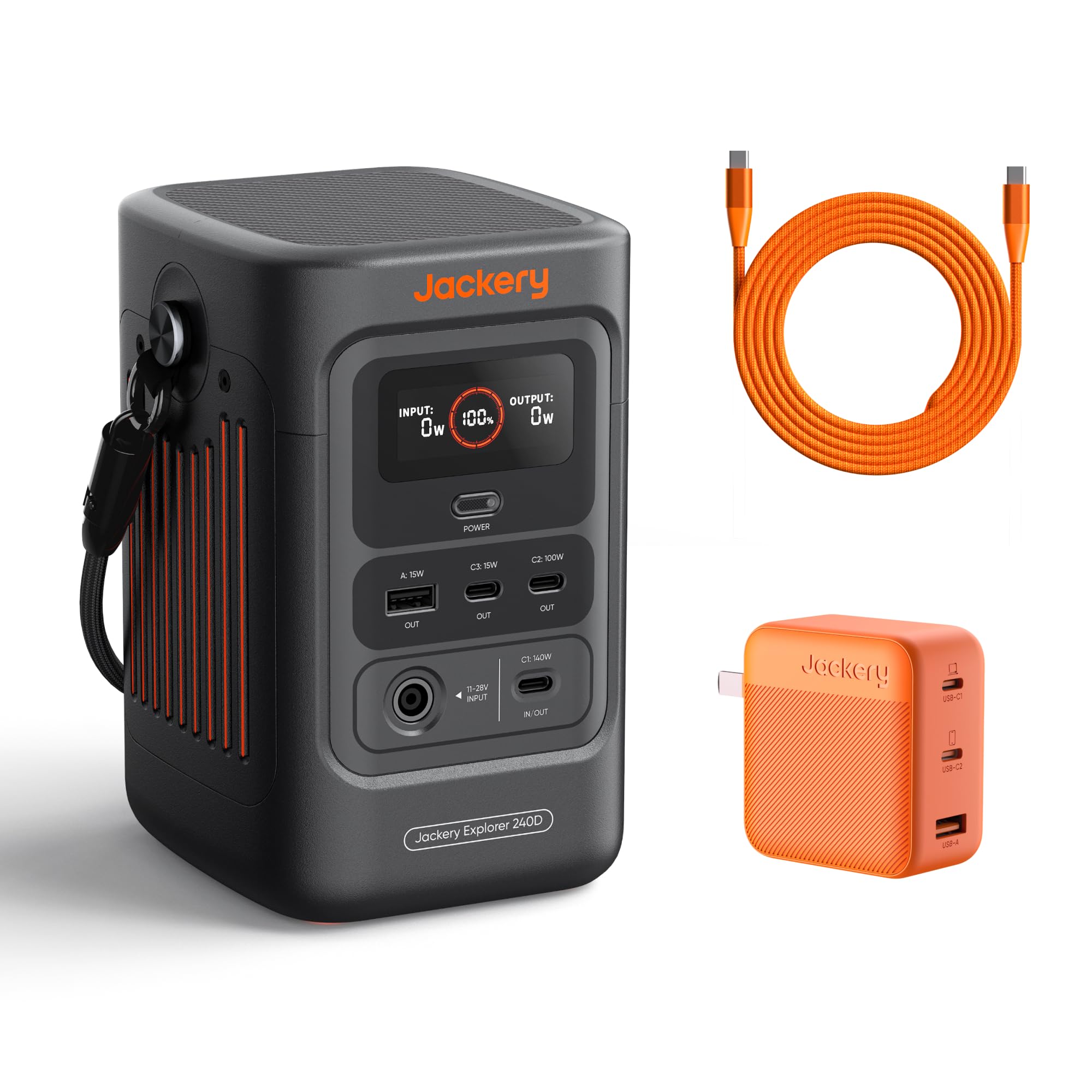
Image: The Jackery Explorer 240D, a compact and portable power station with multiple ports.
4. Persediaan
- Bongkar: Keluarkan semua komponen dari pembungkusan dengan berhati-hati.
- Caj Permulaan: Before first use, fully charge the Explorer 240D using any of the available charging methods. It is recommended to fully charge the unit every 3 months to maintain battery health.
- Hidupkan kuasa: Press the "POWER" button to turn on the unit. The display will show battery percentage, input, and output wattage.
- Activate Outlets: Press the individual power buttons for DC/USB or AC outlets to activate them before connecting devices.
5. Arahan Operasi
5.1 Mengecas Peranti
- Connect your device's charging cable to the appropriate output port (USB-A, USB-C, or AC).
- Press the corresponding power button (DC/USB or AC) to activate the output.
- The display will show the output wattage.
- When finished, turn off the output ports to conserve battery.
5.2 Mod Penjimatan Kuasa
The Explorer 240D features a Smart Energy-Saving Mode to efficiently extend power supply duration. This mode is activated by default upon first use.
- To activate the maximum 200W output, press the "POWER" button three times.
- The display will indicate when power saving mode is active or inactive.

Image: The Jackery Explorer 240D connected to and charging a laptop, smartphone, and other devices, demonstrating its multi-device charging capability.
6. Kaedah Mengecas
The Jackery Explorer 240D offers flexible charging options:
- Pengecasan USB-C: Use the included USB-C to USB-C cable and 102W GaN Fast Charger for rapid charging.
- AC-DC Dual Input: Achieve 0% to 80% charge in approximately one hour using both AC and DC inputs simultaneously.
- Pengecasan Suria: Connect compatible solar panels (up to 100W input) for eco-friendly charging. Charging time depends on weather conditions and solar panel wattage.
- Pengecasan Kereta: Charge the unit using a 12V car charger (DC cable not included in all packages).

Image: The Jackery Explorer 240D demonstrating its multiple charging methods: AC wall outlet, solar panel, and car charger.
7. Galeri Media
7.1 Imej Produk

The Explorer 240D features 3 USB-C ports (1x 140W, 1x 100W, 1x 15W) and 1 USB-A port (15W) for fast charging.

The innovative 2-in-1 USB-C strap cable serves as both a convenient carrying handle and a powerful 140W fast-charging cable.

Equipped with a LiFePO4 battery, the Explorer 240D boasts a 10+ year lifespan and 6,000 charge cycles, ensuring long-term durability.

Weighing only 4.85lbs, the Explorer 240D is 46% lighter and 70% smaller than other AC portable power stations of similar capacity.
7.2 Video Produk Rasmi
Video: Tamatview of the Jackery Explorer 240D, highlighting its features and portability. This video is provided by Jackery Inc.
Video: Pratonton ringkasview tunjuk casing the Jackery Explorer 240D's compact size and ease of use. This video is provided by Jackery Inc.
8. Spesifikasi
| Jenama | Jackery |
| Nama Model | Jackery Explorer 240D + 102W GaN 3-Port Fast Charger |
| Nombor Model | JE-240B |
| Kapasiti Bateri | 256Wj (80,000mAh) |
| Output Wattage | 200W (DC output, up to 140W per port) |
| Jenis Penyambung | USB Jenis C |
| Bilangan Pelabuhan | 5 (3x USB-C, 1x USB-A, 1x DC 12V 10A) |
| Sumber Kuasa | Dikuasakan Bateri, Dikuasakan Suria |
| Berat Barang | 4.85 paun |
| Dimensi Item | 4.73 x 6.69 x 4.19 inci |
| Jenis Bateri | Bateri Litium LiFePO4 |
| Suhu Operasi | -4°F hingga 113°F (-20°C hingga 45°C) |
9. Penyelenggaraan
- Storan: Store the Explorer 240D in a cool, dry place away from direct sunlight and extreme temperatures.
- Kekerapan cas semula: To prolong battery life, fully recharge the unit at least once every 3 months, even if not in use.
- Pembersihan: Gunakan kain kering dan lembut untuk membersihkan bahagian luar unit. Jangan gunakan pembersih cecair atau rendam unit di dalam air.
- Avoid Over-Discharging: Do not allow the battery to completely drain for extended periods.
10. Penyelesaian masalah
- Unit Tidak Dihidupkan: Ensure the battery is charged. If the battery is completely depleted, it may take a few minutes of charging before the unit powers on.
- Tiada Keluaran dari Pelabuhan: Confirm that the specific output port (DC/USB or AC) has been activated by pressing its respective power button. Check if the device connected is within the power station's wattage had.
- Pengecasan perlahan: Verify that the charging cable and adapter are functioning correctly and are properly connected. For solar charging, ensure panels are in direct sunlight and free from obstructions.
- Perlindungan Lebihan: If the unit detects an overload, it may automatically shut down. Disconnect the overloaded device and restart the power station.
11. Waranti & Sokongan
The Jackery Explorer 240D comes with a Waranti pengilang selama 5 tahun. For technical support, warranty claims, or additional information, please contact Jackery Inc. directly or visit their official webtapak.
Manufacturer: Jackery
For further assistance, refer to the official Jackery support channels.