
1. Pengenalan
The DOOGEE Note56X Pro is an Android 16 smartphone designed for optimal performance and user experience. It features a sleek design, a powerful octa-core processor, a high-capacity battery, and advanced camera capabilities. This manual provides essential information for setting up, operating, and maintaining your device.

This image displays the DOOGEE Note56X Pro smartphone in light blue and black, showcasing its sleek profile and key features such as its 8.45mm ultra-thin design, 6150mAh silicon-carbon battery, integrated Gemini AI with Android 16, 128GB expandable ROM, and a 6.56-inch HD+ 90Hz display.
2. Apa yang ada di dalam Kotak
Sahkan bahawa semua item terdapat dalam pembungkusan produk anda:
- 1 x DOOGEE Note56X Pro Smartphone
- 1 x Kabel Pengecasan
- 1 x Pengecas
- 1 x Pelindung Skrin (sebelum digunakan)
- 1 x SIM Card Ejection Tool
- 1 x Sarung Pelindung
- 1 x Kotak Pembungkusan
- 1 x Manual Pengguna
- 1 x Card Service
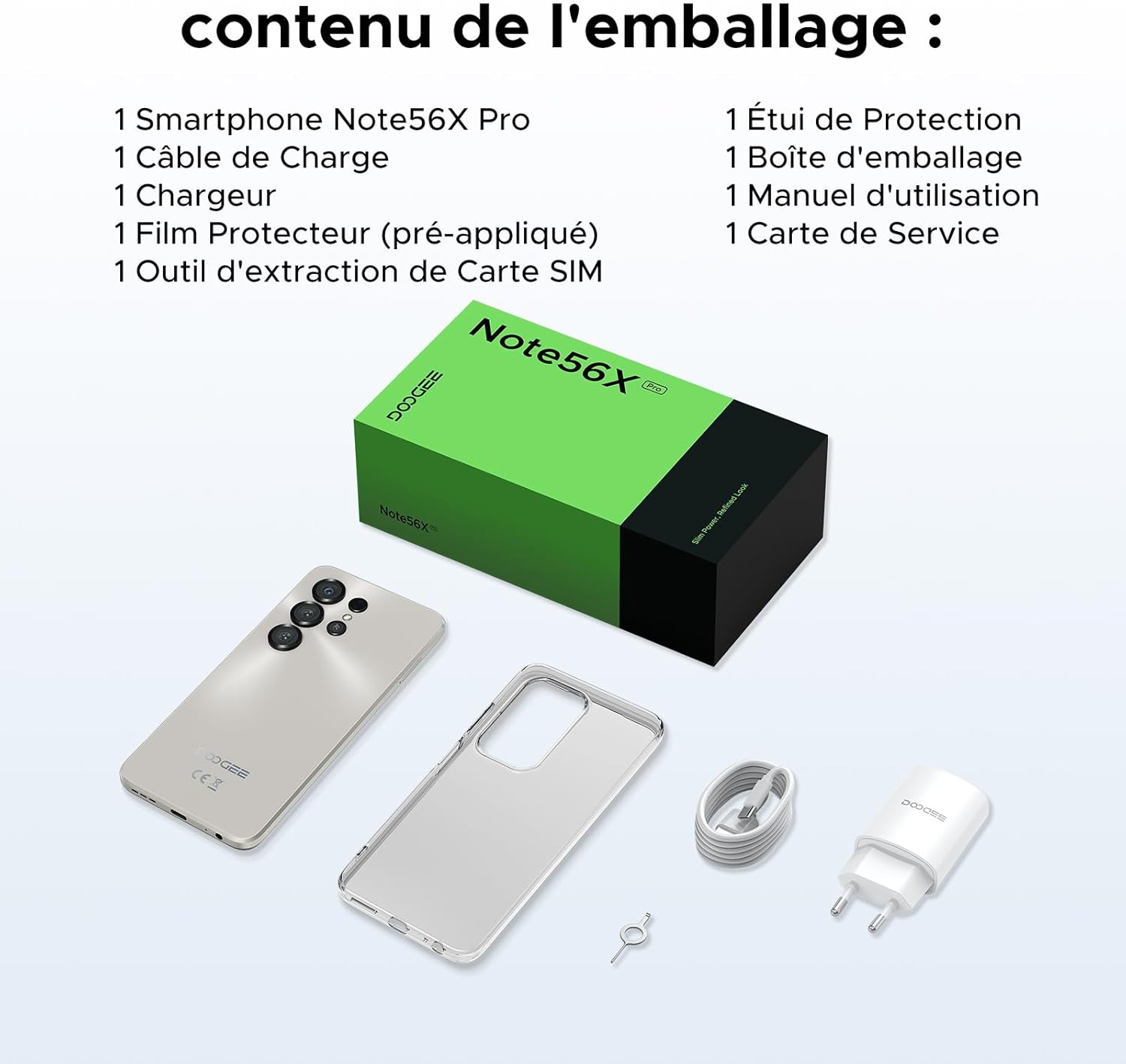
This image shows the contents included in the DOOGEE Note56X Pro packaging: the smartphone, a charging cable, a charger, a pre-applied screen protector, a SIM card ejection tool, a protective case, the packaging box, a user manual, and a service card.
3. Bermula
3.1. Memasukkan Kad SIM
The DOOGEE Note56X Pro supports Dual SIM functionality. To insert your SIM card(s):
- Cari dulang kad SIM di sisi peranti.
- Use the provided SIM ejection tool to open the tray.
- Letakkan kad Nano-SIM dan/atau kad microSD anda ke dalam dulang dengan sesentuh emas menghadap ke bawah.
- Tolak dulang kembali ke dalam slot dengan berhati-hati sehingga siram dengan peranti.
3.2. Menghidupkan/Mematikan
- Untuk Menghidupkan: Tekan dan tahan butang Kuasa sehingga logo DOOGEE muncul.
- Untuk Mematikan: Press and hold the Power button until the power options appear on the screen, then select "Power off".
- Untuk Mulakan Semula: Press and hold the Power button until the power options appear, then select "Restart".
3.3. Persediaan Awal
Setelah dihidupkan buat kali pertama, ikuti arahan pada skrin untuk menyelesaikan persediaan awal:
- Pilih bahasa anda.
- Sambung ke rangkaian Wi-Fi.
- Log masuk dengan akaun Google anda atau buat yang baharu.
- Set up screen lock (PIN, pattern, password, fingerprint, or Face ID).
- Review dan menerima terma dan syarat.
4. Mengendalikan Peranti Anda
4.1. Paparan
The Note56X Pro features a 6.56-inch HD+ IPS Waterdrop display with a 90Hz refresh rate, offering smooth visuals and vibrant colors. The 90% screen-to-body ratio provides an immersive viewpengalaman dalam.

This graphic highlights the display features of the DOOGEE Note56X Pro, including a 90Hz refresh rate for smooth visuals, support for 16.7 million colors, and a 90% screen-to-body ratio for an immersive viewpengalaman dalam.
A brief video demonstrating the smooth gaming experience on the DOOGEE Note56X Pro's 6.56-inch HD+ 90Hz display, showing responsive gameplay.
4.2. Prestasi
Powered by an UNISOC T7225 Octa-Core processor, the Note56X Pro ensures fluid multitasking and efficient application launch. It comes with 32GB of RAM (4GB physical + 28GB virtual) and 128GB of internal storage, expandable up to 2TB via a TF card (sold separately).

This image presents a technical diagram of the UNISOC T7225 Octa-Core processor, highlighting its 1.8 GHz high frequency and Mali G57 ARM GPU, ensuring smooth performance for web browsing, online learning, and chats.

This graphic illustrates the memory configuration of the DOOGEE Note56X Pro, featuring 32GB RAM (4GB physical + 28GB virtual) and 128GB ROM, expandable up to 2TB with a TF card (sold separately), providing ampruang untuk aplikasi dan media.
A short video highlighting the internal components of the DOOGEE Note56X Pro, specifically the Octa-Core UNISOC T7225 processor and the 32GB RAM (4GB + 28GB virtual) and 128GB ROM configuration.
4.3. Bateri
Equipped with a 6150mAh Silicon-Carbon battery, the Note56X Pro offers extended usage time and supports 5W reverse charging. The battery is designed for durability, with up to 1000 charge/discharge cycles and an estimated 4-year lifespan.

A detailed diagram showing the internal structure of the 6150mAh Silicon-Carbon battery within the DOOGEE Note56X Pro, emphasizing its extended endurance, 1000 charge/discharge cycles, 4-year lifespan, 20% reduced size, and 5W reverse charging capability.
Tayangan video pendekasing the sleek design, vertical lens arrangement, ultra-thin 8.45mm body, lightweight 195g build, and available colors (Midnight Black, Glacier Blue, Titanium Grey Mist) of the DOOGEE Note56X Pro.
4.4. Kamera
Capture clear and vibrant photos with the Note56X Pro's camera system:
- Kamera Utama: 13MP with AI recognition, HDR, Pro Mode, Smile Capture, Panoramas, Burst Mode, Night Mode, and Fun Filters.
- Kamera Depan: 8MP with Beauty Mode and Portrait Mode for natural selfies.

This graphic highlights the features of the 13MP main camera on the DOOGEE Note56X Pro, including AI recognition, HDR, Pro Mode, Smile Capture, Panoramas, Burst Mode, Night Mode, and Fun Filters, illustrated with a landscape photo taken by the phone.

This image showcases the 8MP front camera features of the DOOGEE Note56X Pro, including Beauty Mode and Portrait Mode, designed to simplify photography and produce bright, natural selfies.

This graphic details the intelligent features of the Google Smart Camera on the DOOGEE Note56X Pro, such as displaying search results, text extraction and translation, homework analysis, plant and animal identification, and online search capabilities.
4.5. Ketersambungan
The device supports 4G cellular networks, Wi-Fi, Bluetooth 5.0, and NFC for secure contactless payments. It also includes GPS for precise navigation and OTG functionality for connecting external devices.
4.6. Ciri-ciri Keselamatan
The Note56X Pro offers multiple security options to protect your data:
- ID Wajah: Buka kunci telefon anda menggunakan pengecaman wajah.
- Pengecaman Cap Jari: Sensor cap jari yang dipasang di sisi menyediakan akses yang cepat dan selamat.
- Standard PIN, Pattern, and Password options are also available.
4.7. Operating System and AI
Running on Android 16, the Note56X Pro provides an intuitive and secure user experience. It integrates Google Gemini AI, offering intelligent assistance for various tasks.

A visual representation of the Android 16 operating system interface on the DOOGEE Note56X Pro, showcasing various application icons and a clean, intuitive user experience.

This image shows the Google Gemini AI chat interface on the DOOGEE Note56X Pro, demonstrating its capability for planning vacations, discussing current events, and practicing interview soalan.
5. Spesifikasi
| Ciri | Spesifikasi |
|---|---|
| Jenama | DOOGEE |
| Nama Model | Note56X Pro |
| Sistem Operasi | Android 16 |
| Saiz Skrin | 6.56 Inci |
| Resolusi Skrin | 720 x 1612 |
| Kadar Segar Semula | 90 Hz |
| Pemproses | UNISOC T7225 Octa-Core |
| Saiz RAM yang Dipasang | 32 GB (4GB fizikal + 28GB maya) |
| Kapasiti Penyimpanan Memori | 128 GB (Boleh dikembangkan sehingga 2TB) |
| Jenis Bateri | Litium-polimer |
| Kapasiti Bateri | 6150 mAh |
| Teknologi Selular | 4G |
| Pembawa Tanpa Wayar | All carriers (Unlocked) |
| Ketersambungan | Wi-Fi, Bluetooth 5.0, NFC |
| Ciri Khas | Dual SIM, Integrated GPS, USB OTG Support, Face ID, Fingerprint Recognition |
| Bicu Audio | 3.5 mm |
| Dimensi (Ketebalan) | 8.45 mm |
| Berat badan | 195 g |

Satu sisi view of the DOOGEE Note56X Pro, emphasizing its ultra-thin 8.45mm profile and lightweight 195g construction, designed for easy portability and comfortable handling throughout the day.

This image displays the DOOGEE Note56X Pro in its available elegant colors: Midnight Black, Titanium Grey Mist, and Glacier Blue, showcasing the aesthetic options for the device.
6. Penyelenggaraan
To ensure the longevity and optimal performance of your DOOGEE Note56X Pro, follow these maintenance guidelines:
- Pembersihan: Gunakan kain lembut dan tidak berbulu untuk membersihkan skrin dan badan. Elakkan bahan yang melelas atau bahan kimia yang keras.
- Kemas Kini Perisian: Semak dan pasang kemas kini sistem secara berkala untuk memanfaatkan ciri terkini, tampalan keselamatan dan penambahbaikan prestasi. Pergi ke Tetapan > Sistem > Kemas kini sistem.
- Penjagaan Bateri: Elakkan suhu yang melampau. Jangan biarkan bateri kehabisan bateri dengan kerap. Gunakan pengecas asal untuk pengecasan yang optimum.
- Pengurusan Storan: Kosongkan secara berkala yang tidak perlu files and uninstall unused apps to free up storage space and maintain device speed.
- Perlindungan: Use the provided protective case and screen protector to guard against scratches and minor impacts.
7. Penyelesaian masalah
If you encounter issues with your DOOGEE Note56X Pro, try the following solutions:
- Peranti Tidak Dihidupkan: Pastikan bateri dicas. Sambungkan pengecas dan tunggu beberapa minit sebelum cuba menghidupkan semula.
- Skrin Tidak Responsif: Force restart the device by pressing and holding the Power button for about 10-15 seconds.
- Apl Ranap/Pembekuan: Kosongkan cache aplikasi yang bermasalah (Tetapan > Apl > [Nama Apl] > Storan & cache > Kosongkan cache). If the issue persists, uninstall and reinstall the app.
- Hayat Bateri Lemah: Check background app usage (Tetapan > Bateri). Reduce screen brightness, disable unused features like Wi-Fi, Bluetooth, GPS when not needed.
- Isu Ketersambungan Rangkaian: Toggle Airplane Mode on and off. Restart the device. Check SIM card insertion. Reset network settings (Tetapan > Sistem > Tetapkan semula pilihan > Tetapkan semula Wi-Fi, mudah alih & Bluetooth).
- Fingerprint/Face ID Not Working: Ensure your fingers are clean and dry for fingerprint scanning. For Face ID, ensure adequate lighting and that your face is clearly visible to the front camera. Re-register your fingerprint or face if necessary.
- Prestasi Perlahan: Close unused background apps. Clear cache and temporary files. Consider a factory reset as a last resort (Tetapan > Sistem > Tetapkan semula pilihan > Padam semua data (tetapan semula kilang) - Nota: Ini akan memadamkan semua data pada telefon anda. Sandarkan maklumat penting terlebih dahulu.).
8. Waranti dan Sokongan
Your DOOGEE Note56X Pro comes with a 24-month warranty and a 30-day return policy. For any questions or assistance, please contact DOOGEE customer service via Amazon. Our dedicated support team is available to help you.

This image displays DOOGEE's customer service commitments: a 30-day money-back and free return guarantee, a 2-year limited warranty, and 24/7 online individual assistance.