
1. Pengenalan
Thank you for choosing the suevery Gaming Desktop Computer. This manual provides essential information for setting up, operating, maintaining, and troubleshooting your new computer. This system is equipped with an AMD Ryzen 5 5600GT processor, 16GB DDR4 memory, and a 512GB SSD, designed for efficient performance in various applications, including gaming and multitasking.

Image 1: suevery Gaming Desktop Computer overview, highlighting key specifications like R5-5600GT, 16GB DDR4 RAM, 512GB NVMe SSD, and AMD Radeon GPU.
2. Maklumat Keselamatan
Please read and follow these safety guidelines to ensure safe operation and to prevent damage to your computer:
- Bekalan Kuasa: Use only the power adapter provided with your computer. Ensure the power outlet is properly grounded.
- Pengudaraan: Do not block ventilation openings. Ensure adequate airflow around the computer to prevent overheating.
- Cecair dan Kelembapan: Keep the computer away from liquids and excessive moisture. Do not operate the computer with wet hands.
- penempatan: Place the computer on a stable, flat surface. Avoid placing it near heat sources or in direct sunlight.
- Servis: Do not attempt to service the computer yourself. Refer all servicing to qualified service personnel.
3. Kandungan Pakej
Sahkan bahawa semua item terdapat dalam pakej:
- suevery Gaming Desktop Computer (Tower)
- Kabel Kuasa
- Dokumentasi (manual ini)
4. Panduan Persediaan
4.1 Membuka kotak dan Meletakkan
- Carefully remove the computer from its packaging.
- Place the computer on a flat, stable surface with adequate space for ventilation.
- Remove any protective films or packaging materials from the exterior.
4.2 Menyambung Peranti
Connect your monitor, keyboard, mouse, and other peripherals to the appropriate ports on the computer.

Image 2: Rear ports of the suevery Gaming Desktop Computer, including HDMI, VGA, USB, LAN, and Audio Jacks.
- Pantau: Connect your monitor to the HDMI or VGA port on the back of the computer. Ensure the monitor is also powered on.
- Papan Kekunci dan Tetikus: Sambungkan papan kekunci dan tetikus anda ke port USB.
- Rangkaian: For a wired connection, connect an Ethernet cable to the LAN port. For Wi-Fi, ensure the Wi-Fi antenna (if external) is connected.
- Audio: Connect speakers or headphones to the audio jacks.
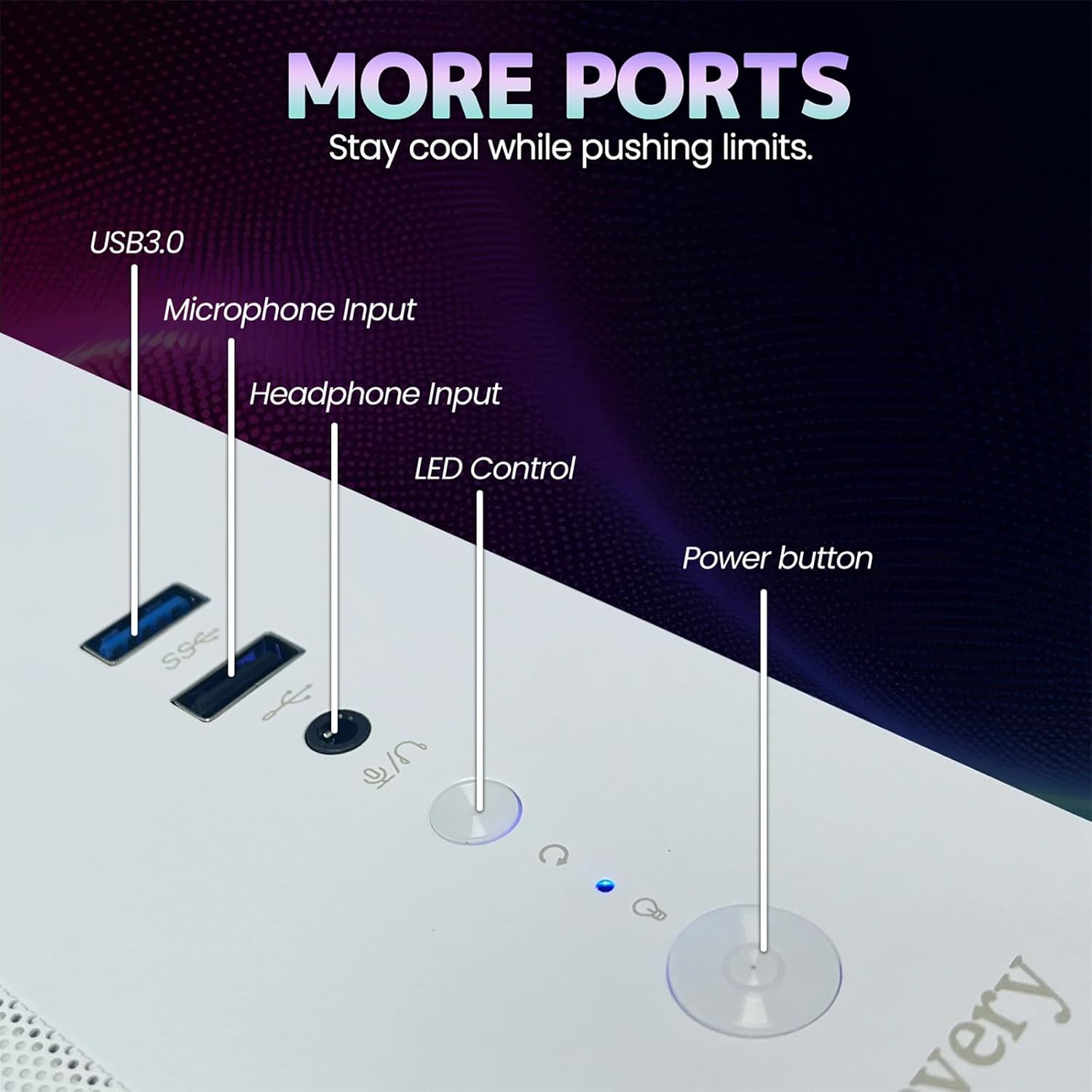
Image 3: Front panel of the suevery Gaming Desktop Computer, showing USB 3.0 ports, Microphone Input, Headphone Input, LED Control button, and Power button.
4.3 Power Connection and First Boot
- Connect the power cable to the power input on the back of the computer and then to a wall outlet.
- Tekan butang kuasa di hadapan komputer untuk menghidupkannya.
- The computer comes with DOS pre-installed. You will need to install your preferred operating system (e.g., Windows) to fully utilize the system. Follow the on-screen instructions for OS installation.
5. Arahan Operasi
5.1 Hidupkan/Mati Kuasa
- Untuk Menghidupkan: Tekan butang kuasa pada panel hadapan.
- Untuk Mematikan: Use the shutdown option within your operating system. For a forced shutdown, press and hold the power button for 5-7 seconds.
5.2 Kawalan Pencahayaan RGB
Your computer features 5 RGB fans and a tempered glass panel, allowing for customizable lighting effects. Use the dedicated LED Control button on the front panel to cycle through various lighting modes and colors to match your preference.

Imej 4: Dalaman view of the suevery Gaming Desktop Computer, showcasing the RGB fans and internal components.
5.3 Prestasi dan Pelbagai Tugas
The AMD Ryzen 5 5600GT processor and 16GB DDR4 memory provide robust performance for demanding applications. You can run office software, stream 4K videos, edit documents, and play games simultaneously without significant lag. The 512GB SSD ensures fast boot times and quick application loading.
6. Penyelenggaraan
6.1 Pembersihan
- Luaran: Use a soft, dry cloth to wipe the exterior of the computer. Avoid abrasive cleaners or solvents.
- habuk: Periodically use compressed air to clean dust from ventilation openings and fan grilles. Ensure the computer is powered off and unplugged before cleaning.
6.2 Optimal Airflow
The computer features an optimal airflow design to keep components cool. Ensure that the computer's vents are not obstructed to maintain proper cooling and stable temperatures, which is crucial for peak performance and longevity.
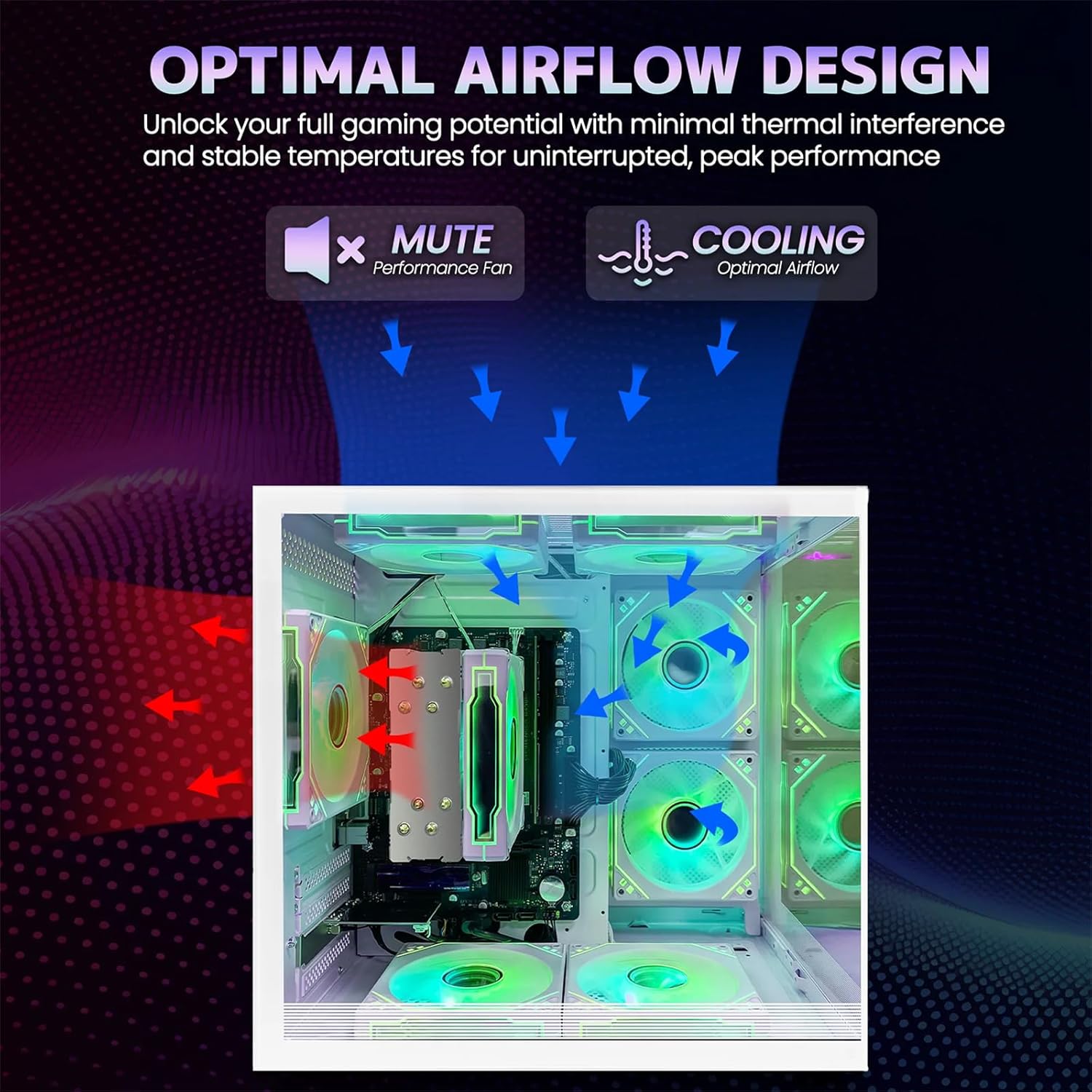
Image 5: Optimal airflow design diagram, showing air intake and exhaust paths for efficient cooling.
7. Penyelesaian masalah
If you encounter issues with your computer, refer to the following common troubleshooting steps:
| Masalah | Penyelesaian yang Mungkin |
|---|---|
| Computer does not power on | Check power cable connections to the computer and wall outlet. Ensure the power button is fully pressed. |
| Tiada paparan pada monitor | Ensure the monitor is powered on and connected correctly to the computer's video output (HDMI/VGA). Try a different video cable or monitor if available. |
| Tiada sambungan internet (Wi-Fi) | Check if Wi-Fi is enabled in your operating system. Ensure the Wi-Fi antenna is securely connected. Restart your router and computer. |
| Sistem lambat atau tidak bertindak balas | Close unnecessary applications. Check for background processes consuming resources. Ensure adequate ventilation to prevent thermal throttling. |
8. Spesifikasi
Detailed technical specifications for the suevery Gaming Desktop Computer:
| Ciri | Perincian |
|---|---|
| Jenama | pertikaian |
| Nama Model | SUT1-5600GT |
| Model CPU | AMD Ryzen 5 5600GT (6-Core, 12-Thread) |
| Kelajuan CPU | 3.6 GHz (Base), up to 4.4 GHz (Max Boost) |
| Sistem Operasi | DOS (User-installable OS required) |
| Memori RAM | 16 GB DDR4 (3200 MHz) |
| Penyimpanan | 512 GB SSD (Siri ATA-600) |
| Kad Grafik | Integrated AMD Radeon Vega Graphics (2 GB GDDR5) |
| Ketersambungan | Wi-Fi (802.11ax), Ethernet, USB |
| Output Video | HDMI, VGA |
| Port USB | 6 Jumlah Port USB |
| Kaedah Penyejukan | Air Cooling (with RGB fans) |
| Penggunaan Kuasa | 400 Watt |
| warna | putih |
| Dimensi (Anggaran) | 13.25 inci (Dalam) x 10.71 inci (Lebar) x 12.36 inci (Tinggi) |
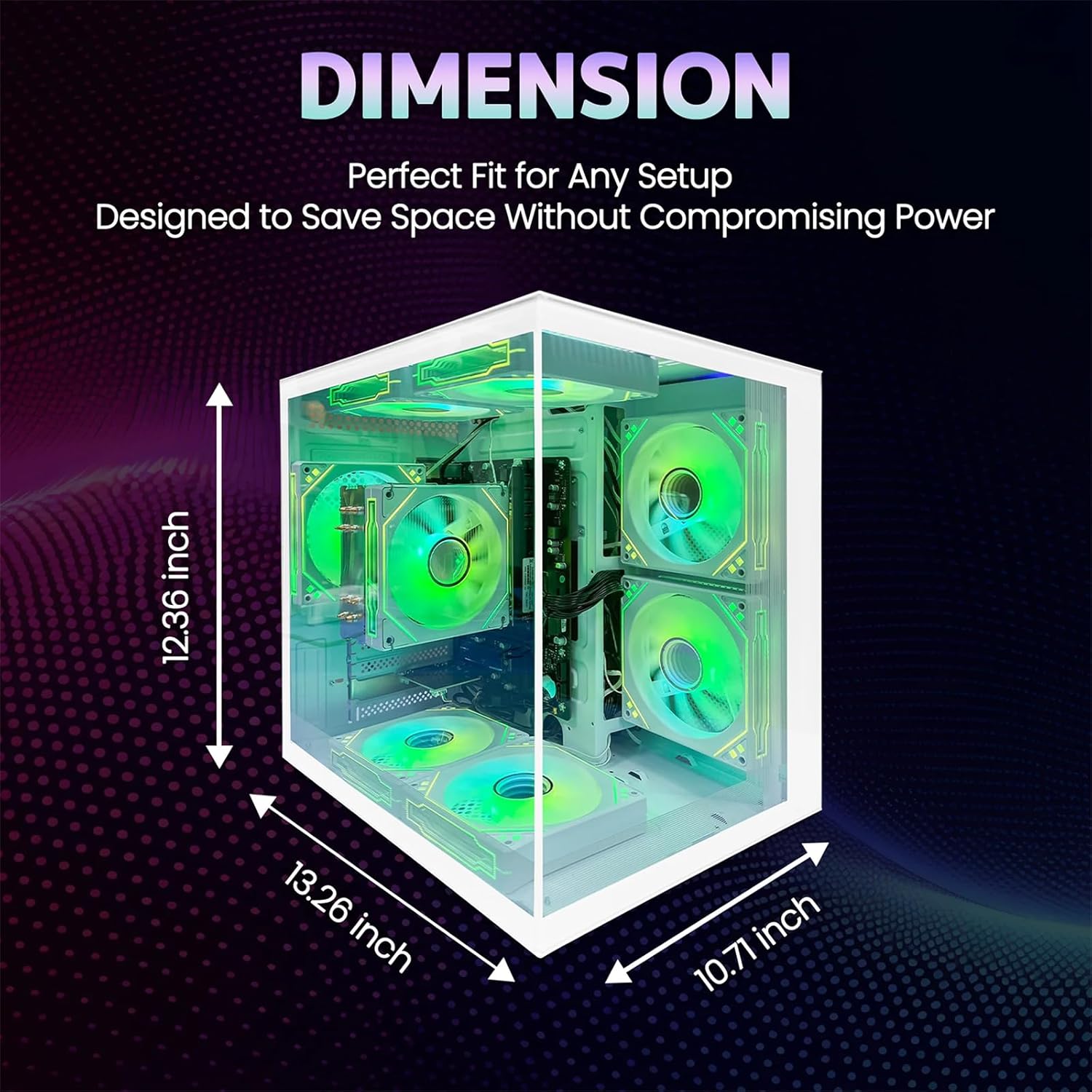
Image 6: Dimensions of the suevery Gaming Desktop Computer case.
9. Waranti dan Sokongan
9.1 Waranti Produk
This suevery Gaming Desktop Computer comes with a Waranti Pengeluar 1 Tahun from the date of purchase. This warranty covers defects in materials and workmanship under normal use. It does not cover damage caused by accident, misuse, unauthorized modifications, or external causes.
9.2 Sokongan Pelanggan
For technical assistance, warranty claims, or any questions regarding your suevery Gaming Desktop Computer, please contact our customer support. Refer to the contact information provided on the product packaging or the official suevery webtapak untuk saluran sokongan yang paling terkini.