
SWZEC B0FPVHVQ3C
SWZEC Meacode Smart Watch User Manual
Model: B0FPVHVQ3C
1. Pengenalan
Thank you for choosing the SWZEC Meacode Smart Watch. This manual provides essential information for setting up, operating, and maintaining your device. Please read it carefully to ensure optimal performance and longevity of your smart watch.
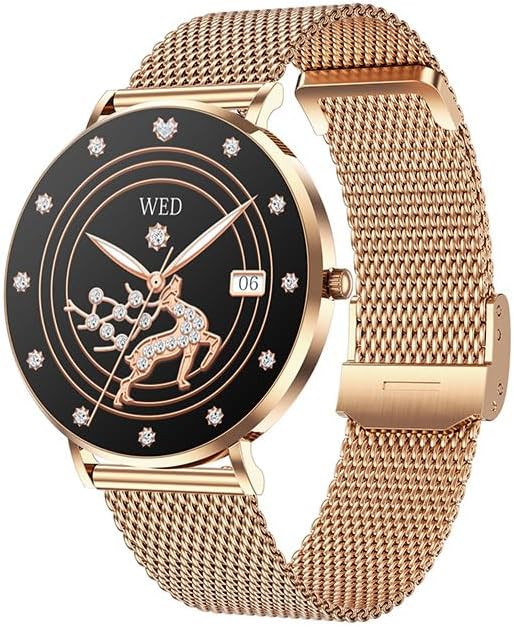
Image: The SWZEC Meacode Smart Watch with a pink strap and rose gold casing, displaying a digital watch face with health metrics.
2. Apa yang ada di dalam Kotak
Sahkan bahawa semua item terdapat dalam pakej anda:
- 1 x SWZEC Meacode Smart Watch
- 1 x Kabel Pengecasan
- 1 x Manual Pengguna
- 2 x Watch Straps (Silicone and Stainless Steel)
3. Persediaan Awal
3.1 Mengecas Peranti
Before first use, fully charge your smart watch. Connect the provided charging cable to the charging port on the back of the watch and plug the USB end into a power adapter (not included) or a computer's USB port. The watch display will indicate charging status.
3.2 Hidupkan/Mati Kuasa
- Untuk Menghidupkan: Tekan dan tahan butang sisi sehingga skrin menyala.
- Untuk Mematikan: Navigate to the 'Settings' menu on the watch, then select 'Power Off' and confirm.
3.3 Pemasangan Apl dan Berpasangan
To unlock the full functionality of your SWZEC Meacode Smart Watch, you need to pair it with your smartphone via the dedicated companion application. The watch is compatible with both iOS and Android devices.
- Muat turun Apl: Scan the QR code in the manual (if provided) or search for the official SWZEC app in your smartphone's app store (Apple App Store for iOS, Google Play Store for Android).
- Dayakan Bluetooth: Pastikan Bluetooth didayakan pada telefon pintar anda.
- Buka Apl: Launch the SWZEC app and follow the on-screen instructions to create an account or log in.
- Tambah Peranti: In the app, select 'Add Device' or a similar option. The app will search for available devices.
- pasangan: Select 'SWZEC Meacode' from the list of found devices. Confirm the pairing request on both your phone and the watch if prompted.
Once paired, the watch will synchronize data with your phone, and you can customize settings through the app.
4. Mengendalikan Jam Tangan Pintar Anda
4.1 Navigasi Asas
The SWZEC Meacode Smart Watch features a full touchscreen display for easy navigation. Swipe left, right, up, or down to access different functions and menus. Tap to select an option or confirm an action.
4.2 Health Tracking Features
- Pemantauan Denyut Jantung: Jam tangan ini sentiasa memantau kadar denyutan jantung anda 24/7. View data masa nyata pada jam tangan atau arah aliran terperinci dalam apl.
- Penjejakan Tidur: Automatically tracks your sleep patterns, including Awake, REM, Light, and Restful sleep stages. Access comprehensive sleep analysis in the app.
- Stress Detection & Breathing Exercises: The watch can detect your stress levels in real-time. Follow guided breathing exercises on the watch to help manage stress.
- Penjejakan Kesihatan Wanita: A dedicated feature to track menstrual cycles, providing predictions and insights into your body's rhythm.

Image: A woman experiencing discomfort, with the SWZEC Meacode Smart Watch on her wrist displaying a 'Cycle Tracking' interface.
- Penjejakan Aktiviti: Monitors daily steps, calories burned, and exercise duration. Set daily goals in the app to stay motivated.

Image: A woman running outdoors, with the SWZEC Meacode Smart Watch on her wrist showing steps, calories, and exercise time.
- Pemantauan Oksigen Darah (SpO2): Mengukur tahap ketepuan oksigen darah anda.

Image: A woman lifting weights, with the SWZEC Meacode Smart Watch on her wrist displaying an SpO2 reading of 86%.
4.3 Ketersambungan Pintar
- Pemberitahuan Pintar: Receive alerts for incoming calls, SMS messages, and app notifications directly on your watch. Customize which app notifications you receive through the companion app.
- Panggilan Bluetooth: With its built-in microphone, you can make and receive calls directly from your watch when connected to your smartphone via Bluetooth.

Image: A person's wrist wearing the SWZEC Meacode Smart Watch, which shows an incoming call from 'Allen' with options to accept or decline.
- Kawalan Muzik: Control music playback on your smartphone (play, pause, skip tracks) directly from your watch.
- Jauh Kamera: Gunakan jam tangan anda sebagai pengatup jauh untuk kamera telefon pintar anda.

Image: A group of people on a beach, with the SWZEC Meacode Smart Watch on a wrist displaying a camera shutter icon, and a smartphone screen showing a camera preview.
- Cari Telefon Saya: Use this feature on your watch to make your paired smartphone ring, helping you locate it.
5. Penyelenggaraan
5.1 Membersihkan Jam Tangan Pintar Anda
Regularly clean your watch and straps to prevent skin irritation and maintain functionality.
- Lap skrin dan badan jam tangan dengan kain lembut dan tidak berbulu. Jika perlu, lap sedikitampen kain dengan air.
- Untuk tali silikon, basuh dengan sabun lembut dan air, kemudian bilas dengan teliti dan keringkan.
- For stainless steel straps, wipe with a soft, dry cloth. Avoid harsh chemicals.
- Pastikan sesentuh pengecasan bersih dan kering sebelum mengecas.
5.2 Rintangan Air (IP68)
The SWZEC Meacode Smart Watch has an IP68 water resistance rating, meaning it is resistant to sweat, rain, and can be submerged up to 1.5 meters in fresh water for a limited time. It is suitable for showering and swimming in shallow water.
- Jangan gunakan jam tangan ini di dalam air panas, sauna atau bilik wap.
- Elakkan menekan butang di bawah air.
- After exposure to water, wipe the watch dry before charging or using.

Image: A woman in a swimming pool wearing the SWZEC Meacode Smart Watch, which displays a watch face with health metrics.
6. Penyelesaian masalah
If you encounter issues with your smart watch, refer to the following common solutions:
- Tonton tidak dihidupkan: Ensure the watch is fully charged. Connect it to the charging cable and allow it to charge for at least 30 minutes.
- Tidak dapat dipasangkan dengan telefon pintar:
- Pastikan Bluetooth didayakan pada telefon anda dan jam tangan berada dalam liputan.
- Mulakan semula jam tangan dan telefon pintar anda.
- Semak sama ada apl dikemas kini kepada versi terkini.
- If previously paired, try unpairing and re-pairing the device through the app.
- Pemberitahuan tidak diterima:
- Sahkan bahawa jam tangan berjaya dipasangkan dengan telefon anda.
- Check notification settings within the SWZEC app and your phone's system settings to ensure permissions are granted.
- Ensure 'Do Not Disturb' mode is not active on either the watch or phone.
- Data kesihatan tidak tepat:
- Pastikan jam tangan dipakai dengan kemas di pergelangan tangan anda, kira-kira satu jari lebar di atas tulang pergelangan tangan.
- Pastikan sensor di bahagian belakang jam tangan bersih.
- Faktor persekitaran dan fisiologi individu boleh mempengaruhi bacaan.
- Skrin tidak bertindak balas: Try restarting the watch. If the issue persists, ensure it is charged.
Jika langkah-langkah ini tidak menyelesaikan masalah, sila rujuk bahagian sokongan.
7. Spesifikasi
| Ciri | Spesifikasi |
|---|---|
| Nombor Model | B0FPVHVQ3C |
| Sistem Operasi | Android (Compatible with iOS and Android devices) |
| Teknologi Ketersambungan | Bluetooth, USB |
| Standard Komunikasi Tanpa Wayar | Bluetooth |
| Kapasiti Bateri | 380 mAh |
| Komposisi Bateri | Beralkali |
| Jenis Paparan | OLED |
| Tahap Ketahanan Air | IP68 (sehingga 1.5 meter) |
| Bahan Band | Silikon, Keluli Tahan Karat |
| Kaedah Input | Skrin sentuh |
| Aplikasi yang Disokong | Phone Call, Music Player, Find My Device, Messaging, Notifications, Fitness Tracker |
| Pemantauan Kesihatan | Heart Rate Monitor, Sleep Duration, Stress, Female Health, SpO2 |
| Fungsi GPS | Tiada GPS |
| Dimensi Item (L x W x H) | 7 x 7 x 7 milimeter |
8. Maklumat Waranti
This SWZEC Meacode Smart Watch comes with a Limited Warranty. Please refer to the warranty card included in your package for specific terms and conditions, including the warranty period and coverage details. Typically, the warranty covers manufacturing defects under normal use.
9. Sokongan Pelanggan
If you have any questions, require technical assistance, or experience issues not covered in this manual, please contact SWZEC customer support. Refer to the contact information provided on the product packaging or the official SWZEC webtapak untuk saluran sokongan yang paling terkini.
Ask a question about this manual
Ask about setup, troubleshooting, compatibility, parts, safety, or missing instructions. Manuals+ will review the question and use this page’s manual context to help answer it.