
1. Pengenalan
The T-WOLF G520 is a high-performance wired gaming mouse designed for precision and comfort. It features a USB2.0 wired connection, 7 customizable buttons, and dynamic RGB lighting. This manual provides essential information for setting up, operating, and maintaining your G520 gaming mouse.
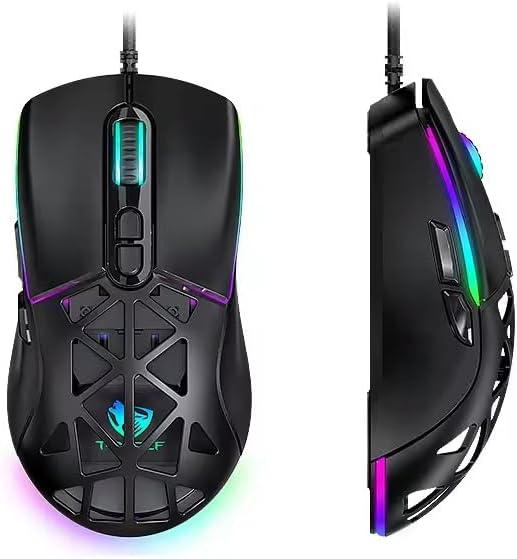
Figure 1: T-WOLF G520 Gaming Mouse (Front and Side View)
2. Ciri-ciri Produk
- Sambungan: Wired USB2.0 for stable and responsive performance.
- Jenis Sensor: Optical sensor for accurate tracking.
- Tetapan DPI: Adjustable DPI from 800 to 12800 (800 / 1600 / 3200 / 4800 / 6400 / 12800).
- Kadar Pengundian: 1000Hz for rapid response times.
- Butang: 7 programmable buttons (Left, Right, Middle, Forward, Back, DPI+, DPI-).
- Pencahayaan RGB: 13 dynamic RGB lighting modes.
- Ketahanan: 10 million click lifespan for micro switches.
- kabel: 1.5m braided cable for enhanced durability and tangle resistance.
- Reka bentuk: Lightweight honeycomb structure and ergonomic shape for comfortable grip and ventilation.
- Penyesuaian: Magnetic interchangeable back cover.

Rajah 2: Ciri Utama Berakhirview
3. Kandungan Pakej
- T-WOLF G520 Gaming Mouse Unit
- Interchangeable Magnetic Back Covers (2 types)

Figure 3: G520 Mouse with Interchangeable Back Covers
4. Arahan Persediaan
- Connect the USB connector of the T-WOLF G520 gaming mouse to an available USB 2.0 port on your computer.
- The mouse is Plug & Play compatible and does not require additional drivers for basic functionality. Your operating system will automatically detect and install the necessary drivers.
- Once detected, the mouse will be ready for use.
5. Arahan Operasi
5.1 Fungsi Butang
The T-WOLF G520 mouse features 7 buttons with the following default functions:
- Butang Kiri: Fungsi klik utama.
- Butang Kanan: Fungsi klik sekunder (menu konteks).
- Middle Button / Scroll Wheel: Scroll up/down, click for universal scroll or other functions.
- Butang ke hadapan: Navigasi ke hadapan web pelayar atau file penjelajah.
- Butang Belakang: Navigasi ke belakang web pelayar atau file penjelajah.
- Butang DPI+: Meningkatkan kepekaan DPI.
- Butang DPI: Mengurangkan kepekaan DPI.
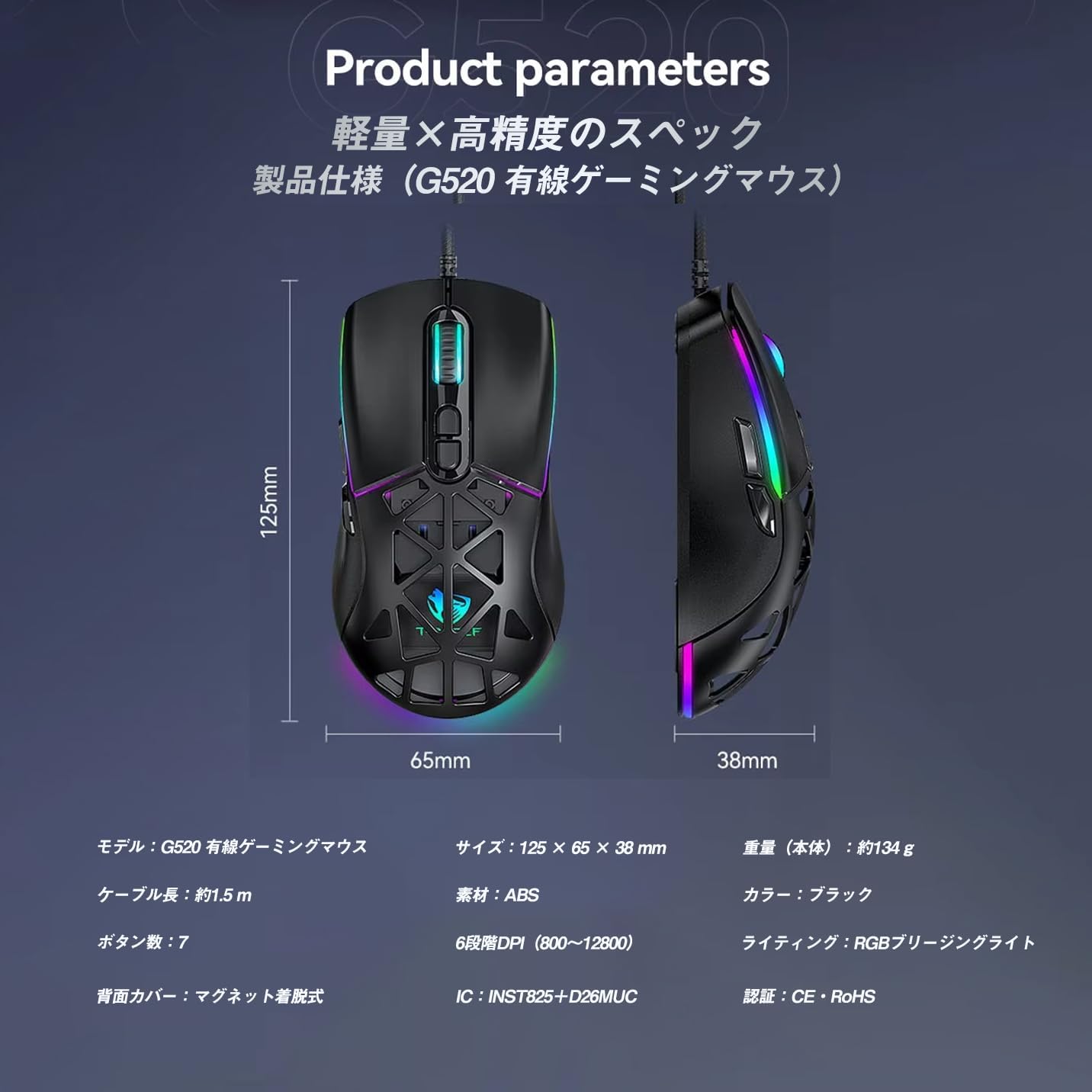
Figure 4: G520 Button Layout
5.2 Pelarasan DPI
The mouse supports 6 adjustable DPI levels. To change the DPI, press the DPI+ or DPI- buttons located on the top of the mouse. Each press will cycle through the available DPI settings: 800, 1600, 3200, 4800, 6400, and 12800.

Figure 5: DPI Adjustment Levels
5.3 Kawalan Pencahayaan RGB
The T-WOLF G520 features 13 RGB lighting modes. To change the RGB lighting mode, press and hold the Butang Belakang dan DPI- Butang simultaneously for approximately 3 seconds. Repeat this action to cycle through the different lighting effects.
5.4 Magnetic Back Cover
The mouse comes with two types of magnetic back covers that can be easily interchanged. To remove a cover, gently lift it from the back of the mouse. To attach a cover, align it with the mouse body and allow the magnets to secure it in place.

Figure 6: Magnetic Back Cover Exchange
6. Penyelenggaraan
- Pembersihan: Gunakan kain lembut dan kering untuk membersihkan tetikus. Untuk kotoran degil, sedikit damp kain boleh digunakan, memastikan tiada cecair memasuki tetikus.
- Elakkan Cecair: Do not immerse the mouse in water or expose it to excessive moisture.
- Storan: Simpan tetikus di tempat yang sejuk dan kering jauh dari cahaya matahari langsung dan suhu yang melampau.
- Penjagaan Kabel: Avoid bending or twisting the braided cable excessively to prevent damage.
7. Penyelesaian masalah
- Tetikus Tidak Menjawab:
- Ensure the USB cable is securely connected to your computer's USB port.
- Cuba sambungkan tetikus ke port USB lain.
- Mulakan semula komputer anda.
- DPI Tidak Berubah:
- Ensure you are pressing the correct DPI+ or DPI- buttons.
- The mouse cycles through 6 fixed DPI levels; there is no software adjustment.
- RGB Lighting Not Working/Changing:
- Pastikan tetikus disambungkan dengan betul.
- Tekan dan tahan butang Butang Belakang dan DPI- Butang simultaneously for 3 seconds to cycle through modes.
- Isu Penjejakan:
- Bersihkan sensor optik di bahagian bawah tetikus.
- Use the mouse on a clean, uniform surface or a mouse pad.
8. Spesifikasi
| Ciri | Spesifikasi |
|---|---|
| Model | G520 |
| Jenis Sambungan | Wired USB2.0 |
| Jenis Sensor | Optik |
| Tetapan DPI | 800 / 1600 / 3200 / 4800 / 6400 / 12800 |
| Kadar Mengundi | 1000Hz |
| Bilangan Butang | 7 |
| Panjang Kabel | 1.5m (Braided) |
| Dimensi (L×W×H) | 124 × 65 × 40 mm |
| Berat badan | lebih kurang 132g |
| Vol Operasitage / Semasa | 5V / 150mA |
| Pencahayaan | RGB (13 Mod) |
| bahan | Plastik (ABS) |
| OS yang serasi | Windows 10, Windows 11, Mac OS, Linux (OS standard, no driver required) |

Figure 7: Product Specifications Diagram
9. Waranti dan Sokongan
This product is covered by a standard manufacturer's warranty. Please refer to your purchase documentation for specific warranty terms and conditions. For technical support or warranty claims, please contact the retailer or the manufacturer's customer service.


