1. Pengenalan
This manual provides detailed instructions for the safe and effective operation of your Sanyipace S810-165FT/512HZ Self-Leveling Sewer Camera. This device is designed for professional and home inspection of various pipelines, including sewage, underground water pipes, oil and gas lines, kitchen plumbing, and HVAC ducts. Please read this manual thoroughly before use and retain it for future reference.
2. Produk Lebihview
The Sanyipace S810-165FT/512HZ is a robust sewer inspection system featuring a self-leveling camera, real-time distance counter, and a 512Hz transmitter for precise location. It includes a 10-inch IPS screen for clear visualization and a rigid cable for extended reach.
2.1 Komponen Utama
- Konsol Kawalan: Features a 10-inch color IPS screen, microphone for audio notes, built-in speakers for playback, and a detachable design for flexible positioning.
- Siasatan Kamera: IP68 waterproof, 0.9-inch (23mm) bendable and flexible camera head with a 145° viewing angle and 12 adjustable LED lights. Equipped with self-leveling gravity to maintain upright images.
- kabel: 165 feet (50 meters) of 0.28-inch (7mm) rigid fiberglass cable, designed for durability and ease of navigation through pipes.
- Kaunter Jarak: Real-time display of cable insertion distance on the screen, switchable between feet and meters.
- 512Hz Transmitter: Integrated into the camera head for use with a 512Hz locator (sold separately) to pinpoint camera location.
- Aksesori: Includes a camera protector cover (for pipes > 1.57in/40mm) and a pipe pulley guide wheel (for pipes > 5.12in/130mm).
- Storan: 32GB TF card included, supporting up to 128GB.
- Bateri: 4500mAh rechargeable battery providing up to 10 hours of operation.

Figure 2.1: Contents of the Sanyipace S810-165FT/512HZ sewer camera package, including the monitor, keyboard, TF card, user manual, metal bracket, fiberglass cable coil, camera head, pipe pulley, protective cover, US DC adapter, and screwdrivers.
3. Persediaan
3.1 Assembling the System
- Buka bungkusan semua komponen daripada pembungkusan.
- Attach the control console to the top of the metal frame using the provided screws. Ensure it is securely fastened.
- Insert the provided 32GB TF card into the TF card slot on the control console.
- Connect the camera cable to the designated port on the control console.
- If inspecting pipes larger than 1.57 inches (40mm), attach the camera protector cover to the camera head. For pipes larger than 5.12 inches (130mm), attach the pipe pulley guide wheel.
- Ensure the battery is fully charged before initial use. Connect the US DC adapter to charge the unit.
Video 3.1: This video demonstrates the assembly, key features, and operation of the Sanyipace S810-165FT/512HZ sewer camera, including the detachable screen, TF card insertion, cable management, self-leveling camera, LED brightness adjustment, recording with audio, and playback.
4. Arahan Operasi
4.1 Menghidupkan/Mematikan
- To power on, press and hold the power button on the control console.
- To power off, press and hold the power button again until the unit shuts down.
4.2 Pengurusan Kabel
To release the cable, loosen the cable coil lock on the side of the reel. Push the cable into the pipe. To retract the cable, turn the reel handle clockwise while guiding the cable back onto the coil. Ensure the cable is properly coiled to prevent tangles.

Figure 4.1: Image demonstrating the cable coil mechanism, showing how to loosen the lock for cable release and roll-up, and illustrating pipe compatibility for different diameters and bends.
4.3 Operasi Kamera
- Meratakan Kendiri: The camera probe automatically levels itself, providing upright images even when the probe is tilted.
- Pelarasan Kecerahan LED: Use the dedicated buttons on the console to adjust the brightness of the 12 LED lights on the camera head (0-5 gear adjustment) for optimal visibility in varying pipe conditions.
- Zum Digital: The 10-inch IPS screen supports 5X digital zoom. Use the zoom buttons on the console to magnify the image for detailed inspection.
- Kaunter Jarak: The screen displays the real-time distance the camera has traveled into the pipe. Press the F4 key to switch between feet and meters.
- Rakaman: Press the record button to start/stop video recording. The built-in microphone allows for audio notes to describe findings.
- Main balik: Access recorded videos and captured images from the TF card via the console. The built-in speaker allows for audio playback.

Figure 4.2: Image showing the 5X digital zoom capability of the Sanyipace sewer camera's display, allowing for closer inspection of pipe conditions.

Figure 4.3: Image highlighting the 10-inch HD IPS screen of the Sanyipace sewer camera, displaying features like video recording, audio recording, picture capture, meter counter, and time display.

Figure 4.4: Image illustrating the self-leveling camera probe and its IP68 waterproof rating, along with the 12 adjustable LED lamp manik untuk penerangan.
4.4 Pipe Compatibility
The camera is designed to navigate various pipe sizes and bends:
- For 1-inch and 1.5-inch PVC pipes, the camera is suitable for straight pipe lengths only.
- For 2-inch PVC pipes, the camera can continuously pass through two 90-degree bends.
- For 3-inch+ PVC pipes, the camera can pass through three 90-degree bends in a row.
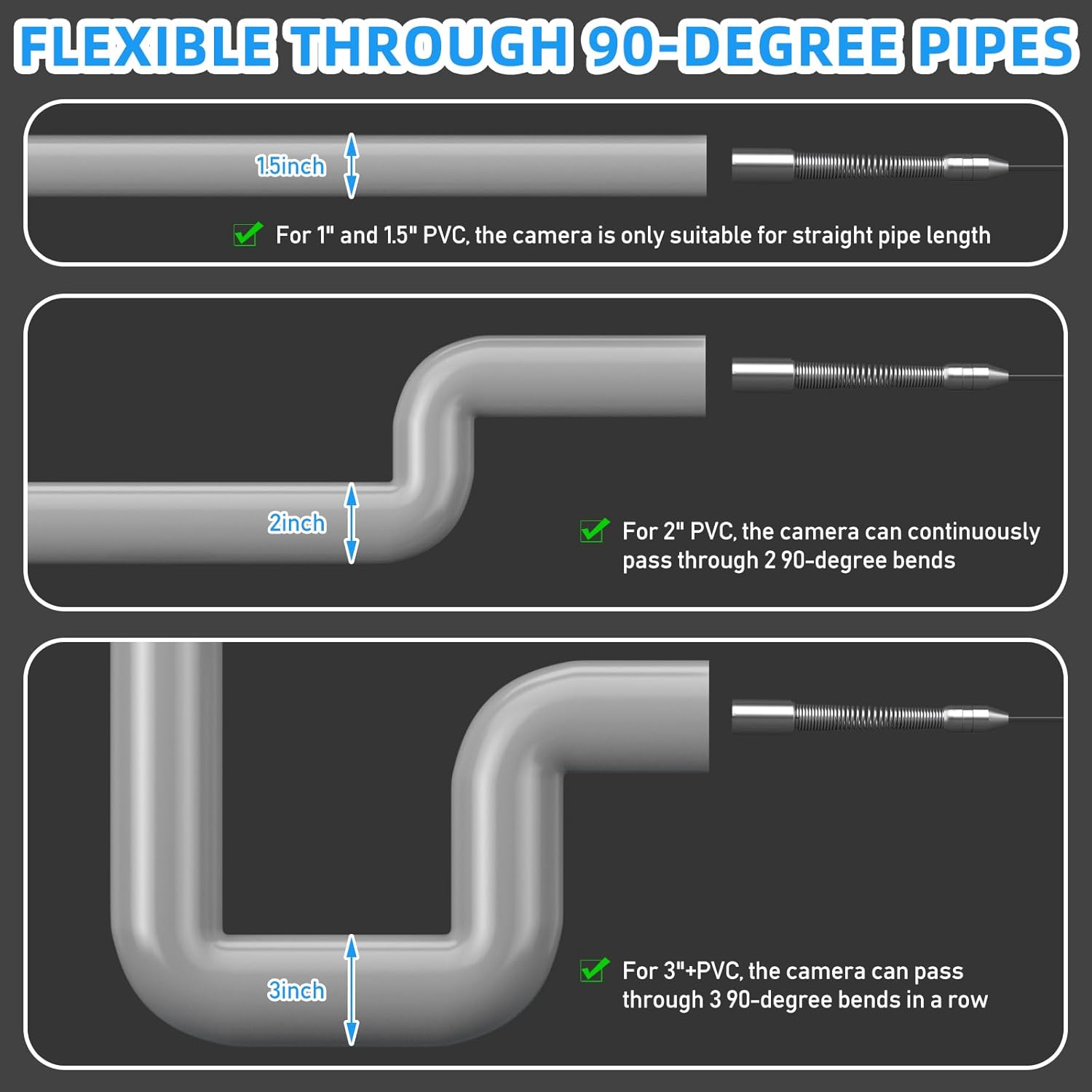
Figure 4.5: Diagram illustrating the camera's flexibility and compatibility with various pipe diameters and 90-degree bends, specifying limitations for 1.5-inch, 2-inch, and 3-inch+ PVC pipes.
5. Penyelenggaraan
5.1 Cleaning the Camera Probe and Cable
After each use, especially in dirty environments, clean the camera probe and cable thoroughly. The IP68 waterproof design allows for easy rinsing with water. Ensure all debris is removed from the camera head and cable to maintain optimal performance and prevent damage.
5.2 Penjagaan Bateri
Recharge the 4500mAh battery after each use to ensure it is ready for the next inspection. Store the unit in a cool, dry place when not in use.
6. Penyelesaian masalah
If you encounter any issues with your Sanyipace S810-165FT/512HZ sewer camera, please refer to the following common troubleshooting steps:
- Tiada Kuasa: Ensure the battery is fully charged and the power button is pressed correctly. Check all cable connections.
- Tiada Imej pada Skrin: Verify the camera cable is securely connected to the console. Check for any physical damage to the camera head or cable.
- Kualiti Imej Lemah: Adjust the LED brightness. Clean the camera lens if it appears dirty. Ensure the pipe is not completely filled with opaque liquid.
- Isu Rakaman: Check if the TF card is properly inserted and has sufficient free space. Ensure the TF card is not locked.
- Cable Stuck: Do not force the cable. Gently retract and re-insert, or use the pipe pulley guide wheel if appropriate for the pipe size.
For further assistance, please contact Sanyipace customer support.
7. Spesifikasi
| Ciri | Spesifikasi |
|---|---|
| Dimensi Produk | 21.93 x 11.42 x 26.57 inci |
| Berat Barang | 30.4 paun |
| Pengeluar | Sanyipace |
| Nombor Model Item | S830ASMKT-US (Note: This is the general model number, specific variant is S810-165FT/512HZ) |
| Tarikh Mula-mula Tersedia | 4 September 2025 |
| Mod Penangkapan | Automatic, Manual, Landscape |
| Jenis Kawalan Pendedahan | Manual |
| warna | Hitam |
| Resolusi Tangkapan Video | 1080p |
| Jenis Media | Kad SD |
8. Waranti dan Sokongan
Sanyipace provides 24/7 after-sales service and lifetime technical support for the S810-165FT/512HZ sewer camera. For any inquiries, technical assistance, or warranty claims, please contact Sanyipace customer support through the official channels.