
1. Produk Lebihview
The HEIBAS G7 Bluetooth Headset is designed for clear communication and audio playback, featuring advanced Bluetooth 6.0 connectivity, active and environmental noise cancellation, and a long-lasting battery. Its ergonomic design ensures a comfortable and secure fit for extended use.

Imej: Selesaiview of the HEIBAS G7 Bluetooth Headset highlighting Bluetooth 6.0 features.
2. Kandungan Pakej
Sila semak pakej untuk item berikut:
- HEIBAS G7 Bluetooth Headset x 1
- Ear tips (S/M/L) x 3 pairs (6 pieces total)
- Kabel Pengecas Jenis-C x 1
- Manual Arahan x 1

Image: Diagram showing the headset, charging case, ear tips, and charging cable included in the package.
3. Persediaan dan Berpasangan
3.1 Caj Permulaan
Before first use, fully charge the headset and its charging case using the provided Type-C cable. The LED display on the charging case indicates the battery level.

Image: The charging case with an LED display showing battery percentage, menunjukkan status pengecasan.
3.2 Berpasangan dengan Peranti
- Pastikan set kepala dicas.
- Open the charging case. The headset will automatically enter pairing mode.
- On your smartphone, tablet, or PC, enable Bluetooth and search for available devices.
- Select "G7" from the list of devices to connect.
- Once connected, the headset is ready for use.
The headset supports automatic connection to previously paired devices when taken out of the case.

Image: The headset and charging case next to a smartphone, illustrating automatic connection upon removal from the case.
4. Memakai Alat dengar
The G7 headset features an adjustable design for a secure and comfortable fit on either ear.
4.1 Melaraskan Padanan
- The ear hook can be rotated 180° and 360° to fit various ear shapes.
- The head part can rotate 45° left or right, allowing use on either the left or right ear.
- Choose the appropriate ear tip size (S, M, L) for optimal comfort and sound quality.

Image: Diagrams illustrating the 180°, 360°, and 45° adjustment capabilities of the headset for a customized fit.
4.2 Kaedah Pemakaian
- Rotate the ear hook 90 degrees to the left (for right ear use, rotate 90 degrees to the right).
- Rotate the ear hook 90 degrees upwards.
- Rotate the earphone head and adjust its position to fit your ear shape.
Image: Step-by-step guide on how to wear the headset, including selecting the correct ear tip size (S, M, L).
5. Kawalan dan Fungsi
The G7 headset features physical buttons for intuitive control of various functions.

Image: Diagram showing the physical buttons on the headset and their corresponding functions, including power, volume, play/pause, call control, mute, and Siri activation.
5.1 Operasi Asas
- Hidupkan/Mati Kuasa: Tekan dan tahan butang utama selama 3 saat.
- Main/Jeda: Tekan butang utama sekali sahaja.
- Kelantangan Naik/Turun: Press the volume buttons (indicated by +/-).
- Trek Seterusnya / Sebelumnya: Press and hold the volume buttons for 2 seconds.
5.2 Pengurusan Panggilan
- Jawab/Tamatkan Panggilan: Tekan butang utama sekali sahaja.
- Tolak Panggilan: Tekan dan tahan butang utama selama 2 saat.
- Redam/Nyahredam: During a call, press the dedicated mute button (located on the side of the headset).
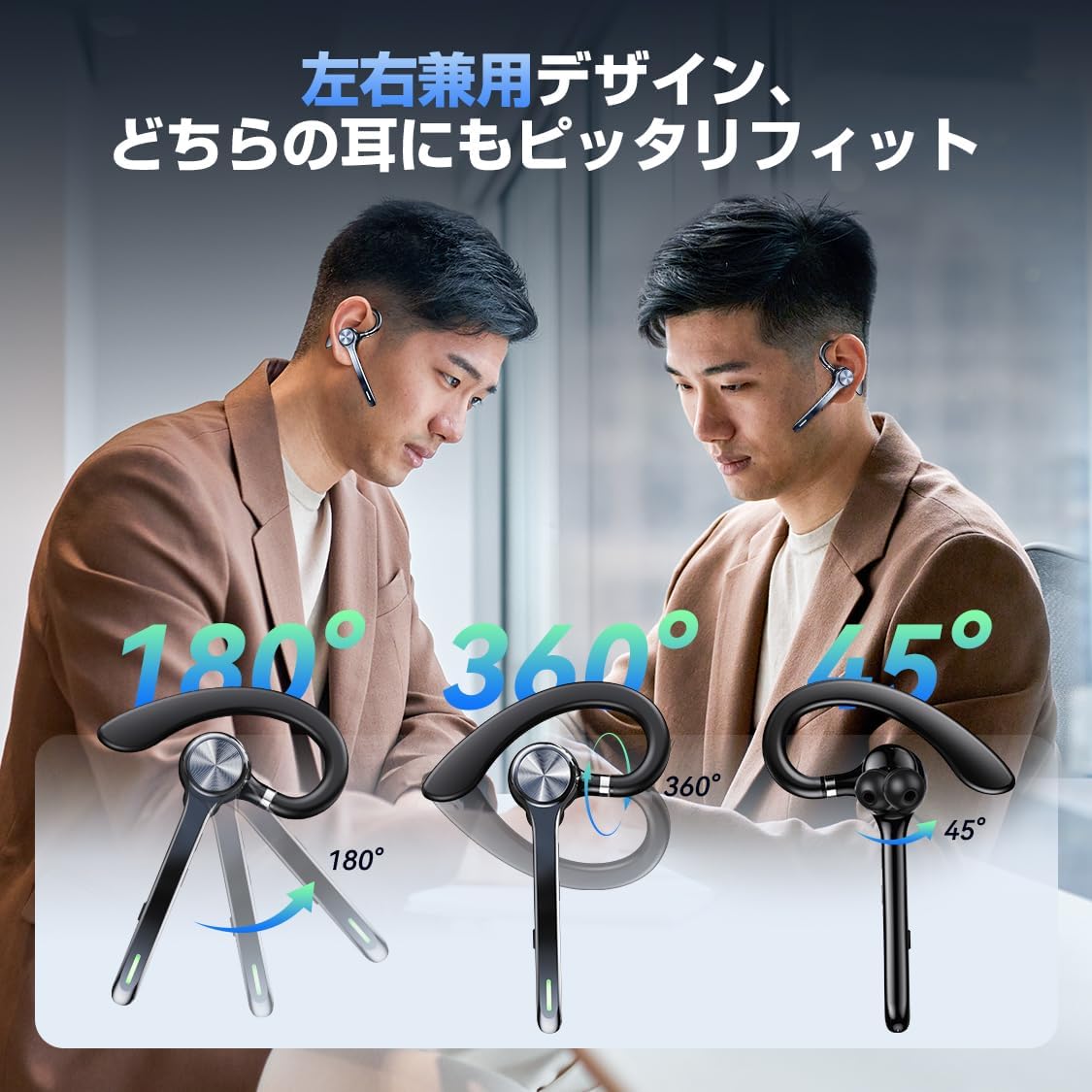
Image: A person using the headset during a call, demonstrating the mute function.
5.3 Voice Assistant (Siri)
- Aktifkan Siri: Tekan dua kali butang utama.
6. Ciri Lanjutan
6.1 Sambungan Berbilang Titik
The G7 headset supports simultaneous connection to two devices (e.g., a smartphone and a PC). This allows for seamless switching between music playback on one device and calls on another.

Image: The headset connected to both a smartphone and a laptop, demonstrating the multipoint connection feature.
6.2 Noise Cancellation (ANC & ENC)
- Pembatalan Bunyi Aktif (ANC): Reduces low-frequency ambient noise during music playback (e.g., train sounds, air conditioner hum).
- Pembatalan Bunyi Persekitaran (ENC): Suppresses background noise during calls, ensuring your voice is transmitted clearly to the other party.

Image: Diagram illustrating the effect of ANC and ENC on sound, showing noise reduction before and after cancellation.
7. Bateri dan Pengecasan
The G7 headset offers extended battery life for prolonged use.
- Headset Playback Time: Approximately 21-23 hours on a single charge.
- Total Playback Time (with charging case): Sehingga 108 jam.
- Kapasiti Kes Pengecasan: 500mAh.
- Antara Muka Pengecasan: Jenis-C.
- Masa Pengecasan: Kira-kira 2-2.5 jam untuk cas penuh.

Image: Visual representation of the headset's battery life, including single playback time, total time with the charging case, and standby time.
8. Spesifikasi
| Nama Model | G7 |
| Jenama | HEIBAS (Origin qilin) |
| Teknologi Ketersambungan | Wayarles (Bluetooth 6.0) |
| Faktor Bentuk Fon Kepala | Bluetooth Headset (Single Ear) |
| Pembatalan Bunyi | ANC + ENC Dual Noise Cancellation |
| Hayat Bateri (Fon Kepala) | 21-23 jam |
| Jumlah Hayat Bateri (dengan Sarung) | Sehingga 108 jam |
| Kapasiti Kes Pengecasan | 500mAh |
| Antara Muka Pengecasan | Jenis-C |
| Berat badan | Approx. 12g (headset) |
| Tahan Air | Waterproof (level not specified, generally splash-proof) |
| Peranti Serasi | Telefon Pintar, Tablet, Komputer Riba |
| Komponen yang Disertakan | Bluetooth Headset, Ear tips, Cable, Instruction Manual |
9. Penyelesaian masalah
9.1 Tidak Boleh Hidupkan
- Pastikan set kepala dicas sepenuhnya.
- Tekan dan tahan butang kuasa selama sekurang-kurangnya 3 saat.
9.2 Tidak Boleh Berpasangan
- Pastikan alat dengar berada dalam mod berpasangan (biasanya ditunjukkan oleh LED berkelip).
- Lumpuhkan dan dayakan semula Bluetooth pada peranti anda.
- Ensure the headset is within 10 meters of your device.
- Forget "G7" from your device's Bluetooth list and try pairing again.
9.3 Poor Sound Quality or Disconnections
- Pastikan set kepala dicas sepenuhnya.
- Kurangkan jarak antara set kepala dan peranti anda.
- Avoid obstacles (walls, large electronic devices) between the headset and your device.
- Semak gangguan daripada peranti wayarles lain.
9.4 Isu Mikrofon
- Ensure the microphone is not muted during a call.
- Check your device's audio settings to ensure the headset is selected as the input/output device.
10. Penyelenggaraan
- Bersihkan set kepala dengan kerap menggunakan kain lembut dan kering.
- Avoid exposing the headset to extreme temperatures, humidity, or corrosive liquids.
- Store the headset in its charging case when not in use to protect it and keep it charged.
- Do not attempt to disassemble or repair the headset yourself. Contact customer support if issues arise.
11. Waranti dan Sokongan
For warranty information or technical support, please refer to the contact details provided on the product packaging or the official HEIBAS webtapak. Simpan resit pembelian anda untuk tuntutan waranti.
12. Video Produk
Video: Pratonton ringkasview demonstrating key features of the HEIBAS G7 Bluetooth Headset, including its design, charging, and controls.
