
pengenalan
This manual provides essential information for the setup, operation, maintenance, and troubleshooting of your AWOW Mini PC, Model BA7. Please read these instructions carefully before using the device.

Imej: Selesaiview of the AWOW BA7 Mini PC, highlighting its compact design and key features.
Kandungan Pakej
Sahkan bahawa semua item terdapat dalam pakej:
- AWOW BA7 Mini PC
- Penyesuai Kuasa
- Skru Pemasangan
- Pendakap Lekap VESA
- Kabel HDMI
- Manual Pengguna (dokumen ini)

Image: Illustration of the AWOW BA7 Mini PC and its included accessories: power adapter, screws, VESA mount, HDMI cable, and user manual.
Arahan Persediaan
- Sambung Peranti: Connect your keyboard, mouse, and monitor(s) to the appropriate ports on the Mini PC.
Imej: Depan view of the Mini PC showing the Power Button, Type-C port, USB 3.2 ports, and 3.5mm Audio Jack.

Imej: Belakang view of the Mini PC showing the DC IN, DP1.2, HDMI2.0, USB 2.0 ports, and RJ45 LAN port.
- Sambungan Kuasa: Sambungkan penyesuai kuasa ke port DC IN pada Mini PC, kemudian pasangkan penyesuai ke soket kuasa.
- Hidupkan kuasa: Tekan butang kuasa yang terletak di hadapan Mini PC. Sistem akan boot.
- Persediaan Awal: Ikut arahan pada skrin untuk melengkapkan persediaan awal Windows 11 Pro, termasuk bahasa, rantau, sambungan rangkaian dan penciptaan akaun pengguna.
- Sambungan Rangkaian:
- Berwayar: Connect an Ethernet cable to the RJ45 LAN port for a stable wired connection.
- wayarles: During Windows setup or via Windows settings, connect to your Wi-Fi network using the built-in WiFi 6.
Arahan Operasi
Operasi Asas
- Hidupkan/Mati Kuasa: Press the power button to turn on the PC. To shut down, use the Windows Start menu options (Shut down, Restart, Sleep). A short press on the power button can put the PC to sleep. A long press (approx. 5 seconds) will force a shutdown.
- Output Paparan: The Mini PC supports up to three 4K displays simultaneously via DP, HDMI, and USB-C. Connect your monitors and configure display settings in Windows.

Image: A user working with a triple monitor setup, demonstrating the Mini PC's multi-display capability.
- Kesambungan USB: Utilize the USB 2.0 and USB 3.0 ports for connecting external devices such as external hard drives, USB flash drives, printers, and other peripherals. The Type-C port also supports data transfer and display output.
- Audio: Sambungkan fon kepala atau pembesar suara ke bicu audio 3.5mm.
Penggunaan Lanjutan
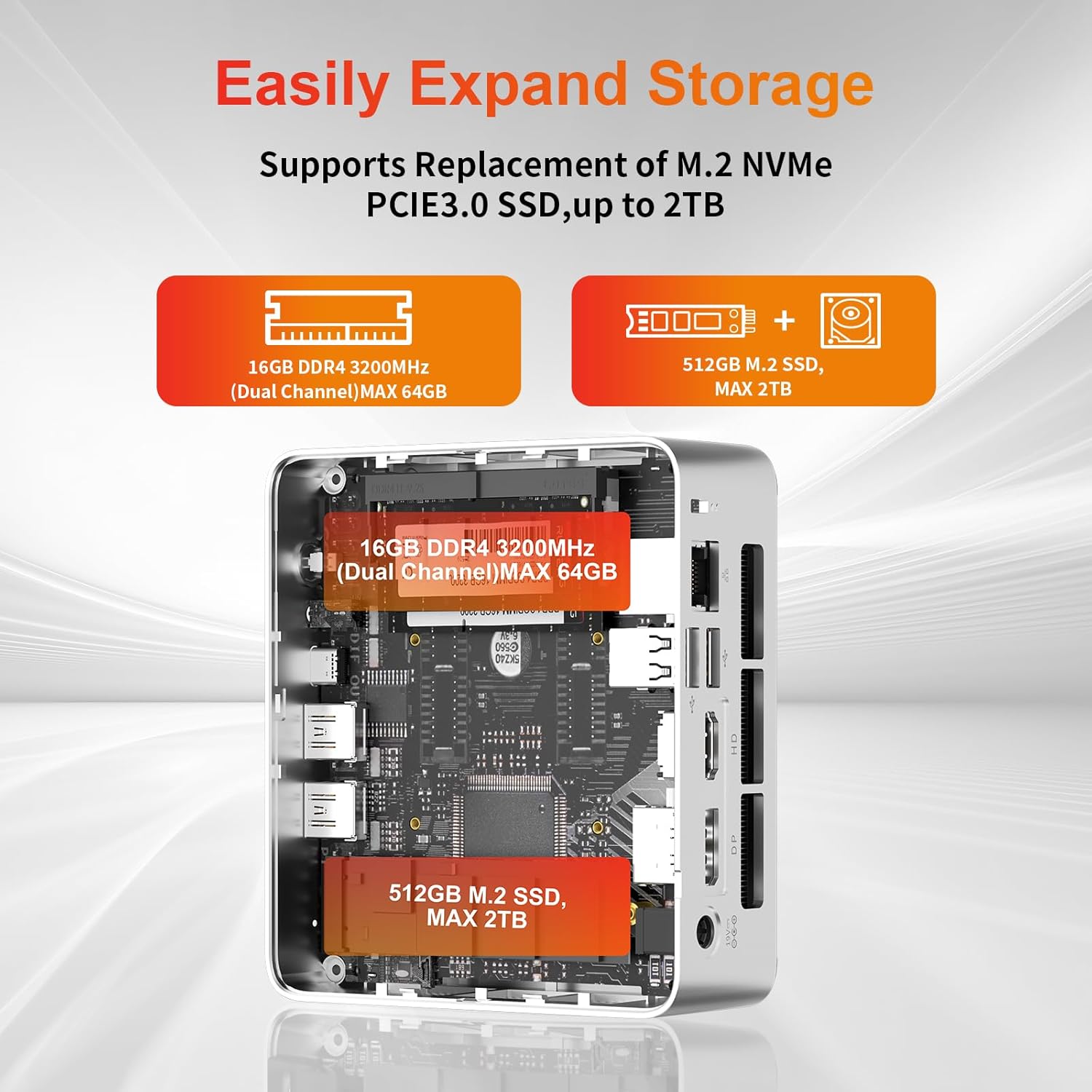
- Perluasan Storan: The Mini PC supports replacement of the M.2 NVMe PCIe 3.0 SSD up to 2TB. It also supports memory expansion up to 64GB DDR4.

Image: Diagram illustrating the internal components and options for expanding storage (M.2 SSD up to 2TB) and RAM (DDR4 up to 64GB).
- Pemasangan VESA: Use the included VESA mount bracket to attach the Mini PC to the back of a compatible monitor or to a wall mount, saving desk space.
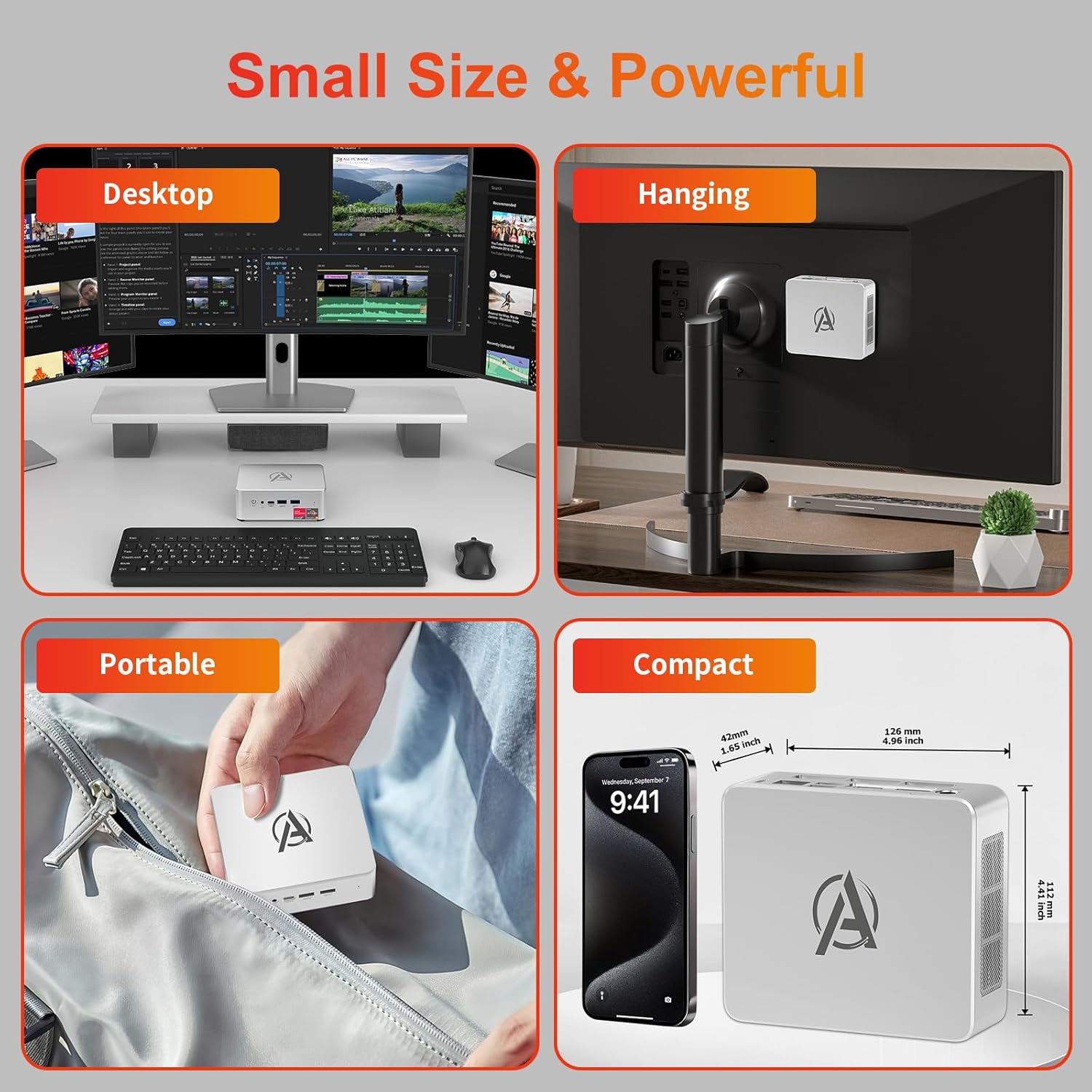
Image: Various usage scenarios for the Mini PC, including desktop, VESA-mounted behind a monitor, portable, and compact size comparison.
Penyelenggaraan
- Pembersihan: Use a soft, dry cloth to clean the exterior of the Mini PC. Do not use liquid cleaners or aerosols. Ensure ventilation openings are free from dust.
- Kemas Kini Perisian: Regularly check for and install Windows updates and driver updates to ensure optimal performance and security.
- Pengurusan Haba: Ensure the Mini PC is placed in a well-ventilated area. Avoid blocking the air vents. The intelligent cooling system is designed for low noise and efficient heat dissipation.

Image: Diagram illustrating the internal cooling fan and heat sink, showing airflow for efficient heat dissipation.
- Pengurusan Storan: Bersihkan secara berkala yang tidak perlu files and applications to maintain system performance.
Menyelesaikan masalah
- Tiada Kuasa:
- Periksa sama ada penyesuai kuasa disambungkan dengan selamat ke PC Mini dan alur keluar kuasa.
- Pastikan salur keluar kuasa berfungsi.
- Cuba salur keluar kuasa yang berbeza.
- Tiada Paparan:
- Verify that the HDMI/DP/USB-C cable is securely connected to both the Mini PC and the monitor.
- Pastikan monitor dihidupkan dan ditetapkan kepada sumber input yang betul.
- Cuba kabel paparan atau monitor lain jika tersedia.
- Prestasi Perlahan:
- Tutup aplikasi yang tidak perlu berjalan di latar belakang.
- Semak dan pasang sebarang kemas kini Windows atau kemas kini pemacu yang belum selesai.
- Pastikan terdapat ruang kosong yang mencukupi pada SSD.
- Monitor CPU and RAM usage in Task Manager to identify resource-intensive processes.
- Isu Ketersambungan Rangkaian:
- For wired connections, ensure the Ethernet cable is properly connected and the router is working.
- For Wi-Fi, check if the Wi-Fi adapter is enabled and connected to the correct network. Restart your router/modem.
- Sistem Membeku/Ranap:
- Mulakan semula PC Mini.
- Ensure the system is not overheating (check ventilation).
- Run a system diagnostic or check Windows Event Viewer for error messages.
Spesifikasi
| Model | AWOW BA7 Mini PC |
| Pemproses | AMD Ryzen 5 7430U (6 Teras, 12 Benang, sehingga 4.3 GHz) |
| Grafik | Grafik AMD Radeon Bersepadu |
| RAM | 16GB DDR4 (Boleh dikembangkan sehingga 64GB) |
| Penyimpanan | 512GB PCIe 3.0 M.2 SSD (Expandable up to 2TB) |
| Sistem Operasi | Windows 11 Pro |
| Output Video | DP1.2 (4K@60Hz), HDMI2.0 (4K@60Hz), USB-C (4K@60Hz) - Supports Triple Display |
| Ketersambungan | WiFi 6, Bluetooth 5.2, 1000Mbps RJ45 LAN |
| Pelabuhan | 2x USB 3.2, 2x USB 2.0, 1x Type-C (Full Function), 1x DP1.2, 1x HDMI2.0, 1x RJ45 LAN, 1x 3.5mm Audio Jack, 1x DC IN |
| Dimensi | 126mm x 112mm x 42mm (lebih kurang 4.96 x 4.41 x 1.65 inci) |
| Berat badan | 398g (peranti sahaja) Image: The Mini PC with its dimensions (126mm x 112mm x 42mm) and weight (398g) labeled. |
Waranti dan Sokongan
AWOW provides comprehensive support for its products.
- Waranti: This product includes a 12-month service period from the date of purchase, covering manufacturing defects.
- Sokongan Teknikal: Lifetime technical support is available for all AWOW products.
- Hubungi: For technical assistance, warranty claims, or any product-related inquiries, please visit the official AWOW webtapak atau hubungi perkhidmatan pelanggan mereka.

Image: AWOW brand message emphasizing fulfillment, lifetime technical support, and 12-month service.