
1. Pengenalan
This manual provides comprehensive instructions for the proper use and care of your Casio W220H Illuminator Digital Watch. Please read this manual thoroughly to ensure optimal performance and longevity of your timepiece. Keep this manual for future reference.
2. Produk Lebihview
The Casio W220H is a durable digital watch designed for everyday use, featuring an Illuminator backlight, stopwatch, alarm functions, and water resistance. Its robust resin construction ensures reliability.
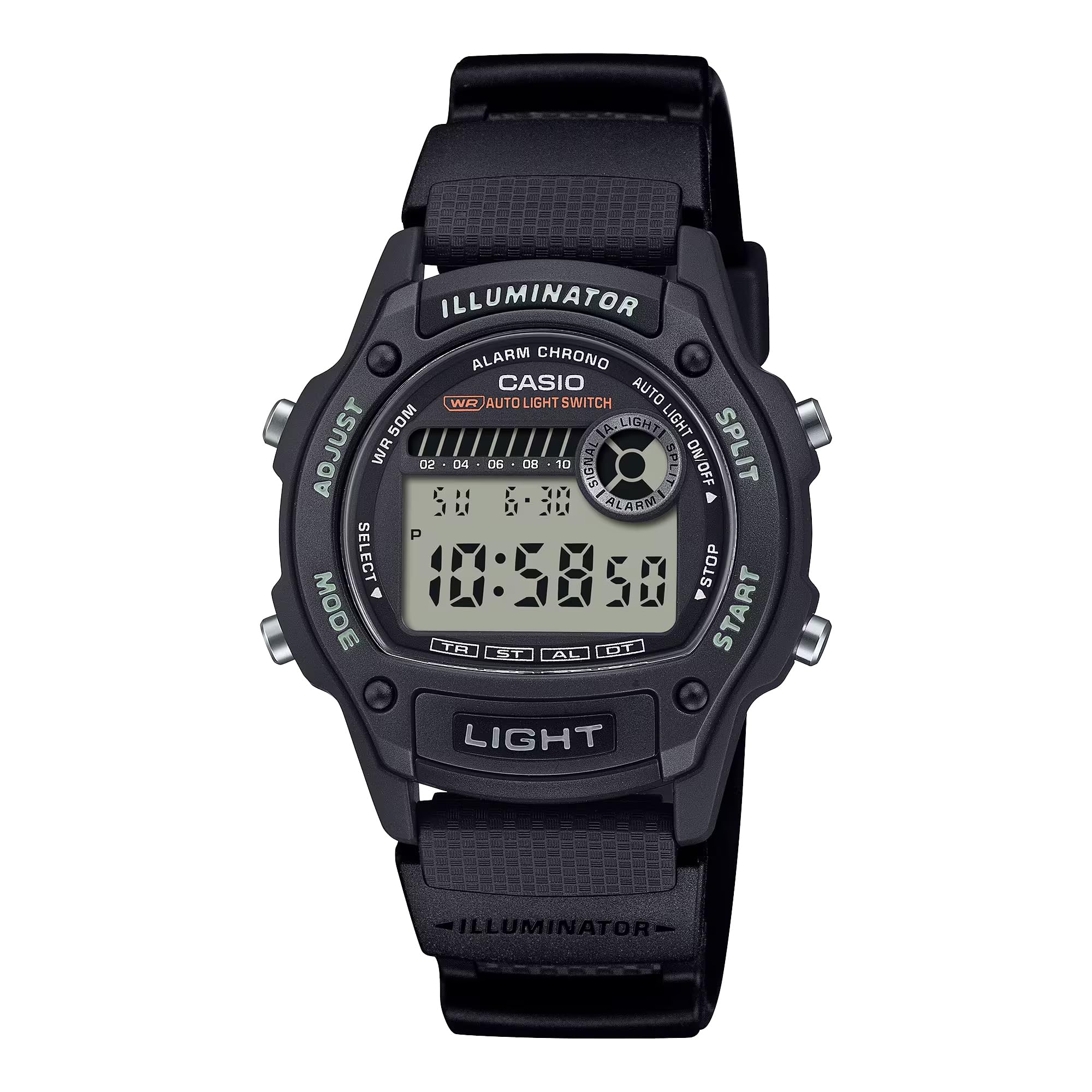
Rajah 2.1: Depan view of the Casio W220H Illuminator Digital Watch. The watch features a black resin case and band, with a clear digital display showing time and date. Buttons are visible on both sides of the case.
Fungsi Butang:
- Butang LARUT (Kiri Atas): Digunakan untuk masuk dan keluar dari mod tetapan, dan untuk mengesahkan pilihan.
- Butang MOD (Kiri Bawah): Cycles through different watch modes (Timekeeping, Stopwatch, Countdown Timer, Alarm, Dual Time).
- LIGHT Button (Bottom Front): Activates the Illuminator backlight.
- Butang MULA (Kanan Bawah): Used to start/stop stopwatch or timer, and to change settings in setting modes.
- SPLIT Button (Top Right): Used for split times in stopwatch mode, and to change settings in setting modes.
3. Persediaan Awal
3.1 Setting the Time and Date:
- Dalam Mod Penjagaan Masa, tekan dan tahan SESUAIKAN button until the seconds digits begin to flash, indicating the setting screen.
- Tekan ke MODE butang untuk melihat tetapan: Saat → Jam → Minit → Tahun → Bulan → Hari.
- Gunakan MULAKAN or BERPECAH buttons to increase or decrease the flashing value.
- Setelah semua tetapan betul, tekan butang SESUAIKAN butang untuk keluar dari mod tetapan.
3.2 Auto Light Switch:
The watch features an auto light switch that illuminates the display when you angle the watch towards your face. This feature can be toggled on or off.
- Dalam Mod Penjagaan Masa, tekan dan tahan CAHAYA button for approximately three seconds.
- An indicator (e.g., "AUTO LIGHT ON") will appear or disappear on the display to confirm the change.
- Note that the auto light switch automatically disables after approximately three hours to conserve battery life.
4. Arahan Operasi
This section details the various modes and functions of your Casio W220H watch.
4.1 Mode Navigation:
Tekan ke MODE butang untuk kitaran melalui mod berikut:
- Mod Penjagaan Masa
- Mod Jam Randik
- Mod Pemasa Kiraan Balik
- Mod Penggera
- Mod Masa Ganda
4.2 Stopwatch/Chronograph:
The stopwatch measures elapsed time, split times, and two finishes. It has a 1/100-second accuracy and can measure up to 23 hours, 59 minutes, 59.99 seconds.
- Masuk ke Mod Jam Rangup dengan menekan butang MODE butang.
- Tekan ke MULAKAN butang untuk memulakan pemasaan.
- Tekan ke MULAKAN butang sekali lagi untuk menghentikan pemasaan.
- Tekan ke SESUAIKAN butang untuk menetapkan semula jam randik kepada sifar.
- To record a split time, press the BERPECAH button while the stopwatch is running. The display will show the split time while the internal timer continues. Press BERPECAH sekali lagi untuk kembali ke masa yang telah berlalu.
4.3 Daily Alarm & HourlIsyarat Masa y:
Jam tangan ini mempunyai penggera harian dan hourlisyarat masa y.
- Masuk ke Mod Penggera dengan menekan butang MODE butang.
- Tekan ke SESUAIKAN button to enter the alarm setting mode. The hour digits will flash.
- Gunakan MULAKAN or BERPECAH butang untuk menetapkan jam.
- Tekan ke MODE button to move to the minute digits, then use MULAKAN or BERPECAH untuk menetapkan minit.
- Tekan ke SESUAIKAN butang untuk keluar dari mod tetapan penggera.
- To toggle the alarm or hourly time signal on/off, press the MULAKAN button in Alarm Mode (without holding SESUAIKAN).
4.4 Illuminator Backlight:
The Illuminator backlight provides easy readability in low-light conditions.
- Tekan ke CAHAYA butang untuk menerangi paparan.
- The light will stay on for a few seconds.
Video 4.1: A demonstration of the Casio W220H Illuminator backlight function. The video shows the watch display lighting up with an orange glow when the light button is pressed, enhancing visibility in dark environments.
Video 4.2: Penutupan terperinciview of the Casio W220H Series watch, demonstrating various functions including time setting, mode navigation, and the Illuminator backlight. This video provides a comprehensive guide to operating the watch.
5. Ciri-ciri Utama
- Illuminator Backlight: Fully automatic LED backlight for clear visibility in any lighting condition.
- Hayat Bateri yang Panjang: Approximately 3 years with the included CR1616 battery.
- Stopwatch/Chronograph: 1/100-second stopwatch functions for precise time measurement.
- Penggera & Ho HarianurlIsyarat Masa y: Convenient alerts and time markers.
- Tahan Air 50M: Suitable for swimming and showering, but not for diving.
- Kalendar Automatik Penuh: Pre-programmed calendar up to the year 2099, automatically adjusting for month lengths and leap years.
6. Penyelenggaraan
6.1 Rintangan Air:
The Casio W220H is water resistant to 50 meters. This means it is suitable for everyday use and can withstand splashes, rain, and brief immersion in water. However, it is not recommended for prolonged underwater use or high-pressure water activities like diving. Do not operate buttons while the watch is wet or submerged.
6.2 Pembersihan:
Untuk membersihkan jam tangan anda, lap dengan kain lembut dan kering. Untuk kotoran degil, gunakan kain lembutampened with water and a mild neutral detergent, then wipe dry. Avoid using volatile agents like thinner, benzine, or alcohol, as they may damage the resin components.
6.3 Penggantian Bateri:
The watch uses a CR1616 battery. When the display becomes dim or functions become erratic, it is time to replace the battery. Battery replacement should ideally be performed by a qualified technician to ensure proper sealing and water resistance.
7. Penyelesaian masalah
- Paparan kosong atau malap: Bateri mungkin lemah atau habis. Gantikan bateri.
- Masa tidak tepat: Re-set the time and date as described in the "Setting the Time and Date" section. Ensure the correct AM/PM setting is selected.
- Penggera tidak berbunyi: Check if the alarm is enabled in Alarm Mode. Ensure the volume is not muted if applicable (this model does not have volume control, but general advice).
- Air di dalam jam tangan: Immediately take the watch to an authorized service center. Do not attempt to open or dry the watch yourself, as this may cause further damage.
8. Spesifikasi
| Ciri | Perincian |
|---|---|
| Nombor Model | W220H-1AV |
| Jenis Paparan | digital |
| Jenis Pergerakan | Kuarza |
| Bahan Kes | damar |
| Bahan Band | nilon |
| Diameter Kes | 36.6 Milimeter |
| Ketebalan Kes | 10.9 Milimeter |
| Kedalaman Rintangan Air | 50 Meter |
| Sumber Kuasa | Battery Powered (CR1616) |
| lebih kurang Hayat Bateri | 3 Tahun |
| Ciri-ciri | Illuminator Backlight, 1/100-Second Stopwatch, Daily Alarm, Hourly Time Signal, Full Auto-Calendar |
9. Waranti & Sokongan
Your Casio W220H watch comes with a limited warranty. For specific warranty terms and conditions, please refer to the warranty card included with your product or visit the official Casio webtapak.
For technical support, service, or inquiries regarding your watch, please contact Casio customer service through their official webtapak atau maklumat hubungan yang diberikan dalam pembungkusan produk anda.
Casio Rasmi Webtapak: www.casio.com