pengenalan
Thank you for choosing the TNICER G1EX Bluetooth 5.2 Motorcycle Intercom System. This device is designed to enhance your riding experience by providing clear communication, music playback, and navigation assistance. Please read this manual thoroughly before use to ensure proper operation and to maximize the product's potential.
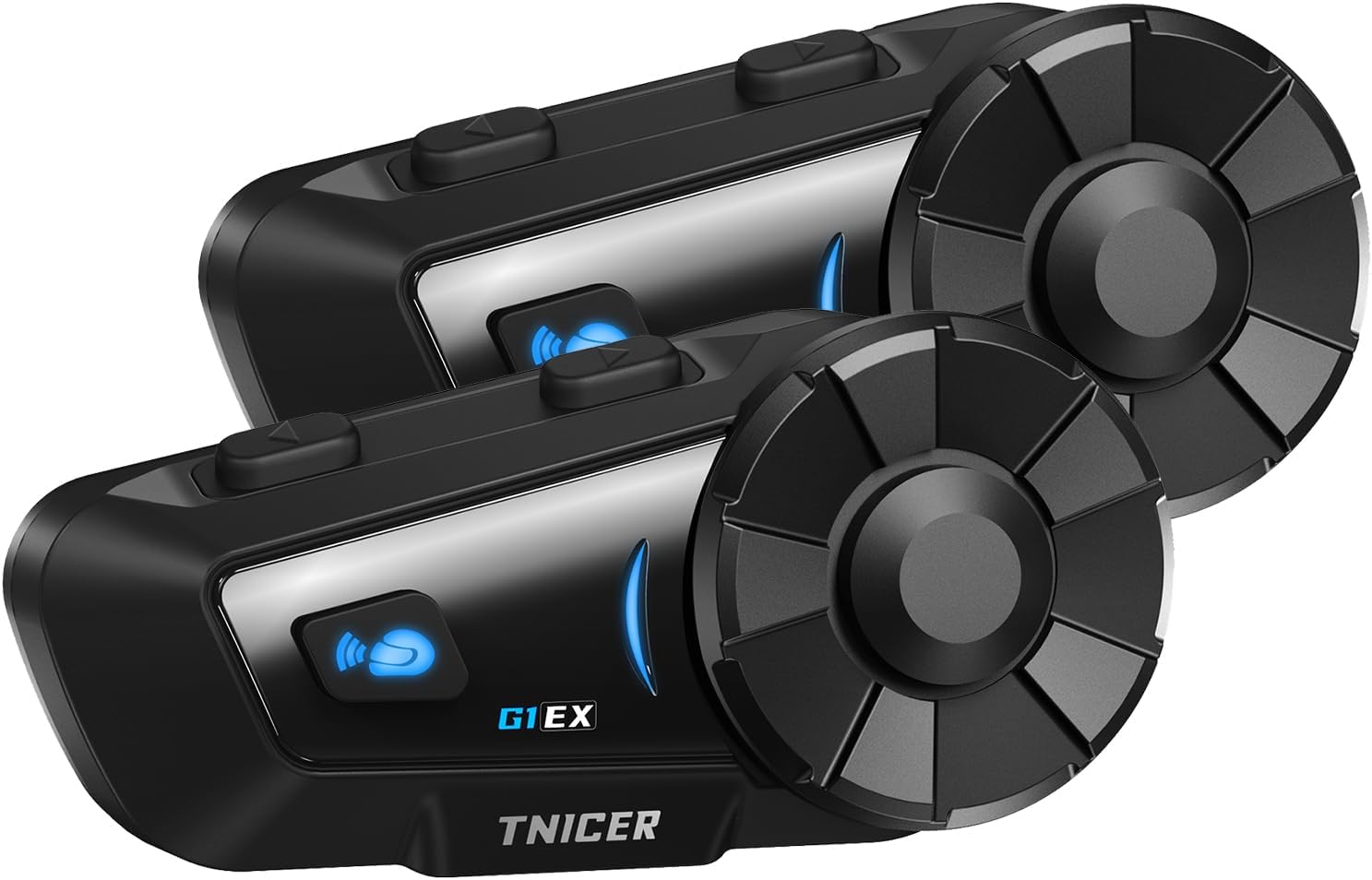
Image: Two TNICER G1EX intercom units, showcasing their sleek design and control buttons.
Kandungan Pakej
Sahkan bahawa semua item terdapat dalam pakej anda:
- G1EX Main Unit (x2)
- 3.5mm Universal Jack (x2)
- Speaker & Arm Microphone (x2 sets)
- Plat Asas (x2)
- Speaker Velcro (x2 sets)
- Speaker Spacer (x2 sets)
- Metal Clip (x2)
- Microphone Velcro (x2 sets)
- 3M Double-sided Tape (x2 sets)
- Kabel Pengecasan USB (x2)
- Manual Pengguna (Bahasa Jepun)

Image: A visual representation of all components included in the TNICER G1EX package.
Ciri-ciri Produk
- Bluetooth 5.2 Terperinci: Ensures stable and fast data transmission for seamless communication.
- Interkom Berbilang Penunggang: Supports simultaneous communication for up to 6 riders with a maximum range of 1000 meters.
- One-Touch Automatic Pairing: Simplifies connection with other G1EX units and compatible TNICER models (e.g., T2, T4X).
- Keserasian Universal: Connects with most third-party intercoms on the market.
- Penyambungan Semula Automatik: Automatically re-establishes communication if temporarily disconnected within range.
- Superior Noise Cancellation: Features CVC and DSP technologies to reduce wind and engine noise for clear audio.
- Perkongsian Muzik: Share your music with fellow riders.
- Sokongan Pembantu Suara: Compatible with smartphone voice assistants for hands-free control.
- Hayat Bateri yang Panjang: 1000mAh battery provides up to 25 hours of music playback, 22 hours of talk time, and 300 hours of standby.
- Penilaian Kalis Air IP65: Designed to withstand dust, rain, and harsh weather conditions.
- Fungsi Radio FM: Enjoy local FM broadcasts during your ride.
- 3.5mm Universal Earphone Interface: Allows for custom speaker replacement.

Imej: Tamatview of the TNICER G1EX's main features, including its robust design and audio capabilities.
Persediaan
1. Pemasangan
The G1EX unit can be mounted to your helmet using either the metal clip or the 3M double-sided adhesive tape. Choose the method that best suits your helmet and preference.
- Memasang Unit Interkom:
- Menggunakan Klip Logam: Slide the metal clip between the helmet shell and the inner padding. Secure the intercom unit to the clip.
- Using 3M Adhesive: Clean the desired mounting area on your helmet. Attach the base plate with the 3M adhesive tape, then secure the intercom unit to the base plate.
- Installing Speakers:
- Attach the speaker Velcro pads inside your helmet, aligning them with your ears.
- Place the speakers onto the Velcro pads. Use speaker spacers if needed for a better fit and sound quality.
- Connect the speaker cable to the 3.5mm universal jack on the intercom unit.
- Installing Microphone:
- Attach the microphone Velcro pad inside the helmet, positioning the microphone close to your mouth.
- Connect the microphone cable to the intercom unit.
2. Mengecas
Before first use, fully charge the G1EX unit. Use the provided USB charging cable and a 5V/1A power adapter. Avoid using fast chargers as this may damage the battery.
- Connect the USB charging cable to the charging port on the G1EX unit.
- Connect the other end of the cable to a 5V/1A USB power adapter.
- The indicator light will show charging status (refer to the device's LED indicators for specific colors/patterns).
- Pengecasan penuh biasanya mengambil masa lebih kurang 2 jam.

Image: The TNICER G1EX unit being charged, highlighting its battery capacity and usage times.
3. Gandingan Awal
The G1EX features one-touch automatic pairing for convenience.
- Ensure both G1EX units (or compatible TNICER models) are powered off.
- Press and hold the power button on both units simultaneously until they enter pairing mode (indicator light will flash rapidly, typically blue and red).
- The units will automatically detect and pair with each other. A voice prompt or a change in the indicator light will confirm successful pairing.
- For pairing with a smartphone, refer to the "Operating Instructions - Phone Calls" section.

Image: Riders communicating via TNICER G1EX intercoms, demonstrating the multi-rider connection capability.
Arahan Operasi
1. Hidupkan/Mati Kuasa
- Hidupkan kuasa: Press and hold the Power button for approximately 3 seconds until the indicator light turns on and you hear a voice prompt.
- Matikan: Press and hold the Power button for approximately 5 seconds until the indicator light turns off and you hear a voice prompt.
2. Komunikasi Interkom
After successful pairing, you can initiate intercom communication.
- Mulakan Interkom: Briefly press the Intercom button once.
- Tamatkan Interkom: Briefly press the Intercom button once again.
- Penyambungan Semula Automatik: If communication is temporarily lost due to distance, the G1EX will automatically reconnect when units are back within range.
3. Main balik Muzik
Sambungkan telefon pintar anda melalui Bluetooth untuk memainkan muzik.
- Main/Jeda: Tekan butang Pelbagai fungsi sebentar.
- Lagu Seterusnya: Rotate the jog dial forward.
- Trek Sebelumnya: Rotate the jog dial backward.
- Kelantangan: Rotate the jog dial forward and hold.
- Perlahankan suara: Rotate the jog dial backward and hold.
- Perkongsian Muzik: While music is playing, press and hold the Music Sharing button to share audio with a paired intercom unit.
4. Radio FM
- Hidupkan/Matikan Radio FM: Press and hold the FM button for 2 seconds.
- Imbas Saluran: Briefly press the Multi-function button to automatically scan and save available FM stations.
- Tukar Stesen: Rotate the jog dial forward or backward to switch between saved stations.
5. Pembantu Suara
Activate your smartphone's voice assistant (Siri, Google Assistant) for hands-free control.
- Aktifkan Pembantu Suara: Briefly press the Voice Assistant button.
6. Panggilan Telefon
Pair your G1EX with your smartphone via Bluetooth.
- Berpasangan dengan Telefon Pintar:
- Ensure the G1EX is powered on and not in intercom mode.
- Enter Bluetooth pairing mode on the G1EX (refer to the manual for specific button press, usually holding a button until indicator flashes blue/red).
- On your smartphone, go to Bluetooth settings and select "TNICER G1EX" from the list of available devices.
- Gesaan suara akan mengesahkan sambungan yang berjaya.
- Menjawab Panggilan: Tekan butang Pelbagai fungsi sebentar.
- Panggilan Akhir: Tekan butang Pelbagai fungsi sebentar.
- Menolak Panggilan: Tekan dan tahan butang Berbilang fungsi selama 2 saat.
- Dail Semula Nombor Terakhir: Tekan dua kali butang Berbilang fungsi.

Image: The TNICER G1EX highlighting its diverse functionalities including music, radio, voice assistant, and call management.
Penyelenggaraan
- Pembersihan: Lap unit dengan lembut, damp kain. Jangan gunakan bahan kimia yang keras atau pembersih yang kasar.
- Storan: Simpan peranti di tempat yang sejuk dan kering apabila tidak digunakan. Elakkan suhu yang melampau.
- Penjagaan Bateri: To prolong battery life, avoid fully discharging the battery frequently. Charge the unit regularly, even if not in active use.
- Pendedahan Air: While IP65 rated, avoid prolonged submersion in water. Ensure the charging port cover is securely closed.

Image: The TNICER G1EX unit undergoing a water splash test, illustrating its IP65 water resistance.
Menyelesaikan masalah
| Masalah | Kemungkinan Punca | Penyelesaian |
|---|---|---|
| Tiada kuasa | Low battery; Unit not charged. | Charge the unit fully. Ensure the charging cable and adapter are working. |
| Cannot pair with other units/smartphone | Units are too far apart; Incorrect pairing mode; Interference. | Ensure units are close (within 1 meter) during pairing. Follow pairing instructions carefully. Restart both devices. |
| Intercom communication is unclear or has static | Out of range; Environmental interference; Microphone position. | Move closer to the other intercom unit. Avoid areas with strong electromagnetic interference. Adjust microphone position closer to your mouth. |
| Music/FM radio not playing | Not connected to smartphone; FM radio off; Low volume. | Ensure smartphone is connected via Bluetooth. Activate FM radio. Adjust volume. |
| Pembantu suara tidak bertindak balas | Smartphone not connected; Voice assistant not enabled on phone. | Ensure smartphone is connected. Verify voice assistant is active on your phone. |

Image: The TNICER G1EX's noise cancellation system actively reducing ambient sounds for clearer communication.
Spesifikasi
| Ciri | Perincian |
|---|---|
| Nama Model | G1EX |
| Teknologi Ketersambungan | Wayarles (Bluetooth 5.2) |
| Teknologi Komunikasi Tanpa Wayar | Bluetooth |
| Kapasiti Bateri | 1000mAh |
| Masa Berbual | Sehingga 22 jam |
| Masa Main semula Muzik | Sehingga 25 jam |
| Masa Tunggu Sedia | Sehingga 300 jam |
| Masa Mengecas | lebih kurang 2 jam |
| Julat Interkom | Up to 1000 meters (between 2 units) |
| Pengguna Interkom Maksimum | 6 riders |
| Penilaian Kalis Air | IP65 |
| Berat badan | Approx. 0.3 kg (per unit) |
| Gaya Fon Kepala | Fon telinga |
| Bicu Fon Kepala | Mini USB (for charging/data), 3.5mm (for speakers) |
Waranti dan Sokongan
For warranty information and technical support, please refer to the documentation included with your purchase or contact TNICER customer service through their official webtapak atau peruncit tempat anda membeli produk tersebut. Simpan bukti pembelian anda untuk tuntutan waranti.
Pengeluar: TNICER
ASIN: B0FPLX8F43