
1. Pengenalan
Terima kasih kerana membeliasing the VIFLYKOO Bluetooth 5.4 Turntable. This device combines classic vinyl playback with modern connectivity, featuring integrated stereo speakers, Bluetooth 5.4 for both receiving and transmitting audio, USB recording, and multiple audio outputs. This manual provides essential information for safe operation, setup, and maintenance of your turntable.

Image: The VIFLYKOO Bluetooth 5.4 Turntable, showcasing its mahogany finish and classic design.
2. Arahan Keselamatan
Please read these safety instructions carefully before using the product and retain them for future reference. Incorrect use may result in electric shock, fire, or other hazards.
- Jangan dedahkan unit kepada hujan, kelembapan atau suhu yang melampau.
- Pastikan penyesuai kuasa serasi dengan bekalan kuasa tempatan anda.
- Jangan buka casing; merujuk semua perkhidmatan kepada kakitangan yang berkelayakan.
- Jauhkan unit daripada sumber haba, cahaya matahari langsung dan medan magnet yang kuat.
- Bersihkan hanya dengan kain kering. Jangan gunakan pembersih cecair atau aerosol.
- Place the turntable on a stable, level surface to prevent vibrations and ensure proper playback.
3. Kandungan Pakej
Sahkan bahawa semua item terdapat dalam pakej:
- VIFLYKOO Bluetooth 5.4 Turntable
- Penyesuai Kuasa
- Manual Arahan
- 45 RPM Adapter (for 7-inch records)
4. Produk Lebihview
Familiarize yourself with the main components and features of your turntable.
4.1 Ciri-ciri Utama
- Kesambungan Bluetooth 5.4: Supports both receiving audio from external devices and transmitting audio to Bluetooth speakers or headphones.
- Pembesar Suara Stereo Bersepadu: Two 5W speakers provide clear and authentic sound directly from the unit.
- Meja Putar 3-Kelajuan: Memainkan 33 rekod 1/3, 45 dan 78 RPM.
- Fungsi USB: Allows recording vinyl to MP3/WAV files and playing digital audio from a USB drive.
- Multiple Audio Connections: RCA output for external amplifiers, 3.5mm AUX input for external audio sources, and a headphone output for private listening.
- Fungsi Auto Henti: Automatically lifts the tonearm at the end of a record to protect the stylus and vinyl.
- Penutup Habuk Boleh Tanggal: Protects the platter and stylus from dust accumulation.
- Anti-Resonance Belt Drive: Meminimumkan getaran untuk kualiti bunyi yang lebih baik.
4.2 Komponen
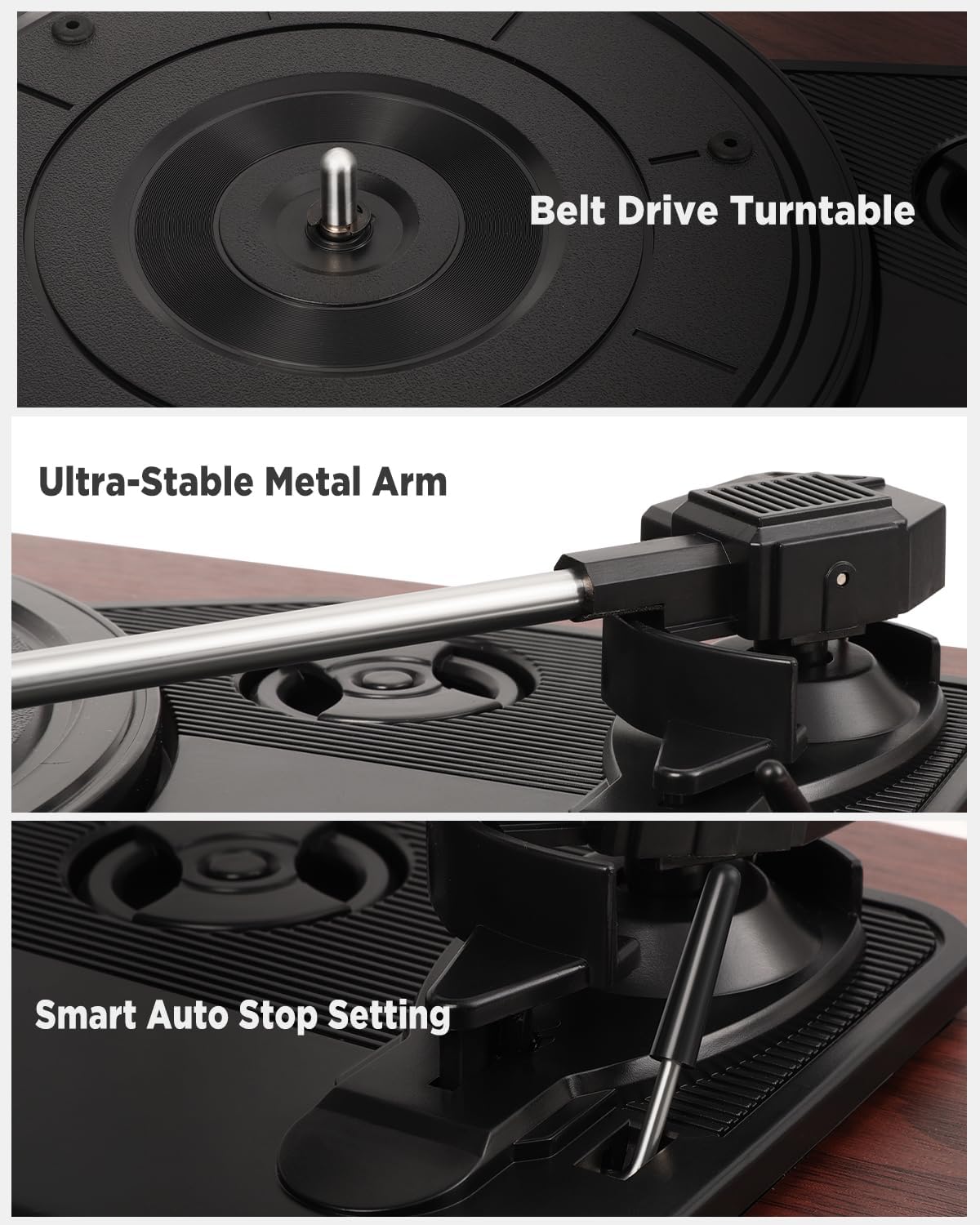
Imej: Terperinci views of the belt drive system, the ultra-stable metal tonearm, and the smart auto-stop setting.

Image: An exploded diagram illustrating the internal structure of the integrated stereo speakers, highlighting the HiFi sound components.

Image: The rear panel of the turntable, showing the RCA output, AUX-in port, USB port, and headphone port, along with their respective functions.
5. Persediaan
Follow these steps to set up your turntable for the first time.
- Buka bungkus Meja Putar: Keluarkan semua komponen dari pembungkusan dengan berhati-hati.
- Position the Turntable: Place the unit on a flat, stable, and vibration-free surface. Ensure there is adequate ventilation around the unit.
- Install the Dust Cover: If not already installed, carefully attach the removable dust cover to the hinges at the back of the unit.
- Tanggalkan Pelindung Stilus: Gently remove the protective cap from the stylus (needle). Be careful not to touch the stylus itself.
- Sambungkan Kuasa: Insert the DC plug of the power adapter into the DC IN port on the back of the turntable, then plug the adapter into a wall outlet.
- Kuasa Awal Hidup: Turn the volume knob to power on the unit.
6. Arahan Operasi
6.1 Memainkan Rekod Vinyl
- Buka penutup habuk.
- Place a vinyl record on the platter. If playing a 7-inch record, use the included 45 RPM adapter.
- Pilih kelajuan yang sesuai (33, 45 atau 78 RPM) menggunakan suis pemilih kelajuan.
- Angkat lengan atas perlahan-lahan menggunakan tuil isyarat.
- Move the tonearm over the desired starting groove of the record.
- Slowly lower the tonearm using the cueing lever. The record will begin to play.
- Laraskan kelantangan menggunakan kenop kelantangan.
- At the end of the record, the auto-stop function will automatically lift the tonearm and stop the platter rotation. Manually return the tonearm to its rest.
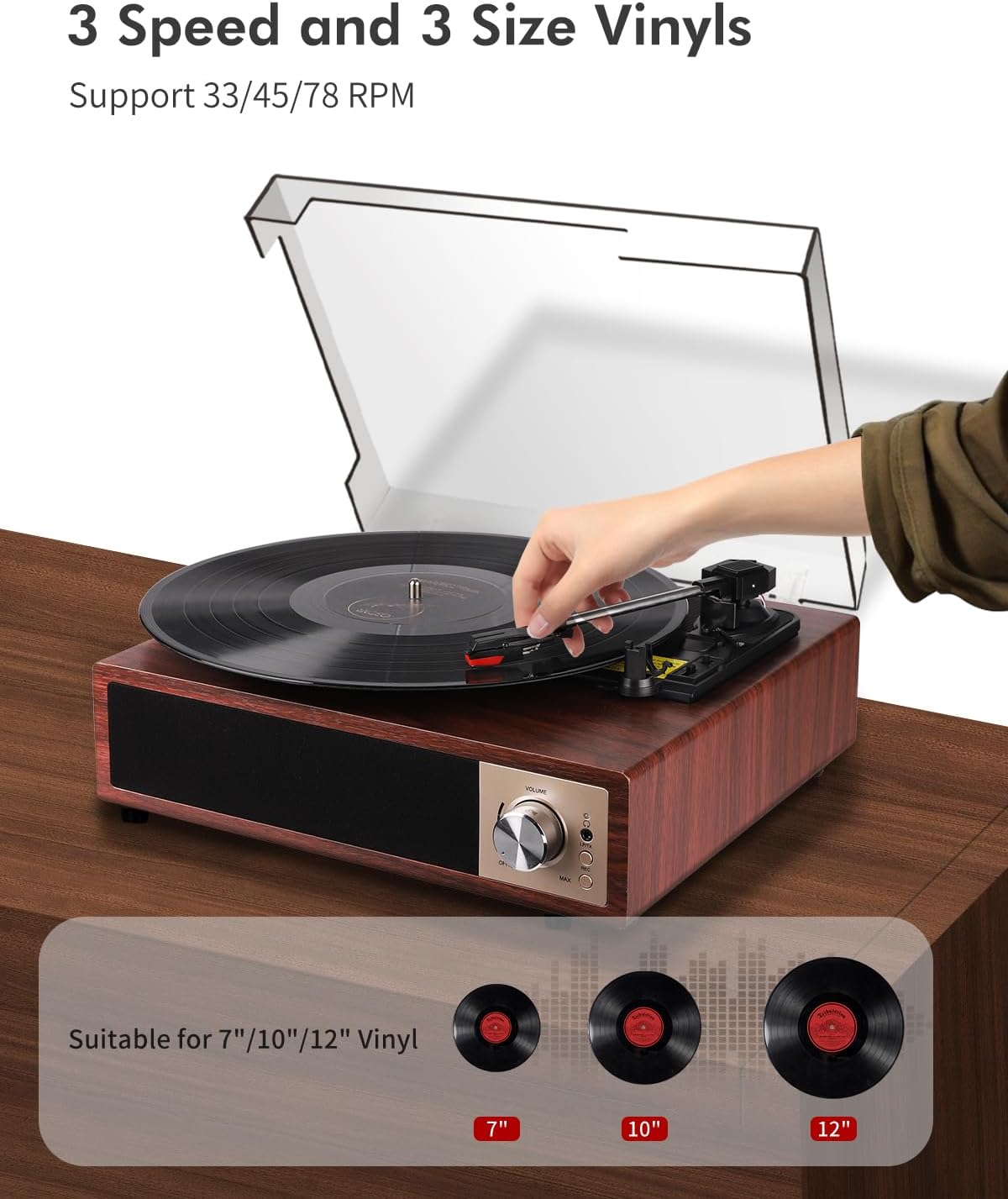
Image: A hand placing a record on the turntable, with visual representations of 7-inch, 10-inch, and 12-inch vinyl records, indicating support for all three sizes and 33/45/78 RPM speeds.
6.2 Operasi Bluetooth
The turntable supports Bluetooth 5.4 for both receiving and transmitting audio.
6.2.1 Bluetooth Receiving (Playing music from your phone)
- Hidupkan meja putar.
- Switch the function mode to Bluetooth (BT). The Bluetooth indicator light will flash.
- Enable Bluetooth on your smartphone, tablet, or other Bluetooth device.
- Cari untuk "VIFLYKOO" in the list of available devices and select it to pair.
- Once paired, the indicator light will stop flashing. You can now play music from your device through the turntable's speakers.
6.2.2 Bluetooth Transmitting (Playing vinyl through external Bluetooth speakers/headphones)
- Ensure your external Bluetooth speaker or headphones are in pairing mode.
- Turn on the turntable and select the desired input source (e.g., Phono for vinyl).
- Press and hold the Bluetooth button on the turntable to activate transmitting mode. The Bluetooth indicator will flash rapidly.
- Meja putar akan mencari dan menyambung secara automatik ke peranti audio Bluetooth berdekatan.
- Once connected, the indicator light will stop flashing, and audio from the turntable will play through your external Bluetooth device.

Image: Two scenarios demonstrating Bluetooth 5.4 functionality: a user receiving music from a smartphone to the turntable, and the turntable transmitting vinyl audio to external Bluetooth speakers and headphones.
6.3 USB Function (Recording & Playback)
The USB port allows you to convert your vinyl records to digital files or play audio files daripada pemacu USB.
6.3.1 Recording Vinyl to USB
- Insert a USB drive into the USB port on the back of the turntable.
- Select the Phono input mode.
- Start playing your vinyl record.
- Press the 'REC' button (usually near the USB port or control panel) to start recording. The indicator light will confirm recording is active.
- Press the 'REC' button again to stop recording. The recorded audio will be saved as an MP3 or WAV file pada pemacu USB.
6.3.2 Playing Audio from USB
- Insert a USB drive containing MP3 or WAV audio files ke dalam port USB.
- Switch the function mode to USB.
- The turntable will automatically detect and begin playing the audio files. Use the control buttons (if available) to skip tracks or pause playback.

Image: The turntable with a USB drive inserted, illustrating the process of recording vinyl to digital files (MP3 or WAV) and playing music files daripada pemacu USB.
6.4 Input AUX
Connect external audio devices like MP3 players or smartphones via the 3.5mm AUX IN port.
- Connect one end of a 3.5mm audio cable (not included) to the AUX IN port on the turntable.
- Sambungkan hujung satu lagi ke bicu fon kepala atau output audio peranti luaran anda.
- Switch the function mode to AUX.
- Mainkan audio daripada peranti luaran anda dan ia akan dikeluarkan melalui pembesar suara meja putar.
6.5 Keluaran RCA
Connect your turntable to an external amplifier or powered speakers for enhanced sound.
- Connect an RCA cable (not included) to the RCA OUT ports (Red for Right, White for Left) on the back of the turntable.
- Connect the other end of the RCA cable to the corresponding audio input on your amppembesar atau pembesar suara berkuasa.
- Memastikan amplifier/speakers are powered on and set to the correct input.
- Play your vinyl record, and the audio will be routed through the external system.
6.6 Output Fon Kepala
For private listening, connect headphones to the dedicated headphone jack.
- Plug your headphones into the 3.5mm headphone jack on the front or side of the turntable.
- The integrated speakers will typically mute when headphones are connected.
- Laraskan kelantangan ke tahap pendengaran yang selesa.
7. Penyelenggaraan
Proper maintenance ensures the longevity and optimal performance of your turntable.
- Membersihkan Unit: Wipe the turntable's surface with a soft, dry, lint-free cloth. Avoid using abrasive cleaners, waxes, or solvents.
- Membersihkan Stylus: Gunakan berus lembut yang direka untuk membersihkan stylus, memberus perlahan-lahan dari belakang ke hadapan. Elakkan menyentuh stylus dengan jari anda.
- Penjagaan Penutup Habuk: The removable acrylic dust cover can be cleaned with a soft, damp cloth. Avoid harsh chemicals that may scratch or cloud the acrylic.
- Penjagaan Rekod: Keep your vinyl records clean and free of dust to prevent damage to both the records and the stylus. Store them vertically in their sleeves.
- Penggantian Stilus: The stylus has a limited lifespan. If you notice a decrease in sound quality or increased skipping, consider replacing the stylus. Consult VIFLYKOO support for compatible replacement styli.
8. Penyelesaian masalah
If you encounter any issues, refer to the following troubleshooting guide.
| Masalah | Kemungkinan Punca | Penyelesaian |
|---|---|---|
| Tiada kuasa | Penyesuai kuasa tidak disambungkan atau alur keluar rosak. | Pastikan penyesuai kuasa disambungkan dengan selamat dan soketnya berfungsi. |
| Tiada suara dari pembesar suara | Volume too low; headphones connected; incorrect input mode. | Increase volume; disconnect headphones; select correct input mode (Phono, BT, AUX, USB). |
| Record skips or sound distortion | Dirty record; dirty or worn stylus; turntable not level. | Bersihkan rekod; bersihkan atau gantikan stylus; pastikan meja putar berada di atas permukaan yang rata. |
| Penggandingan Bluetooth gagal | Device too far; incorrect mode; device not in pairing mode. | Ensure devices are close; select correct Bluetooth mode (receiving/transmitting); put external device in pairing mode. |
| Rakaman USB tidak berfungsi | USB drive full or incompatible format; incorrect recording procedure. | Use a formatted USB drive (FAT32); ensure enough space; follow recording steps carefully. |
9. Spesifikasi
Technical details of the VIFLYKOO Bluetooth 5.4 Turntable.
- Jenama: VIFLYKOO
- Nombor Model: 3388651
- ASIN: B0FP57JZHX
- GTIN/UPC: 774882248156
- Kelajuan Putaran: 33 1/3, 45, 78 RPM
- Jenis Motor: Bergerak tali pinggang
- Teknologi Ketersambungan: Bluetooth 5.4 (Receive & Transmit), Auxiliary (3.5mm), USB, RCA
- Penceramah Bersepadu: Yes, 2 x 5W Stereo
- Keluaran Audio: RCA, 3.5mm Headphone Jack
- Input Audio: 3.5mm AUX-in, Bluetooth
- Fungsi USB: MP3/WAV Recording, MP3/WAV Playback
- Ciri Khas: Anti-resonance design, Automatic belt drive, Auto-stop function, Removable dust cover
- Bahan: Kayu Kejuruteraan, Logam
- Berat Barang: 2.15 Kilogram
- Dimensi Item (L x W x H): 35 cm x 29 cm x 12 cm
- Sumber Kuasa: Electric Cable (DC Adapter)
- Format Isyarat: Analog, Digital
10. Waranti dan Sokongan
Your VIFLYKOO Turntable is covered by a manufacturer's warranty and dedicated customer support.
- Waranti: This product comes with a 2-year manufacturer's warranty from the date of purchase. Please retain your proof of purchase for warranty claims.
- Sokongan Pelanggan: For technical assistance, troubleshooting not covered in this manual, or warranty inquiries, please contact VIFLYKOO customer service through the retailer's platform or the official VIFLYKOO webtapak.