
1. Pengenalan
Terima kasih kerana membeliasing the EasySMX X05PRO Wireless PC Game Controller. This manual provides detailed instructions on how to set up, operate, and maintain your controller. Please read this manual carefully before use to ensure optimal performance and a satisfying gaming experience.
Produk habisview tayangan videocasing the EasySMX X05PRO controller's design and key features.
2. Produk Lebihview
The EasySMX X05PRO is a versatile wireless game controller designed for a wide range of platforms including PC, Nintendo Switch, iOS, and Android devices. It features advanced technologies such as Hall effect joysticks and triggers, a 1000Hz polling rate, and customizable RGB lighting to enhance your gaming sessions.
Kandungan Pakej:
- EasySMX X05PRO Wireless Game Controller
- Kabel Pengecas USB-C
- Penerima Tanpa Wayar 2.4G (Dongle USB)
- Manual Pengguna

An image displaying the EasySMX X05PRO controller with its main features such as wireless/wired connection, silent buttons, RGB lighting, 1000Hz polling rate, TURBO function, vibration adjustment, and 1000mAh battery.
3. Persediaan dan Sambungan
The X05PRO controller supports multiple connection methods for various devices.
3.1. 2.4G Wireless Connection (for PC Windows)
- Insert the 2.4G wireless receiver into an available USB port on your PC.
- Tekan dan tahan butang Rumah button on the controller until the indicator light flashes rapidly, indicating pairing mode.
- Once connected, the indicator light will become solid. The controller is now ready for use.
3.2. Bluetooth Connection (for Switch, iOS, Android)
- On your device (Switch, iOS, or Android), navigate to the Bluetooth settings and enable Bluetooth.
- On the EasySMX X05PRO controller, press and hold the Berpasangan Bluetooth button (refer to the diagram in Section 2 for button layout) until the indicator light flashes rapidly.
- Select "EasySMX X05PRO" from the list of available devices on your screen.
- Setelah dipasangkan, lampu penunjuk pada pengawal akan menjadi pepejal.
3.3. Wired Connection (for PC, Switch, and charging)
- Connect one end of the USB-C cable to the controller and the other end to your device (PC or Switch).
- The controller will automatically switch to wired mode. This mode also charges the controller.

An image illustrating the wireless connection capabilities of the EasySMX X05PRO controller, highlighting its compatibility with PC and other devices.
4. Ciri-ciri Utama
4.1. Silent Buttons
The X05PRO features a redesigned full button structure with silicone dampers, ensuring ultra-quiet operation. This design is optimized for late-night gaming sessions, preventing disturbance to family, roommates, or neighbors.

A terperinci view of the controller's buttons, illustrating the silicone damper mechanism for reduced noise during gameplay.
4.2. Dwi-Stage Hall Effect Triggers
Experience precise control with adjustable trigger locks, allowing for short (3mm) or long (9mm) stroke distances. The 2+2 built-in rumble motors provide realistic haptic feedback for immersive racing and FPS experiences.
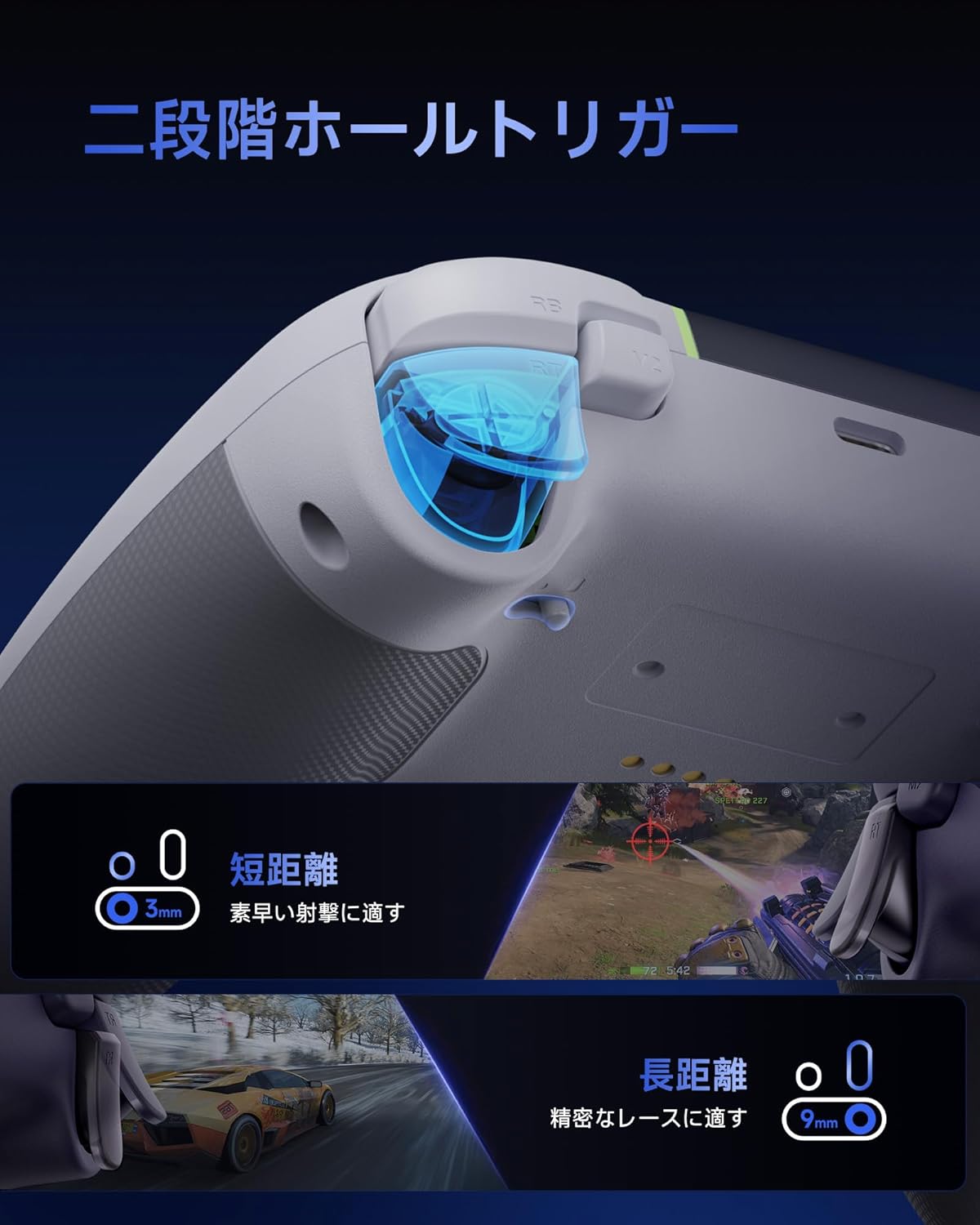
An image demonstrating the dual-stage Hall effect triggers, highlighting the short travel distance for quick shots and long travel for precise racing control.
4.3. Upgraded 8-Way D-Pad
The D-pad incorporates a dome switch and concave pivot structure, enabling smooth diagonal inputs and precise 8-way control. This design is particularly beneficial for fighting games and retro titles requiring accurate directional commands.

An exploded diagram showing the internal components of the upgraded 8-way D-pad, emphasizing its improved design for seamless and precise operation.
4.4. 4-Zone Vibration Feedback
The controller features a 2+2 motor structure that provides immersive 4-zone vibration feedback, enhancing tactile immersion during gameplay. Note: Trigger vibration requires in-game support and may only be available in certain titles.

An illustration of the controller's 4-zone vibration feedback system, depicting the internal motors and their effect on tactile immersion.
4.5. Dynamic RGB Backlight
Personalize your gaming experience with customizable RGB lighting effects. Choose from 7 color combinations and 5 diverse lighting modes (Brightness, Breathing, Colorful, Fade, Off) to match your style or mood.

Tayangan imejcasing two controllers with different dynamic RGB lighting effects, illustrating the customizable illumination options.
4.6. Two Programmable Buttons
The controller includes two additional programmable buttons located on the top, designed to prevent accidental presses during intense gameplay, a common issue with traditional back paddles.

A view of the controller's top side, highlighting the two programmable buttons (M1 and M2) and their programming settings.
4.7. 1000Hz Polling Rate & Hall Effect Joysticks
Achieve virtually no input lag with a 1000Hz polling rate in both wired and 2.4G wireless modes. The high-precision 11-bit Hall effect sensors in the joysticks ensure drift-free accuracy and a long operational lifespan.

A diagram illustrating the 1000Hz polling rate and the internal mechanism of the Hall effect joystick, emphasizing drift-free high precision.
4.8. Ergonomic Grip & Long-Life Battery
The controller features a soft-touch silicone coating for a sweat-resistant, non-slip grip, ensuring comfort during extended gaming sessions. A built-in 1000mAh rechargeable battery provides prolonged playtime.

An image highlighting the ergonomic, skin-friendly grip texture and the 1000mAh battery capacity of the controller.
5. Operasi
5.1. Changing RGB Lighting Modes
To cycle through the 5 RGB lighting modes (Brightness, Breathing, Colorful, Fade, Off) and 7 color combinations, refer to the detailed instructions in the full product manual or the manufacturer's website. Typically, a dedicated button or a combination of buttons is used for this function.
5.2. Programming Buttons (M1/M2)
The M1 and M2 buttons can be programmed to replicate other button inputs. To program:
- Tekan dan tahan butang M button (usually located near the D-pad) and the desired programmable button (M1 or M2) simultaneously.
- The indicator light will flash, indicating programming mode.
- Press the button you wish to map (e.g., A, B, X, Y, LB, RB, LT, RT, L3, R3).
- Press the M button again to save the mapping. The indicator light will return to solid.
5.3. Adjusting Trigger Modes
Dwi-stage triggers can be adjusted for different travel distances. Consult the full product manual for specific button combinations or switches to toggle between short (3mm) and long (9mm) trigger strokes, optimizing for quick actions or precise control.
6. Mengecas Pengawal
The EasySMX X05PRO controller is equipped with a built-in 1000mAh rechargeable Lithium-ion battery.
Prosedur pengecasan:
- Connect the USB-C charging cable to the controller's charging port.
- Connect the other end of the USB-C cable to a USB power source (e.g., PC, USB wall adapter, power bank).
- The indicator light on the controller will show the charging status (e.g., breathing light, solid light when fully charged). Refer to the controller's LED indicators for specific charging status details.
- Pengecasan penuh biasanya mengambil masa kira-kira 2-3 jam.
7. Spesifikasi
| Ciri | Perincian |
|---|---|
| Nombor Model | X05PRO |
| Jenis Bateri | 1 bateri Lithium Ion (termasuk) |
| Kapasiti Bateri | 1000mAh |
| Ketersambungan | 2.4G Wireless, Bluetooth, Wired (USB-C) |
| Kadar Mengundi | 1000Hz (Berwayar & Tanpa Wayar 2.4G), 125Hz (Bluetooth) |
| Jenis Pencetus | Dual-Stage Hall Effect Triggers |
| Jenis Kayu Ria | Hall Effect Joysticks (11-bit precision) |
| D-Pad | Upgraded 8-Way D-Pad (Dome switch, concave pivot) |
| Getaran | 4-Zone Vibration Feedback (2+2 motors) |
| Pencahayaan | Dynamic RGB Backlight (7 colors, 5 modes) |
| Butang Boleh Aturcara | 2 (M1, M2) |
| Dimensi | 17.9 x 14.7 x 7.4 cm |
| Berat badan | 400 g |
| Negara Asal | China |

Image showing the EasySMX X05PRO controller and its technical compliance certifications for the Japanese market.
8. Penyelesaian masalah
8.1. Pengawal Tidak Bersambung
- Periksa Bateri: Ensure the controller is sufficiently charged. Connect it via USB-C cable to charge.
- pasangan semula: For wireless connections, try re-pairing the controller with your device. Follow the steps in Section 3.
- Check Receiver (2.4G): Ensure the 2.4G wireless receiver is securely plugged into a working USB port on your PC. Try a different USB port.
- Gangguan Bluetooth: If using Bluetooth, ensure no other devices are causing interference. Try disconnecting other Bluetooth devices.
- Sambungan Berwayar: If wireless connection fails, try connecting the controller directly via USB-C cable to confirm functionality.
8.2. Input Lag or Unresponsive Buttons/Joysticks
- Kadar Pengundian: Ensure you are using 2.4G wireless or wired mode for the optimal 1000Hz polling rate. Bluetooth mode operates at 125Hz, which may feel less responsive in competitive gaming.
- Gangguan: For 2.4G wireless, ensure the receiver is not obstructed and is close to the controller. Avoid areas with high electromagnetic interference.
- Kemas kini Firmware: Check the EasySMX official website for any available firmware updates for your controller.
- Penentukuran semula: Some operating systems or game platforms allow for controller calibration. Refer to your device's settings for this option.
8.3. Getaran Tidak Berfungsi
- In-Game Support: Sahkan bahawa permainan yang anda mainkan menyokong maklum balas getaran.
- Tetapan Permainan: Check the in-game settings to ensure vibration is enabled.
- Pemasangan Pemandu: For PC, ensure the correct drivers are installed.
9. Penyelenggaraan
- Pembersihan: Gunakan kain lembut dan kering untuk membersihkan pengawal. Jangan gunakan bahan kimia yang keras atau bahan yang melelas.
- Storan: Simpan pengawal di tempat yang sejuk dan kering jauh dari cahaya matahari langsung dan suhu yang melampau.
- Penjagaan Bateri: Avoid fully discharging the battery frequently. Charge the controller regularly, even if not in use for extended periods, to maintain battery health.
- Elakkan Titisan: Lindungi pengawal daripada titisan dan hentaman, yang boleh merosakkan komponen dalaman.
10. Maklumat Keselamatan
- Do not attempt to disassemble or modify the controller. This may void your warranty and cause damage.
- Keep the controller away from water, moisture, and high temperatures.
- Jangan dedahkan bateri kepada api atau haba melampau.
- Buang produk dan baterinya secara bertanggungjawab mengikut peraturan tempatan.
- Produk ini bukan mainan. Jauhkan daripada kanak-kanak kecil.
11. Waranti dan Sokongan
EasySMX products come with a standard warranty. For specific warranty terms, duration, and to register your product, please visit the official EasySMX webtapak atau hubungi sokongan pelanggan.
If you encounter any issues not covered in this manual or require further assistance, please contact EasySMX customer support through their official webtapak atau maklumat hubungan yang diberikan bersama pembelian anda.
EasySMX Official Webtapak: www.easysmx.com