
Laxasfit LF-01
Laxasfit LF-01 Smart Watch User Manual
Model: LF-01
1. Pengenalan
Welcome to the user manual for your Laxasfit LF-01 Smart Watch. This guide provides essential information on setting up, operating, and maintaining your device to ensure optimal performance and a seamless user experience. Please read this manual thoroughly before using your smart watch.
1.1 Apa yang ada di dalam Kotak
- Jam pintar
- Kabel Pengecasan
- Manual Pengguna
2. Persediaan
2.1 Mengecas Peranti
Before initial use, fully charge your Laxasfit LF-01 Smart Watch. Connect the provided charging cable to the charging port on the back of the watch and plug the USB end into a standard USB power adapter (not included) or a computer's USB port. The watch display will indicate charging status. A full charge typically takes approximately 2 hours.
2.2 Pemasangan Aplikasi
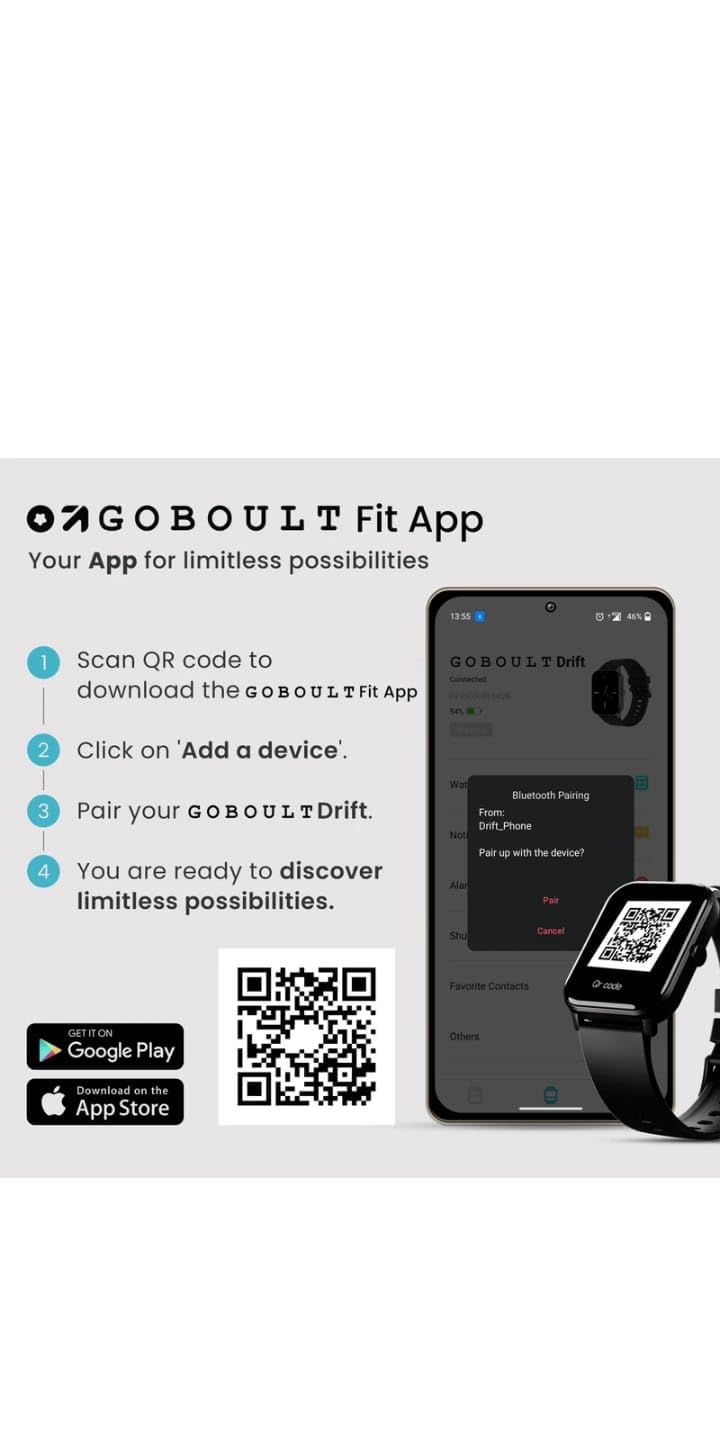
To unlock the full potential of your smart watch, download and install the companion application on your smartphone. The application allows for data synchronization, notification management, and watch face customization.
- Scan the QR code provided in the image below or search for "Boult Fit App" in your smartphone's app store (Google Play Store for Android, Apple App Store for iOS).
- Pasang aplikasi.
- Open the application and follow the on-screen instructions to create an account or log in.

Penerangan Imej: This image displays a smartphone screen with instructions for downloading and pairing the companion app. It shows four steps: "Scan QR code to download the Boult Fit App", "Click on 'Add a device'", "Pair your Boult Drift", and "You are ready to discover limitless possibilities." Below these steps are QR codes for both Google Play and the App Store, along with their respective logos. The right side of the image shows a smartwatch display and a phone screen demonstrating the Bluetooth pairing process within the app.
Download the Boult Fit App: https://app.moyoung.com/app-download/BoultFit
2.3 Berpasangan dengan Telefon Pintar Anda
After installing the app, follow these steps to pair your smart watch:
- Pastikan Bluetooth didayakan pada telefon pintar anda.
- Open the companion app and navigate to the "Add Device" or "Pair Device" section.
- The app will search for available devices. Select "Laxasfit LF-01" or a similar device name from the list.
- Sahkan permintaan pasangan pada telefon pintar dan jam tangan pintar anda jika digesa.
- Sebaik sahaja dipasangkan, jam tangan akan menyegerakkan data dengan telefon anda.
3. Ciri-ciri Utama
The Laxasfit LF-01 Smart Watch offers a range of features designed to enhance your daily life and fitness tracking.
3.1 Pemantauan Kesihatan
Monitor your vital health parameters directly from your wrist.
- Pemantau Kadar Jantung: Mengesan kadar denyutan jantung anda sepanjang hari.
- Penjejakan Tidur: Analyzes your sleep patterns, including deep sleep, light sleep, and wake times.
- Penjejakan Aktiviti: Merekod langkah, jarak dan kalori yang dibakar.

Penerangan Imej: This image shows a collage of smartwatch features. Prominently featured is a smartwatch display showing a heart rate monitor with a graph and current heart rate (108 bpm). Other elements include icons for 7-day battery life, IP68 water resistance, 60 sports modes, mini games, 1.69" HD display, Bluetooth calling, and multiple watch faces.
3.2 Mod Sukan
The watch supports over 60 workout modes to accurately track various physical activities.
- Track specific metrics for activities like running, cycling, walking, and more.
- View real-time data such as duration, calories burned, and heart rate during workouts.

Penerangan Imej: A man is shown performing an exercise with a battle rope, wearing a smartwatch on his wrist. The image highlights the watch's capability to track over 60 workout modes. An overlay shows a smartwatch display with fitness metrics: "Steps 25969", "Distance 10.56 km", and "Calories 2982 Kcal".
3.3 Panggilan Bluetooth
With its built-in speaker and microphone, the Laxasfit LF-01 allows you to manage calls directly from your wrist when connected to your smartphone via Bluetooth.
- Receive incoming call notifications.
- Answer or reject calls.
- Make calls using the watch's interface (requires phone connection).
Penerangan Imej: This image shows a smartwatch worn on a wrist, displaying an incoming call notification. The screen shows "Mom" as the caller, along with green (answer) and red (decline) call icons. Text above the watch states "Manage calls, the smart way." and "Bluetooth calling" with "Dedicated Speaker & Microphone" below.
3.4 Display and Watch Faces
- Jenis Paparan: LCD touchscreen for clear visibility and easy interaction.
- Muka Jam Boleh Disesuaikan: Choose from over 140 watch faces via the companion app to personalize your device.
4. Operasi
4.1 Navigasi Asas
- Skrin sentuh: Leret ke kiri/kanan, atas/bawah untuk menavigasi menu dan ciri. Ketik untuk memilih.
- Butang Sisi: Typically used to wake the screen, return to the home screen, or access the app menu. Refer to the on-screen prompts for specific functions.
4.2 Using Fitness Tracking
Untuk memulakan senaman:
- Swipe on the watch face to find the "Workout" or "Sports Modes" icon.
- Tap to select your desired activity (e.g., Running, Cycling).
- Tap "Start" to begin tracking.
- During the workout, you can view data masa nyata.
- Tap "Pause" or "End" to stop the workout. Data will sync with the app.
4.3 Mengurus Pemberitahuan
Once paired with your smartphone, the watch will display notifications for calls, messages, and other app alerts.
- Leret ke bawah dari muka jam tangan ke view pemberitahuan terkini.
- Tap on a notification to read the full message (if supported).
- Notifications can be managed and filtered through the companion app settings.
5. Penyelenggaraan
5.1 Membersihkan Jam Tangan Pintar Anda
- Lap skrin dan tali jam tangan dengan kerap menggunakan kain lembutamp kain.
- Elakkan menggunakan bahan kimia yang keras atau bahan yang melelas, kerana ini boleh merosakkan peranti.
- Pastikan sesentuh pengecasan bersih dan kering sebelum mengecas.
5.2 Penjagaan Bateri
- Elakkan daripada mendedahkan jam tangan kepada suhu yang melampau.
- Jangan biarkan jam tangan dalam keadaan nyahcas sepenuhnya untuk tempoh yang lama.
- For optimal battery life, charge the device before it completely runs out of power.
6. Penyelesaian masalah
If you encounter issues with your Laxasfit LF-01 Smart Watch, refer to the following common solutions:
- Tonton tidak dihidupkan: Pastikan jam tangan dicas sepenuhnya. Sambungkannya ke pengecas selama sekurang-kurangnya 30 minit.
- Tidak boleh berpasangan dengan telefon pintar:
- Pastikan Bluetooth didayakan pada telefon anda.
- Pastikan jam tangan berada dalam julat telefon anda.
- Mulakan semula telefon dan jam tangan pintar anda.
- Cuba nyahpasang dan pasang semula peranti melalui aplikasi.
- Inaccurate fitness data:
- Pastikan jam tangan dipakai dengan kemas di pergelangan tangan anda, kira-kira satu jari lebar di atas tulang pergelangan tangan.
- Calibrate the device through the app if an option is available.
- Pemberitahuan tidak muncul:
- Check app notification settings on your phone and within the companion app.
- Pastikan jam tangan disambungkan dengan betul melalui Bluetooth.
- Skrin tidak bertindak balas: Restart the watch by pressing and holding the side button (if applicable) or by connecting it to the charger.
If problems persist, consult the companion app's help section or contact customer support.
7. Spesifikasi Teknikal
| Ciri | Spesifikasi |
|---|---|
| Model | LF-01 |
| Jenis Paparan | LCD |
| Ketersambungan | Bluetooth |
| Sistem Operasi | OS Proprietari |
| Kapasiti Penyimpanan Memori | 32 GB |
| Ciri Khas | Fitness Tracking, Heart Rate Monitor, Notifications, Sleep Tracking |
| Peranti Serasi | Telefon Pintar, Tablet |
| Masa Mengecas | 2 Jam |
| bahan | Plastik, Silikon |
| Berat Barang | 200 g |
| Negara Asal | China |
8. Waranti dan Sokongan
8.1 Maklumat Waranti
Your Laxasfit LF-01 Smart Watch typically comes with a standard warranty. Please refer to your purchase documentation for specific warranty terms and conditions. A 10-day replacement policy may apply, and extended warranty options might be available for purchase.
8.2 Sokongan Pelanggan
For further assistance, technical support, or warranty claims, please refer to the contact information provided with your product packaging or visit the official Laxasfit website (if available). You may also contact the seller directly for support.