
1. Pengenalan
The Retevis RB666S is a user-friendly, rechargeable two-way radio designed for clear and reliable communication. It is ideal for family activities, hiking, camping, and other outdoor adventures. This manual provides detailed instructions on how to set up, operate, and maintain your RB666S walkie talkie.

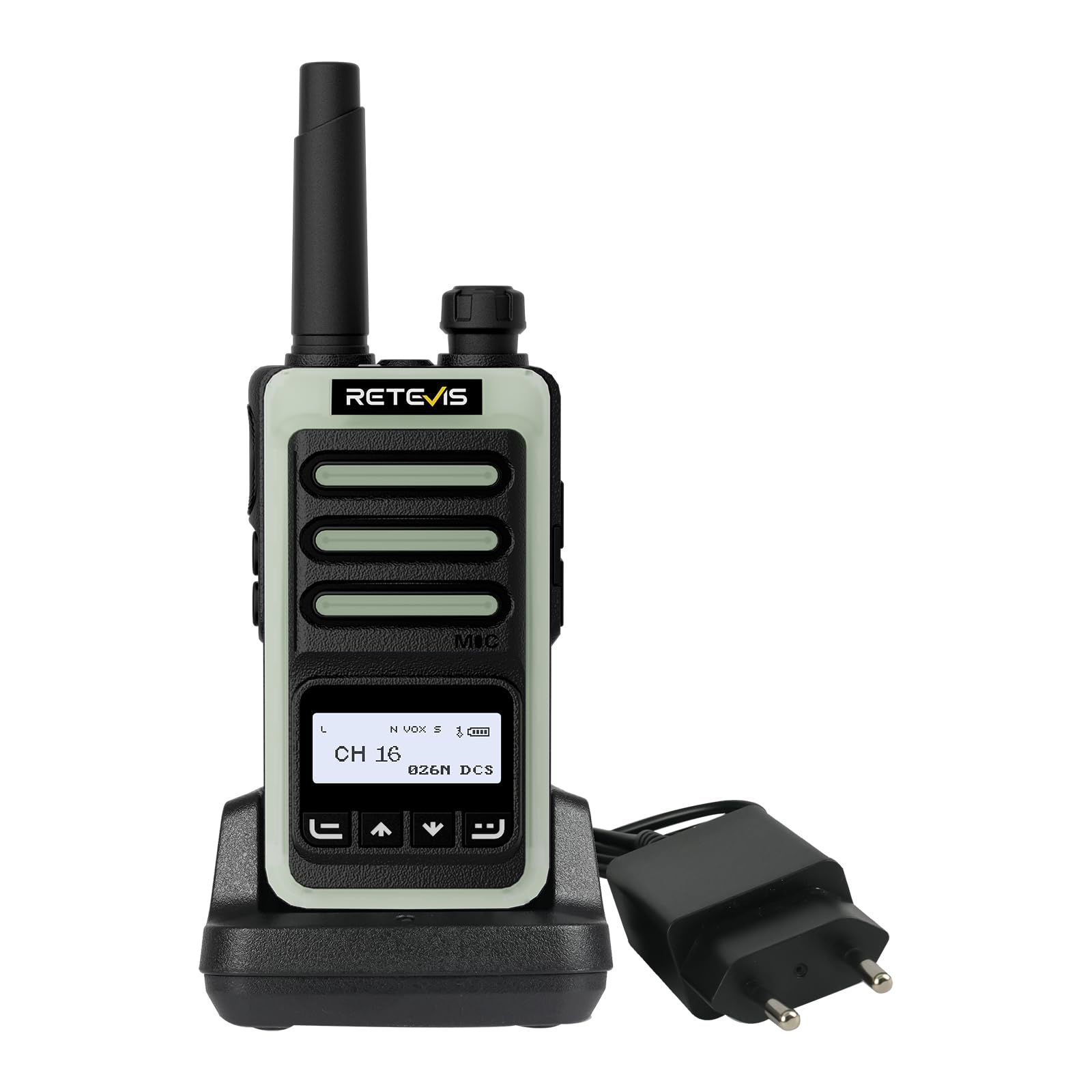
The Retevis RB666S walkie talkie is designed for easy communication during outdoor activities.
2. Kandungan Pakej
Sila semak pakej dengan teliti untuk memastikan semua item ada:
- 1 x RB666S Walkie Talkie
- 1 x Bateri
- 1 x Buaian Mengecas
- 1 x Kabel Pengecas Jenis-C
- 1 x Penyesuai
- 1 x Klip Tali Pinggang
- 1 x Lanyard
- 1 x Manual Pengguna

All components included in the RB666S package.
3. Produk Lebihview
3.1 Komponen
Familiarize yourself with the main components of your RB666S walkie talkie:

Terperinci view of the RB666S walkie talkie components.
- On/Off/Volume Knob: Putar untuk hidup/mati dan laraskan kelantangan.
- Lampu suluh: Lampu LED bersepadu.
- Port Pengecasan: Type-C port for direct charging.
- Lampu Penunjuk: Menunjukkan status (cth., menghantar, menerima, mengecas).
- Butang PTT (Push-to-Talk): Tekan dan tahan untuk menghantar suara anda.
- Butang Sisi 1: Multi-function button, typically for emergency alarm.
- Butang Sisi 2: Multi-function button, typically for flashlight activation.
- MIC: Mikrofon untuk input suara.
- Skrin Paparan: 1.3-inch LCD for channel, battery, and signal information.
- Butang Menu: Mengakses pilihan menu.
- Up/Channel+ Button: Navigates up or changes channel.
- Down/Channel- Button: Navigates down or changes channel.
- Butang Belakang: Returns to previous screen or exits menu.
4. Persediaan
4.1 Memasang Bateri
- Pastikan walkie talkie dimatikan.
- Cari penutup petak bateri di bahagian belakang unit.
- Luncurkan penutup ke bawah dan keluarkannya.
- Insert the battery, aligning the contacts correctly.
- Gantikan penutup petak bateri dan luncurkannya ke atas sehingga ia berbunyi pada tempatnya.
4.2 Memasang Klip Tali Pinggang dan Lanyard
- Pasang klip tali pinggang pada slot yang ditetapkan di belakang radio untuk memudahkan pembawaan.
- Thread the lanyard through the loop on the top or side of the radio for added security.
5. Mengecas Peranti
Before first use, fully charge the battery. The RB666S offers two convenient charging methods:
5.1 Menggunakan Buaian Pengecasan
- Connect the adapter to the charging cradle and plug it into a power outlet.
- Place the walkie talkie into the charging cradle. Ensure the charging contacts align.
- The indicator light on the radio or cradle will show the charging status (e.g., red for charging, green for fully charged).
5.2 Using the Type-C Cable
- Connect the Type-C charging cable to the charging port on the side of the walkie talkie.
- Plug the other end of the cable into a compatible USB power source (e.g., wall adapter, car charger, power bank, PC).
- Lampu penunjuk akan menunjukkan status pengecasan.
Cas penuh mengambil masa lebih kurang 1 jam, menyediakan lebih 14 hours of autonomy dan lebih 46 hours of standby time.
Fast charging in 1 hour using the cradle.

Versatile Type-C charging options.
6. Operasi Asas
6.1 Kuasa Hidup/Mati dan Pelarasan Kelantangan
- To power on, rotate the On/Off/Volume knob clockwise until you hear a click.
- Untuk mematikan kuasa, putar tombol lawan arah jam sehingga anda mendengar bunyi klik.
- Laraskan kelantangan dengan memutar tombol yang sama.
6.2 Paparan Skrin LCD
The 1.3-inch LCD screen provides essential information at a glance:
- Nombor Saluran: Indicates the current communication channel.
- Tahap Bateri: Menunjukkan baki cas bateri.
- Kekuatan Isyarat: Displays the strength of the received signal.

Clear 1.3-inch LCD screen for essential information.
6.3 Memilih Saluran
Use the Up/Channel+ and Down/Channel- buttons to select your desired communication channel. Ensure all radios in your group are on the same channel.
6.4 Menghantar dan Menerima
- Kepada menghantar, press and hold the PTT (Push-to-Talk) button. Speak clearly into the microphone. The indicator light will typically glow red.
- Kepada menerima, release the PTT button. The indicator light will typically glow green when a signal is received.

Intuitive 4-button layout for easy control.
7. Ciri Lanjutan
7.1 Kualiti Bunyi yang Jelas
The RB666S is engineered to provide clear audio, ensuring every word is heard distinctly, even in noisy outdoor environments like windy trails or busy camptapak.

Enjoy clear sound quality for effective communication.
7.2 Fungsi VOX (Pertukaran Dikendalikan Suara)
Fungsi VOX membolehkan penghantaran bebas tangan. Apabila diaktifkan, radio akan menghantar secara automatik apabila ia mengesan suara anda, sekali gus menghapuskan keperluan untuk menekan butang PTT.

Hands-free communication with VOX function.
7.3 One-Touch Pairing
Simplify connecting with other compatible radios using the one-touch pairing feature. Refer to the specific instructions for pairing in the full manual if available.

Effortless connection with one-touch pairing.
7.4 CTCSS/DCS (Continuous Tone-Coded Squelch System / Digital Coded Squelch)
Utilize CTCSS/DCS codes to filter out unwanted signals and ensure more private communication within your group. This feature helps to reduce interference from other users on the same channel.

Enhanced privacy with CTCSS/DCS codes.
7.5 Lampu Suluh LED
The integrated LED flashlight provides illumination for navigating in low-light conditions. Briefly press Side Button 2 to activate or deactivate the flashlight.

Illuminate your path with the built-in LED flashlight.
7.6 Fluorescent Design
The RB666S features a fluorescent design, making it highly visible and easy to locate in low-light outdoor environments, enhancing safety during nighttime activities.

High visibility in low light with fluorescent design.
7.7 Penggera Kecemasan
For added safety, the RB666S includes an emergency alarm function. Long-press Side Button 1 to activate the alarm, alerting others to your situation.

Activate the emergency alarm for enhanced safety.
7.8 Channel Lock / Keypad Lock
To prevent accidental channel changes or button presses, you can activate the channel lock or keypad lock feature. This ensures stable communication, especially during active use like climbing or cycling.

Maintain stable communication with channel lock.
8. Penyelenggaraan
- Pembersihan: Gunakan yang lembut, damp kain untuk membersihkan bahagian luar radio. Jangan gunakan bahan kimia yang keras atau pembersih yang kasar.
- Storan: Store the walkie talkie in a cool, dry place away from direct sunlight and extreme temperatures. Remove the battery if storing for extended periods.
- Penjagaan Bateri: Avoid fully discharging the battery frequently. Recharge regularly to prolong battery life.
- Elakkan Air: While designed for outdoor use, avoid submerging the radio in water unless specified as waterproof.
9. Penyelesaian masalah
| Masalah | Kemungkinan Punca | Penyelesaian |
|---|---|---|
| Radio tidak dihidupkan | Bateri lemah atau tidak dipasang dengan betul. | Cas bateri atau pasang semula dengan betul. |
| Tidak boleh menghantar atau menerima | Saluran yang dipilih salah; di luar julat; bateri lemah. | Ensure correct channel; move closer to other radios; charge battery. |
| Kualiti audio yang lemah | Volume too low; interference; microphone/speaker obstructed. | Adjust volume; move away from interference sources; check microphone/speaker. |
| Pad kekunci tidak bertindak balas | Kunci pad kekunci diaktifkan. | Deactivate keypad lock (refer to specific instructions in the full manual). |
10. Spesifikasi
- Jenama: Retevis
- Nombor Model: RB666S
- Bilangan Saluran: 16
- Bateri: 1 x 12V (termasuk)
- Voltage: 7.4 Volt
- Dimensi Produk (D x W x H): 2.5 x 5.3 x 9.5 cm (0.98 x 2.09 x 3.74 inci)
- paparan: Skrin LCD 1.3 inci
- mengecas: Type-C Fast Charging, Charging Cradle
- Ciri Khas: LED Flashlight, Fluorescent Design, Emergency Alarm, VOX, CTCSS/DCS, Channel Lock
11. Waranti dan Sokongan
11.1 Maklumat Waranti
Retevis offers a Waranti 2 tahun untuk badan radio dan a Waranti 1 tahun for accessories. We also provide a Polisi pemulangan tanpa sebab 30 hari. Beyond the warranty period, maintenance services are available, with buyers responsible for associated costs.
11.2 Sokongan Pelanggan
For any questions, issues, or support needs, please contact us through Amazon. We are committed to responding to your inquiries within 12 hours.
11.3 Maklumat Keselamatan
For important safety guidelines, please refer to the official safety information document: Maklumat Keselamatan (PDF)