
pengenalan
Thank you for choosing the PUTORSEN Adjustable PC Tower Stand. This product is designed to provide a mobile, stable, and space-saving solution for your computer tower. Made from high-quality alloy steel, it features adjustable height, protective guardrails, and smooth-rolling casters to enhance your workspace ergonomics and protect your valuable equipment.
This manual provides essential information for the proper setup, operation, and maintenance of your PC tower stand. Please read it thoroughly before use and retain it for future reference.
Maklumat Keselamatan
- Ensure the PC stand is placed on a stable, level surface before placing your computer tower on it.
- Jangan melebihi kapasiti beban maksimum 30 kg (66 lbs).
- Always lock the casters when the stand is in its desired position to prevent accidental movement.
- When adjusting the height, ensure the PC tower is securely positioned and balanced.
- Pastikan tangan dan jari bebas daripada bahagian yang bergerak semasa melaraskan ketinggian.
Kandungan Pakej
Sila pastikan semua komponen ada dan tidak rosak:
- 1 x PUTORSEN Adjustable PC Tower Stand (Model CPM-001)
- 4 x Swivel Casters (2 with locking mechanism)
- Assembly Hardware (if applicable, though product is largely pre-assembled)
Jika mana-mana bahagian yang hilang atau rosak, sila hubungi sokongan pelanggan.
Arahan Persediaan
The PUTORSEN PC Tower Stand (Model CPM-001) requires minimal assembly. It is designed for quick and easy deployment.
- Membuka kotak: Keluarkan semua komponen dari pembungkusan dengan berhati-hati.
- Pemasangan Kastor: If the casters are not pre-installed, insert each caster into the designated holes at the bottom of the stand until they click securely into place. Ensure the two locking casters are positioned at the front for easy access.
- Peletakan Awal: Position the stand in your desired location. Ensure the area is clear and provides adequate space for your PC tower.
- Menyelaraskan Tinggi: To adjust the height, locate the adjustment pins on the side rails. Press the pins inward and slide the platform to one of the 5 available height levels (from 13.3 cm to 30.3 cm). Release the pins to lock the platform in place. Ensure both sides are adjusted to the same level for stability.
- Placing PC Tower: Carefully lift your PC tower and place it onto the stand. Ensure it is centered and fits within the protective guardrails. The stand accommodates PC cases up to 25.5 cm (10 inches) wide.
- Roda Pengunci: Once the PC tower is in place and the stand is in its final position, press down on the locking levers of the two front casters to secure the stand and prevent unwanted movement.


Arahan Operasi
The PUTORSEN PC Tower Stand is designed for simple and effective use.
- Mobiliti: To move your PC tower, unlock the two front casters by lifting their levers. Gently push or pull the stand to its new location. Once in position, lock the casters again to ensure stability. The 360° swivel casters allow for easy maneuverability, making cleaning around your workspace effortless.
- Pelarasan Ketinggian: The stand offers 5 levels of height adjustment, from 13.3 cm (5.2 inches) to 30.3 cm (11.9 inches). This feature is particularly useful for height-adjustable desks, allowing you to keep your PC tower off the floor and at an optimal height for airflow and accessibility.
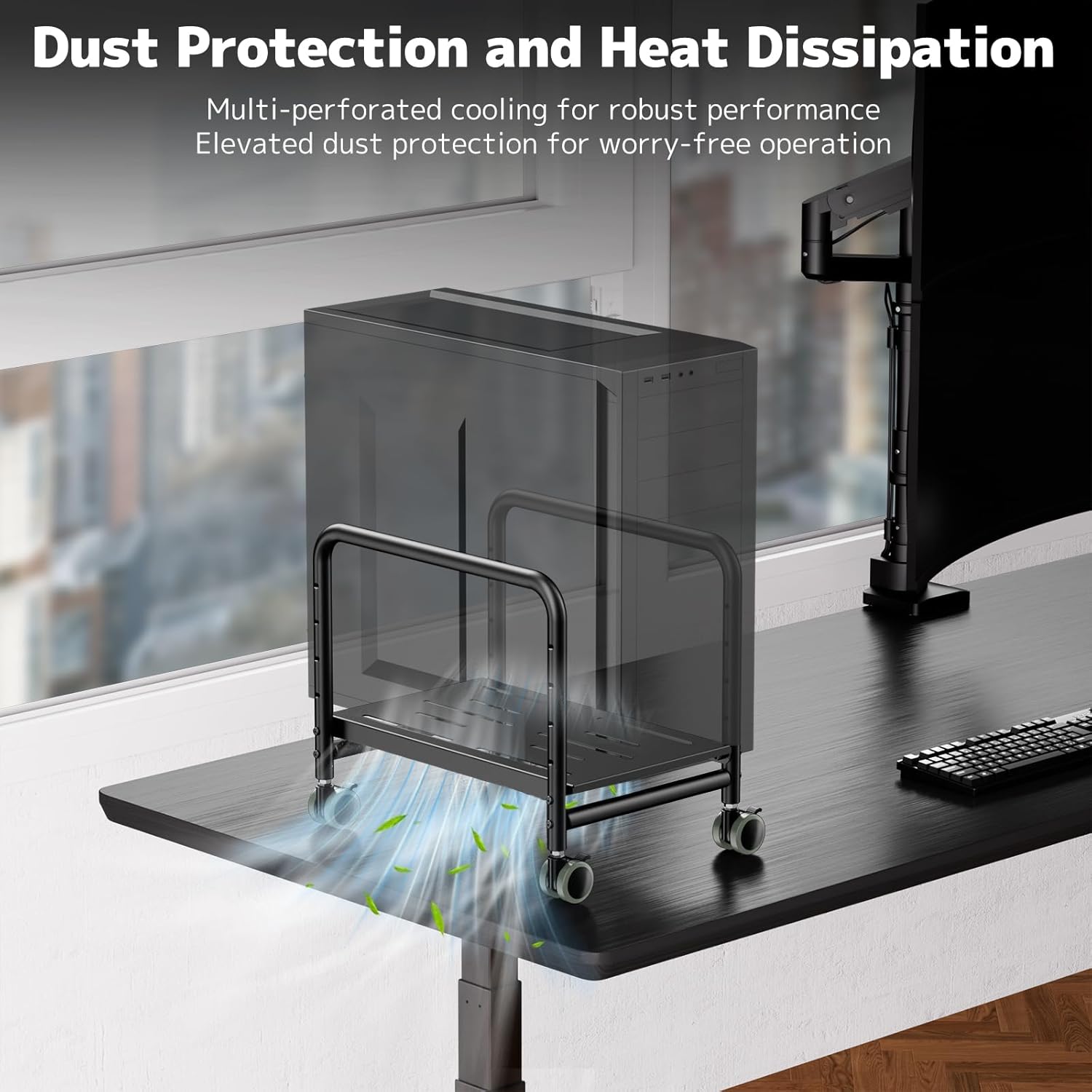
- Dust Protection and Airflow: By elevating your PC tower off the floor, the stand significantly reduces dust intake, which can prolong the life of your computer components. The perforated platform design further promotes robust airflow, aiding in heat dissipation.
- Stability and Protection: The high-quality steel construction and protective side rails ensure your PC tower remains secure and stable, preventing accidental tipping or falling, even on carpeted surfaces.


Penyelenggaraan
- Pembersihan: Lap dirian dengan lembut, damp cloth to remove dust and dirt. Avoid using abrasive cleaners or solvents that could damage the finish.
- Penjagaan Kastor: Periodically check the casters for any accumulated debris (hair, lint) and clean them to ensure smooth rolling.
- Pemeriksaan: Regularly inspect all connections and adjustment mechanisms to ensure they are secure and functioning correctly.
Menyelesaikan masalah
| Masalah | Kemungkinan Punca | Penyelesaian |
|---|---|---|
| Pendirian tidak stabil atau goyah. | Uneven surface; height adjustment pins not fully engaged; PC tower not centered. | Move to a level surface; ensure height pins are securely locked on both sides; reposition PC tower to be centered. |
| Roda tidak bergolek dengan lancar. | Debris caught in casters; casters not properly installed. | Clean any debris from the caster wheels; ensure casters are fully inserted into their sockets. |
| Pelarasan ketinggian adalah sukar. | Pins are stuck; excessive weight on the platform. | Ensure no weight is on the platform during adjustment; check pins for obstruction and apply gentle force. |
Spesifikasi
| Jenama | PUTOR |
| Nombor Model | CPM-001 |
| bahan | Keluli Aloi |
| warna | Hitam |
| Jenis Selesai | Matte |
| Dimensi Item (L x W x H) | 44 x 33 x 9.5 cm (17.3 x 13 x 3.7 inci) |
| Berat Barang | 4.07 Kilogram (8.97 lbs) |
| Kapasiti Beban Maksimum | 30 Kilogram (66 lbs) |
| Tahap Pelarasan Tinggi | 5 levels (13.3 cm to 30.3 cm / 5.2 to 11.9 inches) |
| Compatible PC Case Width | Sehingga 25.5 cm (10 inci) |
| Perhimpunan Diperlukan | Tidak |
| Komponen yang Disertakan | Pendirian CPU |


Waranti dan Sokongan
PUTORSEN products are manufactured to high-quality standards. For specific warranty information, please refer to the documentation included with your purchase or visit the official PUTORSEN webtapak.
If you encounter any issues or have questions regarding your PC tower stand, please contact PUTORSEN customer support through the retailer where you purchased the product or via the contact information provided on the PUTORSEN brand store page on Amazon.
Sokongan dalam talian: Untuk sumber tambahan dan Soalan Lazim, sila layari PUTORSEN Brand Store.