1. Pengenalan
Thank you for choosing the AFMAT PSC4 Electric Pencil Sharpener. This manual provides essential information for the safe and efficient operation, maintenance, and troubleshooting of your new sharpener. Please read these instructions thoroughly before first use and retain them for future reference.
Amaran Keselamatan
- Keep the sharpener away from water or other liquids to prevent electric shock.
- Do not insert fingers or foreign objects into the sharpening hole.
- Ensure the shavings bin is securely closed before operation. The sharpener will not operate if the bin is open or improperly installed.
- Unplug the sharpener from the power outlet before cleaning or performing any maintenance.
- Perkakas ini tidak dimaksudkan untuk digunakan oleh orang (termasuk kanak-kanak) yang kurang keupayaan fizikal, deria atau mental, atau kurang pengalaman dan pengetahuan, melainkan mereka telah diberi pengawasan atau arahan mengenai penggunaan perkakas oleh orang yang bertanggungjawab untuk keselamatan mereka.
2. Kandungan Pakej
Sila semak pakej untuk item berikut:
- AFMAT PSC4 Electric Pencil Sharpener (Green)
- Power Adapter (US version requires a power outlet)
- Manual Pengguna
3. Produk Lebihview
Familiarize yourself with the components of your AFMAT PSC4 Electric Pencil Sharpener:
- Sharpening Hole: Insert pencils for sharpening.
- Sharpness Adjustment Dial: Located on top, allows selection of 5 different tip sharpness levels.
- Transparent Shavings Bin: Collects pencil shavings and allows visibility of fill level.
- Power Cord Port: Connects the sharpener to a power outlet.
- Cawan sedutan: Four suction cups on the base provide stability during use.
- Helical Blade Assembly: Internal sharpening mechanism.

The sharpener features a durable helical blade designed for over 10,000 uses, offering 5 times longer blade life compared to standard sharpeners.

4. Persediaan
- Bongkar: Keluarkan pengasah dan semua aksesori dengan berhati-hati daripada pembungkusan.
- penempatan: Place the sharpener on a stable, flat surface. The four suction cups on the base will help secure it in place.
- Sambungan Kuasa: Plug the power adapter into the power cord port on the sharpener, then plug the adapter into a standard 120V 60Hz power outlet.
- Shavings Bin Check: Ensure the transparent shavings bin is correctly and securely installed. The sharpener will not function if the bin is loose or removed.
5. Arahan Operasi
Pencil Compatibility
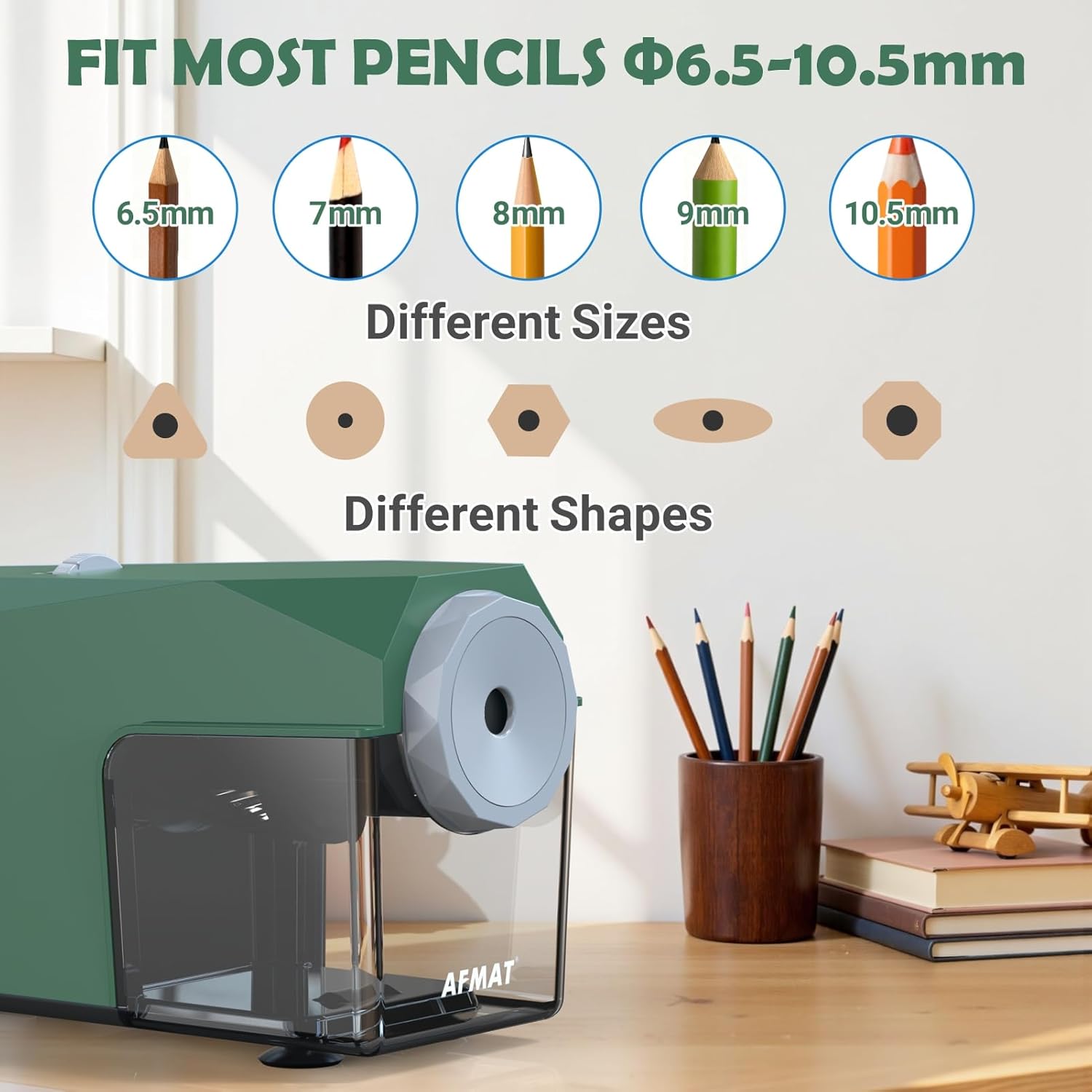
The AFMAT PSC4 sharpener is designed to accommodate pencils with diameters ranging from φ6.5mm to 10.5mm. This includes standard No.2 pencils, jumbo pencils, colored pencils (such as Prismacolor Premiers, Derwent, Faber-Castell), and pencils of various shapes (standard, oval, hexagonal).
Adjusting Sharpness Settings
The sharpener offers 5 adjustable sharpness settings. Rotate the dial on the top of the unit to select your desired tip:
- Sharp Tip: Ideal for fine detail work and precise lines.
- Medium Tip: Suitable for general writing, sketching, or everyday use.
- Blunt Tip: Recommended for shading, heavy use, or for soft-core pencils to prevent breakage.

Mengasah Pensil
- Select Sharpness: Choose your desired sharpness setting using the dial.
- Sisipkan Pensel: Gently insert the pencil into the sharpening hole. The sharpener will automatically pull the pencil in.
- Mengasah Automatik: The sharpener will begin sharpening. It takes approximately 3 seconds for a used pencil and up to 5 seconds for a new pencil to achieve a perfect point.
- Automatic Ejection: Once the pencil is sharpened to the selected tip, the sharpener will automatically stop and eject the pencil. This prevents over-sharpening and minimizes pencil waste.


Video Produk Rasmi: Cara Penggunaan
Video 1: Official demonstration of the AFMAT Fully Automatic Pencil Sharpener for Classroom PSC4, showcasing ciri dan kemudahan penggunaannya.
6. Penyelenggaraan
Mengosongkan Tong Cukur
The AFMAT PSC4 features an extra-large, transparent shavings bin that rarely needs emptying. When it does, follow these steps:
- Cabut plag: Disconnect the sharpener from the power outlet.
- Remove Bin: Gently pull out the transparent shavings bin.
- kosong: Dispose of the pencil shavings. For best results and to prevent spillage, gently shake the unit before removing the shavings box to settle any piled-up shavings.
- Pasang semula: Securely reinsert the shavings bin until it clicks into place. The sharpener will not operate if the bin is not properly installed.

Cleaning the Blade Assembly
Over time, pencil dust or broken lead pieces may accumulate around the blade. Refer to the troubleshooting section for detailed instructions on clearing broken lead, which often involves cleaning the blade assembly.
7. Penyelesaian masalah
| Masalah | Kemungkinan Punca | Penyelesaian |
|---|---|---|
| Pengasah tidak berfungsi. | Shavings compartment not securely closed. | Ensure the shavings compartment is securely closed. The sharpener has a safety mechanism that prevents operation if it's open. |
| Pengasah tidak berfungsi. | Blade round assembly is loose. | Ensure the blade round assembly is tightened clockwise. |
| Pencil is not sharpening or is ejected without sharpening. | Pencil is too short. | Pencils shorter than 79 mm (approx. 3.15 inches) cannot be sharpened and will be ejected automatically. |
| Uneven pencil tip. | Pencil core is off-center. | This is due to the pencil's manufacturing. The sharpener ensures optimal centering during sharpening for even tips with standard pencils. |
| Pencil lead breaks frequently, especially with colored pencils. | Incorrect sharpness setting for pencil type. | Use the blunt setting for soft-core pencils (e.g., many colored pencils) to prevent breakage. Avoid ultra-soft variants if breakage persists. |
| Sharpener jams or makes unusual noises. | Broken lead or debris inside the blade assembly. | Refer to the 'Clearing Broken Lead' instructions below. |
Clearing Broken Lead
- Insert Hard Pencil: Insert a sharpened HB pencil with HARD lead into the sharpening hole.
- Press Down Firmly: Press down firmly and continue sharpening for a few seconds. The jamming lead should be discharged during this process.
- Manual Removal (if needed): If the lead is still not cleared, unplug the sharpener. Remove the shavings box. Open the blade round assembly (it may twist off or unclip depending on design), turn the sharpener upside down, and gently shake. Most broken pieces will fall out automatically.
- Disassemble Blade (advanced): If necessary, carefully disassemble the blade round assembly and use a tool (like a toothpick or a thin, non-metallic probe) to remove any remaining debris. Shaking the cutter during removal may help clear fragments. Wear gloves or use a thick towel to protect your hands from the sharp blade.
- Pasang semula: When reassembling components, ensure all parts are properly aligned and securely tightened.
Official Product Video: Troubleshooting
Video 2: Official troubleshooting guide for the Automatic Classroom Pencil Sharpener PSC4, including solutions for common issues.
8. Spesifikasi
| Ciri | Perincian |
|---|---|
| Nombor Model | PSC4GN |
| Jenama | AFMAT |
| warna | hijau |
| bahan | Metal (blade), Plastic (housing) |
| Berat Barang | 1.94 paun |
| Dimensi Pakej | 9.37 x 6.26 x 4.61 inci |
| Pencil Diameter Compatibility | φ6.5-10.5 mm |
| Tetapan Ketajaman | 5 adjustable nib options |
| Kehidupan Blade | 10,000+ kegunaan |
| Ciri-ciri | Fully Automatic, Hands-Free, Auto-Stop, Auto-Eject, Large Shavings Bin, Suction Cups |
| Input Kuasa | 120V 60Hz (US version) |
| Khalayak Sasaran | Artist, Student, Classroom, Office |
9. Waranti dan Sokongan
For any issues or further assistance, please contact our customer support team:
- e-mel: support@afmat.com
- WhatsApp: +1 (323) 961-7865
Sila simpan resit pembelian anda untuk tujuan jaminan.