
1. Pengenalan
This manual provides instructions for the XHGTJK Universal Replacement Remote Control. This remote is designed to be compatible with various Kenwood audio systems, including models KRF-V5100D, KRF-V5090D, KRF-V6090, KRF-V6100D, RC-R0517, KRF-V5200D, KRF-V6300D, KRF-V6200D, KRF-V7200D-S, and RC-R0518. It operates using infrared (IR) technology and requires no programming or pairing for initial use.
2. Persediaan
2.1 Pemasangan Bateri
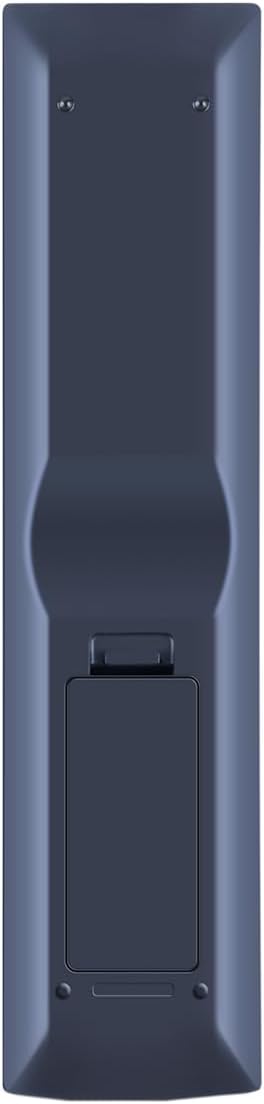
The remote control requires two (2) AAA batteries (not included). Follow these steps to install the batteries:
- Cari petak bateri di belakang alat kawalan jauh.
- Tekan ke bawah pada selak dan luncurkan penutup bateri ke bawah untuk membukanya.
- Masukkan dua bateri AAA, pastikan terminal positif (+) dan negatif (-) sejajar dengan tanda di dalam petak.
- Luncurkan penutup bateri ke tempat semula sehingga ia berbunyi dengan selamat.
Setelah bateri dipasang, alat kawalan jauh sedia untuk digunakan. Tiada pengaturcaraan atau gandingan diperlukan.
3. Arahan Operasi
This replacement remote control functions as an infrared (IR) device. For optimal performance, ensure a clear line of sight between the remote control and your Kenwood audio system. Point the remote directly at the system's IR receiver.
3.1 Fungsi Asas
While this remote is designed to operate the main functions of compatible Kenwood units, it may not support every feature available on the original remote control. Key functions include:
- Hidupkan/Mati Kuasa: Gunakan KUASA butang untuk menghidupkan atau mematikan sistem.
- Pemilihan Input: Buttons like DVD, VIDEO, CD, TUNER, HDMI 1, HDMI 2, dan AUX allow you to switch between different audio/video sources.
- Kawalan Kelantangan: Gunakan JILID + dan JILID - buttons to adjust the sound level. The HILANGKAN butang menyenyapkan audio.
- Navigasi: The central directional pad (UP, TURUN, KIRI, BETUL) dan MASUK button are used for menu navigation and selection.
- Kawalan Main Semula: Butang seperti MAIN/JEDA, BERHENTI, CEPAT KE HADAPAN, dan REWIND are available for media playback.
- Papan kekunci angka: Use the number buttons (0-9, +10) for direct track selection or input.

4. Penyelenggaraan
4.1 Penggantian Bateri
Gantikan bateri apabila tindak balas alat kawalan jauh menjadi lembap atau berhenti berfungsi. Sentiasa gantikan kedua-dua bateri pada masa yang sama dengan bateri AAA baharu. Jangan campurkan bateri lama dan baharu, atau jenis bateri yang berbeza.
4.2 Pembersihan
Untuk membersihkan alat kawalan jauh, lap dengan kain lembut dan kering. Jangan gunakan pembersih cecair, semburan atau bahan yang melelas, kerana ini boleh merosakkan permukaan alat kawalan jauh atau komponen dalaman.
4.3 Penyimpanan
Jika alat kawalan jauh tidak akan digunakan untuk tempoh yang lama, keluarkan bateri untuk mengelakkan kebocoran dan kemungkinan kerosakan pada peranti.
5. Penyelesaian masalah
- Jauh tidak bertindak balas:
- Periksa sama ada bateri dimasukkan dengan betul dengan polariti yang betul.
- Gantikan bateri lama dengan bateri AAA baharu.
- Ensure there is a clear line of sight between the remote control and the Kenwood audio system's IR receiver. Remove any obstructions.
- Confirm that the remote control is compatible with your specific Kenwood model. Refer to the compatibility list in the Introduction.
- Some functions do not work:
- This replacement remote may not support all advanced or specific functions of your original Kenwood remote. It is designed for main operational features.
Jika langkah penyelesaian masalah tidak menyelesaikan isu tersebut, sila hubungi sokongan pelanggan untuk mendapatkan bantuan lanjut.
6. Spesifikasi
| Jenama | XHGTJK |
| Ciri Khas | Tiada Pengaturcaraan Diperlukan |
| warna | Hitam |
| Bilangan Maks Peranti yang Disokong | 1 |
| Peranti Serasi | Kenwood KRF-V5100D, KRF-V5090D, KRF-V6090, KRF-V6100D, RC-R0517, KRF-V5200D, KRF-V6300D, KRF-V6200D, KRF-V7200D-S, RC-R0518 |
| Teknologi Ketersambungan | Inframerah (IR) |
| Jenis Pengawal | Kawalan Butang |
| Julat Maksimum | 10 Kaki (lebih kurang 3 meter) |
| Bilangan Bateri Diperlukan | 2 bateri AAA |
7. Maklumat Waranti
This XHGTJK remote control comes with a 6-month warranty from the date of purchase. This warranty covers manufacturing defects. It does not cover damage caused by misuse, accidents, unauthorized modifications, or normal wear and tear. Please retain your proof of purchase for warranty claims.
8. Sokongan Pelanggan
For any questions, concerns, or technical assistance regarding your XHGTJK Universal Remote Control, please contact our customer support. We are committed to providing satisfactory solutions for any issues you may encounter.