JONR T5 Pro Gen 2 Robot Vacuum Cleaner and Mop User Manual
Model: T5 Pro Gen2
1. Pengenalan
This manual provides essential instructions for the safe and efficient operation of your JONR T5 Pro Gen 2 Robot Vacuum Cleaner and Mop. Please read this manual thoroughly before using the product and retain it for future reference. The JONR T5 Pro Gen 2 is designed to provide comprehensive floor cleaning with powerful suction, mopping capabilities, automatic dust collection, and hot air mop drying.
2. Maklumat Keselamatan
Before using the JONR T5 Pro Gen 2, please observe the following safety precautions:
Pastikan robot dicas sepenuhnya sebelum penggunaan pertama.
Jangan gunakan robot di permukaan basah atau di kawasan yang terdapat air bertakung.
Simpan kabel, langsir dan objek lain yang longgar yang boleh menjerat robot keluar dari laluannya.
Do not allow children or pets to play with the robot.
Do not use the robot to pick up large or sharp objects, liquids, or burning materials.
Regularly clean the brushes and sensors to maintain optimal performance.
Only use the original charging base and power adapter.
Jika kord kuasa rosak, ia mesti diganti oleh pengilang atau ejen perkhidmatan yang berkelayakan untuk mengelakkan bahaya.
3. Kandungan Pakej
Sahkan bahawa semua komponen terdapat dalam pakej:
JONR T5 Pro Gen 2 Robot Vacuum Cleaner and Mop
All-in-One Base Station
2 Pad Mop
Ramp Plat Sambungan
Berus Sisi
Penyesuai Kuasa
Manual Pengguna (dokumen ini)
Image: JONR T5 Pro Gen 2 Robot Vacuum Cleaner and Mop with its All-in-One Base Station.
4. Produk Lebihview
4.1 Komponen Vakum Robot
Sensor Lidar: Untuk navigasi dan pemetaan yang tepat.
Butang Kuasa/Bersih: To start/pause cleaning or power on/off.
Recharge Button: To send the robot back to the base station.
Tong sampah: Mengumpul serpihan kering.
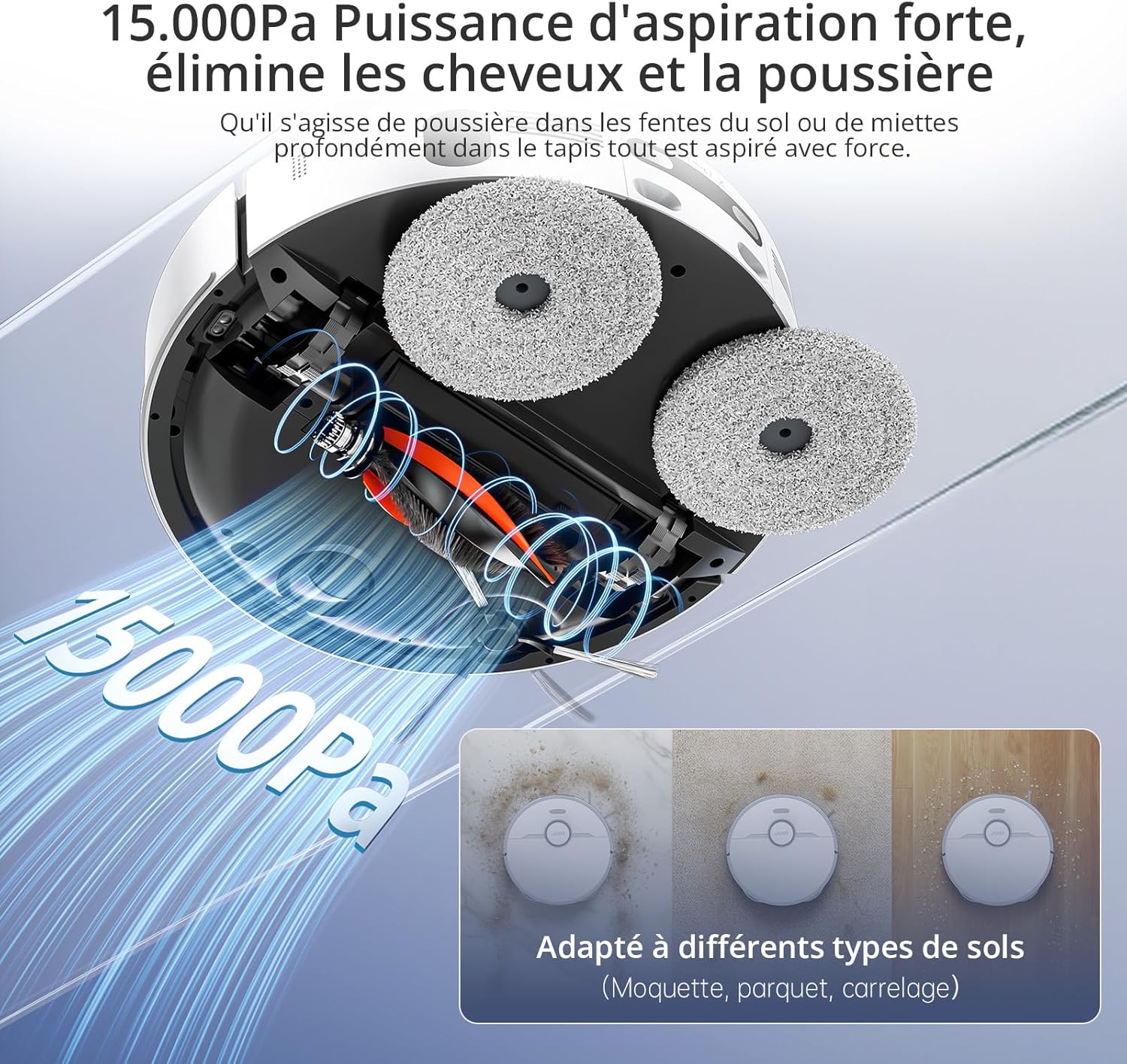
Berus Utama: Untuk membersihkan karpet dan lantai keras.
Imej: Atas view of the JONR T5 Pro Gen 2 robot vacuum, showing the Lidar sensor and control buttons.
4.2 Base Station Components
Tangki Air Bersih: Holds fresh water for mopping and mop cleaning. (4.0 L capacity)
Tangki Air Kotor: Collects used water from mop cleaning. (3.5 L capacity)
Kompartmen Beg Habuk: Houses the disposable dust bag for automatic dust collection. (2.5 L capacity)
Mengecas Kenalan: For robot charging.
Dulang Basuh Mop: Area where mopping pads are cleaned and dried.
Image: The JONR T5 Pro Gen 2 base station with its clean and dirty water tanks visible.
5. Persediaan
Ikuti langkah ini untuk persediaan awal:
Buka bungkusan Komponen: Keluarkan semua item dari bungkusan dengan berhati-hati.
Letakkan Stesen Pangkalan: Place the base station against a wall with at least 0.26ft (8cm) clear space on both sides and 3.94ft (1.2m) in front. Ensure it is near a power outlet.
Lampirkan Ramp Plat Sambungan: Selamatkan ramp extension plate to the front of the base station.
Pasang Tangki Air: Insert the clean and dirty water tanks into their respective slots in the base station.
Pasang Berus Sisi: Snap the side brush onto the designated post on the underside of the robot.
Attach Mopping Pads: Securely attach the mopping pads to the bottom of the robot.
Isi Tangki Air Bersih: Open the clean water tank and fill it with clean tap water.
Sambungkan Kuasa: Plug the base station into a power outlet.
Hidupkan dan Cas:
Tekan dan tahan butang kuasa pada robot selama 3 saat untuk menghidupkannya.
Place the robot onto the base station to begin charging. The robot will automatically power on and start charging when docked.
Sambungan Apl:
Download the "Xiaomi Home" app by scanning the QR code on the robot's panel or searching in your app store.
Open the app and tap the "+" icon to add a device.
Select "Scan" to scan the QR code on the robot or search for "JONR T5 Pro Gen2".
To pair, press and hold both the power and recharge buttons on the robot for 3 seconds until you hear a voice prompt.
Pilih rangkaian Wi-Fi 2.4GHz anda dan masukkan kata laluan.
Ikut arahan dalam apl untuk melengkapkan sambungan.
Video: Step-by-step guide on unboxing, assembling, and connecting the JONR T5 Pro Gen 2 robot vacuum to the mobile application.
6. Arahan Operasi
6.1 Memulakan Kitaran Pembersihan
Melalui Apl: Open the Xiaomi Home app, select your JONR T5 Pro Gen 2, and tap "Clean" to start a cleaning cycle. You can choose between different cleaning modes (e.g., whole home, room, zone).
Melalui Butang Robot: Tekan butang Kuasa/Bersihkan pada robot sekali untuk memulakan kitaran pembersihan penuh.
Kawalan Suara: The robot supports voice commands via Alexa and Google Home. For example, say "Alexa, start cleaning" (if integrated).
Image: The JONR T5 Pro Gen 2 robot vacuum being controlled via the mobile application, showing mapping and zone selection.
6.2 Ciri Pintar
LiDAR Navigation: The robot uses LiDAR to create a precise map of your home, ensuring efficient and thorough cleaning without repetition. It can map up to 4 floors.
Mengelakkan halangan: Advanced sensors allow the robot to recognize and bypass obstacles like furniture, cables, and pet bowls.
Zon Dilarang Pergi: Use the app to define specific areas the robot should avoid, such as pet feeding areas or delicate zones.
Pengesanan Permaidani: The robot automatically detects carpets and adjusts suction power. During mopping, it intelligently lifts the mop pads by 10mm to avoid wetting carpets.
Pembersihan Tepi: An extendable side mop ensures thorough cleaning along walls and into corners.
Image: Illustration of the JONR T5 Pro Gen 2 using LiDAR navigation to map a home environment.
Image: The JONR T5 Pro Gen 2 robot vacuum demonstrating its obstacle avoidance capabilities.
7. Penyelenggaraan
Penyelenggaraan tetap memastikan prestasi optimum dan memanjangkan jangka hayat vakum robot anda.
Tangki Air Kotor Bersih: Regularly empty and clean the dirty water tank to prevent odors and bacterial growth.
Clean Dustbin and Filter: Remove the robot's dustbin, empty it, and clean the HEPA filter under running water. Allow the filter to dry completely before reinserting.
Berus Sisi Bersih: Remove any tangled hair or debris from the side brush.
Bersihkan Berus Utama: Remove the main brush and clear any tangled hair or debris. The anti-tangle design minimizes hair entanglement.
Penderia Bersih: Wipe all sensors (cliff sensors, obstacle avoidance sensors, charging contacts) with a clean, dry cloth.
Gantikan Beg Habuk: When the dust bag in the base station is full (indicated by the app or indicator light), replace it with a new one.
Pad Mop Bersih: The base station automatically cleans and hot-air dries the mop pads after each cleaning cycle. Periodically remove and hand-wash the mop pads for deeper cleaning.
Video: Demonstrates routine maintenance tasks including cleaning the dirty water tank, dustbin, filter, side brush, and replacing the dust bag.
8. Penyelesaian masalah
Masalah
Kemungkinan Punca
Penyelesaian
Robot tidak boleh dihidupkan.
Low battery; not properly docked.
Ensure the robot is fully charged on the base station. Press and hold the power button for 3 seconds.
Robot tidak boleh menyambung ke Wi-Fi.
Incorrect Wi-Fi password; 5GHz network; robot too far from router.
Ensure correct 2.4GHz Wi-Fi password. Move robot closer to router. Reset Wi-Fi on robot (hold power and recharge buttons for 3s).
Prestasi pembersihan yang lemah.
Full dustbin; dirty filters/brushes; clogged sensors.
Empty dustbin, clean/replace filters, clean main/side brushes, wipe all sensors.
Robot kerap tersangkut.
Obstacles; loose cables; narrow spaces.
Clear obstacles. Use the app to set no-go zones for problematic areas.
Mop pads are not cleaning effectively.
Dirty water tank full; clean water tank empty; worn mop pads.
Empty dirty water tank, refill clean water tank. Replace worn mop pads.
9. Spesifikasi
Ciri
Perincian
Jenama
JONR
Nombor Model
T5 Pro Gen2
Kuasa Sedutan
15000 Pa
Hayat Bateri
Sehingga 2.5 jam
Kapasiti Tangki Air Bersih
4.0 Liter
Kapasiti Tangki Air Kotor
3.5 Liter
Kapasiti Beg Habuk
2.5 Liters (up to 75 days maintenance-free)
Jenis Navigasi
LiDAR
Ketinggian Angkat Mop
10 mm (for carpets)
Ketinggian Merentas Halangan
Sehingga 20 mm
Tahap Kebisingan
<60 dB
Jenis Penapis
HEPA
Ketersambungan
Wi-Fi (2.4GHz), Mobile App (Xiaomi Home), Voice Control (Alexa, Google Home)
Dimensi (Robot)
33L x 33W x 10H cm
Dimensions (Base Station)
40L x 34W x 56H cm (approximate, derived from product dimensions)
Berat badan
12 Kilograms (total item weight)
10. Waranti dan Sokongan
JONR provides 365-day support for the T5 Pro Gen 2 Robot Vacuum Cleaner and Mop. For any issues or inquiries, please contact JONR customer service. We aim to resolve all problems within 24 hours.
For spare parts availability, please refer to the product's official website or authorized retailers. Spare parts are generally available for 5 years.