
1. Pengenalan
This manual provides detailed instructions for the setup, operation, and maintenance of your EIGIIS KE3P Military GPS Smartwatch. Please read this manual thoroughly before using your device to ensure proper functionality and to maximize your user experience. Keep this manual for future reference.
2. Penerangan Produk
The EIGIIS KE3P is a rugged smartwatch designed for active lifestyles, featuring a 1.45-inch HD display and a durable construction. Key features include:
- GPS terbina dalam: For accurate route tracking without a phone.
- LED Flashlight & Compass: Essential tools for outdoor activities.
- Bateri 530mAh: Memberikan masa penggunaan yang lebih lama.
- Penilaian Kalis Air 3ATM: Suitable for swimming and various water sports.
- Military-Grade Toughness: Designed to withstand harsh environments.
- Panggilan Bluetooth: Make and receive calls directly from your wrist.
- Health & Fitness Monitoring: Includes 24/7 heart rate, sleep tracking, and over 110 sports modes.
- Pemberitahuan Pintar: Receive alerts for messages and applications.

Imej: Depan view of the EIGIIS KE3P Smartwatch, showcasing its display and rugged design.
Video: A demonstration of the EIGIIS KE3P Smartwatch features and user interface.
3. Persediaan
3.1 Apa yang ada di dalam Kotak
- 1 x EIGIIS Watch Body
- 1 x Jalur Jam Tangan
- 1 x Kabel Pengecasan
- Kotak Hadiah 1 x
- 1 x Manual Pengguna
Video: An unboxing of the EIGIIS KE3P Smartwatch, showing the contents of the package.
3.2 Mengecas Jam Pintar
Before initial use, fully charge your smartwatch. Connect the magnetic charging cable to the charging contacts on the back of the watch and plug the USB end into a power adapter (not included) or a computer's USB port. The watch display will indicate charging status.

Image: The EIGIIS KE3P Smartwatch displaying its battery level, indicating charging.
3.3 Pemasangan Apl dan Berpasangan
To unlock the full potential of your EIGIIS KE3P Smartwatch, download and install the companion app (GloryFit) on your smartphone. Cari untuk "GloryFit" in your device's app store (Apple App Store for iOS, Google Play Store for Android).
- Download and install the GloryFit app.
- Buka apl dan ikut arahan pada skrin untuk membuat akaun atau log masuk.
- Pastikan Bluetooth didayakan pada telefon pintar anda.
- In the GloryFit app, navigate to the device pairing section and select your EIGIIS KE3P Smartwatch from the list of available devices.
- Sahkan permintaan berpasangan pada telefon pintar dan jam tangan pintar anda.
3.4 Keeping the App Running in the Background
To ensure continuous data synchronization and notification delivery, the GloryFit app needs to run in the background. Follow the instructions below for your specific phone operating system:
Untuk Pengguna iPhone:
Video: Instructions on how to configure the GloryFit app to run in the background on an iPhone.
Untuk Pengguna Android:
Video: Instructions on how to configure the GloryFit app to run in the background on an Android device.
4. Arahan Operasi
4.1 Navigasi Asas
The EIGIIS KE3P Smartwatch features a touch screen and physical buttons for navigation:
- Skrin Sentuh: Swipe left/right, up/down to navigate menus and features. Tap to select.
- Upper Button (HOME): Tekan untuk kembali ke skrin utama atau membangunkan peranti.
- Lower Button (BACK): Tekan untuk kembali ke skrin sebelumnya.
4.2 Penjejakan GPS
The smartwatch features built-in GPS for tracking outdoor activities. You can use GPS independently or in conjunction with your smartphone.
Using GPS without a Cellphone:
Video: Instructions on how to use the EIGIIS KE3P Smartwatch's GPS tracking feature independently, without a connected cellphone.
Using GPS with a Cellphone:
Video: Instructions on how to use the EIGIIS KE3P Smartwatch's GPS tracking feature while connected to a cellphone.

Image: The EIGIIS KE3P Smartwatch displaying a GPS-tracked route on its screen.
4.3 Flashlight and Compass
The smartwatch includes a built-in LED flashlight and a digital compass for convenience during outdoor activities. Access these features through the watch's menu.
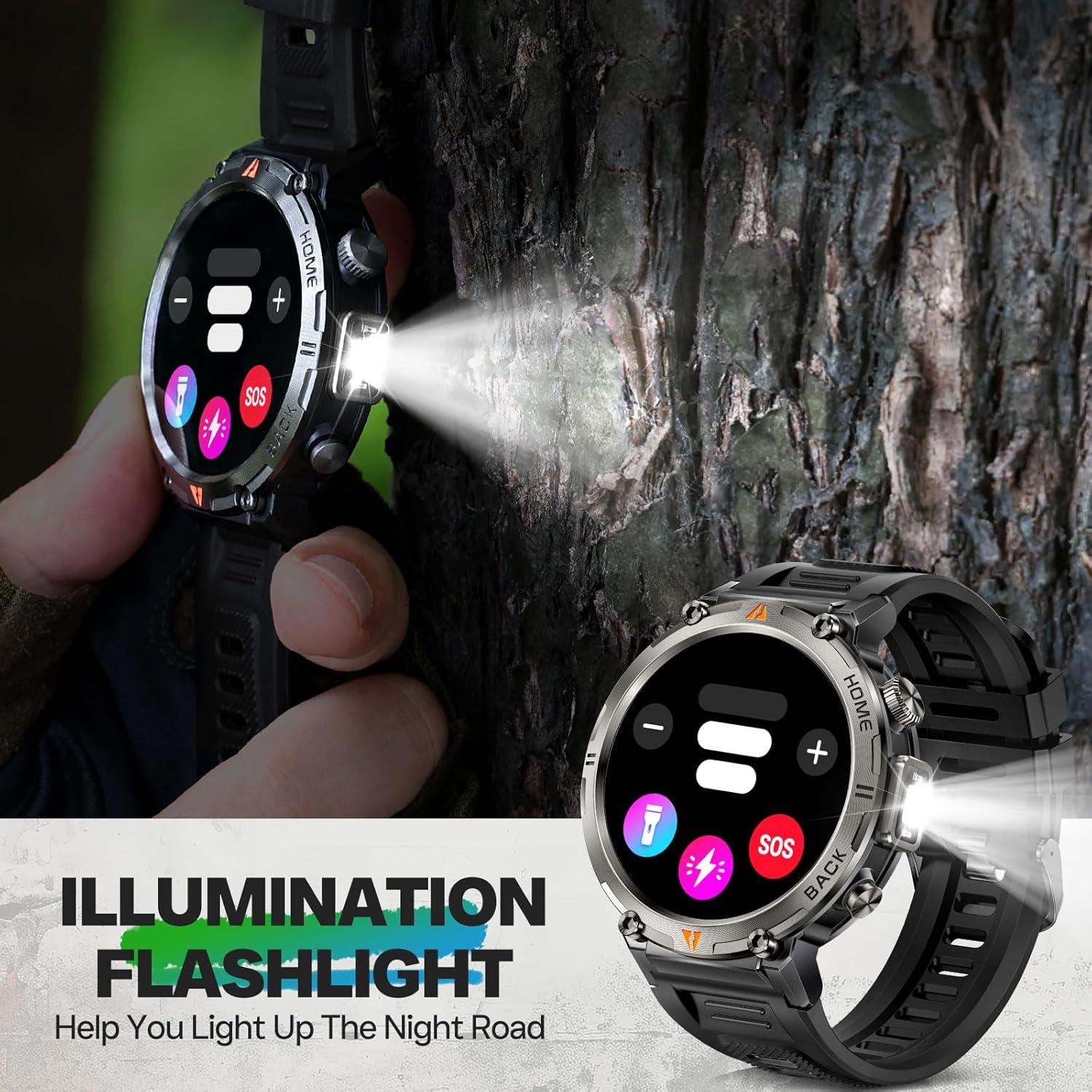
Image: The EIGIIS KE3P Smartwatch with its integrated LED flashlight activated.
4.4 Panggilan dan Pemberitahuan Bluetooth
Once paired with your smartphone, the smartwatch allows you to make and receive calls directly from your wrist. It also displays notifications for incoming messages and app alerts.
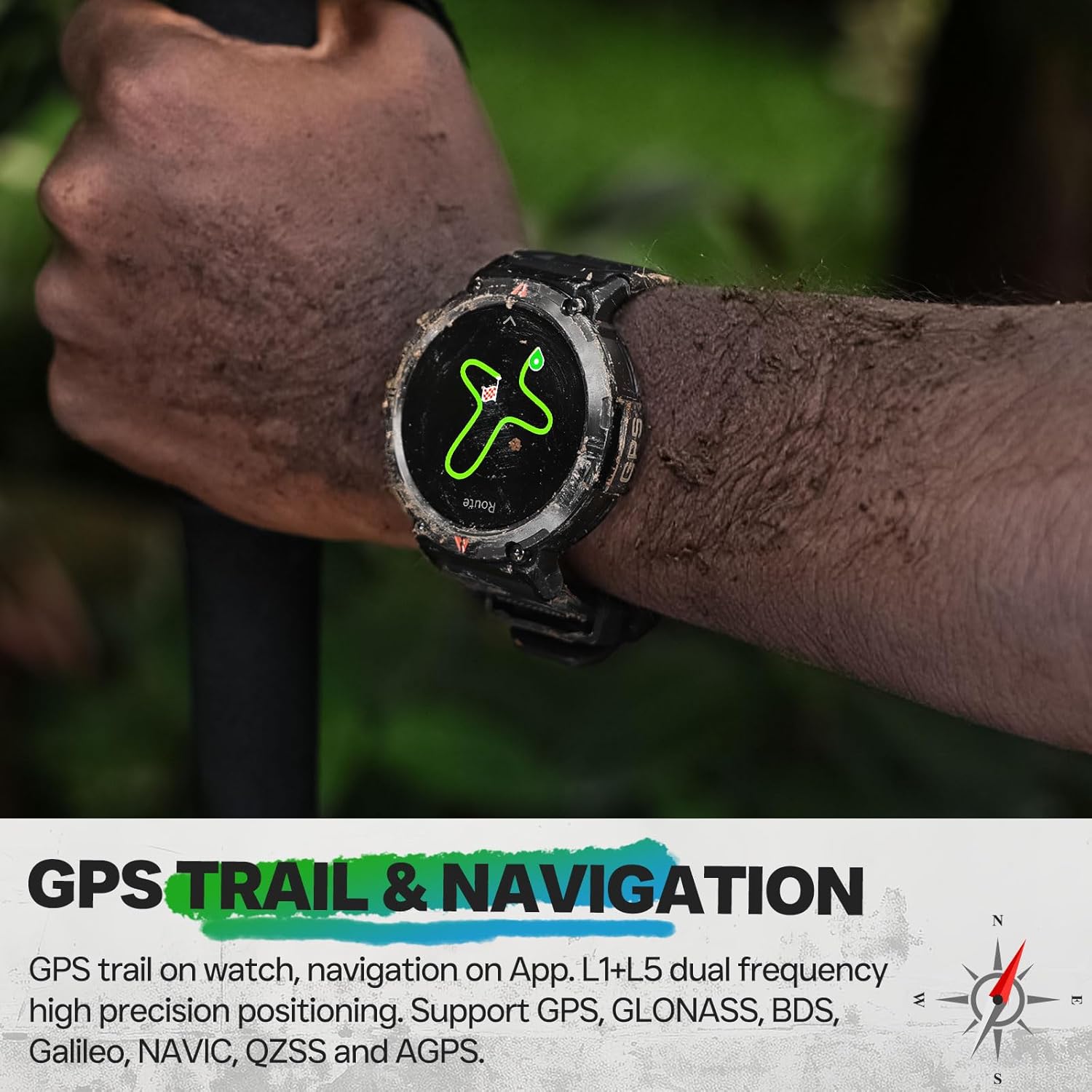
Image: The EIGIIS KE3P Smartwatch displaying an incoming call notification.
4.5 Pemantauan Kesihatan dan Kecergasan
The EIGIIS KE3P Smartwatch is equipped with sensors to monitor various health and fitness metrics:
- Pemantauan Denyut Jantung: Penjejakan kadar denyutan jantung berterusan 24/7.
- Penjejakan Tidur: Memantau corak dan kualiti tidur.
- 110+ Mod Sukan: Track specific data for a wide range of activities.

Image: The EIGIIS KE3P Smartwatch displaying heart rate, calories, and activity duration during a workout.
4.6 Daily Life Assistant Features
Beyond fitness, the smartwatch offers several features to assist with daily tasks:
- Kawalan Main balik Muzik
- Ramalan Cuaca
- Kawalan Kamera Jauh
- Peringatan Sedentari
- Jam Penggera

Image: The EIGIIS KE3P Smartwatch displaying a grid of various application icons, representing its multi-functional capabilities.
5. Penyelenggaraan
5.1 Waterproofing Guidelines
The EIGIIS KE3P Smartwatch has a 3ATM waterproof rating, meaning it is resistant to splashes, rain, and can be worn during swimming. However, it is not suitable for hot showers, saunas, or diving, as steam and high water pressure can compromise the seals.

Image: The EIGIIS KE3P Smartwatch submerged in water, illustrating its 3ATM waterproof capability.
5.2 Pembersihan
Regularly clean your smartwatch and watch band with a soft, damp kain. Elakkan penggunaan bahan kimia yang keras atau bahan kasar yang boleh merosakkan peranti.
5.3 Penjagaan Bateri
To prolong battery life, avoid extreme temperatures and fully discharging the battery frequently. The 530mAh battery provides 7-10 days of typical use.
6. Penyelesaian masalah
If you encounter issues with your EIGIIS KE3P Smartwatch, try the following steps:
- Peranti Tidak Dihidupkan: Pastikan jam tangan dicas sepenuhnya. Sambungkannya ke kabel pengecas dan sumber kuasa.
- Tidak Boleh Dipasangkan dengan Telefon: Ensure Bluetooth is enabled on your phone and the watch. Restart both devices and try pairing again through the GloryFit app.
- Data Tidak Tepat: Ensure the watch is worn snugly on your wrist. For GPS, ensure you are in an open area with a clear sky.
- Pemberitahuan Tidak Diterima: Check app permissions on your phone to ensure GloryFit has access to notifications. Verify that the app is running in the background.
- Skrin Tidak Responsif: Try restarting the watch by pressing and holding the power button (if available) or performing a hard reset if the option is present in the settings.
For further assistance, please refer to the official EIGIIS support channels.
7. Spesifikasi
| Nombor Model Item | KE3P |
| Dimensi Pakej | 6.73 x 4.37 x 1.06 inci |
| Berat Barang | 5.6 auns (160 Gram) |
| Bateri | Bateri 1 C diperlukan (termasuk) |
| Saiz Paparan Skrin Berdiri | 1.45 Inci |
| Kapasiti Penyimpanan Memori | 128 MB |
| Sistem Operasi | No (Proprietary OS) |
| Ciri Khas | GPS, 3ATM Waterproof, 530 mAh Large Battery, 1.45" Big Screen, Flashlight, Compass, Military Standard, Bluetooth Calling, Built-in Speaker, 110+ Sports Modes, Heart Rate Monitor, Sleep Tracker, Long Standby Time, Weather Forecast, Music Control, Sedentary Reminder, Remote Camera Control, Alarm Clock |
| Kapasiti Bateri | 530 Miliamp jam |
| Teknologi Ketersambungan | Bluetooth |
| Standard Komunikasi Tanpa Wayar | Bluetooth |
| GPS | GPS terbina dalam |
| bentuk | Bulat |
| Sokongan Bahasa | Inggeris, Perancis, Jerman, Itali, Sepanyol |
| Pengeluar | EIGIIS |
8. Waranti dan Sokongan
For warranty information and customer support, please refer to the documentation included with your product or visit the official EIGIIS webtapak. Simpan resit pembelian anda sebagai bukti pembelian untuk sebarang tuntutan waranti.