
Elgin 42VEN3PASP00
Elgin Silence Air Pro Ceiling Fan Instruction Manual
Model: 42VEN3PASP00
pengenalan
Thank you for choosing the Elgin Silence Air Pro Ceiling Fan. This manual provides essential information for the safe installation, operation, and maintenance of your new ceiling fan. Please read these instructions thoroughly before installation and keep them for future reference.
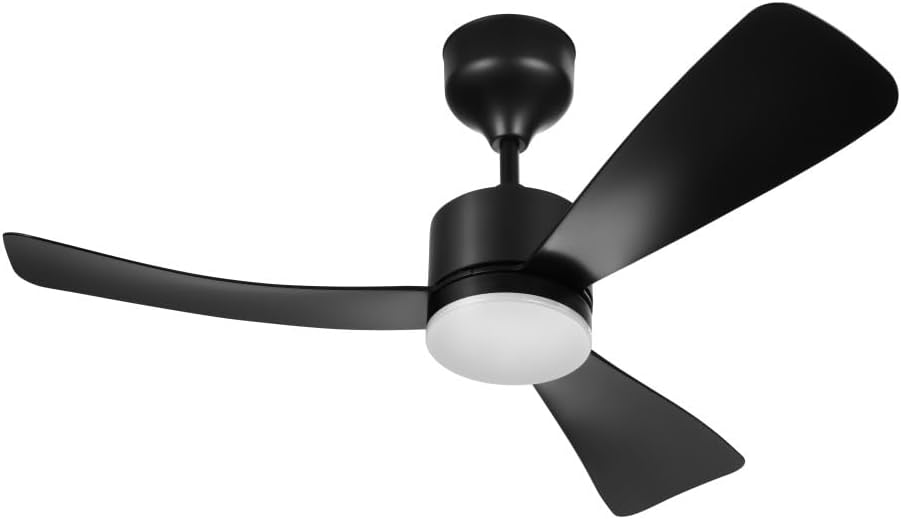
Image: The Elgin Silence Air Pro Ceiling Fan, featuring a sleek black design with three aerodynamic blades and a central integrated LED light fixture.
Arahan Keselamatan
- Sentiasa putuskan kuasa pada pemutus litar sebelum pemasangan, pembersihan atau penyelenggaraan.
- Installation must be performed by a qualified electrician and in accordance with all local electrical codes.
- Ensure the mounting structure can support the weight of the fan (approximately 1.9 kg).
- Jangan masukkan objek ke dalam bilah kipas semasa kipas beroperasi.
- Jauhkan kanak-kanak daripada kipas semasa operasi dan penyelenggaraan.
- Use only original replacement parts and accessories provided by Elgin.
Kandungan Pakej
Sahkan bahawa semua komponen hadir sebelum memulakan pemasangan:
- Pemasangan Motor Kipas Siling
- 3 Bilah ABS
- Kit Lampu LED
- Alat Kawalan Jauh
- Bateri AAA untuk Kawalan Jauh
- Wall Mount for Remote Control
- Ceiling Mounting Kit (screws, brackets, etc.)
- Manual Arahan
Persediaan
1. Pemasangan
The Elgin Silence Air Pro fan features an Palam Mudah system for simplified installation. Follow the detailed instructions provided in the separate installation guide included with your product. Ensure all connections are secure and the fan is firmly mounted to the ceiling structure.

Image: The Easy Plug system, designed for quick, safe, and straightforward electrical connection during installation.
2. Persediaan Alat Kawalan Jauh
Insert the provided AAA batteries into the remote control, ensuring correct polarity. The remote control is pre-paired with the fan. If pairing is required, refer to the specific instructions in the installation guide.
Arahan Operasi
Your Elgin Silence Air Pro fan is operated via the included remote control. Ensure the fan has power and the remote control batteries are correctly installed.

Image: The remote control for the Elgin Silence Air Pro fan, providing convenient access to all fan and light functions.
Fungsi Kawalan Jauh:

Image: A detailed diagram illustrating the various buttons and their functions on the remote control, including speed adjustment, light control, timer settings, and rotation inversion.
- Hidupkan/Mati Kuasa: Press the designated button to turn the fan and light on or off.
- Kelajuan Kipas: Use the numbered buttons (1-6) to select one of six available fan speeds. '1' is the lowest speed, and '6' is the highest.
- Kawalan Cahaya: Press the 'Luz on/off' button to toggle the LED light.
- Suhu Warna Cahaya: The integrated 18W LED light offers three color temperatures: 3000K (Warm White), 4000K (Neutral White), and 6500K (Cool White). Cycle through these options by repeatedly pressing the light button or a dedicated color temperature button if available on your remote.
- Fungsi Pemasa: Set the fan to automatically turn off after a specified period (e.g., 1 hour, 4 hours) using the timer buttons.
- Rotation Inversion: The 'R' button allows you to reverse the direction of the fan blades, useful for circulating warm air in colder months.
- Fungsi Breeze: The 'F' button activates a natural breeze mode, which cycles through different fan speeds to simulate a natural airflow.

Image: Visual representation of the three adjustable LED light color temperatures: warm (3000K), neutral (4000K), and cool (6500K), demonstrating the versatility for different ambient lighting needs.
Penyelenggaraan
1. Pembersihan
To maintain the appearance and performance of your fan, clean it regularly. Ensure the power is disconnected before cleaning.
- Lap bilah kipas dan perumah motor dengan kain lembut,amp kain.
- Jangan gunakan pembersih atau pelarut yang kasar, kerana ini boleh merosakkan kemasan.
- Avoid getting water into the motor housing or electrical components.
2. Penggantian LED
The integrated LED light is designed for long-lasting performance. If replacement becomes necessary, contact Elgin customer support for guidance and authorized service. The LED module is replaceable.
Menyelesaikan masalah
Jika anda mengalami masalah dengan kipas anda, rujuk masalah dan penyelesaian biasa berikut:
| Masalah | Kemungkinan Punca | Penyelesaian |
|---|---|---|
| Kipas tidak dihidupkan | No power supply; Remote control batteries depleted; Loose wiring connection. | Check circuit breaker; Replace remote control batteries; Verify all wiring connections are secure (consult a qualified electrician). |
| Kipas mengeluarkan bunyi yang berlebihan | Loose mounting screws; Unbalanced blades; Obstruction. | Tighten all mounting screws; Check for balanced blades and ensure they are securely attached; Remove any obstructions. |
| Cahaya tidak berfungsi | No power to light; LED module issue. | Check light switch/remote light button; Contact customer support for LED module inspection/replacement. |
| Alat kawalan jauh tidak bertindak balas | Depleted batteries; Remote out of range; Interference. | Replace batteries; Ensure you are within range of the fan; Minimize electronic interference. |
Spesifikasi
Detailed technical specifications for the Elgin Silence Air Pro Ceiling Fan:

Imej: Tamatview of the fan's key features, including its 6 speed settings, silent motor operation, 3 light color temperatures, and bivolt power compatibility.
- Nombor Model: 42VEN3PASP00
- Jenama: Elgin
- warna: Hitam (juga tersedia dalam Putih)
- Kuasa Motor: 30W
- Bilangan bilah: 3
- Bahan Bilah: ABS
- Bilangan Kelajuan: 6
- Kuasa Lampu LED: 18W
- LED Color Temperatures: 3000K (Putih Hangat), 4000K (Putih Neutral), 6500K (Putih Sejuk)
- Voltage: Bivolt (110V / 220V)
- Ciri Khas: Remote Controlled, LED Light, Silent Operation, Automatic Shutdown, Easy Plug System
- Dimensi Produk: 106 cm (Dalam) x 106 cm (Lebar) x 54 cm (Tinggi)

Image: A diagram illustrating the physical dimensions of the ceiling fan, indicating a total width of 1060 mm and a height of 165 mm from the ceiling mount to the bottom of the blades.
Waranti
The Elgin Silence Air Pro Ceiling Fan comes with a Waranti 24 bulan from the date of purchase. This warranty covers manufacturing defects and ensures the quality and durability of the product. Please retain your proof of purchase for warranty claims. For full warranty terms and conditions, refer to the warranty card included in the product packaging or contact Elgin customer support.
Sokongan
For technical assistance, troubleshooting beyond this manual, or warranty inquiries, please contact Elgin customer support. Visit the official Elgin webtapak untuk maklumat hubungan dan sumber tambahan.
Elgin Official Webtapak: Visit the Elgin Store on Amazon