
pengenalan
This manual provides instructions for the proper use and maintenance of your Thermal Master P3 Thermal Camera. The P3 is a compact, manual focus thermal imaging camera designed for use with iOS and Android devices, offering a 512×384 X³ IR resolution and a wide temperature detection range. It is suitable for various applications including PCB inspection, electrical system testing, HVAC diagnostics, and home inspections.
Persediaan
1. Membongkar Peranti
Keluarkan semua komponen dari pembungkusan dengan berhati-hati. Pastikan item berikut ada:
- Kamera Terma P3
- Jenis-C kepada Penyesuai Kilat
- 50cm USB-C to USB-C/USB Cable
- Manual Pengguna
- Sarung Mudah Alih
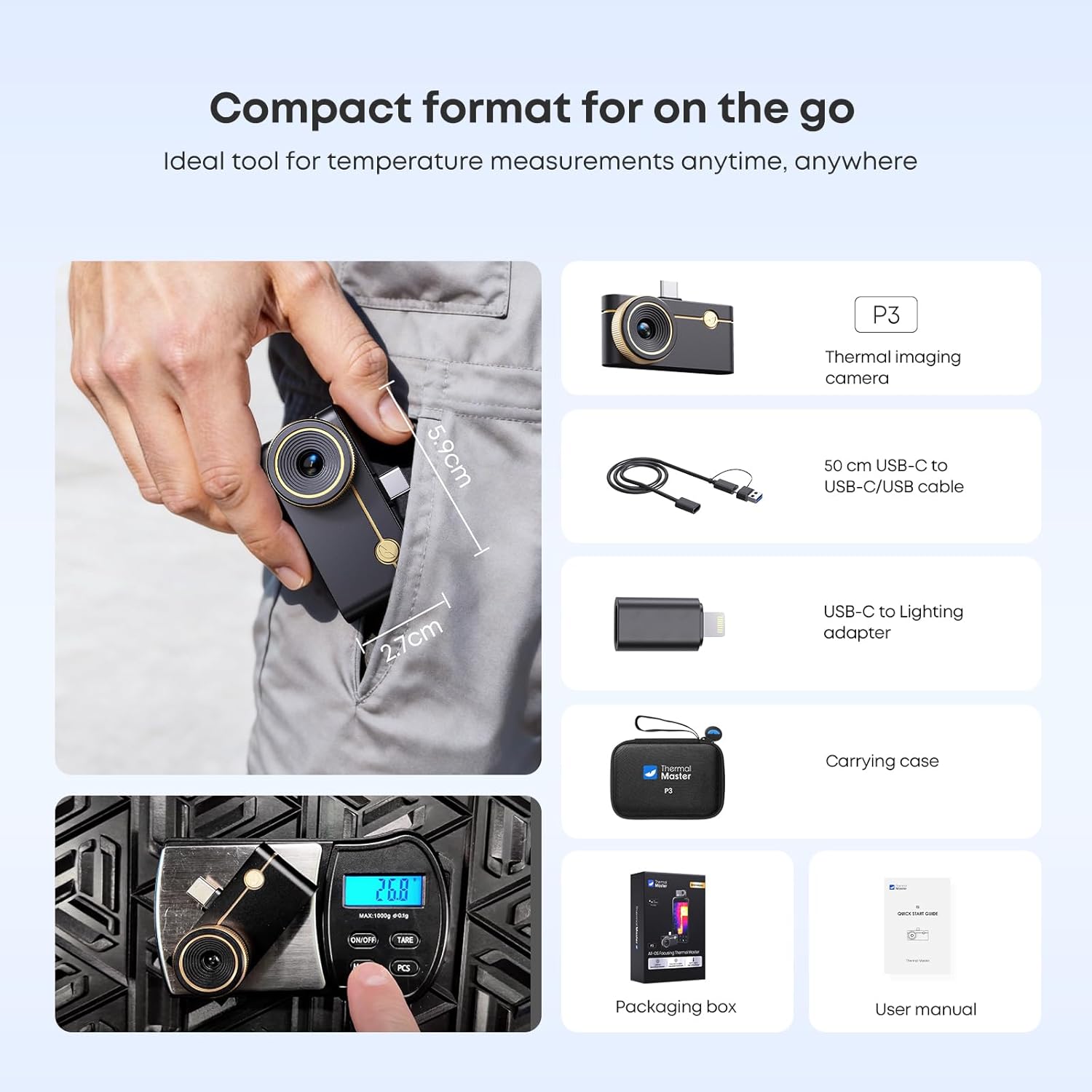
Image: The P3 Thermal Camera and its included accessories, demonstrating its compact size and portability.
2. Pemasangan Apl
The Thermal Master P3 requires the 'Thermal Master' application for operation. Download the app from the Apple App Store for iOS devices or Google Play Store for Android devices.

Image: The Thermal Master P3 camera connected to both an iPhone and an Android device, illustrating app compatibility and download sources.
3. Menyambungkan Kamera
Connect the P3 Thermal Camera to your smartphone or USB-C PC. For iOS devices (iPhone 8-16), use the included Type-C to Lightning adapter. For Android devices (7.0 and over) and USB-C PCs, connect directly via the USB-C port. The device is plug-and-play; no registration is required to begin use.
Arahan Operasi
1. Operasi Asas
Once connected and the 'Thermal Master' app is launched, the camera will automatically display thermal images. The P3 features a manual focus lens, allowing for precise adjustments to achieve clear thermal images across various distances.

Image: Diagram illustrating the manual focus lens and 15x digital zoom feature of the P3 camera.
2. Pelarasan Fokus Manual
Rotate the lens ring to adjust focus. This is crucial for obtaining sharp images, especially for close-up PCB inspections (as close as 3 inches) or distant bird monitoring (up to 33 feet). Proper focus ensures accurate temperature readings and detailed thermal visualization.

Image: The P3 camera's manual focus capability demonstrated across various distances for different inspection types.
3. Understanding Thermal Resolution
The P3 utilizes X³ IR technology to achieve a 512×384 IR resolution, providing enhanced clarity compared to lower resolution cameras. This higher resolution helps in detecting subtle temperature differences and identifying hidden heat faults more effectively.

Image: A visual comparison demonstrating the improved clarity of 512x384 X³ IR resolution.
4. Pengukuran Suhu
The P3 measures temperatures from -4°F to 1112°F (-20°C to 600°C) with an accuracy of ±3.6°F (±2°C). The app displays real-time temperature data, including hot and cold spot tracking.

Image: Illustration of the P3's broad temperature measurement range.
5. Ciri Apl
The Thermal Master app provides several professional features:
- Zum Digital 15x: Magnify thermal images for closer inspection.
- 12 Palet Warna: Choose different color schemes to visualize temperature distribution.
- AI Temperature Alerts: Set customizable high and low temperature alarms.
- Penjejakan Titik Panas dan Sejuk: Automatically identify the hottest and coldest points in the image.
- 3D Data Analysis: Analyze thermal data in a three-dimensional view.
- Tangkapan Foto dan Video: Record thermal images and videos directly from the app.
- Gambar dalam Gambar: Overlay a visual image with the thermal image for context.
- Post-image Offline Analysis: Generate professional reports from captured data.
6. Permohonan Cthamples
The P3 is a versatile tool for various professional and home inspection tasks:
- Pemeriksaan PCB: Detect leakage points as low as 1mA.
- Pemeriksaan Elektrik: Identify overheating components in electrical panels and systems.
- HVAC Inspection: Diagnose issues in heating, ventilation, and air conditioning systems.
- Pipeline and Leak Detection: Locate hidden water or air leaks.
- Pemeriksaan Rumah: Find insulation gaps, drafts, and moisture issues.

Imej: Cthamples of the P3 thermal camera's diverse applications in different inspection scenarios.
7. Video Pengajaran
Video: P3 Thermal Camera Users Guide. This video provides a general overview of the camera's features and basic usage.
Video: P3 Thermal Camera, Ultra Clear. This video demonstrates the clarity of the thermal imaging provided by the P3.
Video: P3 Manual Focus Thermal Camera for PCB Detection. This video highlights the manual focus feature specifically for detailed PCB inspections.
Penyelenggaraan
1. Pembersihan
To clean the P3 Thermal Camera, gently wipe the exterior with a soft, dry cloth. Avoid using abrasive cleaners or solvents that could damage the lens or casing.
2. Penyimpanan
When not in use, store the camera in its portable case to protect it from dust, moisture, and physical damage. Store in a cool, dry place.
3. Penggunaan kuasa
The P3 has a low power consumption of 0.32W, allowing for 5-8 hours of continuous use when connected to a compatible smartphone. No internal battery requires charging.
Menyelesaikan masalah
1. Unclear Image
If the thermal image appears blurry, adjust the manual focus lens by rotating the ring until the image becomes sharp. Ensure the lens is clean and free of smudges or debris.
2. Bacaan Suhu Tidak Tepat
Verify that the emissivity settings in the Thermal Master app are correctly configured for the material being inspected. Different materials have different emissivities, which can affect temperature accuracy. The app also allows for temperature correction if needed.
3. Peranti Tidak Menyambung
Ensure the P3 camera is securely connected to your smartphone or PC. For iOS devices, confirm the Lightning adapter is properly seated. Check that the 'Thermal Master' app is open and has the necessary permissions.
4. Burn Protection
The app includes a 'Burn Protection' feature to prevent irreversible damage to the detector from excessively high temperatures. Ensure this feature is enabled in the app settings for safety.
Spesifikasi
| Ciri | Perincian |
|---|---|
| Nama Model | P3 |
| Jenama | Sarjana Terma |
| Resolusi IR | 512×384 X³ |
| Julat Suhu | -4°F hingga 1112°F (-20°C hingga 600°C) |
| Ketepatan | ± 3.6 ° F (± 2 ° C) |
| Kadar Segar Semula | 25Hz |
| NETD (Kepekaan Terma) | 0.035°C |
| Lensa | 4.3mm, Manual Focus |
| Bidang View (FOV) | 40 ° × 30.2 ° |
| Zum Digital | 15x |
| Keserasian | iOS (iPhone 8-16), Android (7.0+), USB-C PCs |
| Ketersambungan | USB-C |
| Sumber Kuasa | No Built-in Battery (powered by host device) |
| Penggunaan Kuasa | 0.32W |
| Berat Barang | 26.3 Gram |
| Ciri Khas | Macro Lens, Manual Focus, PCB Detection, Plug-and-Play, Portable |
Maklumat Waranti
The Thermal Master P3 Thermal Camera comes with a Waranti 2 tahun. Replacement is provided only under warranty terms. Please retain your proof of purchase for warranty claims.
Sokongan
For technical assistance or product inquiries, please contact Thermal Master customer support. Responses are typically provided within 24 hours.
If you have questions before purchasing, you can use the "Ask a Question" button on the product page or visit the official Thermal Master store on Amazon.

Image: Thermal Master customer support information.