
pengenalan
This instruction manual provides detailed guidance for the assembly, operation, and maintenance of your BEISHI Arc-Shaped Art Mobile TV Stand. Please read this manual thoroughly before beginning assembly or use to ensure safe and correct operation.
Maklumat Keselamatan
- Always secure the TV stand to the wall using the provided safety straps to prevent tip-over.
- Jangan melebihi had berat maksimum 220 paun (100 kg) for the TV.
- Berhati-hati dengan tepi tajam semasa pemasangan dan penggunaan.
- Pastikan semua skru dan sambungan diketatkan dengan kukuh sebelum meletakkan TV di atas penyangga.
- Jauhkan kanak-kanak dan haiwan peliharaan dari kawasan perhimpunan.
Kandungan Pakej
Sahkan bahawa semua komponen telah tersedia sebelum memulakan pemasangan. Jika mana-mana bahagian hilang atau rosak, sila hubungi khidmat pelanggan.
- TV Stand Components (Carbon Steel Frame, Wooden Shelves)
- Installation Accessories (Screws, bolts, washers, tools)
- Manual Arahan
Spesifikasi
| Ciri | Perincian |
|---|---|
| Jenis Pemasangan | Lantai Lantai |
| Jenis Pergerakan | Rotate (with wheels) |
| bahan | Carbon Steel, Wood |
| warna | Hitam |
| Berat Barang | 40 Paun (lebih kurang 18.1 kg) |
| Keserasian Saiz TV | Most 50-100 Inch TVs |
| Kapasiti Berat Maksimum | 220 paun (100 kg) |
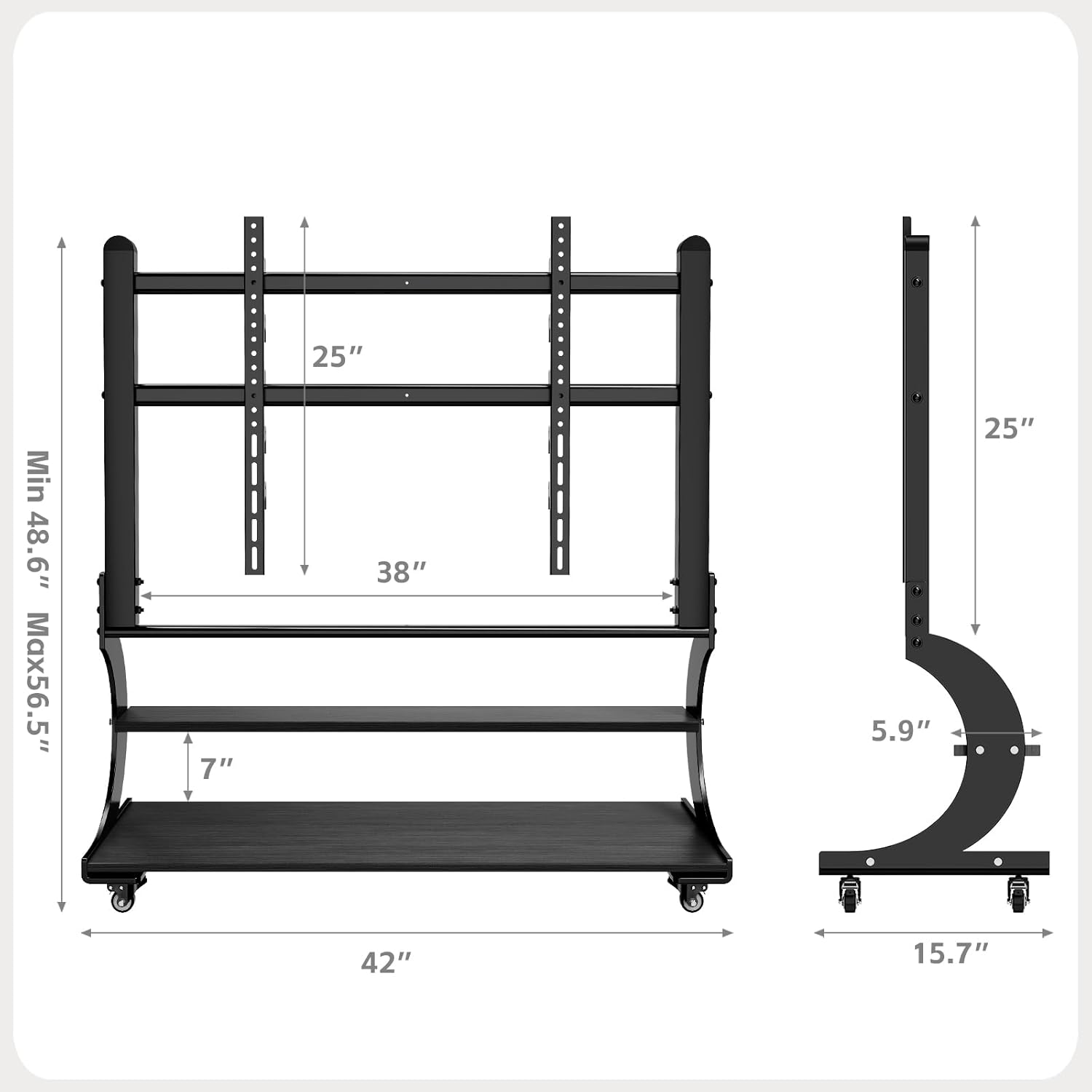
| Keserasian VESA | From 100x100mm (4"x4") to 900x600mm (24"x35") |
| rak | 2-Tier Wooden Shelves |
| Pelarasan Ketinggian | Adjustable TV mounting height (Min 48.6" to Max 56.5") |

Figure 1: Product Dimensions and VESA Compatibility
Persediaan dan Perhimpunan
The BEISHI Arc-Shaped Art Mobile TV Stand is designed for easy assembly. Please follow the step-by-step instructions and diagrams provided in the separate installation guide included in your package. Ensure you have all the necessary tools and components before starting.
Langkah Perhimpunan Utama:
- Buka bungkusan semua komponen dan sahkan terhadap senarai bahagian.
- Attach the base and casters to the main support frame.
- Assemble the two-tier wooden shelves and secure them to the frame.
- Install the TV mounting brackets onto the main support frame.
- Attach the TV to the mounting brackets, ensuring VESA compatibility and secure fastening.
- Adjust the TV height to your preferred viewtahap ing.
- Utilize the cable management features to organize wires.
Rajah 2: Pemasangan Selesaiview Gambar rajah

Figure 3: Sturdy Load Capacity of 220 lbs
Arahan Operasi
Moving the TV Stand:
The mobile TV stand is equipped with wheels for easy relocation. To move the stand, ensure the TV is securely mounted and any cables are managed to prevent snagging. Unlock the caster wheels if they are locked, then gently push the stand to its desired location. Lock the wheels once the stand is in position to prevent accidental movement.

Figure 4: Mobile Caster Wheels
Melaraskan Ketinggian TV:
The TV mounting brackets allow for height adjustment. Refer to your assembly guide for specific instructions on how to safely adjust the TV's vertical position. Always ensure the TV is balanced and securely fastened after any adjustments.
Menggunakan Rak Penyimpanan:
The two-tier wooden shelves provide ample space for media devices such as DVD players, gaming consoles (PS4, PS5, Xbox, Switch), soundbars, and other accessories. Distribute weight evenly on the shelves and do not exceed their individual weight capacity.

Figure 5: Two-Tier Wooden Storage Shelves
Penyelenggaraan
- Pembersihan: Lap penyangga dengan kain lembut dan kering. Untuk kesan degil, gunakan sedikit kain lapamp kain dan detergen ringan, kemudian keringkan segera. Elakkan pembersih atau pelarut yang kasar.
- Pemeriksaan: Periksa semua skru dan bolt secara berkala untuk memastikan ia kekal ketat. Ketatkan semula jika perlu.
- Penjagaan Kastor: Pastikan roda kastor bebas daripada serpihan untuk memastikan pergerakan lancar.
Menyelesaikan masalah
Problem: TV stand is unstable or wobbles.
- Penyelesaian: Ensure all assembly screws are fully tightened. Verify that the TV is centered and within the specified weight limit. Check if the floor surface is even.
Problem: Difficulty moving the stand.
- Penyelesaian: Check if the caster wheels are locked. Clear any obstructions or debris from the wheels. Ensure the stand is not overloaded.
Problem: TV does not fit the mounting brackets.
- Penyelesaian: Verify your TV's VESA pattern against the stand's compatibility (100x100mm to 900x600mm). Ensure your TV size is within the 50-100 inch range.
Waranti dan Sokongan
Maklumat Waranti:
This BEISHI TV stand comes with a Waranti Sebulan dari tarikh pembelian, meliputi kecacatan pembuatan. Sila simpan bukti pembelian anda untuk tuntutan waranti.
Sokongan Pelanggan:
For any questions, missing parts, or technical assistance, please contact BEISHI customer support through the retailer where you purchased the product or visit the official BEISHI weblaman web untuk maklumat hubungan.