
1. Pengenalan
Thank you for choosing the iPazzPort Mini Wireless Keyboard. This compact device offers dual-mode connectivity (2.4G wireless and Bluetooth), a precision touchpad, 3-color backlighting, and an IR learning remote function. It is designed for versatile use with Smart TVs, Android TV Boxes, PCs, Laptops, Projectors, PS5, Xbox, and other compatible devices. This manual provides detailed instructions for setup, operation, maintenance, and troubleshooting to ensure optimal performance.
2. Kandungan Pakej
Sila semak pakej untuk item berikut:
- 1 x iPazzPort Mini Wireless Keyboard
- 1 x USB Dongle (2.4G receiver)
- 1 x Kabel Pengecas USB
- 1 x Manual Pengguna
- 1 x Lithium Polymer Battery (pre-installed or separate)
3. Produk Lebihview
The iPazzPort Mini Wireless Keyboard combines multiple functionalities into a single, portable unit. Key features include:
- Kesambungan Dwi Mod: Seamlessly switch between 2.4G wireless (via USB dongle) and Bluetooth connections.
- Pad Sentuh Ketepatan: High-sensitivity multi-touch trackpad with gesture support for easy navigation.
- IR Learning Remote: 8 programmable keys to learn functions from your existing TV or projector remote.
- Lampu Belakang 3 Warna: Adjustable red, green, and blue backlighting for visibility in low-light conditions.
- Bateri boleh dicas semula: Built-in lithium battery, rechargeable via USB.
- Reka bentuk padat: Pocket-sized for portability and convenience.

Image: The iPazzPort Mini Wireless Keyboard, showcasing its compact design and layout.
4. Persediaan
4.1 Mengecas Papan Kekunci
- Sambungkan kabel pengecas USB yang disediakan ke port pengecasan papan kekunci.
- Sambungkan hujung kabel yang satu lagi ke sumber kuasa USB (cth, port USB komputer, penyesuai dinding USB).
- Lampu penunjuk pengecasan akan menyala. Ia akan padam atau bertukar warna apabila dicas sepenuhnya.
4.2 Sambungan Wayarles 2.4G
This mode uses the included USB dongle for a stable wireless connection up to 10 meters.
- Insert the USB dongle into an available USB port on your device (Smart TV, PC, Projector, etc.).
- Hidupkan papan kekunci dengan menggeser suis kuasa ke kedudukan 'ON'.
- The keyboard should automatically connect to the dongle. The indicator light may flash briefly and then turn off, indicating a successful connection.

Image: The iPazzPort keyboard demonstrating its universal compatibility with various devices like laptops, tablets, and smart TVs.
4.3 Sambungan Bluetooth
This mode allows connection to Bluetooth-enabled devices without a dongle.
- Pastikan papan kekunci dicas dan dihidupkan.
- Tekan dan tahan butang Fn kunci dan Bluetooth icon key (usually F1 or a dedicated Bluetooth key) simultaneously for 3-5 seconds until the Bluetooth indicator light starts flashing rapidly. This puts the keyboard into pairing mode.
- Pada peranti anda, pergi ke tetapan Bluetooth dan cari peranti baharu.
- Select "iPazzPort Keyboard" or a similar name from the list of available devices.
- If prompted, enter the pairing code displayed on your device using the iPazzPort keyboard and press Enter.
- Once paired, the Bluetooth indicator light on the keyboard will stop flashing and turn off.
4.4 IR Learning Function Setup
The keyboard can learn up to 8 infrared (IR) functions from your existing TV or projector remote.
- Place the iPazzPort keyboard and your original remote control head-to-head, approximately 1-3 cm apart.
- Tekan dan tahan butang SET button on the iPazzPort keyboard for 3-5 seconds until the IR indicator light starts flashing slowly. This indicates learning mode.
- Press the button on the iPazzPort keyboard that you wish to program (e.g., Power button). The IR indicator light will flash rapidly.
- Press the corresponding button on your original remote control (e.g., Power button). The IR indicator light on the iPazzPort keyboard will flash three times and then remain solid, indicating successful learning.
- Repeat steps 3 and 4 for the other 7 programmable IR keys.
- After programming all desired keys, press the SET button again to exit learning mode. The IR indicator light will turn off.

Image: Diagram illustrating the IR learning process, showing the iPazzPort keyboard and an original remote facing each other, with programmable buttons highlighted.
5. Arahan Operasi
5.1 Fungsi Papan Kekunci Asas
- Menaip: Gunakan susun atur QWERTY untuk input teks.
- Kekunci Fungsi: Tekan ke Fn key simultaneously with the F1-F12 keys (or other marked function keys) to access their secondary functions (e.g., volume control, media playback).
- Watak Khas: guna Beralih or Fn in combination with other keys for special characters.
5.2 Gerak Isyarat Pad Sentuh
The touchpad supports various gestures for navigation:
- Ketik Satu Jari: Klik kiri.
- Ketik Dua Jari: Klik kanan.
- Seretan Jari Tunggal: Move cursor.
- Tatal Dua Jari: Tatal ke atas/bawah atau kiri/kanan.
- Pinch Zoom: (If supported by device) Use two fingers to zoom in/out.

Image: The iPazzPort keyboard with a hand demonstrating touchpad usage for precise control and navigation.
5.3 Kawalan Lampu Latar
To adjust the backlight:
- Tekan ke Fn kunci dan F2 key (or the dedicated backlight key) simultaneously to cycle through red, green, blue, and off.

Image: Four views of the iPazzPort keyboard, demonstrating the red, green, and blue backlight options, as well as the unlit state.
5.4 Pengurusan Kuasa
- Tidur Auto: The keyboard will enter sleep mode after a period of inactivity to conserve battery. Press any key to wake it up.
- Matikan: Slide the power switch to 'OFF' when not in use for extended periods.
6. Penyelenggaraan
6.1 Pembersihan
- Matikan papan kekunci sebelum membersihkan.
- Gunakan kain lembut dan kering untuk mengelap permukaan. Untuk kotoran degil, sedikit damp kain boleh digunakan, diikuti dengan kain kering.
- Elakkan menggunakan bahan kimia, pelarut atau pembersih yang kasar.
6.2 Penjagaan Bateri
- Charge the keyboard regularly, especially if it has not been used for a long time.
- Elakkan menyahcas sepenuhnya bateri dengan kerap, kerana ini boleh mengurangkan jangka hayatnya.
- Do not expose the keyboard to extreme temperatures (hot or cold).
7. Penyelesaian masalah
| Masalah | Kemungkinan Punca | Penyelesaian |
|---|---|---|
| Keyboard not responding (2.4G) | Low battery; Dongle not properly inserted; Out of range; Driver issue. | Charge keyboard; Re-insert dongle; Move closer to device; Try on another USB port/device. |
| Papan kekunci tidak bertindak balas (Bluetooth) | Low battery; Not paired; Bluetooth off on device; Out of range. | Charge keyboard; Re-pair the keyboard; Enable Bluetooth on device; Move closer to device. |
| IR learning fails | Remotes too far apart; Incorrect button press; Original remote battery low. | Ensure remotes are 1-3 cm apart; Press buttons firmly; Replace original remote battery. |
| Lampu latar tidak berfungsi | Lampu latar dimatikan; Bateri lemah. | Press Fn+F2 to cycle backlight; Charge keyboard. |
| Touchpad erratic | Dirty touchpad; Interference; Software issue on device. | Clean touchpad; Move away from other wireless devices; Restart device. |
8. Spesifikasi
| Ciri | Perincian |
|---|---|
| Nombor Model | 61SM |
| Ketersambungan | 2.4G RF, Bluetooth |
| Julat Operasi | Sehingga 10 meter (33 kaki) |
| Warna Lampu Latar | Merah, Hijau, Biru (RGB) |
| Jenis Bateri | Polimer Lithium yang boleh dicas semula |
| Port Pengecasan | USB |
| Bilangan Kunci | 92 |
| Berat badan | 100 Gram |
| bahan | Polimer |
| Peranti Serasi | Gaming Console, Laptop, PC, Television |
| Susun atur papan kekunci | QWERTY |
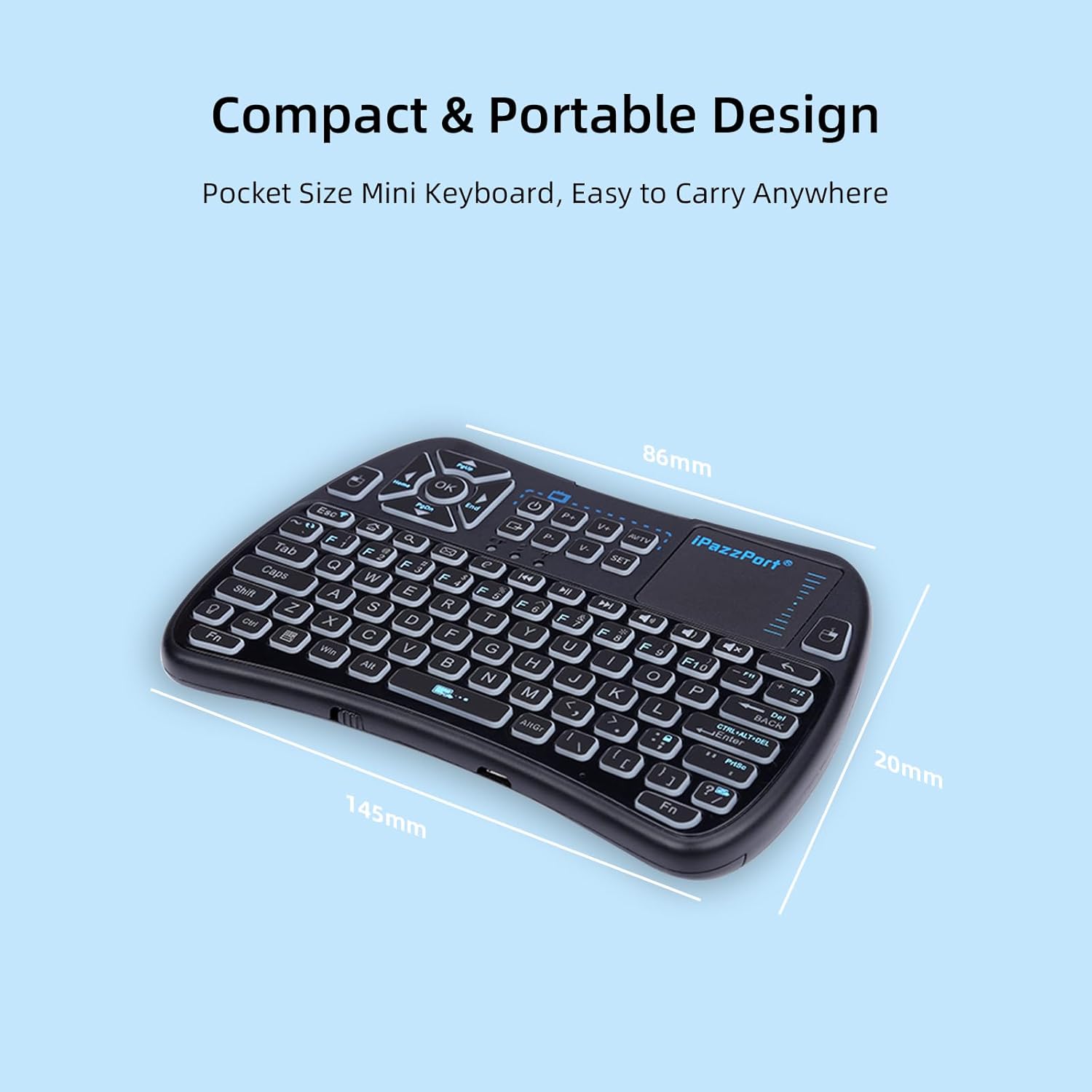
Image: The iPazzPort keyboard with dimensions (145mm x 86mm x 20mm) highlighting its compact and portable design.
9. Maklumat Waranti
This iPazzPort product comes with a Waranti pengilang selama 1 tahun from the date of purchase. The warranty covers defects in materials and workmanship under normal use. It does not cover damage caused by misuse, accidents, unauthorized modifications, or external causes. Please retain your proof of purchase for warranty claims.
10. Sokongan
For technical support, warranty claims, or further assistance, please contact iPazzPort customer service through the retailer's platform or visit the official iPazzPort website. Please have your model number (61SM) and purchase details ready when contacting support.