
1. Pengenalan
Thank you for choosing the NEWFAST NF-RE516 WiFi Range Extender. This device is designed to expand your existing wireless network coverage, eliminate Wi-Fi dead zones, and provide a stable internet connection throughout your home or office. With its easy setup and reliable performance, you can enjoy seamless streaming, gaming, and browsing.
This manual provides detailed instructions on how to set up, operate, and maintain your NEWFAST NF-RE516 WiFi Range Extender. Please read it carefully before using the device.
2. Maklumat Keselamatan
Sila patuhi garis panduan keselamatan berikut untuk mengelakkan kerosakan pada peranti atau kecederaan pada diri anda:
- Jangan dedahkan peranti kepada air, api, kelembapan atau persekitaran panas.
- Jangan cuba membuka, membaiki atau mengubah suai peranti.
- Gunakan hanya penyesuai kuasa yang disediakan bersama peranti.
- Jauhkan peranti daripada kanak-kanak.
- Pastikan pengudaraan yang betul di sekeliling peranti untuk mengelakkan terlalu panas.
3. Produk Lebihview
The NEWFAST NF-RE516 WiFi Range Extender is a compact and powerful device designed to seamlessly integrate into your existing network. It features multiple antennas for enhanced signal strength and coverage.
3.1 Kandungan Pakej
- NEWFAST NF-RE516 WiFi Range Extender
- Panduan Pemasangan Pantas
3.2 Susun atur Peranti
Familiarize yourself with the ports and indicators on your extender:
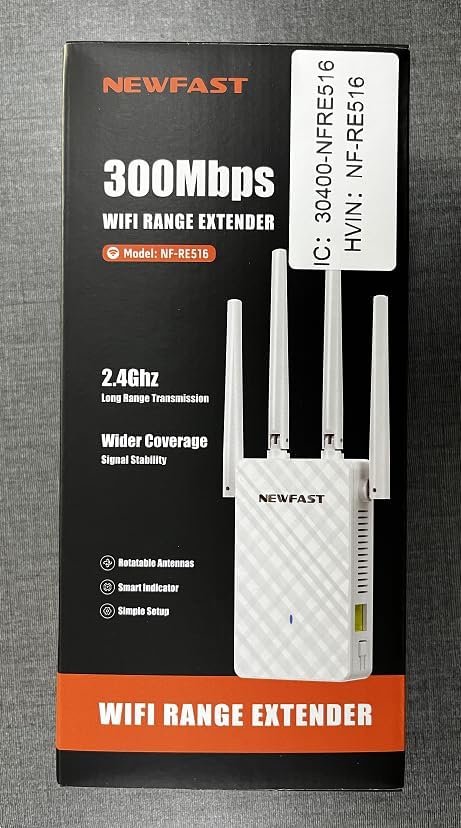
Imej: Depan view of the NEWFAST NF-RE516 WiFi Range Extender, showing its compact design and four adjustable external antennas.

Imej: Belakang view of the NEWFAST NF-RE516 WiFi Range Extender, displaying the power prongs and regulatory labels.

Image: A visual representation of the NEWFAST WiFi Extender providing signal to various devices within a multi-room home, highlighting its ability to boost WiFi coverage.
4. Arahan Persediaan
Follow these steps to set up your NEWFAST NF-RE516 WiFi Range Extender:
4.1 Hidupkan
- Plug the extender into a power outlet near your existing Wi-Fi router.
- Wait for the Power LED to turn solid blue.
4.2 Connect to Your WiFi Router (WPS Method)
Kaedah WPS (Wi-Fi Protected Setup) ialah cara terpantas untuk menyambungkan extender anda ke penghala anda.
- Tekan butang WPS pada penghala Wi-Fi sedia ada anda.
- Within 2 minutes, press the WPS button on your NEWFAST NF-RE516 extender.
- The Wi-Fi LED on the extender should change from blinking to solid, indicating a successful connection.
If your router does not support WPS, or if you encounter issues, please refer to the Web UI/App setup method in the Quick Installation Guide.
Video: A seller-provided video demonstrating the setup process for the NEWFAST NF-RE516 WiFi Range Extender, including connection to the router and initial power-on steps.
5. Mod Operasi
The NEWFAST NF-RE516 typically operates in Repeater Mode, extending the range of your existing Wi-Fi network. It can also function as an Access Point (AP) if connected to your router via an Ethernet cable, creating a new Wi-Fi hotspot.
5.1 Mod Pengulang
In Repeater Mode, the extender wirelessly connects to your router and amplifies its signal, extending coverage to areas with weak or no Wi-Fi. This is the default and most common operating mode.
5.2 Mod Titik Akses (AP).
To use AP Mode, connect the extender to your router using an Ethernet cable. The extender will then create a new wireless network, converting your wired connection into a Wi-Fi hotspot.
6. Penyelenggaraan
To ensure optimal performance and longevity of your NEWFAST NF-RE516 WiFi Range Extender, follow these maintenance tips:
- Pembersihan: Gunakan kain lembut dan kering untuk membersihkan peranti. Jangan gunakan pembersih cecair atau aerosol.
- Pengudaraan: Pastikan peranti diletakkan di kawasan yang mempunyai pengudaraan yang baik dan lubang pengudaraannya tidak terhalang.
- Kemas kini Firmware: Regularly check for and install firmware updates from the NEWFAST official webtapak untuk memastikan prestasi dan keselamatan terbaik.
- Penempatan semula: If you need to move the extender, ensure it is powered off before unplugging and replugging it into a new location.
7. Penyelesaian masalah
If you encounter issues with your NEWFAST NF-RE516, try the following solutions:
- Tiada Kuasa: Ensure the extender is securely plugged into a working power outlet. Check if the Power LED is solid blue.
- Tiada sambungan internet: Verify that your main router has an active internet connection. Restart both your router and the extender.
- Isyarat Lemah: Relocate the extender closer to your main router. Ensure there are no major obstructions (e.g., thick walls, large metal objects) between the extender and your devices.
- Sambungan Terputus: Check for interference from other electronic devices. Try changing the Wi-Fi channel on your router if possible.
- Lupa kata laluan: If you forget the extender's Wi-Fi password, you may need to reset the device to factory defaults and set it up again.
- Tetapkan semula kepada Lalai Kilang: To reset the extender, use a paperclip to press and hold the Reset button (usually a small pinhole) for about 5-10 seconds until the LEDs flash.
8. Spesifikasi
| Ciri | Perincian |
|---|---|
| Jenama | PUASA BARU |
| Model | NF-RE516 (also known as 1111111) |
| Standard Tanpa Wayar | Frekuensi Radio 2.4 GHz |
| Kadar Pemindahan Data | Up to 300 Mbps (as per product title) |
| Kelas Band Kekerapan | Tri-Band (Note: Wireless Standard only mentions 2.4GHz, please verify with product packaging) |
| Julat | Sehingga 98,000 kaki padu |
| warna | putih |
| Sumber Kuasa | Palam AC |
| Antena | Multiple external antennas (adjustable) |
9. Waranti dan Sokongan
NEWFAST products come with a standard manufacturer's warranty. For specific warranty terms and conditions, please refer to the warranty card included in your product packaging or visit the official NEWFAST webtapak.
If you require technical assistance or have any questions about your NEWFAST NF-RE516 WiFi Range Extender, please contact our customer support team:
- e-mel: shenhuadianzi@outlook.com
- Sokongan dalam talian: Visit the NEWFAST official webtapak untuk Soalan Lazim dan sumber sokongan.
Our support team is dedicated to providing prompt and helpful assistance.