
pengenalan
Thank you for choosing the Jectse Mini Stick Gaming Keyboard. This manual provides essential information for setting up, operating, and maintaining your device. Please read these instructions carefully before use to ensure proper functionality and to maximize your gaming experience.
Kandungan Pakej
Sebelum meneruskan dengan persediaan, sila sahkan bahawa semua item yang disenaraikan di bawah disertakan dalam pakej anda:
- 1 × Jectse Mini Stick Gaming Keyboard
- 1 × Kabel USB Jenis-C
- 1 × Keycap Puller Tool
- 1 × Sepana
- 6 × Adhesive Feet
- 1 × Manual Arahan (dokumen ini)

Image: The Jectse Mini Stick Gaming Keyboard shown with its included accessories: USB-C cable, keycap puller, wrench, and adhesive feet.
Persediaan
- Sambungkan Kabel USB: Locate the USB Type-C port on the gaming keyboard. Connect one end of the provided USB Type-C cable to this port.
- Sambung ke Peranti: Connect the other end of the USB cable to an available USB port on your PC, Steam Deck, MiSTerFPGA, or other compatible gaming device.
- Pengiktirafan Awal: Your operating system or gaming device should automatically detect the keyboard. No additional drivers are typically required.
- Apply Feet (Optional): For enhanced stability, peel and apply the six adhesive feet to the bottom of the keyboard as desired.

Imej: Dari dekat view of the USB-C input port on the side of the gaming keyboard.
Arahan Operasi
The Jectse Mini Stick Gaming Keyboard is designed for responsive and versatile gameplay. Below are key operational aspects:
Mod Input
The keyboard supports multiple input modes to ensure compatibility with various games and platforms:
- Mod XInput: Standard input mode for many modern PC games and consoles, recognized as a gamepad.
- Mod Papan Kekunci: Functions as a standard keyboard, suitable for games that primarily use keyboard controls.
Refer to your device's specific instructions or the product's online resources for details on switching between input modes, if applicable.
SOCD Cleaning Modes
Simultaneous Opposing Cardinal Directions (SOCD) cleaning prevents conflicting directional inputs. The keyboard offers the following modes:
- neutral: Both opposing inputs cancel each other out, resulting in no directional input.
- Up Priority: If Up and Down are pressed simultaneously, Up input is prioritized.
- Second Input Priority: The last directional input pressed is prioritized.
The specific method for selecting SOCD cleaning modes may involve key combinations or software settings. Consult the product's online documentation or support for detailed instructions.

Image: The gaming keyboard in use, connected to a console or PC setup, demonstrating its compact size and illuminated keys.
Ciri-ciri
The Jectse Mini Stick Gaming Keyboard incorporates several features designed to enhance your gaming performance:
- Latensi Sangat Rendah: Engineered with a processor-breaking polling rate, achieving a response time of less than 1 millisecond for precise and immediate input.
- Keserasian Peranti Luas: Fully compatible with various platforms including PC, Steam Deck, and MiSTerFPGA, offering broad utility across your gaming ecosystem.
- Flexible Input Modes: Easily switch between XInput and Keyboard input modes to match game requirements and personal preferences.
- Multiple SOCD Cleaning Modes: Provides Neutral, Up Priority, and Second Input Priority SOCD cleaning options to ensure fair and consistent directional inputs in competitive play.
- Silent Cherry MX Red Mechanical Switches: Equipped with genuine Cherry MX Silent Red mechanical switches, providing a quiet yet highly responsive and tactile gaming experience without distracting click noises.
- Paparan OLED: Features a 128x64 single-color Organic Light Emitting Diode (OLED) display for displaying status information or settings.

Imej: Satu dalaman view of the gaming keyboard, emphasizing the Raspberry Pi RP2040 Master Chip, which contributes to its low latency performance.
Penyelenggaraan
Proper maintenance ensures the longevity and optimal performance of your gaming keyboard:
- Pembersihan: Gunakan kain lembut dan kering untuk mengelap permukaan papan kekunci. Untuk kotoran degil, gunakan sedikit kainamp kain dengan sabun lembut boleh digunakan, memastikan tiada cecair memasuki peranti.
- Pembuangan Papan Kekunci: Use the provided keycap puller tool to carefully remove keycaps for cleaning or replacement. Avoid using excessive force to prevent damage to the switches.
- Storan: Store the keyboard in a cool, dry place away from direct sunlight and extreme temperatures when not in use.
- Elakkan Cecair: Do not expose the keyboard to water or other liquids, as this can cause internal damage.
Menyelesaikan masalah
If you encounter issues with your Jectse Mini Stick Gaming Keyboard, refer to the following common troubleshooting steps:
| Masalah | Kemungkinan Punca | Penyelesaian |
|---|---|---|
| Papan kekunci tidak dikenali | Loose USB connection, faulty cable, incompatible USB port. | Ensure the USB cable is securely connected to both the keyboard and the device. Try a different USB port or cable. Restart your device. |
| Inputs not registering correctly | Incorrect input mode, software conflict, dirty switches. | Verify the correct input mode (XInput/Keyboard) is selected. Check for conflicting software or drivers. Clean key switches if necessary. |
| Paparan OLED tidak berfungsi | Power issue, display settings. | Ensure the keyboard is powered on and connected. Check if there are any specific key combinations to activate/adjust the display. |
| Kekunci berasa melekit atau tidak bertindak balas | Kotoran atau serpihan di bawah penutup kekunci. | Use the keycap puller to remove the keycap and clean the switch area. |
If the problem persists after attempting these solutions, please contact Jectse customer support for further assistance.
Spesifikasi
Detailed technical specifications for the Jectse Mini Stick Gaming Keyboard:
- Jenis Produk: Fighting Box Keyboard
- Nombor Model: Jectse6gms3tvf4o
- Bahan: Akrilonitril Butadiena Stirena (ABS)
- Dimensi: Approximately 190 × 76 × 10.6 mm (7.5 × 3.0 × 0.4 inches)
- Berat: Lebih kurang 342 gram
- Port Input: 1 × USB Type-C
- Latensi: Less than 1 millisecond
- paparan: 128x64 Single Color Organic Light Emitting Diode (OLED)
- Keycap Color: Kelabu Lutsinar
- Selectable Input Modes: XInput, Keyboard
- SOCD Cleaning Modes: Neutral, Up Priority, Second Input Priority
- Suis Mekanikal: Silent Cherry MX Red
- Keserasian: PC, Steam Deck, MiSTerFPGA
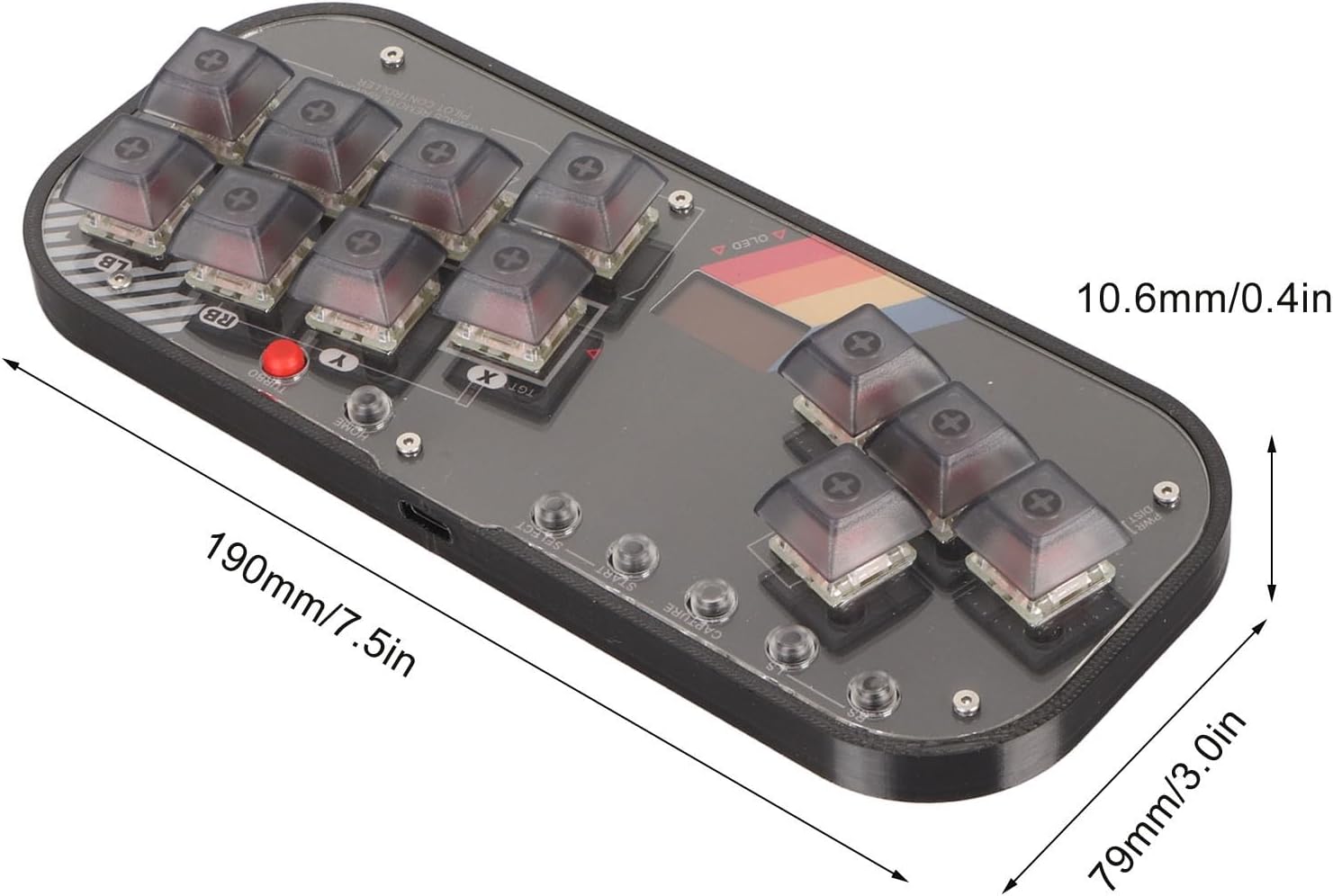
Image: A diagram illustrating the dimensions of the Jectse Mini Stick Gaming Keyboard, showing its length (190mm/7.5in) and width (79mm/3.0in), and thickness (10.6mm/0.4in).
Note: All data is measured manually, and there may be slight errors in measurement results.
Waranti dan Sokongan
This product is covered by a standard manufacturer's warranty. For specific warranty terms and conditions, please refer to the documentation provided with your purchase or contact Jectse customer support.
For technical support, troubleshooting assistance, or any inquiries regarding your Jectse Mini Stick Gaming Keyboard, please visit the official Jectse store or contact their customer service department. Contact information can typically be found on the product packaging or the brand's official webtapak.
Kedai atas talian: Jectse Amazon Store