
1. Pengenalan
This manual provides detailed instructions for the operation and maintenance of your MAXKERUN W3 Digital Camera. Please read this manual thoroughly before using the camera to ensure proper function and to maximize your photography experience. Keep this manual for future reference.
2. Produk Lebihview
The MAXKERUN W3 is a versatile digital camera designed for photography and vlogging, featuring 4K video recording, 72MP image capture, 12X optical zoom, and a 180° flip screen. It includes Wi-Fi connectivity for easy transfer and a webfungsi cam.
2.1 Komponen Kamera

Imej 1: Berakhirview of the MAXKERUN W3 Digital Camera, showing the camera body, lens, flip screen, and included 32GB SD card and battery information.
The camera body includes the lens, flash, mode dial, control buttons, and a 3-inch IPS flip screen. Essential accessories such as a 32GB SD card and two rechargeable lithium-ion batteries are included.
2.2 Ciri-ciri Utama
- Zum Optik 12X: Allows for detailed magnification without compromising image quality.
- 4K Video & 72MP Photos: Capture high-resolution videos at 4K/24FPS and still images up to 72 megapixels.
- 59mm Wide-Angle & Macro Lens: Equipped with a professional lens suitable for both expansive scenes and close-up details.
- 180° Flip Screen: A 3-inch IPS display that rotates for easy self-recording and framing from various angles.
- Kesambungan Wi-Fi: Enables wireless transfer of photos and videos to a smartphone and remote control via an app.
- WebFungsi cam: Connects to a PC via USB for live streaming and video calls.
- Auto Focus & Anti-Shake: Features for clear and stable imaging.
- Integrated Flash Light: Menyediakan pencahayaan dalam keadaan cahaya malap.
- Berbilang Mod Penangkapan: Includes Auto, Program (P), Shutter Priority (Tv), Aperture Priority (Av), Manual (M), Scene (SCN), Continuous Shooting, Intelligent Scene, and Filter modes.
3. Persediaan
3.1 Pemasangan Bateri
- Cari penutup petak bateri di bahagian bawah kamera.
- Luncurkan selak untuk membuka penutup.
- Insert one of the provided NP-120 lithium-ion batteries, ensuring the correct orientation according to the diagram inside the compartment.
- Tutup penutup petak bateri sehingga ia berbunyi dengan selamat.
The camera requires 2 A batteries, which are included. Ensure batteries are fully charged before first use.
3.2 Pemasangan Kad SD
- Cari slot kad SD, biasanya berhampiran petak bateri atau di sisi kamera.
- Insert the included 32GB SD card into the slot with the metal contacts facing the correct direction (refer to the camera's indicator).
- Push the card gently until it clicks into place. To remove, push the card again until it springs out.
3.3 Kuasa Awal Hidup
Press and hold the power button (usually located on the top of the camera) until the screen illuminates. The camera will perform a brief startup sequence.
4. Arahan Operasi
4.1 Fotografi Asas

Imej 2: Demonstrates the camera's capability to capture high-resolution 4K video and 72MP still images, ideal for detailed landscapes.
- Hidupkan kuasa: Tekan butang kuasa.
- Fokus: Half-press the shutter button to activate autofocus. The focus frame will turn green when focus is achieved.
- Tangkap: Tekan sepenuhnya butang pengatup untuk mengambil gambar.
- Zum: Use the zoom lever (typically around the shutter button) to adjust the 12X optical zoom.

Imej 3: Visual representation of the 12X optical zoom feature and the 59mm focal length range of the MAXKERUN W3 camera.
4.2 Mod Penangkapan

Imej 4: The mode dial of the MAXKERUN W3 camera, illustrating various shooting modes such as Auto, Program, Shutter Priority, Aperture Priority, Manual, Scene, Continuous Shooting, Intelligent Scene, and Filter modes.
Putar dail mod pada bahagian atas kamera untuk memilih mod penangkapan yang anda inginkan:
- Mod Auto (A): Kamera melaraskan tetapan secara automatik untuk hasil yang optimum.
- Program Mode (P): Kamera menetapkan apertur dan kelajuan pengatup, tetapi membenarkan pengguna mengawal tetapan lain.
- Shutter Priority (Tv): Pengguna menetapkan kelajuan pengatup, kamera menetapkan apertur.
- Aperture Priority (Av): Pengguna menetapkan apertur, kamera menetapkan kelajuan pengatup.
- Mod Manual (M): Pengguna mengawal kedua-dua apertur dan kelajuan pengatup.
- Scene Mode (SCN): Mod pratetap untuk senario tertentu (cth, Potret, Landskap).
- Mod Penangkapan Berterusan: Merakam berbilang foto secara berturut-turut.
- Mod penapis: Applies creative filters to images.
4.3 Rakaman Video
To record video, switch the mode dial to video mode (often indicated by a camera icon). Press the shutter button to start recording and press it again to stop. The camera supports a video pause feature, allowing you to pause and resume recording within a single clip.
4.4 Using the Flip Screen

Imej 5: The 3-inch IPS flip screen of the MAXKERUN W3 camera, demonstrating its 180° rotation capability for vlogging and flexible shooting angles.
The 3-inch IPS screen can be rotated 180 degrees forward for self-recording or vlogging, and 270 degrees for various low or high-angle shots. Adjust the screen to your preferred viewsudut ing.
4.5 Flash Light Operation
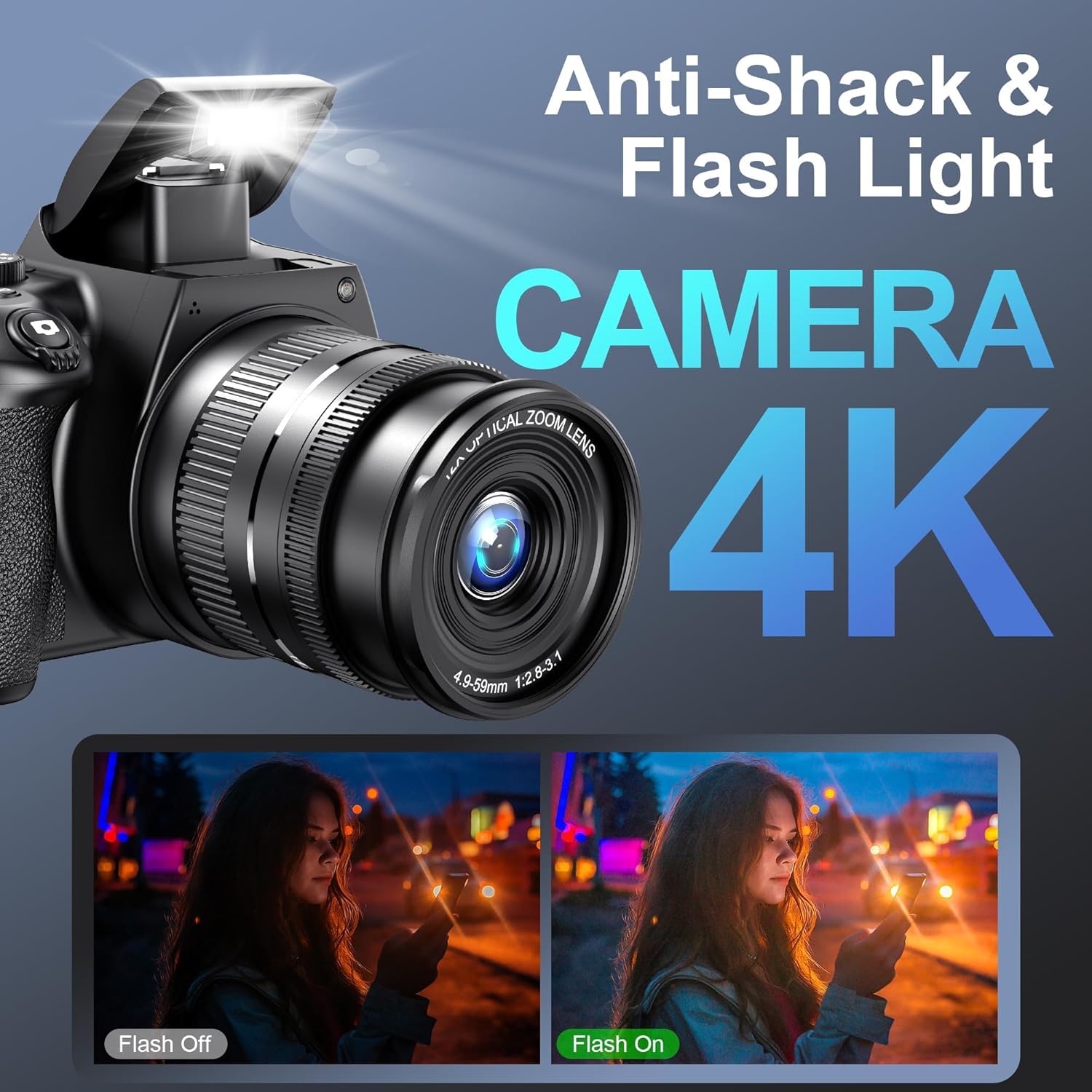
Imej 6: Illustrates the built-in flash light and anti-shake capabilities of the MAXKERUN W3 camera, showing its effectiveness in low-light conditions.
The camera features a built-in flash light. You can typically control the flash mode (Automatic, Manual On/Off) through the camera's menu settings or a dedicated flash button.
4.6 Ciri Ketersambungan

Imej 7: Depicts the MAXKERUN W3 camera's webcam functionality when connected to a computer via USB, and its Wi-Fi transfer capability for sharing photos and videos with a smartphone.
- Pemindahan Wi-Fi: Activate Wi-Fi in the camera settings. Use a compatible smartphone app to connect to the camera's Wi-Fi network. This allows for instant photo/video transfer and remote control.
- WebFungsi cam: Connect the camera to your computer using the provided USB-C cable. Select "PC Camera" mode on the camera when prompted. This enables the camera to function as a webkamera untuk penstriman langsung atau panggilan video.
- Output HDMI: Connect the camera to an external display using a Micro HDMI cable (not included) to view photos and videos on a larger screen.
5. Penyelenggaraan
- Membersihkan Lensa: Gunakan kain lembut dan bebas serat yang direka khusus untuk kanta kamera. Elakkan menyentuh permukaan kanta dengan jari anda.
- Membersihkan Badan: Lap badan kamera dengan kain lembut dan kering. Untuk kotoran degil, sedikit dampen kain dengan air.
- Penjagaan Bateri: Store batteries in a cool, dry place. Do not expose them to extreme temperatures. Charge batteries fully before extended storage.
- Storan: When not in use, store the camera in a dry, dust-free environment, preferably in a camera bag.
6. Penyelesaian masalah
- Kamera tidak dihidupkan: Ensure batteries are fully charged and correctly inserted. Try using the second included battery.
- Imej adalah kabur: Check if autofocus is enabled. Ensure the lens is clean. In low light, use the flash or a tripod.
- Ralat kad SD: Ensure the SD card is properly inserted. If the issue persists, try formatting the card (this will erase all data) or using a different compatible SD card.
- Isu sambungan Wi-Fi: Ensure Wi-Fi is enabled on the camera and your smartphone. Restart both devices. Check the camera's Wi-Fi settings and your phone's network connections.
- No image on external display via HDMI: Verify the HDMI cable connection and ensure the external display is set to the correct input source.
7. Spesifikasi
| Ciri | Spesifikasi |
|---|---|
| Jenama | MAXKERUN |
| Nama Model | W3 |
| Resolusi Maksimum | 72 MP |
| Resolusi Tangkapan Video | 4K (2160p) |
| Zum Optik | 12x |
| Panjang Fokus Min | 59 Milimeter |
| Jenis Paparan | 3-inch IPS Flip Screen |
| Kapasiti Penyimpanan Memori | 32 GB (SD Card included) |
| Bateri | 2 A Lithium Ion batteries (included) |
| Ketersambungan | Micro HDMI, USB, Wi-Fi |
| Ciri Khas | Flip Screen, Autofocus, Anti-shake, Flash light, Webcam Function, Pause Function, Continuous shooting, Slow motion, Time-lapse Recording, Self-timer, Smile Detection, Date Stamp |
| Berat Barang | 948 g |
8. Waranti dan Sokongan
For any inquiries or technical assistance, a dedicated customer service team is available 24/7. Please refer to your purchase documentation for specific warranty details.