
GMKtec M3 Ultra
GMKtec Mini PC M3 Ultra User Manual
Model: M3 Ultra with Intel Core i7-12700H
1. Pengenalan
This manual provides essential information for setting up, operating, maintaining, and troubleshooting your GMKtec Mini PC M3 Ultra. Please read this manual thoroughly before using the device to ensure proper functionality and longevity.
The GMKtec Mini PC M3 Ultra is a compact desktop computer powered by an Intel Core i7-12700H processor, featuring 14 cores and 20 threads with a maximum turbo frequency of 4.7 GHz. It includes Intel Iris Xe Graphics, 16GB DDR4 RAM, and a 1TB NVMe SSD, designed for various computing tasks from daily use to demanding applications.

Imej: Depan dan sisi view of the GMKtec Mini PC M3 Ultra, showcasing its compact design and ventilation.
2. Kandungan Pakej
Sahkan bahawa semua item yang disenaraikan di bawah disertakan dalam pakej anda:
- 1 x Nucbox M3 Ultra Mini PC
- 1 x Power Supply & Cable
- 1 x Manual Pengguna (dokumen ini)
- 1 x Kabel HDMI
- 1 x VESA Mount dengan Skru
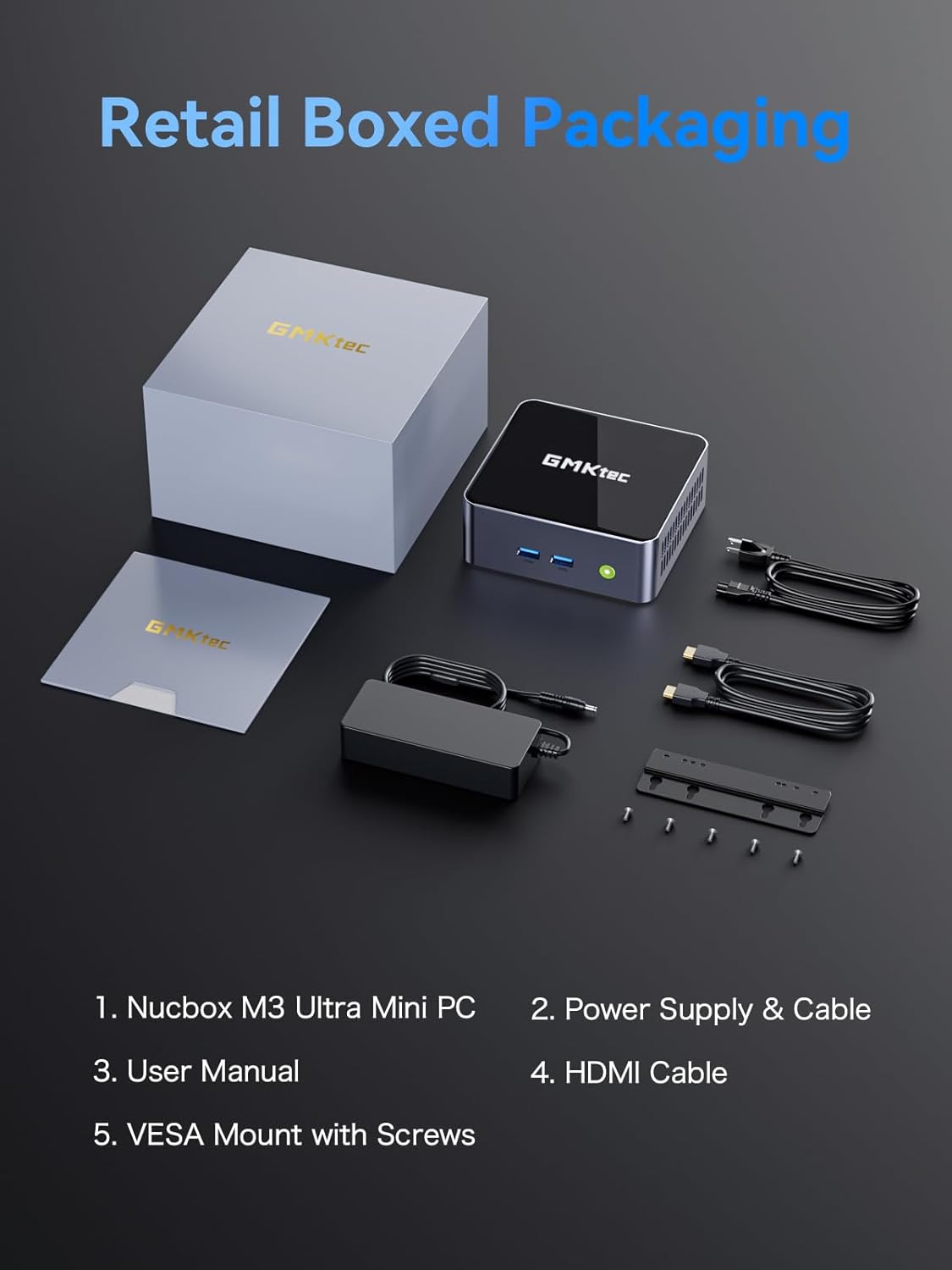
Image: Contents of the GMKtec Mini PC M3 Ultra retail package, including the mini PC, power adapter, cables, user manual, and VESA mount.
3. Produk Lebihview
The GMKtec Mini PC M3 Ultra features a comprehensive set of ports for connectivity and expansion.
Panel Depan
- Butang Kuasa: Untuk menghidupkan atau mematikan peranti.
- USB 3.2 (x2): High-speed data transfer ports.
Panel Belakang
- DC IN (20V/5A 100W): Port input kuasa.
- HDMI (4K@60Hz) (x2): Video output ports for connecting displays.
- 2.5G LAN (Intel I226-V): High-speed Ethernet port for network connectivity.
- USB 3.2 (x1): Port pemindahan data berkelajuan tinggi.
- USB 2.0 (x1): Port pemindahan data standard.
- Type-C (DP1.4/DATA): Multi-function port supporting DisplayPort 1.4 video output and data transfer.
- 3.5mm CTIA: Audio jack for headphones or speakers.

Imej: Terperinci view of the front and rear ports on the GMKtec Mini PC M3 Ultra, indicating their functions.
4. Persediaan Awal
Follow these steps to set up your Mini PC:
- Paparan Sambungkan: Connect your monitor(s) to the HDMI ports or the Type-C port using appropriate cables.
- Sambung Peranti: Palamkan papan kekunci, tetikus dan peranti USB anda yang lain ke dalam port USB yang tersedia.
- Sambungkan Rangkaian (Pilihan): For a wired connection, connect an Ethernet cable from your router or modem to the 2.5G LAN port. For wireless, ensure your WiFi network is available.
- Sambungkan Kuasa: Plug the power adapter into the DC IN port on the Mini PC, then connect the power cable to an electrical outlet.
- Hidupkan kuasa: Press the power button on the front of the Mini PC. The system will boot up.
5. Arahan Operasi
Sistem Operasi
The Mini PC comes with an operating system pre-installed (OS POR). Follow the on-screen instructions for initial setup, including language, region, and user account creation. The device is compatible with various operating systems, including Windows 10, Linux, and Ubuntu.
Operasi Asas
- Hidupkan/Mati Kuasa: Press the power button once to turn on. To turn off, use the operating system's shutdown function or press and hold the power button for 5 seconds.
- Mulakan semula: Gunakan fungsi mula semula sistem pengendalian.
- Mod tidur: Gunakan fungsi tidur sistem pengendalian.
Auto Power On and Wake-on-LAN
The Mini PC supports 'Auto Power On' and 'Wake-on-LAN' features. These can typically be configured within the system's BIOS settings. Refer to your operating system or BIOS documentation for detailed instructions on enabling and configuring these features.
6. Hardware Expansion (RAM & SSD)
The GMKtec Mini PC M3 Ultra is designed for easy upgrades of its RAM and storage components.
Memory (RAM) Expansion
The device is equipped with dual 16GB DDR4 RAM and supports expansion up to 64GB (via two SO-DIMM slots).
Storage (SSD) Expansion
The Mini PC includes a 1TB M.2 PCIe 2280 SSD. It supports expansion up to 16TB. Additionally, there is support for a second M.2 SATA/PCIEX4 2242 drive, also expandable up to 16TB.
To upgrade or install additional components, carefully open the chassis as per the instructions provided in the full user manual (if available) or by a qualified technician. Ensure the device is powered off and unplugged before performing any hardware modifications.

Imej: Dalaman view of the GMKtec Mini PC M3 Ultra, highlighting the M.2 2280 PCIe SSD slot, M.2 2242 SATA/PCIEX4 slot, and dual DDR4 SO-DIMM slots for memory expansion.
7. Sistem Penyejukan
The M3 Ultra Mini PC incorporates an upgraded quiet cooling fan system designed for efficient heat dissipation. It features copper cooling pipes and multiple exhaust vents to maintain optimal operating temperatures and ensure stable performance.
- Dual Turbo Cooling: Enhances airflow and heat removal.
- Two-way Convection Air Inlet: Optimizes air circulation within the chassis.
- Quiet Cooling Design: Minimizes operational noise.

Image: Diagram illustrating the dual turbo cooling, two-way convection air inlet, and quiet cooling design of the GMKtec Mini PC M3 Ultra.
8. Ketersambungan
Wired Network (2.5GbE NIC LAN)
The built-in Intel Ethernet Controller I226-V provides a 2.5 Gbit/s connection speed, offering significantly faster network performance compared to traditional Gigabit Ethernet. This is beneficial for large data transfers, online gaming, and streaming.
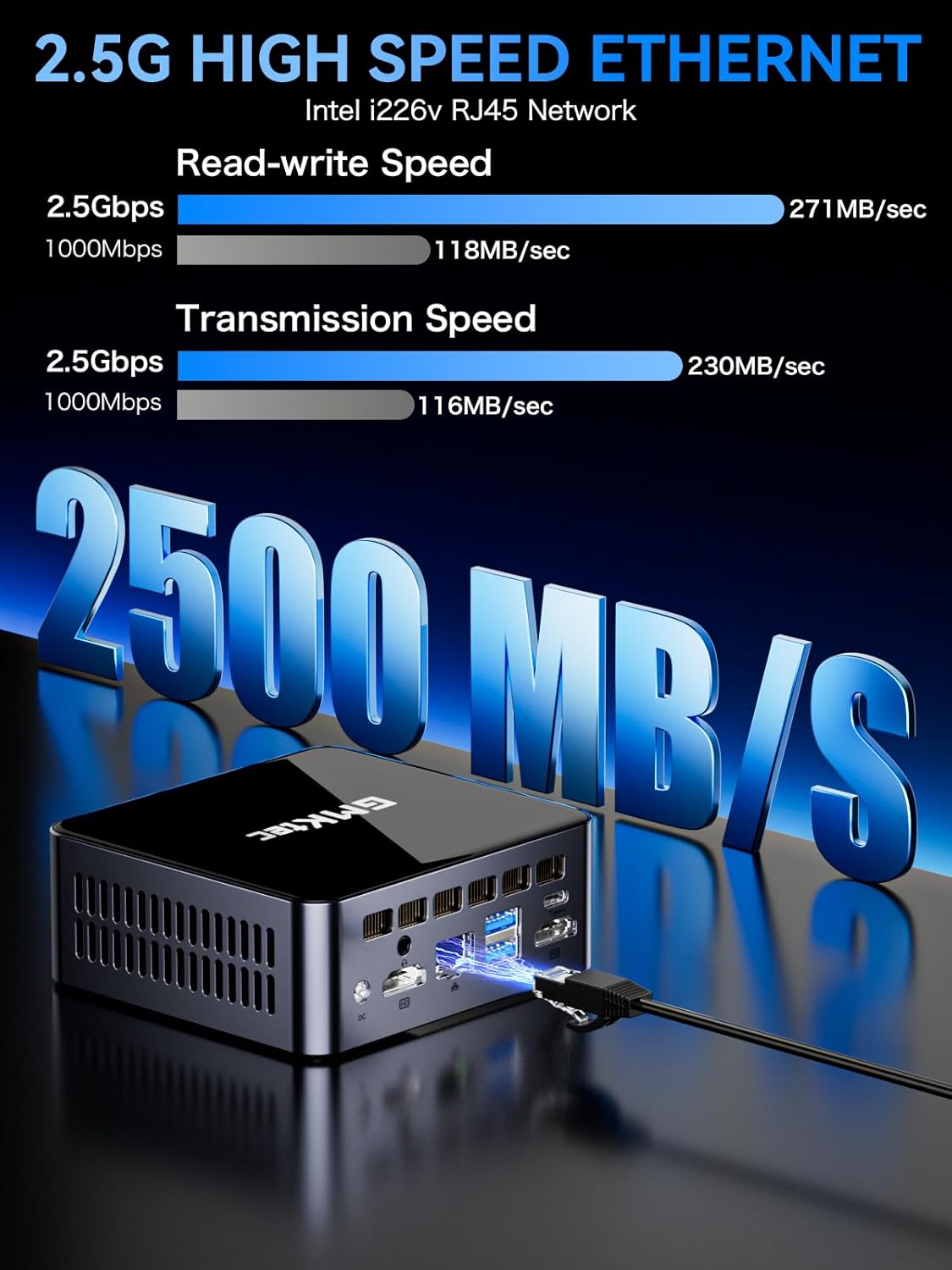
Image: Visual representation of 2.5G high-speed Ethernet performance on the GMKtec Mini PC M3 Ultra, showing read-write and transmission speeds compared to 1000Mbps.
Wireless Connectivity (WiFi 6 + Bluetooth 5.2)
The Mini PC supports WiFi 6 (802.11ax) and Bluetooth 5.2 technologies. WiFi 6 offers faster internet speeds, lower latency, and improved network efficiency for stable and quick connections. Bluetooth 5.2 enables seamless connection with wireless peripherals such as keyboards, mice, and audio devices.
9. Triple 4K Display Setup
The GMKtec M3 Ultra supports up to three 4K displays simultaneously, enhancing productivity and providing an extended workspace. This is achieved through its dual HDMI ports and one Type-C (DP1.4/DATA) port.
Menyambungkan Pelbagai Paparan
- Sambungkan monitor utama anda ke salah satu port HDMI.
- Connect a second monitor to the other HDMI port.
- Connect a third monitor to the Type-C port using a compatible USB-C to DisplayPort cable or adapter.
- Once connected, configure your display settings within your operating system to extend or duplicate your desktop across the monitors.

Image: A user enjoying a triple 4K display setup powered by the GMKtec Mini PC M3 Ultra, demonstrating its multi-monitor capabilities for gaming and productivity.
10. Penyelenggaraan
To ensure the longevity and optimal performance of your Mini PC, follow these maintenance guidelines:
- Jaga kebersihan: Regularly clean the exterior of the Mini PC with a soft, dry cloth. Use compressed air to clear dust from ventilation openings.
- Pengudaraan yang Betul: Ensure the Mini PC is placed in a well-ventilated area, away from direct sunlight or heat sources. Do not block the air vents.
- Kemas Kini Perisian: Pastikan sistem pengendalian dan pemacu anda dikemas kini untuk memastikan keselamatan dan prestasi.
- Matikan dengan Selamat: Always shut down the system properly through the operating system before unplugging the power.
- Elakkan Cecair: Keep the Mini PC away from liquids to prevent damage.
11. Penyelesaian masalah
If you encounter issues with your GMKtec Mini PC, refer to the following common troubleshooting steps:
Tiada Kuasa
- Pastikan penyesuai kuasa disambungkan dengan selamat ke PC Mini dan salur keluar kuasa yang berfungsi.
- Sahkan alur keluar kuasa berfungsi dengan memasang peranti lain.
Tiada Paparan
- Check that the display cable (HDMI, USB-C) is securely connected to both the Mini PC and the monitor.
- Pastikan monitor dihidupkan dan ditetapkan kepada sumber input yang betul.
- Cuba sambungkan ke paparan lain atau gunakan kabel lain.
Tiada Sambungan Internet
- Berwayar: Check the Ethernet cable connection. Verify your router/modem is working.
- wayarles: Ensure WiFi is enabled in the operating system. Check if you are connected to the correct network and entered the password correctly. Restart your router/modem.
System Slowdown or Freezing
- Tutup aplikasi yang tidak perlu berjalan di latar belakang.
- Check for sufficient free storage space on your SSD.
- Pastikan Mini PC mempunyai pengudaraan yang mencukupi dan tidak terlalu panas.
- Update drivers and operating system.
Jika langkah-langkah ini tidak menyelesaikan masalah anda, sila hubungi khidmat pelanggan.
12. Spesifikasi Teknikal
| Komponen | Spesifikasi |
|---|---|
| Pemproses | Intel Core i7-12700H (14 Cores/20 Threads, up to 4.7 GHz, 24 MB Cache) |
| Grafik | Intel Iris Xe Graphics (up to 1.45GHz) |
| Memori (RAM) | 16GB DDR4 (Dual Channel SO-DIMM, expandable up to 64GB) |
| Penyimpanan | 1TB M.2 PCIe 2280 SSD (expandable up to 16TB) |
| Secondary Storage Slot | M.2 SATA/PCIEX4 2242 (expandable up to 16TB) |
| Output Video | 2 x HDMI (4K@60Hz), 1 x Type-C (DP1.4/DATA) - Triple 4K Display Support |
| Ethernet | 2.5GbE NIC LAN (Intel I226-V) |
| Kesambungan Wayarles | WiFi 6 (802.11ax), Bluetooth 5.2 |
| Port USB | 3 x USB 3.2, 1 x USB 2.0, 1 x Type-C (DP1.4/DATA) |
| Audio | Bicu Audio CTIA 3.5mm |
| Bekalan Kuasa | 20V/5A (100W) |
| Sistem Operasi | OS Pre-installed (Compatible with Windows 10, Linux, Ubuntu) |
| Dimensi | Kira-kira 6.46 x 6.22 x 4.69 inci (Saiz Pakej) |
| Berat badan | Kira-kira 3.27 paun |
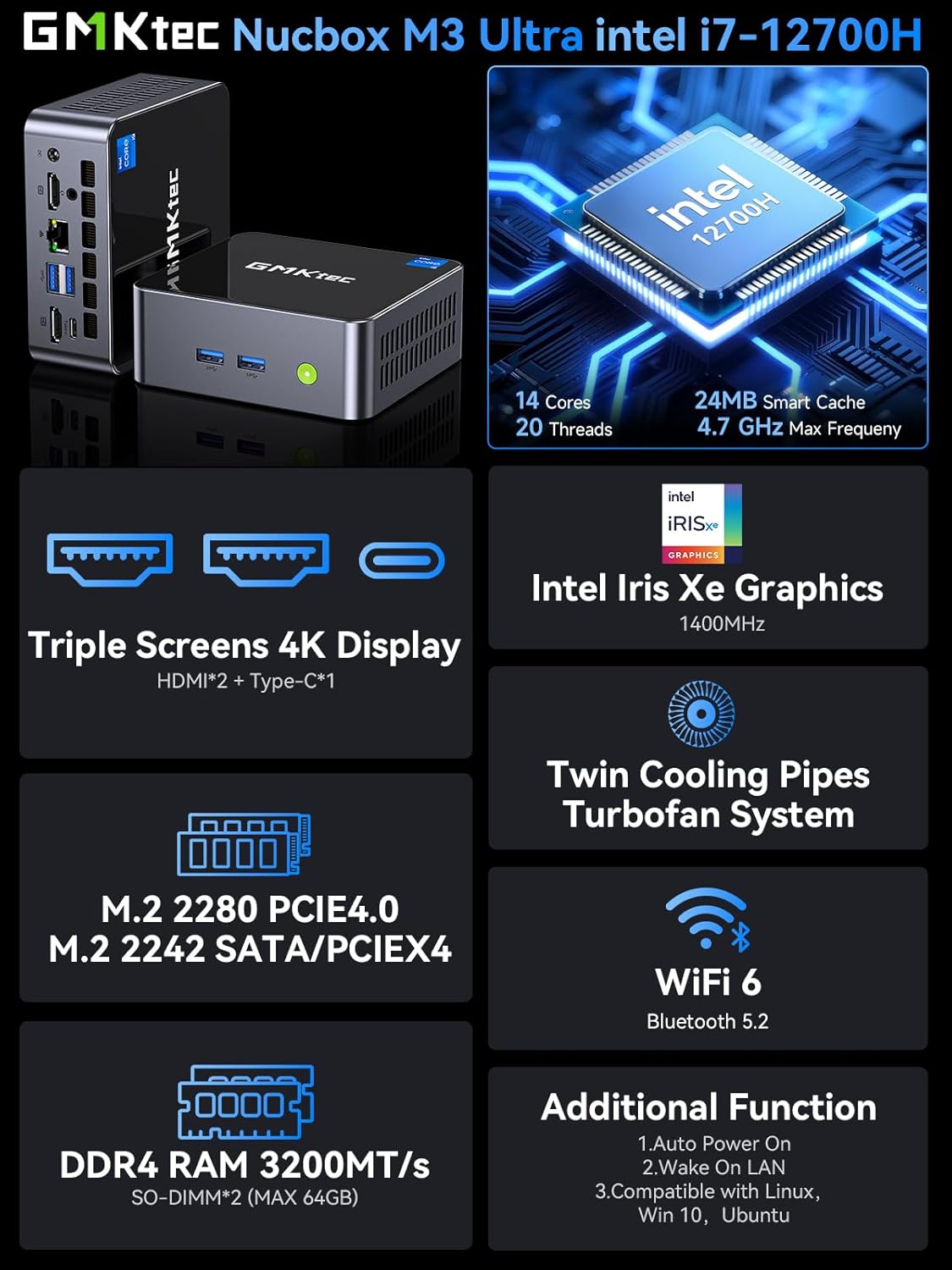
Image: Summary of key features for the GMKtec Nucbox M3 Ultra, including CPU, GPU, display, storage, cooling, and connectivity.
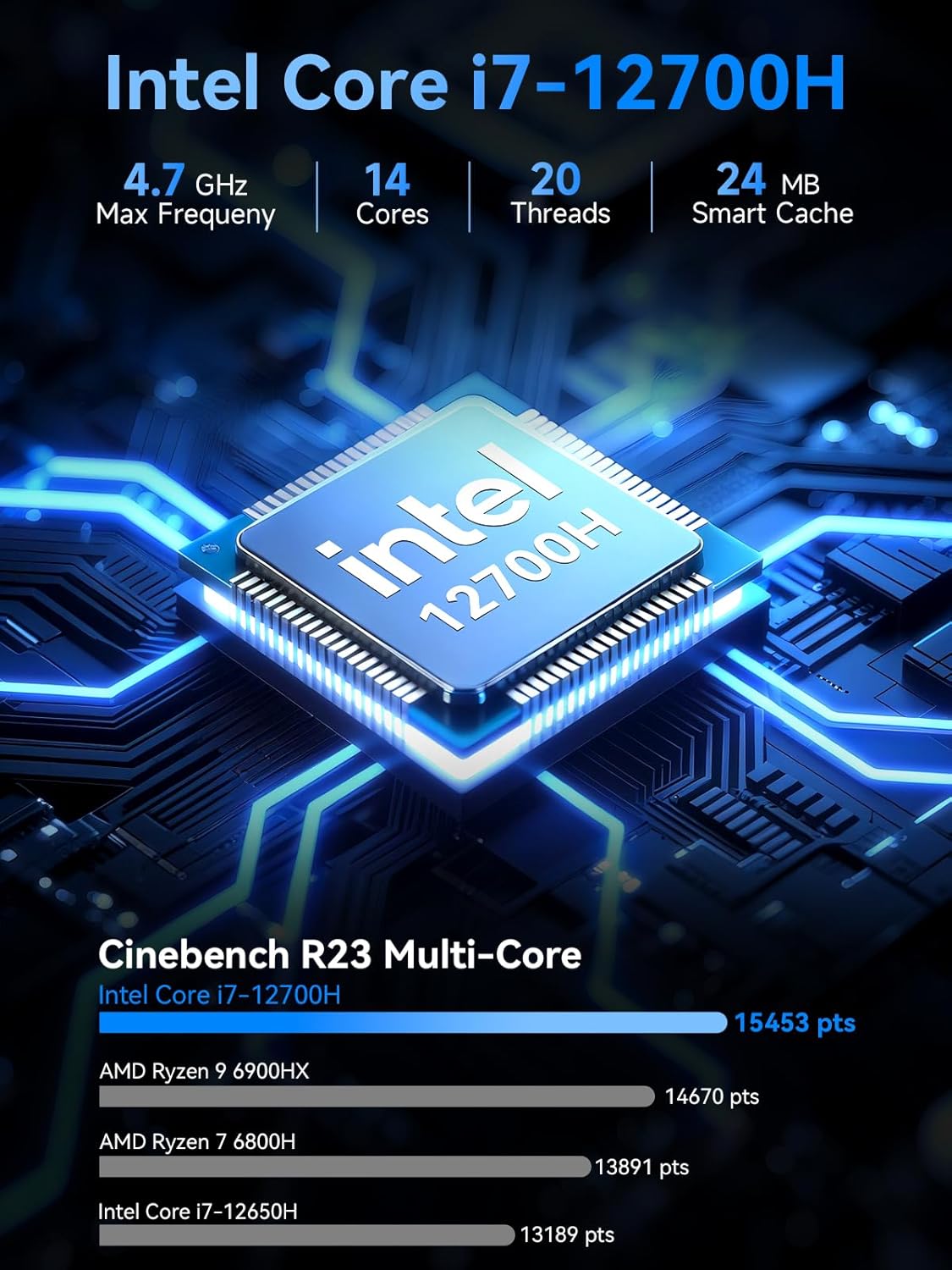
Image: Detailed specifications of the Intel Core i7-12700H processor, including core count, threads, max frequency, and Cinebench R23 multi-core performance comparison.
13. Maklumat Waranti
GMKtec menyediakan Waranti terhad 1 tahun for each Mini PC, effective from the date of purchase. This warranty covers all defects attributed to design and workmanship. For warranty claims or service, please retain your proof of purchase.
14. Sokongan Pelanggan
Should you require assistance, have questions, or encounter issues not covered in this manual, please contact the GMKtec professional after-sales support team. Refer to the contact information provided with your product packaging or visit the official GMKtec webtapak untuk butiran sokongan.
Ask a question about this manual
Ask about setup, troubleshooting, compatibility, parts, safety, or missing instructions. Manuals+ will review the question and use this page’s manual context to help answer it.