
pengenalan
This manual provides detailed instructions for the proper use and maintenance of your ORDRO M5 Handheld Camcorder. Please read this manual thoroughly before operating the device to ensure optimal performance and longevity.
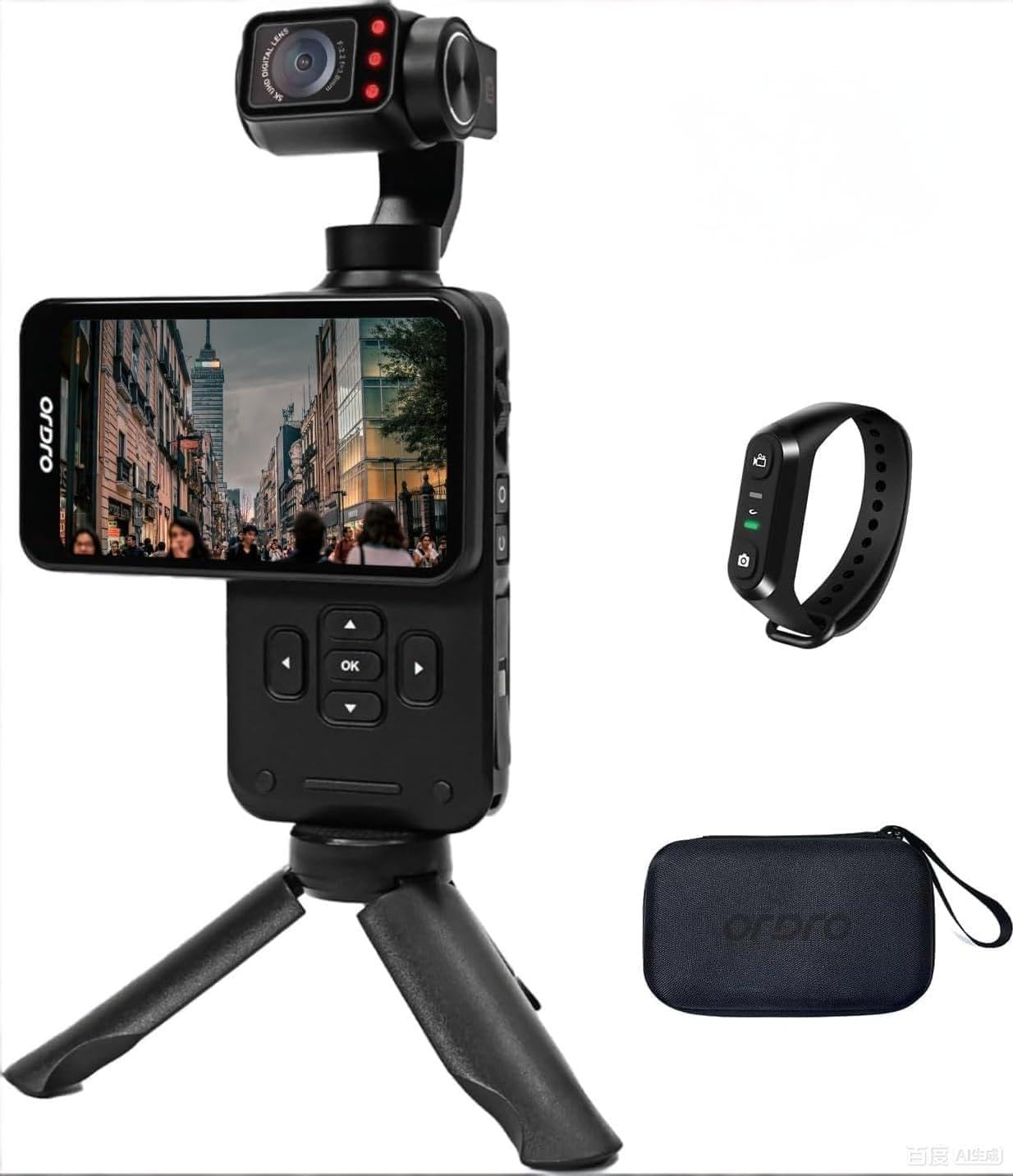
Figure 1: ORDRO M5 Handheld Camcorder Overview
1. Persediaan
1.1 Mengecas Bateri
The ORDRO M5 camcorder is equipped with a built-in battery. Before first use, fully charge the device. Connect the camcorder to a power source using the provided USB cable. The charging indicator will illuminate during charging and turn off when complete. A full charge provides approximately 150 minutes of 4K/60FPS recording time.

Figure 2: Charging the ORDRO M5 Camcorder
1.2 Memasukkan Kad SD Mikro
The camcorder supports Micro SD cards for storage. Locate the Micro SD card slot, typically on the side or bottom of the device. Insert the card with the gold contacts facing down until it clicks into place. Ensure the card is rated V60 or higher for optimal 5K video recording performance. A 64GB card is typically included.
1.3 Menghidupkan/Mematikan
To power on the camcorder, press and hold the power button until the screen illuminates. To power off, press and hold the power button again until the device shuts down.
2. Arahan Operasi
2.1 Rakaman Asas
After powering on, the camcorder enters standby mode. Press the record button to start recording. Press it again to stop. The device supports 5K at 30fps and 4K at 60fps video resolutions.
2.2 3.5-inch Rotating Touch Screen
The 3.5-inch IPS touch screen allows for intuitive control and framing. It can be rotated to switch between horizontal (16:9) and vertical (9:16) shooting orientations, ideal for various platforms like YouTube and TikTok.

Figure 3: Horizontal and Vertical Screen Rotation
2.3 3-Axis Mechanical Gimbal Stabilization
The integrated 3-axis mechanical gimbal provides stable and smooth video footage, even during movement such as hiking or running. This reduces camera shake significantly compared to electronic stabilization.

Figure 4: Gimbal Stabilization in Action
Mod Gimbal:
- PF Mode (Pan Following): The camera pans horizontally while maintaining a stable vertical axis.
- TF Mode (Tilt Following): The camera tilts vertically while maintaining a stable horizontal axis.
- L Mode (Lock Mode): The camera maintains a fixed orientation, locking both pan and tilt.
- POV Mode (Full Following): The camera follows all movements of the handle (pan, tilt, roll).
- PTZ (Pan-Tilt-Zoom): Allows for controlled movement of the camera's pan, tilt, and zoom functions. Speed settings include Smooth, Regular, and Sport.
2.4 Face Tracking
Activate face tracking by touching the screen to select a face. The camcorder will then automatically lock onto and follow the detected face, keeping it centered in the frame.

Figure 5: Face Tracking Functionality
2.5 Penglihatan Malam Inframerah
For recording in low-light or dark conditions, activate the infrared night vision function. The camcorder utilizes built-in IR lights to capture clear black and white footage in environments with minimal ambient light.

Figure 6: Infrared Night Vision Operation
2.6 Wide Dynamic Range (WDR) and AE-L Exposure Lock
- W DR: Enhances image quality by capturing more detail in both bright and dark areas of a scene, preventing overexposure in highlights and underexposure in shadows.
- AE-L (Exposure Lock): Locks the exposure settings to prevent automatic adjustments, useful in scenes with challenging lighting conditions or when consistent exposure is desired.
2.7 Ciri Tambahan
- Kanta Sudut Lebar 120°: Captures a broader field of view, suitable for vlogging, landscapes, and group shots.
- Penggambaran Selang Masa: Records a sequence of images over time and compiles them into a video.
- Penggambaran berterusan: Merakam berbilang foto secara berturut-turut.
- Pendedahan Panjang: Allows for extended shutter speeds to capture more light in dark environments or create motion blur effects.
- Imbangan Putih: Adjusts color temperature to ensure accurate color reproduction under different lighting conditions.
- Pergerakan Perlahan: Records video at a higher frame rate to play back in slow motion.
- EV Exposure Compensation: Manually adjusts the exposure level to brighten or darken the image.
3. Penyelenggaraan
3.1 Pembersihan
- Use a soft, dry cloth to clean the camcorder body.
- Untuk kanta dan skrin, gunakan kain dan larutan pembersih kanta khusus. Elakkan bahan yang kasar.
- Do not use strong detergents or solvents.
3.2 Penyimpanan
- Simpan camcorder di tempat yang sejuk dan kering jauh dari cahaya matahari langsung dan suhu yang melampau.
- Tanggalkan kad Micro SD jika disimpan untuk tempoh yang lama.
- Ensure the battery is partially charged (around 50%) before long-term storage to preserve battery health.
4. Penyelesaian masalah
4.1 Isu dan Penyelesaian Biasa
- Camcorder tidak menghidupkan:
- Pastikan bateri terisi penuh.
- Tekan dan tahan butang kuasa selama beberapa saat.
- Cannot record video:
- Check if a Micro SD card is inserted correctly.
- Sahkan bahawa kad Micro SD mempunyai ruang kosong yang mencukupi.
- Ensure the Micro SD card is not write-protected.
- Video footage is shaky despite gimbal:
- Ensure the gimbal is calibrated correctly (refer to device settings).
- Avoid extreme or sudden movements that exceed the gimbal's stabilization capabilities.
- Kualiti imej yang buruk dalam cahaya malap:
- Activate Infrared Night Vision mode.
- Adjust EV exposure compensation if necessary.
- Skrin sentuh tidak bertindak balas:
- Restart the camcorder.
- Pastikan skrin bersih dan kering.
5. Spesifikasi
| Ciri | Perincian |
|---|---|
| Jenama | ORDRO |
| Nombor Model | WXM5 |
| Resolusi Tangkapan Video | 5K (5120 Pixels), 4K |
| Teknologi Penderia Foto | CMOS (1/2.5 inci) |
| Resolusi Pegun Berkesan | 48 MP |
| Penstabilan Imej | 3-Axis Mechanical Gimbal |
| Saiz Skrin | 3.5-inch IPS Touch Screen (Rotatable) |
| Jenis Kanta | 120° Wide Angle (Minimum/Maximum Focal Length: 3mm, Minimum/Maximum Aperture: 2.2f) |
| Jenis Memori Denyar | Micro SD (V60, UHS Speed Class 3 recommended) |
| Format Tangkapan Video | MP4 |
| Format Audio yang Disokong | AAC, MP3 |
| Purata Hayat Bateri | 150 minutes (4K/60FPS) |
| Teknologi Ketersambungan | USB |
| Ciri Khas | IR Night Vision, WDR, Face Tracking, Time-Lapse, Continuous Shooting, AE-L Exposure Lock, Long Exposure, White Balance, Slow Motion, EV Exposure Compensation |
| Faktor Bentuk | pegang tangan |
| Tahap Ketahanan Air | Bukan Tahan Air |
6. Maklumat Waranti
The ORDRO M5 Handheld Camcorder comes with a Waranti Pengeluar 1 Tahun dari tarikh pembelian. Waranti ini meliputi kecacatan bahan dan mutu kerja di bawah penggunaan biasa. Ia tidak meliputi kerosakan yang disebabkan oleh salah guna, kemalangan, pengubahsuaian tanpa kebenaran atau bencana alam.
Please retain your proof of purchase for warranty claims. For detailed warranty terms and conditions, refer to the official ORDRO webtapak atau hubungi sokongan pelanggan.
7. Sokongan Pelanggan
If you encounter any issues or have questions regarding your ORDRO M5 camcorder that are not addressed in this manual, please contact ORDRO customer support. Contact information can typically be found on the official ORDRO webtapak atau pada pembungkusan produk.
When contacting support, please have your product model number (WXM5) and purchase details ready.