pengenalan
This manual provides detailed instructions for the setup, operation, and maintenance of your VOOPEAK TC07 Trail Camera. Designed for outdoor use, this camera features advanced dual-lens technology, 4K video recording, 60MP image capture, solar power, starlight night vision, and convenient app control via WiFi and Bluetooth. Please read this manual thoroughly to ensure optimal performance and longevity of your device.
Produk Selesaiview
The VOOPEAK TC07 Trail Camera is engineered for superior wildlife monitoring and outdoor surveillance. Key features include:
- Advanced Dual-Lens & Starlight Night Vision: Independent day and night lenses provide clear, realistic photos/videos during the day and incredibly clear color photos/videos in low light conditions at night.
- 4K 30FPS UHD Videos & 60MP Clear Images: Equipped with a 6-layer high-quality glass lens, Sony IMX458 image sensor, and Novatek 96670 image denoising technology for natural and authentic wildlife capture. Supports various video resolutions including 4K 30fps, 2K 60fps, and 1080P.
- H.265 Video Recording and Loop Recording: Utilizes H.265 for clearer, smoother video, saving up to 80% of memory card storage. Loop recording ensures continuous operation by overwriting the oldest files semasa kad SD penuh.
- WiFi Bluetooth Connection and APP Control: Built-in hotspot allows connection to the camera's WiFi via a free mobile app. Adjust settings and preview media directly from your smartphone within a limited range of approximately 30ft.
- Solar Powered and Dual Powered: Features an integrated 1800mAh solar panel for continuous power with just one hour of sunlight daily. Also supports 8 AA dry batteries for extended operation, offering an environmentally friendly and cost-effective solution.
Apa yang ada dalam Kotak
Upon unpacking your VOOPEAK TC07 Trail Camera, please ensure all the following items are present:
- VOOPEAK TC07 Trail Camera
- Tali Pemasangan
- Kabel USB
- Manual Pengguna
- Solar Power Bank Manual
- Mounting Accessories (screws, wall mount)

Image: The VOOPEAK TC07 Trail Camera and its included accessories, such as the mounting strap, USB cable, and manuals, are displayed.
Persediaan
1. Pemasangan Panel Suria
Ensure the solar panel is securely attached to the top of the camera. It is recommended to charge the solar panel for 6-8 hours before initial use.

Image: The VOOPEAK TC07 Trail Camera with its integrated solar panel is shown in an outdoor setting, highlighting its power source.
2. Pemasangan Bateri
Buka kamera casing and insert 8 new AA LR6 alkaline batteries into the designated slots. Ensure correct polarity.
3. Pemasangan Kad SD
Insert a U3 speed SD card (up to 128GB, not included) into the SD card slot. It is crucial to format the SD card before first use to ensure compatibility and optimal performance.
4. Tetapan Kamera Awal
Switch the camera to "SETUP" mode. Navigate through the menu to format the SD card. Adjust basic settings such as date, time, and preferred image/video resolution.
Video: This official VOOPEAK video demonstrates the unboxing, solar panel attachment, battery and SD card installation, and initial setup of the TC07 Trail Camera, including formatting the SD card and adjusting settings.
Mengendalikan Kamera
1. Muat Turun Apl dan Sambungan
Download the "Hunting 4K Pro" app from your device's app store (iOS & Android compatible). Enable Bluetooth on your phone to connect to the camera's hotspot. Once connected via Bluetooth, you can then connect to the camera's WiFi network (e.g., "Hunting 4K") to access live view dan tetapan.

Image: The VOOPEAK TC07 Trail Camera is shown mounted on a tree, with a smartphone displaying the app interface for WiFi connection and control.
2. Tetapan Aplikasi
Through the app, you can customize various camera settings, including image size (up to 60MP), video resolution (up to 4K), PIR interval, PIR sensitivity, and more. Ensure to save your changes after adjusting settings.
3. Viewing and Downloading Media
The app allows you to preview photos and videos stored on the camera's SD card. You can also download selected media directly to your smartphone.
Video: This official VOOPEAK video demonstrates how to download the app, connect the camera via Bluetooth and WiFi, adjust settings, and view/ muat turun media.
4. Daytime and Nighttime Operation
The camera automatically switches between its UHD lens for daytime recording and a dedicated night vision lens for nighttime. The starlight night vision feature captures clear color images in low light, while infrared provides black and white footage dalam kegelapan sepenuhnya.
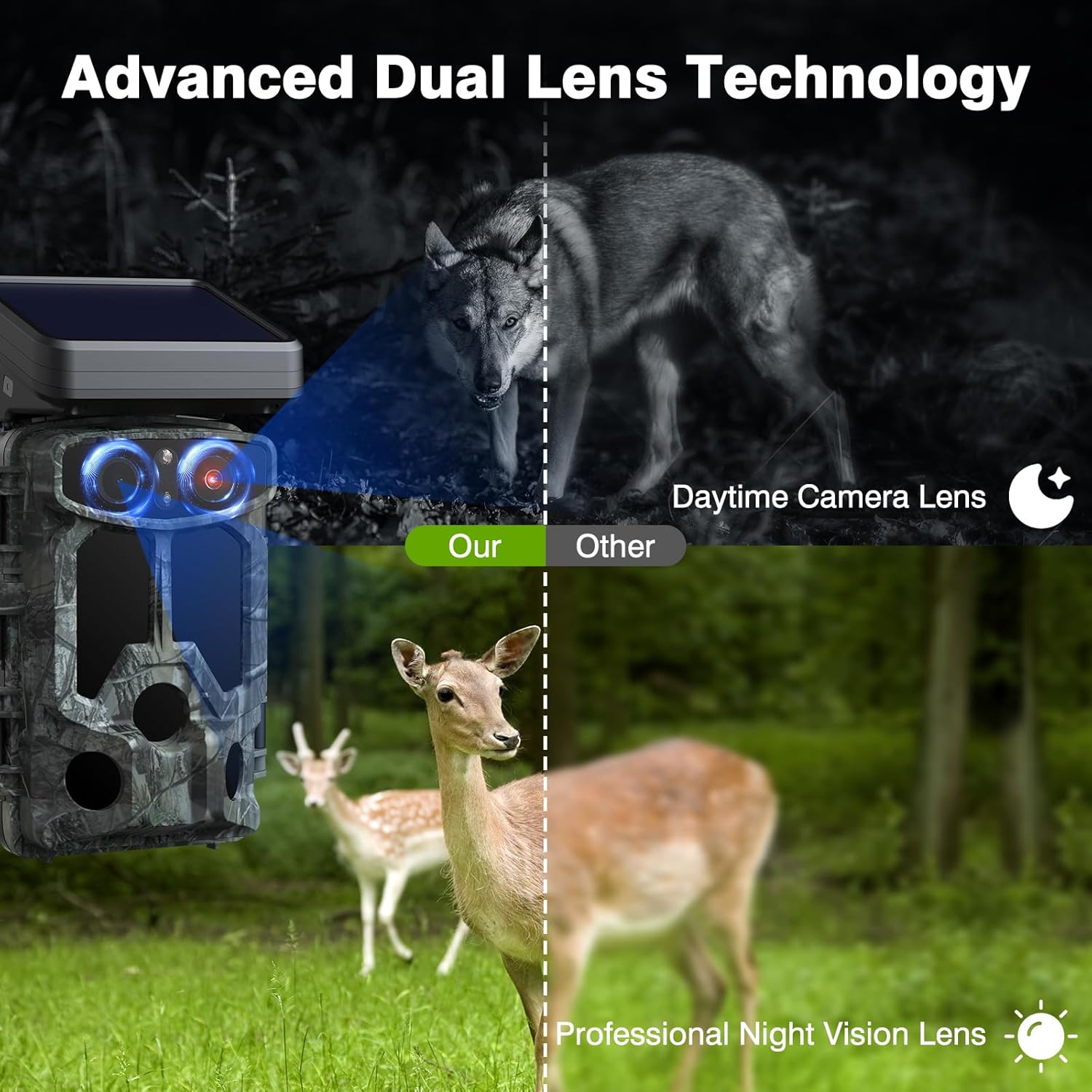
Image: The VOOPEAK TC07 Trail Camera's dual-lens system is illustrated, showing how it captures clear images of a wolf at night and deer during the day.

Image: A fox is shown captured by the VOOPEAK TC07 Trail Camera using starlight night vision (color) and infrared night vision (black and white).
Penyelenggaraan
- Pembersihan: Regularly clean the camera lenses and solar panel with a soft, dry cloth to ensure clear images and efficient charging.
- Pemeriksaan Bateri: Periodically check the battery level via the camera's screen or app. Replace AA batteries as needed. The solar panel helps maintain charge, reducing the frequency of battery replacement.
- Pengurusan Kad SD: Format the SD card regularly (after backing up important files) to prevent data corruption and ensure smooth recording.
- Perlindungan Alam Sekitar: The camera is IP66 waterproof, but avoid submerging it in water. Ensure all latches are securely closed when deployed outdoors.
Menyelesaikan masalah
- Kamera Tidak Dihidupkan: Check if the solar panel is charged or if the AA batteries are correctly inserted and have sufficient power.
- Kualiti Imej/Video Lemah: Ensure lenses are clean and free from obstructions. Check resolution settings in the camera menu or app.
- WiFi/Bluetooth Connection Issues: Ensure your phone's Bluetooth and WiFi are enabled. Confirm you are within the 30ft range of the camera. Restart both the camera and your phone if issues persist.
- Ralat Kad SD: Reformat the SD card (after backing up data). If the issue continues, try a different compatible SD card.
- Pengesanan Pergerakan Tidak Berfungsi: Adjust PIR sensitivity settings. Ensure the PIR sensors are not obstructed.
Spesifikasi
| Ciri | Spesifikasi |
|---|---|
| Nama Model | TC07 |
| Penderia Imej | Sony IMX458 |
| Resolusi Imej | Sehingga 60MP |
| Resolusi Video | 4K 30FPS, 2K 60FPS, 1080P |
| Penglihatan Malam | Starlight Night Vision, Infrared |
| Kecepatan Pencetus | 0.1an |
| Ketersambungan | WiFi, Bluetooth (App Control) |
| Sumber Kuasa | 1800mAh Solar Panel, 8x AA Batteries |
| Penyimpanan | U3 Speed SD Card (up to 128GB, not included) |
| Penilaian Kalis Air | IP66 |
| Dimensi | 2 x 1.5 x 3 inci |
| Berat badan | 1.67 paun |
Waranti dan Sokongan
For warranty information, technical support, or any inquiries regarding your VOOPEAK TC07 Trail Camera, please refer to the contact details provided with your product packaging or visit the official VOOPEAK webtapak. Simpan resit pembelian anda untuk tuntutan waranti.