
1. Pengenalan
This user manual provides detailed instructions for the operation and maintenance of your Phinistec F6 MP3 Player. Please read this manual thoroughly before using the device to ensure proper functionality and to maximize your user experience. Keep this manual for future reference.
2. Produk Lebihview
2.1 Ciri-ciri Utama
- Teknologi Bluetooth 5.3: Enhanced compatibility, stable signal, and reduced power consumption for wireless audio. Note: Cannot connect to phones or tablets.
- Integrated HD Speaker: Provides loud, clear stereo sound for an immersive audio experience without headphones.
- Fungsi Radio FM: Supports automatic station search, saving favorite stations, and radio recording.
- Jangka Hayat Bateri: Up to 50 hours of continuous music playback with a 500mAh battery.
- Lossless HiFi Sound: Premium chips deliver high-fidelity audio quality.
- Ample Penyimpanan: 64GB internal memory, expandable up to 256GB via Micro SD card (FAT32 format).
- Wide Audio Format Support: Compatible with APE, FLAC, MP3, OGG, AAC, ACELP, WMA, WAV.
- Skrin Sentuh 2.4 inci: Antara muka intuitif untuk navigasi mudah.
- Perakam Suara: Built-in function for audio recording.
2.2 Kandungan Pakej
Sahkan bahawa semua item terdapat dalam pakej:
- Phinistec F6 MP3 Player
- Manual Arahan
- Kabel Data USB
- Fon telinga berwayar

Image: Contents of the Phinistec F6 MP3 Player package, showing the device, user manual, USB cable, and wired earphones.
2.3 Susun atur Peranti
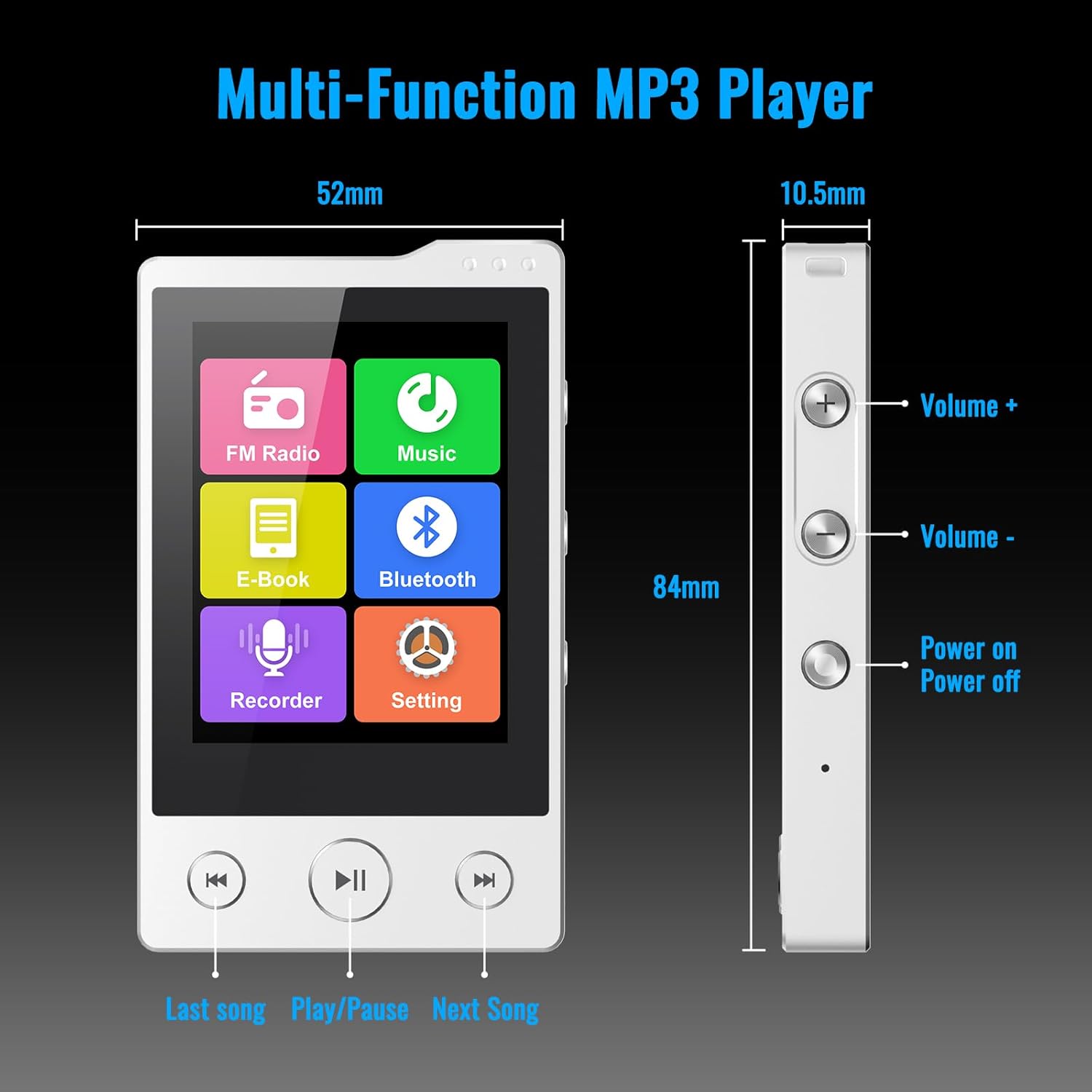
Imej: Depan dan sisi view of the Phinistec F6 MP3 Player with labels for Volume +, Volume -, Power On/Off buttons, and navigation buttons (Last song, Play/Pause, Next Song). Dimensions are also indicated.
- Panel Depan: 2.4-inch touchscreen display, 'Last Song', 'Play/Pause', and 'Next Song' navigation buttons.
- Sebelah Kanan: Volume Up (+), Volume Down (-), and Power On/Off buttons.
- Bawah: 3.5mm audio jack, USB-C port for charging and data transfer, Micro SD card slot.
3. Persediaan
3.1 Mengecas Peranti
- Connect the provided USB-C cable to the player's USB-C port.
- Sambungkan hujung kabel USB yang satu lagi ke penyesuai kuasa USB (tidak disertakan) atau port USB komputer.
- The battery indicator on the screen will show charging status. A full charge provides approximately 50 hours of music playback.

Image: The Phinistec F6 MP3 Player connected to a USB-C charging cable, illustrating the charging process.
3.2 Memasukkan Kad SD Mikro
The device supports Micro SD cards up to 256GB (FAT32 format) for expanded storage.
- Locate the Micro SD card slot on the bottom of the player.
- Masukkan perlahan-lahan kad SD Mikro ke dalam slot sehingga ia berbunyi klik pada tempatnya.
- Untuk mengeluarkannya, tolak kad ke dalam sehingga ia terkeluar.

Image: A Micro SD card being inserted into the Phinistec F6 MP3 Player, highlighting the expandable storage feature.
3.3 Memindahkan Files
- Connect the player to your computer using the USB-C cable.
- The player will appear as a removable disk on your computer.
- Drag and drop your desired music, video, or e-book fileke dalam folder yang sesuai pada pemain atau kad Micro SD.
- Keluarkan peranti dari komputer anda dengan selamat sebelum memutuskan sambungan kabel.
4. Arahan Operasi
4.1 Hidupkan/Mati Kuasa
- Untuk Menghidupkan: Press and hold the Power button on the right side until the screen illuminates.
- Untuk Mematikan: Press and hold the Power button until the power-off option appears on the screen, then confirm.
4.2 Navigasi Asas
- Skrin sentuh: Tap icons to open applications, swipe to navigate menus.
- Butang Kelantangan: Use the '+' and '-' buttons on the right side to adjust audio volume.
- Butang Navigasi: Use the physical 'Last Song', 'Play/Pause', and 'Next Song' buttons below the screen for media control.
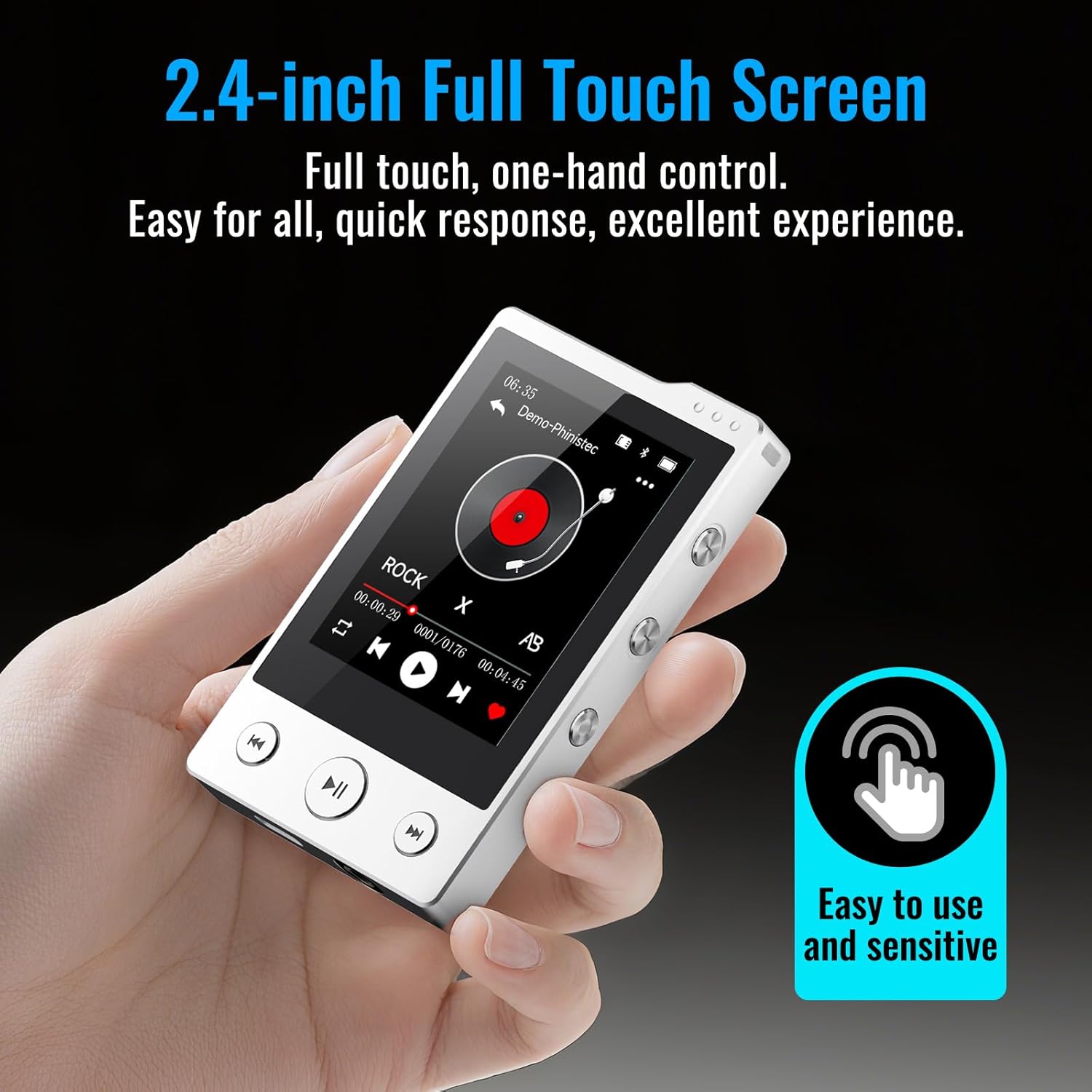
Image: A hand interacting with the 2.4-inch full touchscreen of the Phinistec F6 MP3 Player, illustrating its ease of use.
4.3 Main balik Muzik
- From the main menu, tap the 'Music' icon.
- Layari pustaka muzik anda mengikut artis, album, genre atau folder.
- Ketik lagu untuk memulakan main balik.
- Use the on-screen controls or physical buttons for play/pause, skip tracks, and volume adjustment.
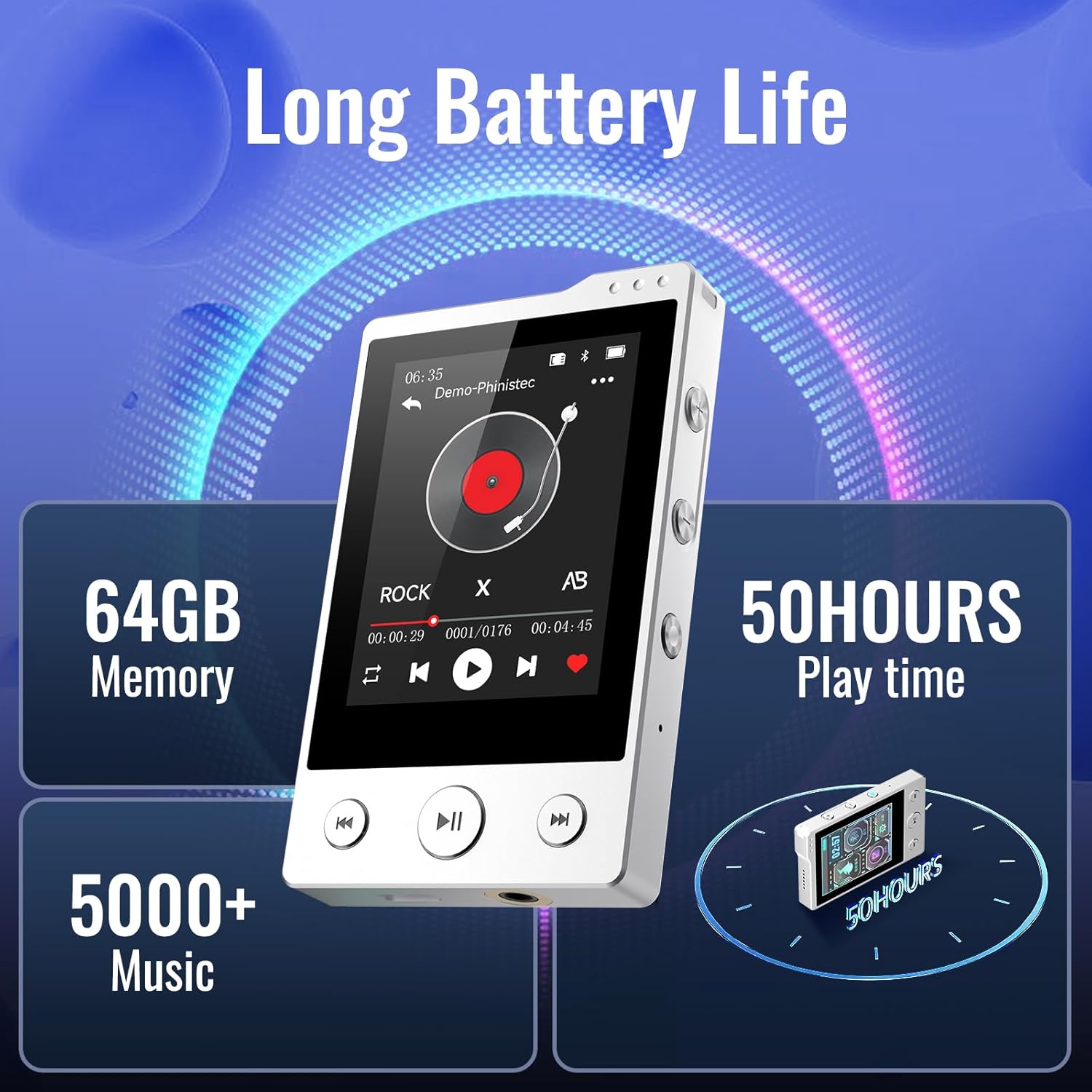
Image: The Phinistec F6 MP3 Player screen showing music playback, along with indicators for 64GB memory and 50 hours of play time.
4.4 Kesambungan Bluetooth
The F6 MP3 player features Bluetooth 5.3 for connecting to Bluetooth headphones or speakers.
- From the main menu, tap the 'Bluetooth' icon or navigate to 'Settings' and select 'Bluetooth'.
- Turn on Bluetooth. The player will scan for available devices.
- Pastikan fon kepala atau pembesar suara Bluetooth anda berada dalam mod berpasangan.
- Pilih peranti anda daripada senarai untuk dipasangkan.
Note: The Phinistec F6 MP3 Player cannot connect to mobile phones or tablets via Bluetooth.

Image: The Phinistec F6 MP3 Player interface displaying icons for FM Radio, Music, E-Book, Bluetooth, Recorder, and Settings, with illustrations of compatible Bluetooth devices like headsets, speakers, and car audio systems.
4.5 Radio FM
To use the FM radio, wired earphones must be connected as they act as the antenna.
- Connect wired earphones to the 3.5mm audio jack.
- From the main menu, tap the 'FM Radio' icon.
- Select 'Auto Search' to find available stations or manually tune.
- You can save favorite stations and record radio broadcasts.
4.6 Perakam Suara
- From the main menu, tap the 'Recorder' icon.
- Ketik butang rakam untuk mula merakam.
- Tap again to pause/resume, and tap the stop button to save the recording.
4.7 Pembaca E-buku
The player supports reading e-books in TXT format.
- Transfer TXT format e-book files kepada pemain.
- From the main menu, tap the 'E-book' icon.
- Select the desired e-book to open and read.
4.8 Main balik Video
The player supports video playback. Some video formats may require conversion using compatible software on a computer before transfer.
- Transfer compatible video files kepada pemain.
- From the main menu, tap the 'Video' icon.
- Pilih video yang dikehendaki file untuk bermain.
4.9 Tetapan
Access the 'Settings' menu to customize various aspects of the player, including:
- Display brightness and timeout
- Tarikh dan masa
- Bahasa
- Tetapan penyama
- System information and factory reset options
5. Penyelenggaraan
- Pembersihan: Gunakan kain lembut dan kering untuk membersihkan peranti. Elakkan pembersih cecair atau bahan yang melelas.
- Storan: Simpan pemain di tempat yang sejuk dan kering jauh dari cahaya matahari langsung dan suhu yang melampau.
- Penjagaan Bateri: Untuk memanjangkan hayat bateri, elakkan daripada menyahcas sepenuhnya bateri dengan kerap. Cas peranti dengan kerap, walaupun tidak digunakan untuk tempoh yang lama.
- Elakkan Kesan: Protect the device from drops and impacts to prevent damage to the screen and internal components.
6. Penyelesaian masalah
| Masalah | Penyelesaian yang Mungkin |
|---|---|
| Peranti tidak dihidupkan. | Ensure the battery is charged. Connect to a power source and try again. If unresponsive, perform a hard reset (refer to device layout for reset pinhole if available, or hold power button for 10-15 seconds). |
| Tidak dapat menyambung ke peranti Bluetooth. | Ensure Bluetooth is enabled on both the player and the target device. Place devices close to each other. Ensure the target device is in pairing mode. Remember, the player cannot connect to phones or tablets. |
| Radio FM tidak berfungsi. | Ensure wired earphones are properly connected to the 3.5mm audio jack, as they function as the antenna. |
| Files not appearing on the player. | Sahkan itu files were transferred to the correct folders. Check if the Micro SD card is properly inserted and formatted (FAT32). Ensure file formats are supported by the player. |
| Skrin sentuh tidak bertindak balas. | Mulakan semula peranti. Jika isu berterusan, pastikan skrin bersih dan bebas daripada lembapan. |
7. Spesifikasi
| Ciri | Perincian |
|---|---|
| Nama Model | F6 |
| Jenama | Phinistec |
| Kapasiti Penyimpanan Memori | 64 GB (Boleh dikembangkan sehingga 256GB melalui Micro SD) |
| Teknologi Ketersambungan | Bluetooth 5.3, Aux (3.5mm), USB-C |
| Ciri Khas | Built-In Speaker, FM Radio, Touch Screen, Voice Recorder |
| Saiz Skrin | 2.4 Inci |
| Peranti Serasi | Headphones, Personal Computer, Bluetooth Speakers |
| Jenis Media | SD mikro |
| Format Audio yang Disokong | APE, FLAC, MP3, OGG, AAC, ACELP, WMA, WAV |
| Bateri | 500mAh (Up to 50 hours music playback) |
| Berat Barang | 6.4 auns |
| Dimensi | 4.41 x 2.83 x 1.46 inci |
8. Waranti dan Sokongan
For warranty information or technical support, please refer to the contact details provided with your purchase documentation or visit the official Phinistec webtapak. Simpan bukti pembelian anda untuk tuntutan waranti.