
1. Pengenalan
Thank you for choosing the Keyluv 75-inch Executive Desk with Hutch and Drawers. This manual provides essential information for the safe assembly, operation, and maintenance of your new desk. Please read these instructions carefully before beginning assembly and retain them for future reference.
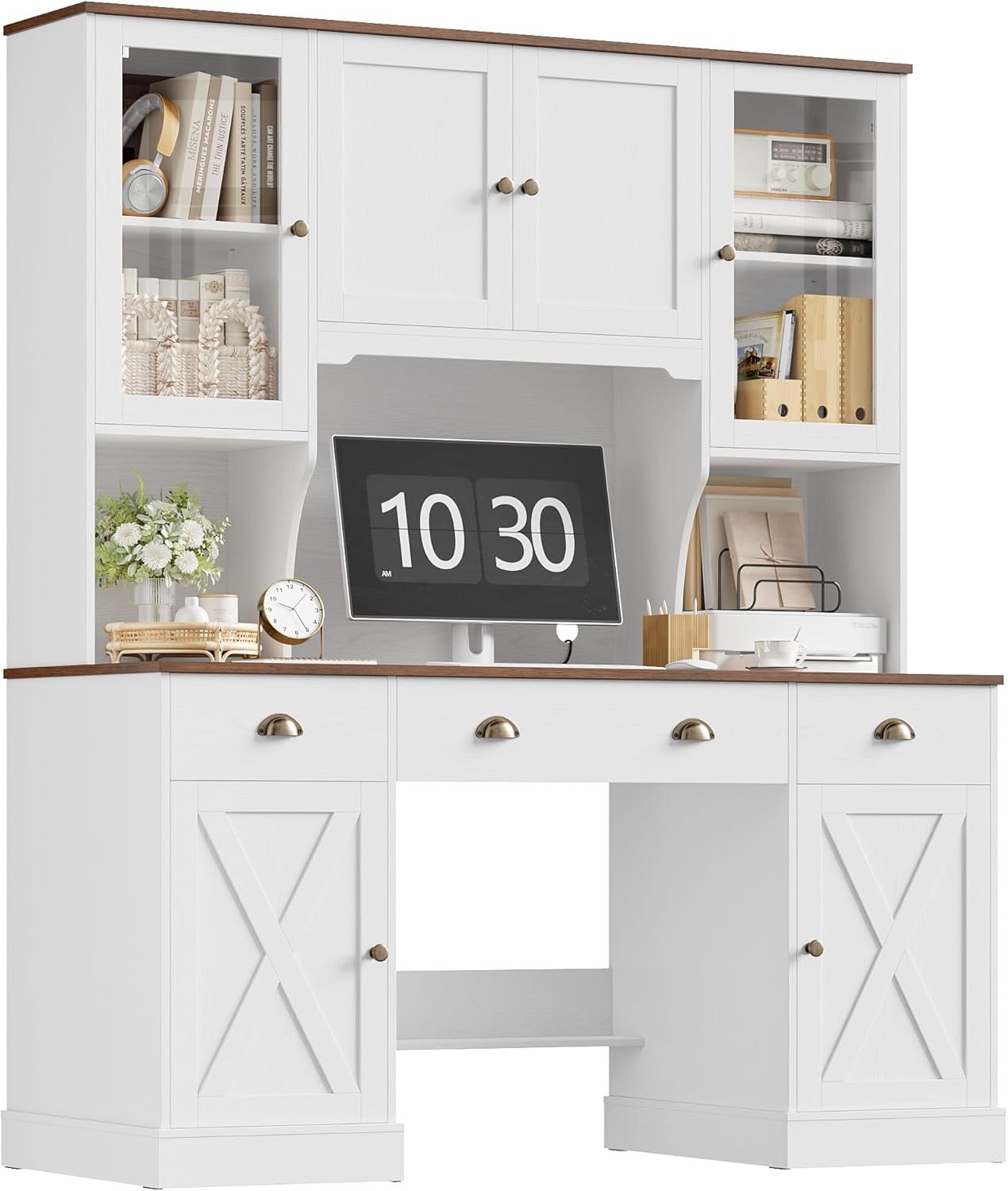
Image 1.1: The Keyluv 75-inch Executive Desk with Hutch and Drawers in White/Brown.
2. Maklumat Keselamatan
CAUTION: This desk is heavy (approximately 192 pounds). Assembly may require two people. Always use proper lifting techniques to avoid injury.
- Pastikan semua komponen ada dan tidak rosak sebelum pemasangan. Jangan teruskan pemasangan jika mana-mana bahagian hilang atau rosak.
- Assemble the desk on a soft, clean surface to prevent scratches or damage to the product and your floor.
- Do not overtighten screws, as this may damage the engineered wood material.
- Jauhkan bahagian kecil dan bahan pembungkusan daripada kanak-kanak dan haiwan peliharaan.
- Once assembled, place the desk on a level surface to ensure stability.
- Jangan berdiri atau duduk di atas meja.
- Distribute weight evenly across the desktop and shelves.
3. Kandungan Pakej
The Keyluv Executive Desk is delivered in two separate packages. Please ensure you have received both boxes before beginning assembly. All components are carefully labeled and accompanied by clear instructions and hardware.
Komponen yang dijangkakan termasuk:
- Desktop panels
- Hutch panels and shelves
- Drawer components and slides
- Cabinet doors and hinges
- Tempered glass panels for hutch doors
- Hardware kit (screws, dowels, cam locks, handles, etc.)
- Alat pemasangan (jika disertakan)

Image 3.1: Desk dimensions and illustration of two package boxes.
4. Arahan Pemasangan (Persediaan)
We recommend two-person assembly for ease and efficiency, especially given the weight and size of the desk. Follow the step-by-step instructions provided in the included assembly manual. Below are general guidelines:
- Buka bungkus dan Kenalpasti Bahagian: Carefully unbox all components. Lay them out on a protected surface. Match each part to the corresponding label in the instruction manual.
- Assemble the Base Desk: Begin by constructing the main desk frame, including the side pedestals and the central desktop support. Ensure all connections are secure.
- Pasang Laci: Assemble the drawer boxes and attach the smooth-gliding drawer slides to both the drawers and the desk frame. Insert the drawers into their respective compartments.
- Pasang Pintu Kabinet: Secure the lower cabinet doors to the pedestals using the provided hinges.
- Assemble the Hutch: Construct the hutch frame, including the central monitor area and side shelving units.
- Install Hutch Doors: Attach the tempered glass doors to the hutch using the appropriate hinges. The glass doors are designed to display items while protecting them from dust.
- Mount Hutch to Desk: Carefully lift and secure the assembled hutch onto the main desk unit. Ensure it is properly aligned and fastened according to the instructions to prevent tipping.
- Pasang Pemegang: Attach all metal handles to the drawers and cabinet doors.
- Pemeriksaan Akhir: Verify that all screws are tightened, and the desk is stable.

Image 4.1: Key structural features for assembly and stability.
5. Ciri-ciri dan Operasi Produk
The Keyluv Executive Desk is designed for functionality and organization, offering a comprehensive workspace solution.
5.1. Desktop and Workspace
The desk features an extra-wide 63"W x 18.7"D desktop, providing ample space for multiple monitors, paperwork, and other work essentials. The surface is made from engineered wood with a laminated finish, offering durability and ease of cleaning.
5.2. Storage Solutions
This desk maximizes storage with a combination of drawers, cabinets, and a hutch:
- Laci Smooth Gliding: Three drawers are integrated into the desk, ideal for organizing electronics, stationery, and other small items. The smooth slides ensure easy access.
- Zoned Storage with Doors: The hutch and lower pedestals offer various storage zones. Glass-door cabinets in the hutch allow for displaying collectibles while protecting them from dust. Multiple lower cabinets provide enclosed storage for larger items.
- Rak boleh laras: Many shelves within the hutch and cabinets are adjustable, allowing you to customize storage space to fit items of various heights.

Image 5.1: Open drawers demonstrating storage capacity.
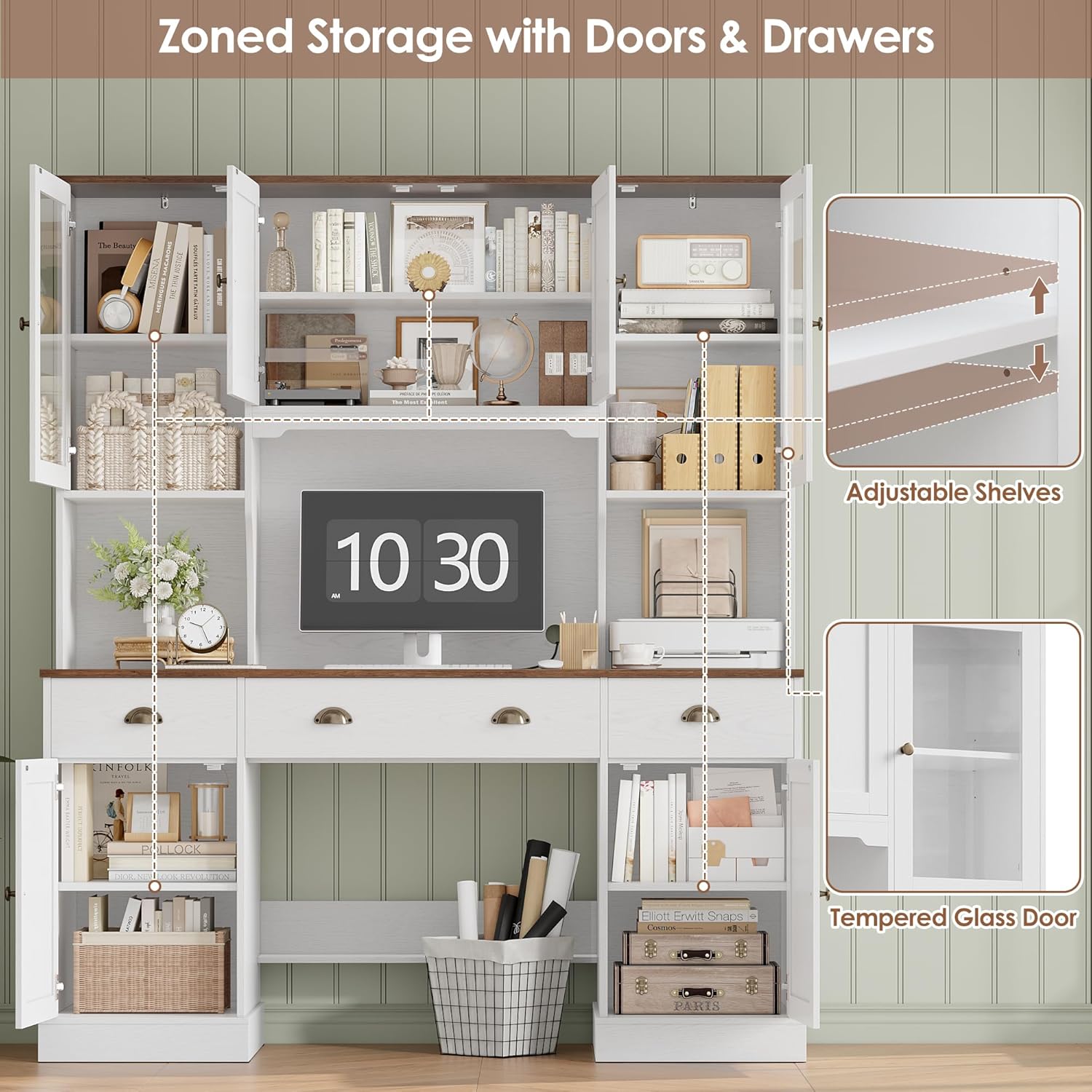
Image 5.2: Zoned storage with adjustable shelves and glass doors.
5.3. Pengurusan Kabel
A dedicated cord management hole is provided on the desktop to help keep cables organized and out of sight, contributing to a tidy workspace.
5.4. Legroom and Comfort
The desk is designed with generous legroom (25" W x 30" H in the central opening) to ensure comfortable use for extended periods.
6. Penyelenggaraan
Proper care will extend the life and appearance of your Keyluv Executive Desk.
- Pembersihan: Lap permukaan dengan lembut, damp cloth. Avoid harsh chemicals, abrasive cleaners, or excessive moisture, which can damage the laminated finish. For glass doors, use a standard glass cleaner.
- Tumpahan: Bersihkan tumpahan dengan segera untuk mengelakkan kotoran atau kerosakan pada kayu yang telah direkayasa.
- Haba dan Kelembapan: Avoid placing hot items directly on the desktop. Use coasters for drinks. Keep the desk away from direct sunlight and excessive humidity to prevent warping or discoloration.
- Perkakasan: Periksa semua skru dan pengikat secara berkala untuk memastikan ia kekal ketat. Ketatkan semula jika perlu untuk mengekalkan kestabilan.
- Menggerakkan Meja: When moving the desk, always lift it rather than dragging it to prevent damage to the legs and frame. If possible, disassemble the hutch from the desk before moving.
7. Penyelesaian masalah
Jika anda menghadapi sebarang masalah dengan meja anda, rujuk penyelesaian biasa berikut:
- Meja goyah:
- Ensure the desk is on a level surface. Adjust any leveling feet if present.
- Check all assembly hardware. Tighten any loose screws or bolts.
- Laci Tidak Meluncur dengan Lancar:
- Sahkan bahawa slaid laci dipasang dan dijajarkan dengan betul.
- Pastikan tiada objek yang menghalang laluan laci.
- Check that the drawer box itself is assembled squarely.
- Pintu Tidak Tertutup dengan Baik:
- Adjust the hinges if they are misaligned. Most hinges allow for minor adjustments.
- Ensure the desk is level and square.
- Bahagian Hilang atau Rosak: If you discover missing or damaged parts during assembly, please contact customer support immediately for assistance.
8. Spesifikasi
| Ciri | Perincian |
|---|---|
| Jenama | Keyluv |
| Nombor Model | KLVB-BH-80 |
| Dimensi Produk (D x W x H) | 19.7"D x 63"W x 75"H |
| Dimensi Desktop (W x D) | 63"L x 18.7"D |
| warna | Putih/coklat |
| Gaya | Rumah ladang |
| bahan | Kayu Kejuruteraan, Kaca Tempered |
| Jenis Selesai | Berlamina |
| Berat Barang | 192 paun |
| Bilangan Laci | 3 |
| Bilangan Kabinet | 3 (including glass-door display cabinets) |
| Bilangan Rak | 7 |
| Perhimpunan Diperlukan | ya |
| Komponen yang Disertakan | Bookcase, Cable Hole, Drawers, Hutch |
9. Sokongan Pelanggan
For any questions, concerns, or assistance with missing/damaged parts, please contact Keyluv customer support. Refer to your purchase documentation for specific contact details or visit the official Keyluv webtapak.
Kami komited untuk memastikan kepuasan anda dengan produk kami.