
1. Pengenalan
This manual provides essential information for the safe and efficient operation of your TOPTRO Quadra Projector. Please read this manual thoroughly before using the projector and retain it for future reference. The TOPTRO Quadra Projector is designed to deliver a high-quality visual and audio experience with its advanced features and smart capabilities.
2. Maklumat Keselamatan
- Jangan halang bukaan pengudaraan. Pastikan aliran udara yang mencukupi di sekitar projektor untuk mengelakkan terlalu panas.
- Jangan dedahkan projektor kepada hujan atau kelembapan untuk mengelakkan renjatan elektrik atau kebakaran.
- Gunakan hanya penyesuai kuasa yang dibekalkan dengan projektor.
- Elakkan melihat terus ke dalam kanta projektor apabila lamp sedang dihidupkan, kerana cahaya terang boleh menyebabkan kerosakan mata.
- Letakkan projektor di atas permukaan yang stabil dan rata untuk mengelakkannya daripada jatuh.
- Jangan cuba membuka atau membaiki projektor itu sendiri. Rujuk semua servis kepada kakitangan yang berkelayakan.
3. Kandungan Pakej
Sahkan bahawa semua item terdapat dalam pakej:
- 1 x TOPTRO Quadra Projector
- 1 x Kabel HDMI
- 1 x Manual Pengguna
- 1 x Alat Kawalan Jauh
4. Produk Lebihview
Familiarize yourself with the main components and interfaces of your TOPTRO Quadra Projector.
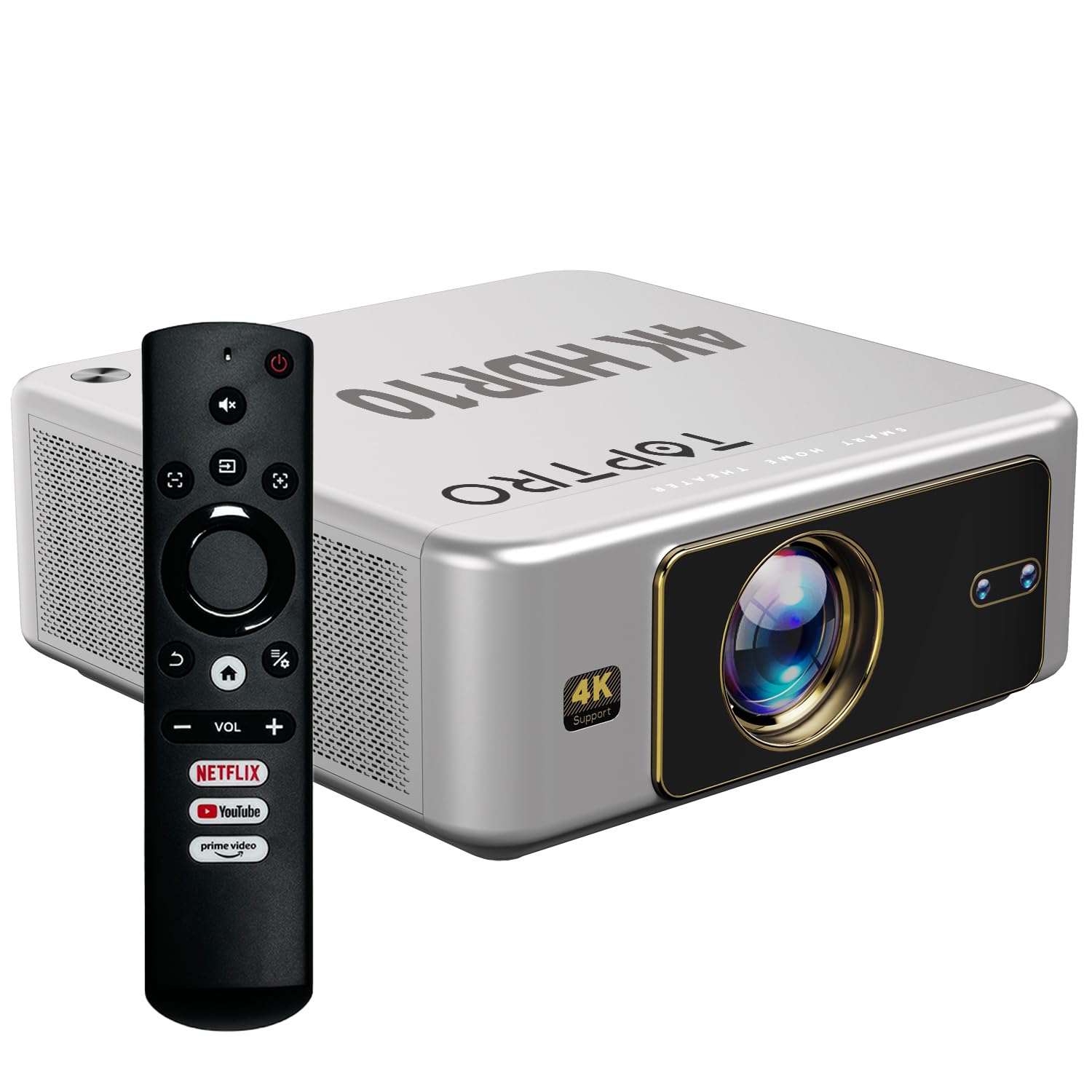
Rajah 4.1: Depan view of the TOPTRO Quadra Projector with included remote control.

Figure 4.2: Rear panel of the projector displaying the power input, audio jack, HDMI ports, and USB ports.
5. Persediaan
5.1 Placement and Projection Size
Position the projector on a stable surface. The TOPTRO Quadra Projector supports a maximum screen size of 300 inches. Adjust the distance from the wall or screen to achieve your desired image size.

Figure 5.1: Recommended projection distances for different screen sizes.
5.2 Sambungan Kuasa
- Sambungkan kabel kuasa ke port input kuasa projektor.
- Palamkan hujung kabel kuasa yang satu lagi ke salur keluar elektrik yang sesuai.
5.3 Kuasa Awal Hidup dan Tetapan Asas
- Tekan butang kuasa pada projektor atau alat kawalan jauh untuk menghidupkannya.
- Upon first use, the projector may guide you through initial setup steps, including language selection and network connection.
5.4 Fokus dan Pembetulan Keystone
The TOPTRO Quadra Projector features AI-powered automatic focus and keystone correction. This system automatically adjusts the image for optimal clarity and shape.
- Fokus Auto: The projector will automatically adjust the image sharpness.
- Batu Kunci Auto: The projector will automatically correct trapezoidal distortion to ensure a rectangular image.
- Auto Obstacle Avoidance & Screen Fit: The projector can detect obstacles and adjust the image to fit the screen area.
If automatic adjustments are not satisfactory, manual adjustments can be made through the settings menu. Navigate to the 'Display & Sound' settings to access these options.

Figure 5.2: Automatic image correction features.
6. Operasi
6.1 Antara Muka Pengguna dan Navigasi
The TOPTRO Quadra Projector runs on a Net-Flix Certified Linux OS, providing a user-friendly interface. Use the remote control to navigate through menus and select applications.

Figure 6.1: Home screen with pre-installed streaming applications.
6.2 Ketersambungan
The projector offers various connectivity options for external devices.
- HDMI: Connect your laptop, MacBook, Blu-ray player, TV sticks, TV boxes, or gaming consoles (e.g., PS4) using the dual HDMI ports. The projector supports HDMI CEC and HDMI EARC for enhanced audio return channel functionality.
- USB: Two USB ports are available for connecting pendrives or hard disks to play media files secara langsung.
- Audio Keluar 3.5mm: Connect external headphones or speakers for a personalized audio experience.
- Wi-Fi: Utilize the 6th Gen Dual Band Wi-Fi (2.4 GHz + 5 GHz) for internet access and streaming.
- Bluetooth 5.2: Connect Bluetooth speakers, headphones, or other compatible audio devices. The projector also supports two-way Bluetooth, allowing it to function as a Bluetooth speaker.
- Miracast: Wirelessly mirror your screen from compatible devices.

Figure 6.2: Connectivity options for external devices.
6.3 Tetapan Paparan
Adjust image quality and display features through the 'Display & Sound' menu.
- Mod Gambar: Select from various preset picture modes (e.g., Vivid) or customize settings like brightness, contrast, and color.
- 4K HDR10+ Support: The projector plays true 4K resolution HDR10+ videos, offering enhanced contrast and color depth.
- MEMC (Anggaran Pergerakan, Pampasan Pergerakan): This technology improves video smoothness and clarity, especially for fast-moving scenes, by interpolating frames.

Figure 6.3: MEMC technology for smoother visuals.
6.4 Tetapan Audio
Manage audio output and formats via the 'Display & Sound' menu.
- Dolby Atmos & Dolby Digital Plus: The projector supports these advanced audio technologies for immersive sound.
- Mod eARC: Enable eARC for high-quality audio return from compatible devices.
- Format Output: Select the appropriate audio output format (e.g., Auto, PCM, Passthrough, Dolby Digital, Dolby Digital Plus) based on your connected audio system.

Figure 6.4: Immersive audio with Dolby Atmos support.
7. Penyelenggaraan
Penyelenggaraan yang betul memastikan jangka hayat dan prestasi optimum projektor anda.
- Pembersihan Kanta: Gently wipe the projector lens with a soft, lint-free cloth specifically designed for optical surfaces. Avoid abrasive materials or harsh chemicals.
- Pembersihan Luaran: Gunakan kain lembut dan kering untuk membersihkan bahagian luar projektor.
- Pencegahan habuk: The TOPTRO Quadra Projector features a fully sealed optical engine, which helps prevent dust, dirt, and moisture from entering the light path. This design reduces the need for frequent internal cleaning and maintains consistent image quality.
8. Penyelesaian masalah
Jika anda menghadapi masalah dengan projektor anda, rujuk kepada masalah dan penyelesaian biasa berikut:
| Masalah | Kemungkinan Punca | Penyelesaian |
|---|---|---|
| Tiada imej dipaparkan | Incorrect input source selected; loose HDMI/USB connection; power issue. | Verify input source in settings; check cable connections; ensure projector is powered on. |
| Tiada bunyi | Volume too low or muted; incorrect audio output setting; external audio device not connected properly. | Adjust volume; check 'Sound output' settings; ensure external speakers are connected and powered. |
| Imej kabur atau herot | Focus or keystone correction issues; projector not placed correctly. | Allow auto-focus/keystone to complete. If issues persist, manually adjust focus and keystone in 'Display & Sound' settings. Ensure the projector is perpendicular to the screen. |
| Alat kawalan jauh tidak berfungsi | Batteries are low or depleted; remote not pointed at IR receiver; obstruction. | Replace batteries; ensure clear line of sight to the projector's IR receiver. |
| Fan noise is noticeable | Normal operation; projector is working hard; ventilation blocked. | Ensure adequate ventilation around the projector. Fan noise is a normal part of projector operation, especially during high-performance tasks. |
9. Spesifikasi
Key technical specifications of the TOPTRO Quadra Projector:
| Ciri | Perincian |
|---|---|
| Jenama | TOPTRO |
| Nama Model | TOPTRO Quadra Projector 4K HDR10+ Dolby |
| Dimensi Produk | 24 x 20 x 10 cm |
| Berat Barang | 2 kg |
| Antara Muka Perkakasan | 3.5mm Audio, Bluetooth 5.2, Dual HDMI (CEC, EARC), Dual USB |
| Peranti Serasi | Gaming Console, Laptop, Smartphone, Speaker, Television |
| Ciri Khas | Dolby Atmos - Dolby Digital Plus, 4K HDR 10+/HLG, Net-Flix Certified Linux OS, 2GB RAM, 32GB ROM, Auto Focus & Keystone, Native 1080p Full HD & True 4K Support, 32000 Lumens Brightness (2600 ANSI), 15W Big Speakers, HDMI ARC, Dual HDMI, Built-in Apps, Dual 5G & 2.4G WiFi 6, Bluetooth, WiFi Display, Electronic Focus & 6D Electronic correction, Fully Sealed Optical Engine, MEMC |
| Teknologi Paparan | LCD |
| Kecerahan Imej | 32000 Lumens (2600 ANSI) |
| Nisbah Kontras Imej | 22000:1 |
| Nisbah Aspek | 16:9 |
| Native Screen Resolution | 1920 x 1080 (HD Penuh) |
| Resolusi Disokong | Up to 3840 x 2160 Pixels (4K) |
| Kadar Segar Semula | 60 Hz |
| Lamp kehidupan | 50000 Jam |
| Faktor Bentuk | Mudah alih |
| Jenis Pemasangan | Pemasangan Siling |
| Negara Asal | China |
10. Waranti dan Sokongan
For warranty information, technical support, or service inquiries, please contact TOPTRO Projectors India using the details below:
- e-mel: support@toptro.in or sreeprojectors@gmail.com
- Whatsapp: 8341888860
- Webtapak: toptro.in
Please have your product model number (Quadra 4K HDR10+ Dolby) and purchase details ready when contacting support.