
pengenalan
Welcome to the truke Buds Lite Earbuds user manual. This guide provides detailed instructions on how to set up, operate, maintain, and troubleshoot your new truke Buds Lite Earbuds (Model S44). Please read this manual carefully before using the product to ensure optimal performance and longevity.
The truke Buds Lite Earbuds are designed for wireless audio enjoyment, offering convenience and quality sound for various activities including entertainment, gaming, and professional use.
Apa yang ada dalam Kotak
Upon unboxing, please ensure all the following components are present:
- Sarung Pengecas Tanpa Wayar
- Kabel Pengecasan
- Telinga (pelbagai saiz)
- Manual Pengguna
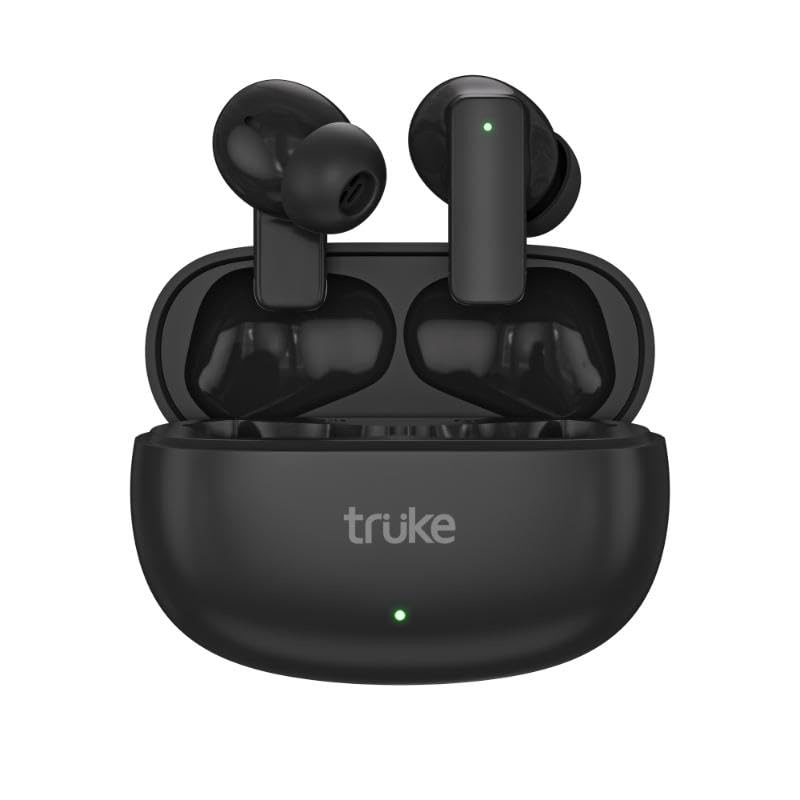
Image: truke Buds Lite Earbuds with their charging case. The earbuds are shown nestled within the open case, highlighting their compact design and the case's smooth finish.
Persediaan
1. Mengecas Fon Telinga dan Sarung
Before first use, fully charge the earbuds and the charging case. The case contains a built-in battery to charge the earbuds multiple times on the go.
- Connect the provided charging cable to the charging port on the case and the other end to a USB power adapter (not included) or a computer's USB port.
- The indicator light on the charging case will show the charging status. Refer to the indicator light section (if available on the physical product) for specific light patterns.
- Place the earbuds into the charging case. Ensure they are correctly seated; magnetic contacts will hold them in place. The earbuds will begin charging automatically.
- Allow approximately 1-2 hours for a full charge of both the case and earbuds.
2. Gandingan Awal dengan Peranti
Follow these steps to pair your truke Buds Lite Earbuds with your smartphone, tablet, or other Bluetooth-enabled device:
- Pastikan fon telinga dicas.
- Open the charging case. The earbuds will automatically enter pairing mode, and their indicator lights will flash (refer to product for specific light patterns).
- Pada peranti anda, pergi ke tetapan Bluetooth dan hidupkan Bluetooth.
- Cari untuk available devices. You should see "truke Buds Lite" appear in the list.
- Select "truke Buds Lite" to connect. Once connected, a voice prompt will confirm the connection, and the earbud indicator lights will turn off or show a steady light.
- If pairing fails, turn off the earbuds, close the case, and repeat the steps.
Arahan Operasi
The truke Buds Lite Earbuds feature touch controls for easy management of audio playback and calls. Specific touch functions may vary slightly; refer to the quick start guide included with your product for precise details.
Basic Controls (Typical)
- Main/Jeda: Ketik sekali pada salah satu fon telinga.
- Lagu Seterusnya: Ketik dua kali pada fon telinga kanan.
- Trek Sebelumnya: Ketik dua kali pada fon telinga kiri.
- Kelantangan: Ketik tiga kali pada fon telinga kanan.
- Perlahankan suara: Ketik tiga kali pada fon telinga kiri.
- Aktifkan Pembantu Suara: Tekan lama (2 saat) pada mana-mana fon telinga.
Pengurusan Panggilan
- Jawab/Tamatkan Panggilan: Ketik sekali pada sama ada fon telinga semasa panggilan masuk atau panggilan aktif.
- Tolak Panggilan: Long press (2 seconds) on either earbud during an incoming call.
Penyelenggaraan
Proper maintenance ensures the longevity and optimal performance of your truke Buds Lite Earbuds.
- Pembersihan: Regularly clean the earbuds and charging case with a soft, dry, lint-free cloth. Do not use abrasive cleaners, alcohol, or chemical solvents. Gently remove any earwax or debris from the eartips and speaker mesh using a small, soft brush or cotton swab.
- Storan: When not in use, store the earbuds in their charging case to protect them from dust, dirt, and physical damage. Store the case in a cool, dry place away from direct sunlight and extreme temperatures.
- Penjagaan Bateri: Untuk menjimatkan hayat bateri, elakkan daripada kerap mengecas fon telinga dan sarungnya sepenuhnya. Caskannya secara berkala, walaupun tidak digunakan secara berterusan.
- Tahan Air: The earbuds may have a degree of water resistance (check product specifications for IP rating). Avoid submerging them in water or exposing them to heavy rain. Dry them thoroughly if they get wet.
Menyelesaikan masalah
If you encounter issues with your truke Buds Lite Earbuds, try the following solutions:
Fon Telinga Tidak Berpasangan/Bersambung
- Pastikan kedua-dua fon telinga dicas.
- Matikan Bluetooth pada peranti anda, kemudian hidupkan semula.
- Letakkan semula fon telinga ke dalam bekas pengecasan, tutup penutupnya, tunggu beberapa saat, kemudian buka penutupnya untuk memasuki semula mod berpasangan.
- Forget "truke Buds Lite" from your device's Bluetooth list and attempt to pair again.
- Cuba gandingkan dengan peranti lain untuk menolak isu khusus peranti.
Tiada Bunyi atau Kelantangan Rendah
- Semak tahap kelantangan pada kedua-dua peranti anda dan fon telinga.
- Pastikan fon telinga diletakkan dengan betul di telinga anda.
- Bersihkan sebarang serpihan daripada jaring pembesar suara fon telinga.
- Sambung semula fon telinga ke peranti anda.
Isu Pengecasan
- Pastikan kabel pengecasan disambungkan dengan selamat pada kedua-dua bekas dan sumber kuasa.
- Try a different charging cable or USB power adapter.
- Bersihkan sesentuh pengecasan pada kedua-dua fon telinga dan sarung.
Spesifikasi
Below are the technical specifications for the truke Buds Lite Earbuds (Model S44):
| Nama Model | truke Buds Lite earbuds |
| Nombor Model | S44 |
| Teknologi Ketersambungan | Tanpa wayar |
| Komunikasi Tanpa Wayar | Bluetooth |
| Penempatan Telinga | Di Telinga |
| Faktor Bentuk | Wayarles Benar |
| Berat Barang | 36.2 Gram |
| Dimensi Produk | 6.3 x 2.7 x 4.5 cm |
| Bateri | 3 9V batteries required (included), Lithium Polymer |
| Peranti Serasi | Telefon bimbit, Desktop, Komputer riba, Tablet |
| Pengeluar | Optiemus Electronics Limited |
| Pengimport | Eccentric Enterprises Private Limited |
Waranti dan Sokongan
Your truke Buds Lite Earbuds come with a Waranti 12 Bulan dari tarikh pembelian. Sila simpan bukti pembelian anda untuk tuntutan waranti.
For technical support, warranty claims, or further assistance, please contact truke customer service. Contact details can typically be found on the official truke webtapak atau melalui peruncit tempat produk itu dibeli.
Manufacturer: Optiemus Electronics Limited
Importer: Eccentric Enterprises Private Limited