1. Maklumat Keselamatan
Please read this manual carefully before operating the BUBLUE D10P Robotic Pool Cleaner. Retain this manual for future reference.
- Pastikan bekalan kuasa diputuskan sambungannya sebelum sebarang penyelenggaraan atau pembersihan.
- Do not operate the cleaner if the power cable is damaged. Contact customer support for replacement.
- Keep children and pets away from the pool area during cleaner operation.
- Only use the provided power box and accessories.
- Pembersih ini direka untuk kegunaan kolam renang sahaja. Jangan gunakannya untuk tujuan lain.
2. Kandungan Pakej
Sahkan bahawa semua item terdapat dalam pakej:
- 1 x Robotic Pool Cleaner
- 1 x Kotak Kuasa
- 1 x Manual Pengguna
- 1 x Carabiner
- 1 x Tali

Image: All components included in the BUBLUE D10P package, including the robotic cleaner, power box, user manual, carabiner, and rope.
3. Produk Lebihview
The BUBLUE D10P Robotic Pool Cleaner is designed for comprehensive pool cleaning with advanced features.
3.1 Ciri-ciri Utama
- Pembersihan 4-dalam-1: Offers Floor Only, Wall Only, and Auto Mode for versatile cleaning, including waterline scrubbing.
- Superior Suction Power: Equipped with Bluehole Technology, a 150 Watt Three-Axis Motor, and dual suction ports for effective debris removal.
- Kawalan APP Pintar: Connect via Bluetooth or WiFi for real-time status monitoring, custom scheduling, and remote control.
- AI Navigation: Bluesonic Path Navigation intelligently maps the pool for maximum coverage and obstacle detection.
- TangleEase™ Tech: Corded design with anti-tangle technology ensures uninterrupted, long-duration cleaning.
3.2 Komponen

Image: The D10P cleaner demonstrating its ability to clean the pool floor, walls, and waterline, highlighting its versatile cleaning modes.

Imej: Terperinci view of the cleaner's powerful suction system and scrubbing brushes.

Image: Illustration of the dual suction and large filter basket capacity for efficient debris collection.
4. Persediaan
Follow these steps to set up your BUBLUE D10P Robotic Pool Cleaner:
- Connect the Power Box: Securely connect the cleaner's cable to the power box. Ensure the connection is tight to prevent water ingress.
- Position the Power Box: Place the power box in a safe, dry location, at least 3.5 meters (11.5 feet) from the pool edge.
- Uncoil the Cable: Gently uncoil the floating cable and ensure it is free of tangles.
- Letakkan di Kolam Renang: Hold the cleaner by its handle and slowly submerge it into the pool. Allow it to sink to the bottom, releasing sebarang buih udara yang terperangkap.
- Sambung ke Alur Kuasa: Plug the power box into a grounded electrical outlet.

Image: The robotic cleaner and its power box ready for operation beside the pool.
Video: Demonstrates the unboxing and initial setup of the BUBLUE D10P robotic pool cleaner, including connecting the power unit and placing it into the pool.
5. Arahan Operasi
The BUBLUE D10P offers both manual control via the power box and advanced control through a mobile application.
5.1 Manual Operation (Power Box)
- Hidupkan kuasa: Press the power button on the power box. The indicator light will illuminate.
- Pilih Mod: Press the 'MODE' button to cycle through available cleaning modes: SEMUA (Floor & Wall), DINDING (Wall Only), LANTAI (Floor Only).
- Tetapkan Masa: Press the 'TIME' button to select the desired cleaning duration: 2H (2 jam), 3H (3 jam), 4H (4 jam).
- The cleaner will begin its cycle according to the selected settings.

Image: The control panel of the power box, showing options for mode and time selection.
5.2 Kawalan Apl
Download the BUBLUE app from your device's app store to unlock advanced features:
- Sambung: Pair your device via Bluetooth or WiFi as instructed in the app.
- Remote Control Car Mode: Manually steer the cleaner for precise spot cleaning.
- Penjadualan Tersuai: Set specific cleaning times and modes for automated operation.
- Return to Waterline: Use the one-touch feature for easy retrieval of the cleaner.

Image: The mobile app interface for controlling the D10P cleaner, including mode selection and remote control options.
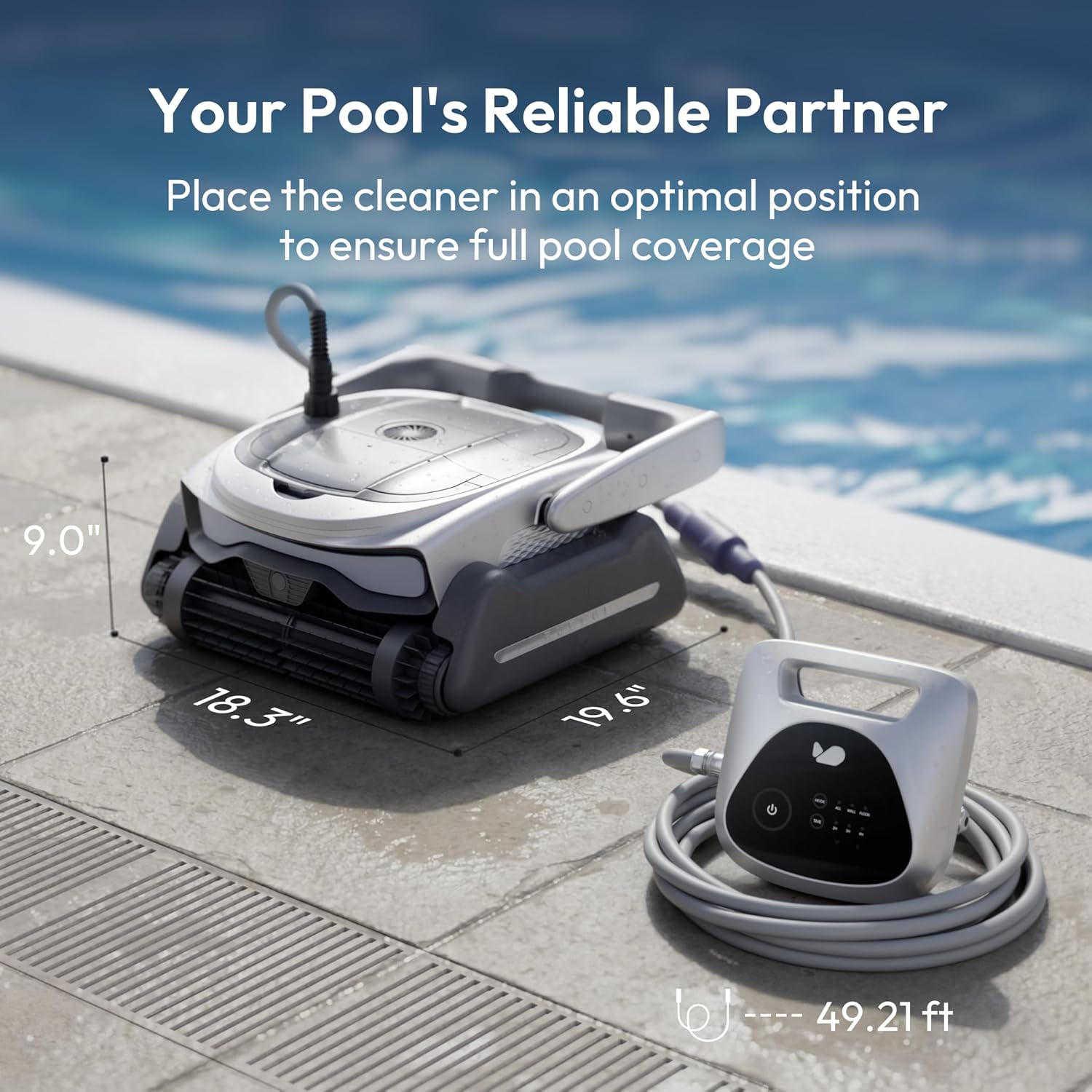
Image: The app's scheduling function for automated cleaning tasks.

Image: The cleaner automatically returning to the waterline for easy retrieval, controlled by the app.
Video: Shows the D10P pool vacuum operating in an above-ground pool, demonstrating its cleaning capabilities and the use of the control panel.
6. Penyelenggaraan
Regular maintenance ensures optimal performance and longevity of your cleaner.
6.1 Membersihkan Bakul Penapis
- Matikan: Putuskan sambungan pembersih daripada bekalan kuasa.
- Remove Cleaner: Carefully lift the cleaner from the pool using its handle.
- Kompartmen Penapis Terbuka: Locate and open the filter compartment latches.
- Remove Baskets: Pull out the dual filter baskets.
- Bilas: Rinse the filter mesh thoroughly with clean water to remove all debris.
- Pasang semula: Place the clean filter baskets back into the cleaner and secure the compartment latches.

Image: Demonstrates the simple process of removing and rinsing the filter basket.
Video: Illustrates the process of cleaning the filter baskets of the robotic pool cleaner, showing how to remove debris effectively.
7. Penyelesaian masalah
Rujuk jadual di bawah untuk isu biasa dan penyelesaiannya:
| Isu | Kemungkinan Punca | Penyelesaian |
|---|---|---|
| Pusing kabel atau belitan kabel | Obstacles in the pool | Remove obstacles from the pool. |
| Panjang kabel tidak mencukupi dalam air | Place enough cable in the water to allow the cleaner to reach the farthest corner of the pool. | |
| Objek asing tersangkut di antara roda | Remove foreign objects from the cleaner. | |
| Lampu merah berkelip | Serpihan tersangkut di pendesak | Unplug the power box and then remove the debris. |
| Pendesak disekat | Unplug the power supply and then remove the debris. | |
| Motor tidak berfungsi | Power or signal connection not properly connected | Check the cable connections between the cleaner and the power box. |
| Pembersih tidak tenggelam | Span pada berus roller sudah kering | Wet the sponge on the roller brush to keep it moist. |
| Pembersih terbalik | Tapis tersumbat | Clean the filter and remove debris from the filter basket. |
| Pembersih bergerak perlahan atau membersihkan dengan tidak cekap | Tapis tersumbat | Clean the filter and remove debris from the filter basket. |
Jika penyelesaian yang dicadangkan ini tidak menyelesaikan masalah anda, sila hubungi pasukan sokongan pelanggan kami.
8. Spesifikasi
| Ciri | Perincian |
|---|---|
| Jenama | BUBLUE |
| Nama Model | D10P |
| Dimensi Produk | 19.6"L x 18.3"W x 9"H |
| Berat Barang | 35.5 paun |
| bahan | plastik |
| warna | Kelabu |
| Sumber Kuasa | Elektrik Bertali |
| Voltage | 28 Volt |
| Kapasiti | 6 Liters (Dual 3L filter baskets) |
| Kaedah Kawalan | App, Manual Buttons |
| Saiz Kolam Maksimum | Sehingga 1,076 Kaki Persegi. |
| Ciri Khas | 3 Cleaning Modes (Floor Only, Wall Only, Auto Mode), APP Control, Custom Scheduling, Corded Anti-Tangle Design, Enhanced Suction Power with Bluehole Tech, Smart Navigation |
9. Waranti dan Sokongan
The BUBLUE D10P Robotic Pool Cleaner is backed by a Waranti 2 tahun. For any inquiries, technical assistance, or warranty claims, please contact BUBLUE customer support.
Contact information can be found on the official BUBLUE webtapak atau melalui platform pembelian anda.