
1. Arahan Keselamatan Penting
Please read all instructions carefully before using this appliance and retain them for future reference. Failure to follow these instructions may result in electric shock, fire, or serious personal injury.
- Pastikan bekalan kuasa voltage sepadan dengan label penilaian pada perkakas.
- Jangan kendalikan kipas dengan kord atau palam yang rosak. Jika kord rosak, ia mesti digantikan oleh pengilang, ejen servisnya atau orang yang berkelayakan untuk mengelakkan bahaya.
- Sentiasa cabut plag kipas dari soket kuasa sebelum membersihkan, menservis atau mengalihkannya.
- Jangan masukkan jari atau sebarang objek ke dalam gril kipas semasa ia beroperasi.
- Keep the fan away from water or other liquids. Do not use it in wet or damp persekitaran.
- Perkakas ini hanya untuk kegunaan dalaman. Jangan gunakan di luar rumah.
- Do not place the fan near heat sources such as radiators, heat registers, stoves, or other appliances that produce heat.
- Awasi kanak-kanak untuk memastikan mereka tidak bermain dengan perkakas.
- Do not use the fan in areas where gasoline, paint, or flammable liquids are stored.
2. Produk Lebihview
The Altus AL 40 TFB is a sleek and efficient tower air cooler designed for indoor use. It features a compact design, multiple speed settings, and easy-to-use push-button controls.
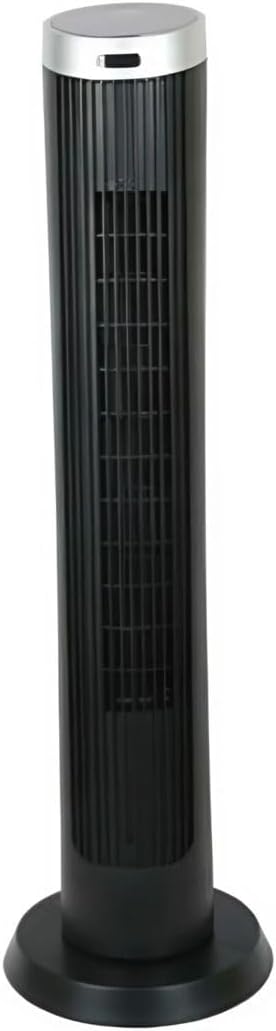
Rajah 2.1: Depan view of the Altus AL 40 TFB Tower Air Cooler. This image shows the tall, slender black body of the fan with its air outlet grille and a stable round base.
Komponen:
- Panel Kawalan: Terletak di bahagian atas unit untuk akses mudah ke semua fungsi.
- Gril Saluran Udara: Vertical grille on the front for air dispersion.
- Pangkalan: Stable round base for secure placement.
- Kord Kuasa: Terletak di bahagian belakang unit.

Rajah 2.2: Terperinci view of the control panel on top of the Altus AL 40 TFB Tower Air Cooler. The panel features a digital display showing '28' and several push buttons for various functions.
3. Persediaan
Follow these steps to set up your Altus AL 40 TFB Tower Air Cooler:
- Bongkar: Tanggalkan kipas dari pembungkusannya dengan berhati-hati. Simpan pembungkusan untuk penyimpanan atau pengangkutan pada masa hadapan.
- Pemasangan Tapak (jika diperlukan): Some models may require minor base assembly. If your unit's base is detached, align the base sections and secure them according to the diagrams in the packaging. Ensure it is firmly attached.
- penempatan: Place the fan on a firm, level surface. Ensure there is adequate space around the fan for proper airflow, at least 30 cm (12 inches) from walls or furniture. This appliance is designed for indoor use only.
- Sambungan Kuasa: Plug the power cord into a standard electrical outlet. Ensure the outlet meets the voltage keperluan yang dinyatakan pada label produk.
4. Arahan Operasi
Your Altus AL 40 TFB Tower Air Cooler is equipped with user-friendly push-button controls on the top panel.
Fungsi Panel Kawalan:
- Butang kuasa (⏻): Press once to turn the fan ON, press again to turn it OFF.
- Butang Kelajuan (💨): Press repeatedly to cycle through the 3 available fan speeds: Low, Medium, and High. The current speed setting may be indicated on the digital display.
- Butang Mod (M): If available, press to select different operating modes (e.g., Normal, Natural, Sleep). Refer to the digital display for the active mode.
- Butang Ayunan (↔): Press to activate or deactivate the oscillation function, which allows the fan to rotate from side to side to distribute air over a wider area.
- Butang Pemasa (🕒): If available, press to set an automatic shut-off timer. Each press typically increases the timer duration by a set increment (e.g., 1 hour).
Operasi Am:
- Palamkan kipas ke salur keluar kuasa yang sesuai.
- Tekan Butang Kuasa (⏻) to turn on the fan.
- Select your desired fan speed using the Speed Button (💨).
- Activate oscillation if desired by pressing the Oscillation Button (↔).
- To turn off the fan, press the Power Button (⏻) lagi.
5. Penyelenggaraan
Regular maintenance ensures optimal performance and extends the lifespan of your Altus AL 40 TFB Tower Air Cooler.
Pembersihan:
- Sentiasa cabut plag kipas sebelum membersihkan.
- Pembersihan Luaran: Lap permukaan luar kipas dengan lembut, damp kain. Jangan gunakan pembersih, lilin atau pengilat yang kasar kerana ia boleh merosakkan kemasan.
- Gril Masuk/Alir Keluar Udara: Use a vacuum cleaner with a brush attachment to gently remove dust and debris from the air inlet and outlet grilles. Do not attempt to disassemble the fan for cleaning.
- Pastikan kipas benar-benar kering sebelum memasangnya semula dan beroperasi.
Storan:
Apabila tidak digunakan untuk tempoh yang lama, simpan kipas di tempat yang sejuk dan kering. Adalah disyorkan untuk menyimpannya di dalam pembungkusan asalnya untuk melindunginya daripada habuk dan kerosakan.
6. Penyelesaian masalah
If you encounter any issues with your Altus AL 40 TFB Tower Air Cooler, please refer to the following common problems and solutions:
- Kipas tidak dihidupkan:
- Periksa sama ada kord kuasa dipasang dengan selamat ke salur keluar elektrik yang berfungsi.
- Ensure the power button on the control panel has been pressed.
- Verify that the household circuit breaker or fuse has not tripped.
- Aliran udara yang lemah:
- Check if the fan speed is set to a higher setting.
- Ensure the air inlet and outlet grilles are not blocked by dust or obstructions. Clean them if necessary.
- Bunyi luar biasa:
- Pastikan kipas diletakkan pada permukaan yang stabil dan rata.
- Check for any foreign objects that might have fallen into the fan grilles.
- Jika bunyi bising berterusan, hentikan penggunaan dan hubungi sokongan pelanggan.
If the problem cannot be resolved using the above steps, please contact Altus customer support.
7. Spesifikasi
Detailed technical specifications for the Altus AL 40 TFB Tower Air Cooler:
| Ciri | Spesifikasi |
|---|---|
| Jenama | Altus |
| Nama Model | AL 40 TFB |
| warna | Hitam |
| Reka Bentuk Kipas Elektrik | Floor Fan (Tower Type) |
| Sumber Kuasa | Elektrik Bertali |
| Dimensi Produk (D x W x H) | 29D x 29W x 101H cm |
| Jenis Pemasangan | Lantai Lantai |
| Jenis Selesai | Dilukis |
| Penggunaan Dalaman/Luar | Dalaman |
| Kaedah Kawalan | Butang Tekan |
| Bilangan Tahap Kuasa | 3 |
| Tanpa wayar | Tidak |
8. Waranti dan Sokongan
Altus provides comprehensive support for its products. For any assistance or warranty-related inquiries, please contact our customer service.

Rajah 8.1: Altus customer service and warranty information. The image displays the Altus logo, a message about service availability, and a contact number for support.
Our services are always available for your Altus products. You can benefit from our door-to-door service by calling our support line for any assistance you may need.
Arçelik Service Warranty: For products under warranty, our home product pickup service is provided free of charge.
Customer Support Line: 0850 210 0 888
Please have your product model number (AL 40 TFB) and purchase details ready when contacting support.