
pengenalan
This manual provides detailed instructions for the operation and maintenance of your NUISK SPSJ-4k Dual Screen Sports Camera. Designed for capturing dynamic moments, this compact camera features 4K video recording, electronic image stabilization, and versatile mounting options. Please read this manual thoroughly to ensure proper use and to maximize your camera's performance.
Apa yang ada dalam Kotak
The NUISK SPSJ-4k package includes the following items:
- NUISK SPSJ-4k Dual Screen Sports Camera
- Sarung Kalis Air
- Loket Magnet
- Various Mounting Accessories (e.g., clip, quick release base, neck bracket, small hole adapter, bandage)
- Kabel Pengecas USB-C
- 128GB Micro SDXC Memory Card
- Manual Arahan
- Kain Pembersih

This image displays the complete set of items included with your NUISK SPSJ-4k camera, such as the camera unit, waterproof housing, magnetic necklace mount, various clips and adapters for different surfaces, a USB charging cable, and the user manual.
Produk Selesaiview
The NUISK SPSJ-4k is a compact and versatile action camera designed for various activities. It features dual screens for easy framing and control, along with robust video capabilities.
Ciri-ciri Utama:
- Magnetic Hands-Free Mounting: Securely attaches to clothing or accessories for POV recording.
- Pocket-Size Design: Ringan dan mudah alih untuk pengangkutan yang mudah.
- Smooth 4K Footage with EIS Stabilization: Reduces shake for clear and professional-looking videos.
- Keupayaan kalis air: Submersible up to 98ft (30m) with the included waterproof case.
- Aksesori Serbaguna: Includes mounts for hats, chest, bikes, and more.
- Dwi Skrin: Front and rear screens for flexible viewing dan kawalan.
- Kesambungan Wi-Fi: Connects to a smartphone app for remote control and file pemindahan.
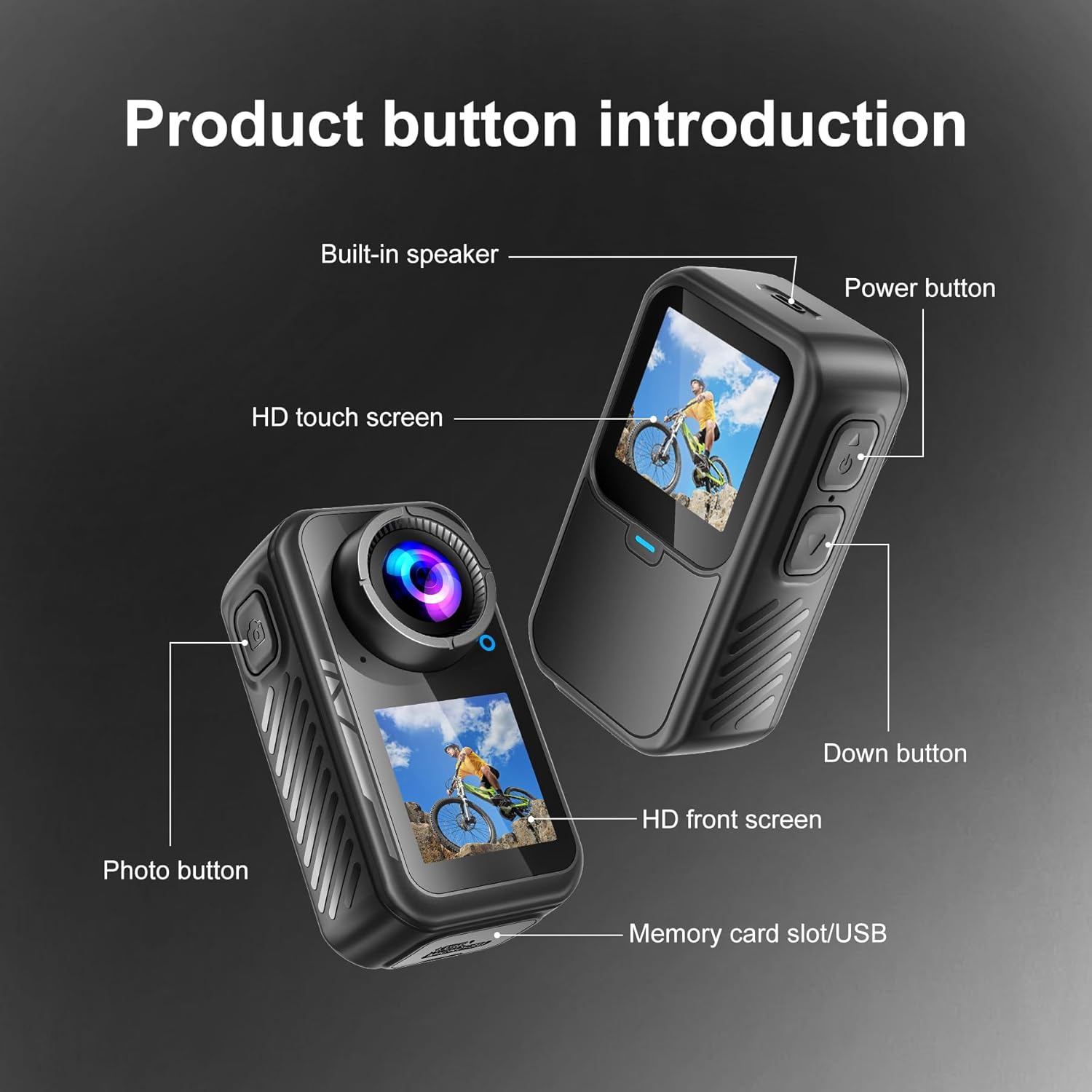
This diagram highlights the key physical features of the camera, including the power button, photo button, HD touch screen, HD front screen, built-in speaker, and the memory card slot/USB port.
Persediaan
- Pengecasan Awal: Connect the camera to a power source using the provided USB-C charging cable. The camera will indicate charging status on its screen.
- Masukkan Kad SD Mikro: Locate the memory card slot (often near the USB port, as shown in Figure 2). Insert the 128GB Micro SDXC card (included) into the slot until it clicks. Ensure the card is inserted correctly to avoid damage.
- Hidupkan kuasa: Press and hold the Power button (refer to Figure 2) to turn on the camera.
- Tetapan Bahasa, Tarikh dan Masa: Upon first use, the camera may prompt you to set the language, date, and time. Use the touchscreen or navigation buttons to select your preferences. It is recommended to set the correct date and time for accurate video timestamps.
- Format Kad SD: For optimal performance and to ensure compatibility, it is recommended to format the SD card directly on the camera. Navigate to the settings menu and select the "Format SD Card" option. Confirm your selection. Nota: Pemformatan akan memadamkan semua data pada kad.
- Connect to Mobile App (Optional):
- Download the official NUISK app from your smartphone's app store.
- On the camera, navigate to the Wi-Fi settings and enable Wi-Fi. The camera screen may display a QR code or network name (SSID) and password.
- On your smartphone, connect to the camera's Wi-Fi network.
- Open the NUISK app. You should now be able to control the camera remotely and view/ muat turun media.
- Attach Mounting Accessories: Depending on your activity, select the appropriate mounting accessory.
- For underwater use, place the camera inside the waterproof case and secure it.
- For hands-free POV recording, attach the magnetic pendant or chest strap.
- Utilize other clips and adapters for helmets, bicycles, or other surfaces as needed.
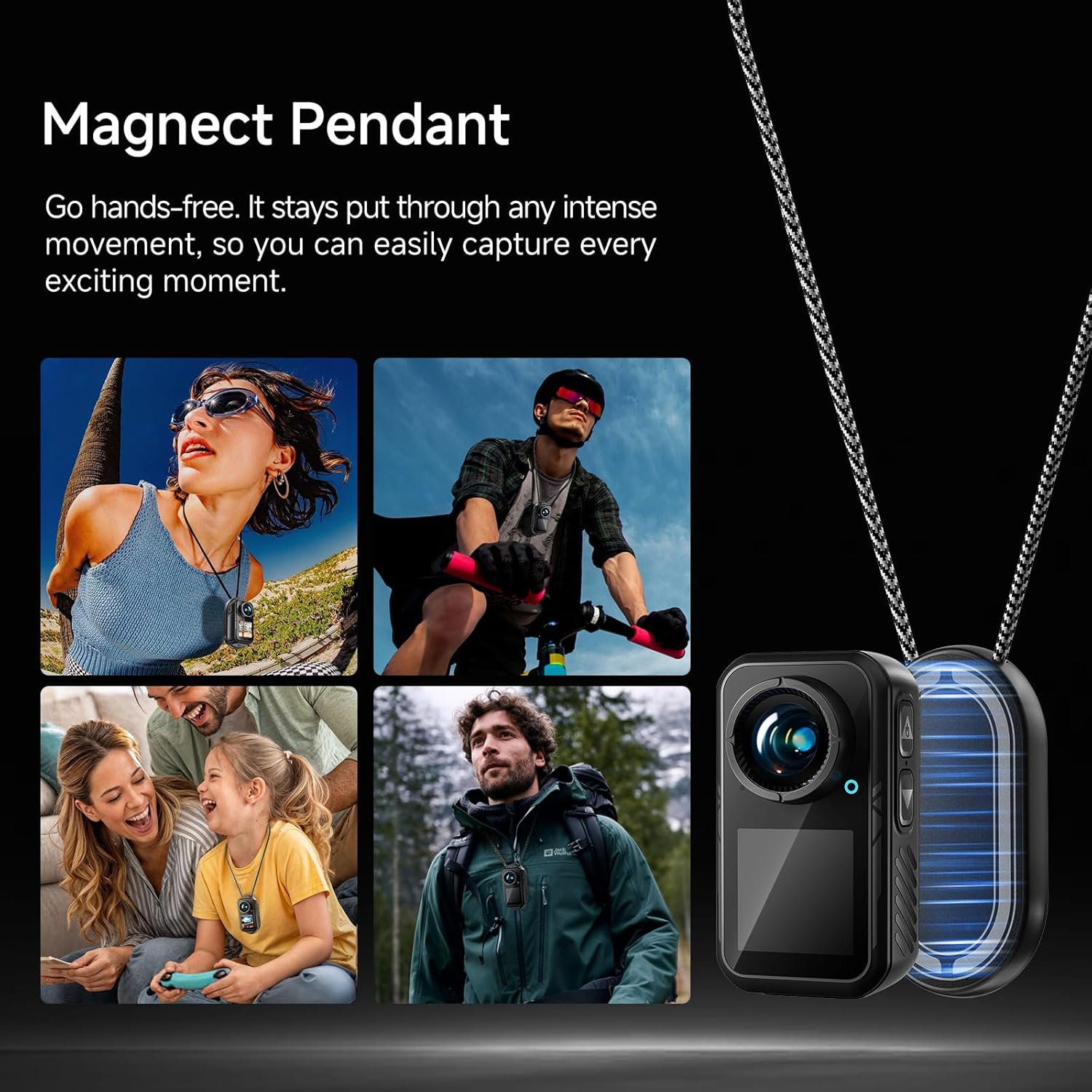
The magnetic pendant allows for secure, hands-free attachment of the camera to your clothing, ensuring stable capture during various activities.

The included waterproof case protects the camera, allowing it to be submerged up to 98 feet (30 meters) for capturing aquatic adventures.
Arahan Operasi
1. Operasi Asas
- Hidupkan/Mati Kuasa: Press and hold the Power button (top right button) to turn the camera on or off.
- Navigasi Skrin: The camera features an HD touchscreen for intuitive navigation. Swipe up, down, left, or right to access different menus and settings.
- Switching Screens: Long-press the 'Down' button (bottom right button) to switch between the rear HD touchscreen and the front HD screen.
- Mula/Hentikan Rakaman: Press the Photo button (top left button) to start or stop video recording, or to capture a photo.
2. Mod Rakaman
The camera offers various recording modes to suit different needs:
- Video Biasa: Rakaman video standard.
- Pergerakan Perlahan: Merakam video pada kadar bingkai yang lebih tinggi untuk main balik gerakan perlahan.
- Rekod gelung: Continuously records video, overwriting the oldest footage apabila kad memori penuh.
- Video Time-lapse (V-Timelapse): Records a sequence of video frames at set intervals to create a time-lapse video.
- Foto Bujang: Captures a single still image.
- Foto Burst: Mengambil berbilang foto secara berturut-turut.
- Self-Timer Photo: Delays photo capture by a set amount of time.
- Photo Time-lapse (P-Timelapse): Captures a series of still images at set intervals.
3. Video and Image Settings
Access the settings menu via the touchscreen to adjust:
- Resolusi Video: Select from options like 4K/60fps, 4K/30fps, 2.7K/60fps, 2.7K/30fps, 1080P/60fps, 1080P/30fps, 720P/120fps, 720P/60fps, etc.
- Kualiti Video: Adjust the compression level for video files.
- Image Stabilization (EIS): Enable or disable Electronic Image Stabilization for smoother footage.
- Imbangan Putih: Adjust color temperature for accurate color reproduction in different lighting conditions.
- Penapis: Apply various visual filters to your footage.
- Putaran Imej: Adjust image orientation.
- Tahap Lampu Latar: Kawal kecerahan skrin.
- Kekerapan: Set the power line frequency (50Hz/60Hz) to avoid flickering in recorded video.

The dedicated smartphone app allows for remote control of the camera, live preview daripada makanantage, and convenient downloading of videos and photos directly to your phone.
Penyelenggaraan
- Pembersihan: Use the provided cleaning cloth or a soft, lint-free cloth to gently wipe the camera lens and screens. Avoid abrasive materials or harsh chemicals.
- Penjagaan Sarung Kalis Air: After using the waterproof case in water, rinse it with fresh water and allow it to air dry. Inspect the seals for any debris or damage before each use to ensure water tightness.
- Penjagaan Bateri: Charge the camera regularly, even when not in use, to maintain battery health. Avoid extreme temperatures.
- Storan: Store the camera and accessories in a cool, dry place away from direct sunlight and dust.
Menyelesaikan masalah
- Kamera Tidak Dihidupkan: Pastikan bateri telah dicas. Sambungkan kamera ke sumber kuasa dan cuba lagi.
- Ralat Kad SD: Reformat the SD card via the camera's settings menu. If the issue persists, try a different compatible Micro SDXC card.
- Shaky Footage: Ensure Electronic Image Stabilization (EIS) is enabled in the settings. For best results, hold the camera as steady as possible or use appropriate mounts.
- Poor Low-Light Performance: Action cameras generally perform best in well-lit conditions. Ensure adequate lighting for optimal video quality.
- Skrin sentuh Tidak Responsif: Gently clean the screen. If unresponsive, try restarting the camera.
- Isu Sambungan Wi-Fi: Ensure the camera's Wi-Fi is enabled and your smartphone is connected to the correct network. Restart both the camera and the app if necessary.
Spesifikasi
| Ciri | Perincian |
|---|---|
| Jenama | NUISK |
| Nombor Model | SPSJ-4k |
| Berat Barang | 13.7 auns |
| Dimensi Produk | 1.26 x 1.46 x 2.7 inci |
| Bateri | 1 Bateri Bukan Standard (termasuk) |
| warna | Hitam |
| Ciri Khas | Anti-Shake (EIS), Internal Memory |
| Teknologi Penderia Foto | Lain-lain |
| Resolusi Tangkapan Video | 4K |
| Panjang Fokus Maksimum | 30 Milimeter |
| Apertur Maksimum | 2.8 f |
| Jenis Memori Denyar | Micro SDXC |
| Format Tangkapan Video | MP4 |
| Format Audio yang Disokong | MP4 |
| Saiz Skrin | 1.3 Inci |

This image illustrates the compact size of the camera, with a length of 2.7 inches (68.5mm), width of 1.46 inches (37.1mm), and depth of 1.26 inches (32mm), weighing only 2.33 ounces.
Waranti dan Sokongan
Specific warranty details are not provided in the product information. For warranty claims, technical support, or further assistance, please refer to the contact information provided with your purchase or visit the official NUISK webtapak.