
pengenalan
This manual provides detailed instructions for the installation, operation, and maintenance of your Alpine ILX-W670-S 7-inch Double-DIN Digital Multimedia Receiver with Backup Bullet Camera. Please read this manual thoroughly before using the product to ensure proper operation and to prevent damage.
Maklumat Keselamatan
Always observe the following safety precautions to prevent injury or damage to the unit and vehicle:
- Jangan kendalikan unit dengan cara yang mengalihkan perhatian anda daripada memandu. Sentiasa mengutamakan keselamatan jalan raya.
- Ensure all wiring is correctly connected to prevent short circuits or electrical hazards. Incorrect wiring can cause fire or damage.
- Rujuk profesional untuk pemasangan jika anda tidak pasti tentang sebarang langkah.
- Pastikan kelantangan pada tahap yang membolehkan anda mendengar bunyi luar, seperti kenderaan kecemasan.
- Do not disassemble or modify the unit. This may cause damage and void the warranty.
Kandungan Pakej
Sahkan bahawa semua item terdapat dalam pakej:
- Alpine ILX-W670-S Digital Multimedia Receiver
- BULCAMC-1 Backup Bullet Camera
- Pendawaian dan Penyambung
- Perkakasan Pemasangan
- Manual Pengguna (dokumen ini)

Rajah 1: Alpine ILX-W670-S Digital Multimedia Receiver with included Backup Bullet Camera. The image displays the 7-inch touchscreen receiver unit, the compact bullet-style backup camera, and a small key fob accessory.
Persediaan
Pemasangan Penerima
The ILX-W670-S is designed for standard double-DIN vehicle openings. Its shallow-mount chassis is beneficial for vehicles with limited dash space. Professional installation is recommended for optimal performance and safety.
- Penyediaan: Putuskan sambungan terminal negatif bateri kenderaan sebelum memulakan sebarang kerja elektrik.
- Pemasangan: Secure the receiver into the double-DIN opening using the provided mounting hardware. Ensure it is firmly seated.
- Sambungan Pendawaian:
- Connect the main power harness (constant 12V, accessory 12V, ground).
- Connect speaker wires to the vehicle's speaker system.
- Connect the backup camera input cable.
- Connect the USB and AUX input cables as needed.
- For steering wheel control integration, connect the SWC adapter via the 3.5mm mini jack.
- Jika menggunakan luaran amplifiers, connect the 4V pre-outs (front, rear, subwoofer).
- Ujian: Sambungkan semula bateri dan lakukan ujian fungsi asas sebelum memasang semula papan pemuka sepenuhnya.
Pemasangan Kamera Sandaran
The BULCAMC-1 bullet camera provides a wide-angle view for enhanced safety when reversing.

Rajah 2: jarak dekat view of the BULCAMC-1 Backup Bullet Camera. This image highlights the compact design and mounting bracket of the camera, which is designed for discreet installation.
- Lokasi Pemasangan: Choose a central location at the rear of the vehicle, typically near the license plate, that offers a clear, unobstructed view.
- Pemasangan selamat: Drill necessary holes (if required) and securely mount the camera using the provided hardware. Ensure the camera is aimed correctly.
- Pendawaian:
- Connect the camera's power wire to the vehicle's reverse light circuit (12V) so it activates when the vehicle is in reverse.
- Run the video signal cable from the camera to the camera input on the ILX-W670-S receiver.
- Kalis air: Ensure all connections are properly sealed, as the camera is IP67-68 waterproof rated.
Arahan Operasi
Hidupkan/Mati Kuasa
The unit will power on automatically when the vehicle's ignition is turned to the accessory or on position. To turn off the unit, turn off the vehicle's ignition.
Antara muka skrin sentuh
The ILX-W670-S features a responsive 6.75-inch touchscreen display with 800 x 480 resolution. The home screen is customizable, allowing you to arrange icons and even upload your own background image. The key illumination can be set to one of five colors (red, green, blue, amber, white).
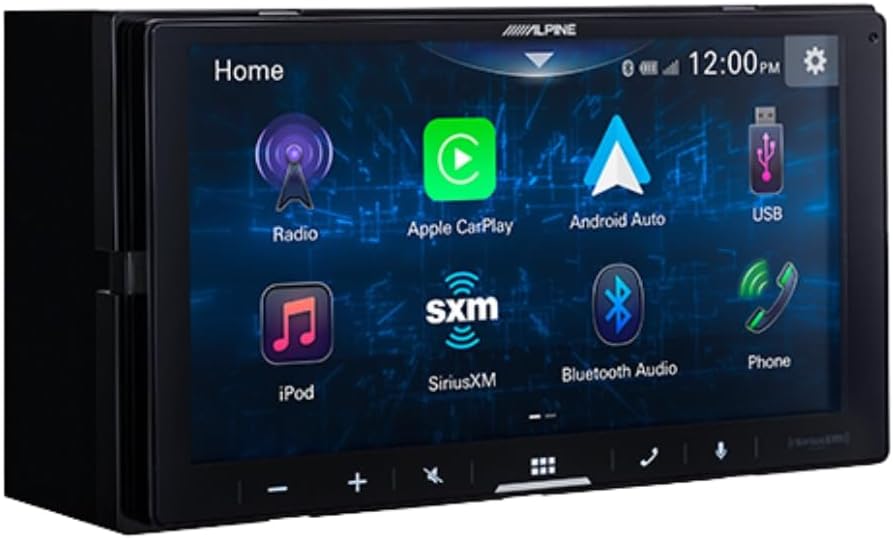
Rajah 3: Alpine ILX-W670-S home screen displaying various application icons. This image shows the customizable interface with options for Radio, Apple CarPlay, Android Auto, USB, iPod, SiriusXM, Bluetooth Audio, and Phone.
Ciri Audio
- Penyama: Utilize the 13-band graphic EQ to fine-tune audio frequencies to your preference.
- Pembetulan Masa: The 6-channel time correction feature allows for precise adjustment of sound delivery to each speaker, optimizing the sound stage.
- Crossover: Adjust front, rear, and subwoofer crossovers to manage frequency distribution to your speakers.
- Sound Boost Menu: Access dedicated controls for bass, mid-bass, and subwoofer output.
- Format Audio yang Disokong: The unit supports AAC, FLAC, MP3, and WMA audio playback.
Ketersambungan
- Apple CarPlay & Android Auto: Connect your compatible smartphone via USB for wired access to navigation, music, messaging, and other apps directly on the receiver's screen.

Rajah 4: Alpine ILX-W670-S display showing the Apple CarPlay interface. This image illustrates the integration of smartphone applications like Phone, Music, Maps, Messages, and Podcasts onto the receiver's screen.
- Bluetooth: Pair your smartphone for hands-free calling and wireless audio streaming.
- SiriusXM-Ready: The unit is compatible with SiriusXM satellite radio (requires a separate SiriusXM Connect Vehicle Tuner and subscription).
- Input AUX: Connect external audio devices using the 3.5mm auxiliary input.
- Input USB: Use the USB port for media playback or smartphone connectivity.
- Kawalan Roda Stereng (SWC): Integrate with your vehicle's factory steering wheel controls using a compatible adapter connected to the 3.5mm mini jack.
Video Main semula
The receiver supports various video formats including MP4, MKV, MOV, H.264, FLV, MPEG-4, and AVC. Video playback is typically restricted while the vehicle is in motion for safety reasons.
Backup Camera Operation
When the vehicle is shifted into reverse, the display will automatically switch to the camera view, providing a 155-degree wide-angle perspective. The camera has a low light sensitivity of 0.5 lux, ensuring visibility in various lighting conditions.
Penyelenggaraan
- Pembersihan Skrin: Gunakan kain lembut dan tidak berbulu untuk mengelap skrin sentuh dengan lembut. Untuk calitan degil, sedikit dampen kain dengan air atau pembersih selamat skrin. Elakkan bahan yang melelas atau bahan kimia yang keras.
- Penjagaan Am: Pastikan unit bebas daripada habuk dan serpihan. Pastikan semua sambungan kekal kukuh.
- Pembersihan Kamera: Periodically clean the camera lens with a soft cloth to ensure a clear view.
Menyelesaikan masalah
| Masalah | Kemungkinan Punca | Penyelesaian |
|---|---|---|
| Tiada kuasa kepada unit | Fius yang ditiup; pendawaian yang salah; sambungan kuasa longgar. | Periksa fius kenderaan dan fius unit. Sahkan sambungan kuasa dan tanah. Pastikan pencucuhan dihidupkan. |
| Tiada keluaran bunyi | Volume too low; mute activated; speaker wires disconnected; incorrect audio source selected. | Increase volume. Check if mute is active. Verify speaker wiring. Select the correct audio source. |
| Apple CarPlay/Android Auto not connecting | Faulty USB cable; phone not compatible; software issue; phone settings. | Use a high-quality, certified USB cable. Ensure your phone's OS is updated. Check phone settings for CarPlay/Android Auto permissions. Restart phone and receiver. |
| Kamera sandaran tidak dipaparkan | Camera power issue; video cable disconnected; vehicle not in reverse. | Ensure vehicle is in reverse. Check camera power connection (to reverse lights). Verify video cable connection to the receiver. |
| Skrin sentuh tidak bertindak balas | Temporary software glitch; screen damage. | Restart the unit (turn vehicle off and on). If issue persists, contact support. |
Spesifikasi
Alpine ILX-W670-S Digital Multimedia Receiver
- paparan: 6.75-inch capacitive touchscreen (800 x 480 resolution)
- Pencahayaan Utama: 5-color customizable (red, green, blue, amber, white)
- Amplebih hidup: Built-in 16W RMS / 45W peak x 4 channels
- Pemprosesan Audio: 13-band graphic EQ, 6-channel time correction, Sound Boost menu, Front/Rear/Subwoofer crossovers
- Pra-keluar: 3 pairs (Front, Rear, Subwoofer) at 4V
- Input: 1x AUX (3.5mm), 1x USB, 1x Camera, SWC adapter via 3.5mm mini jack
- Ketersambungan: Wired Apple CarPlay, Wired Android Auto, Bluetooth (hands-free calling & audio streaming), SiriusXM-ready
- Format Audio yang Disokong: AAC, FLAC, MP3, WMA
- Format Video yang Disokong: MP4, MKV, MOV, H.264, FLV, MPEG-4, AVC
- Dimensi: 8.75 x 6 x 7 inci (Produk)
- Berat: 3.4 paun
BULCAMC-1 Backup Bullet Camera
- Penderia: CMOS
- Resolusi: 420 baris
- Pencahayaan Minimum: 0.5 lux
- View Sudut: 155 darjah
- Penilaian Kalis Air: IP67-68
- Suhu Operasi: -30 to 70 ℃ (-22 to 158 ℉)
Maklumat Waranti
Alpine products are manufactured to high-quality standards. For specific warranty terms and conditions, please refer to the warranty card included with your product or visit the official Alpine webtapak. Simpan bukti pembelian anda untuk tuntutan waranti.
Sokongan
For further assistance, technical support, or to download the latest firmware updates, please visit the official Alpine webtapak di www.alpine-usa.com. You may also contact Alpine customer service directly for personalized support.