
1. Pengenalan
The COMFAST WR773BE WiFi 7 Repeater is a high-performance wireless device designed to extend the coverage and enhance the speed of your existing WiFi network. Utilizing the latest 802.11be (WiFi 7) standard, it offers dual-band connectivity (2.4 GHz and 5 GHz) with speeds up to 3600 Mbps, providing a stable and fast internet experience for multiple connected devices. This manual will guide you through the setup, operation, and maintenance of your repeater.
1.1 Produk Selesaiview

Depan view of the COMFAST WR773BE WiFi 7 Repeater, highlighting its compact design and four external antennas. The device features LED indicators for power, network port, and WiFi status.
1.2 Kandungan Pakej
Sila semak kandungan bungkusan dengan teliti. Jika terdapat sebarang barang yang hilang atau rosak, hubungi peruncit anda.
- COMFAST WR773BE WiFi 7 Repeater Unit
- Manual Pengguna
- Kabel Ethernet RJ45
- Penyesuai Kuasa (Palam EU)
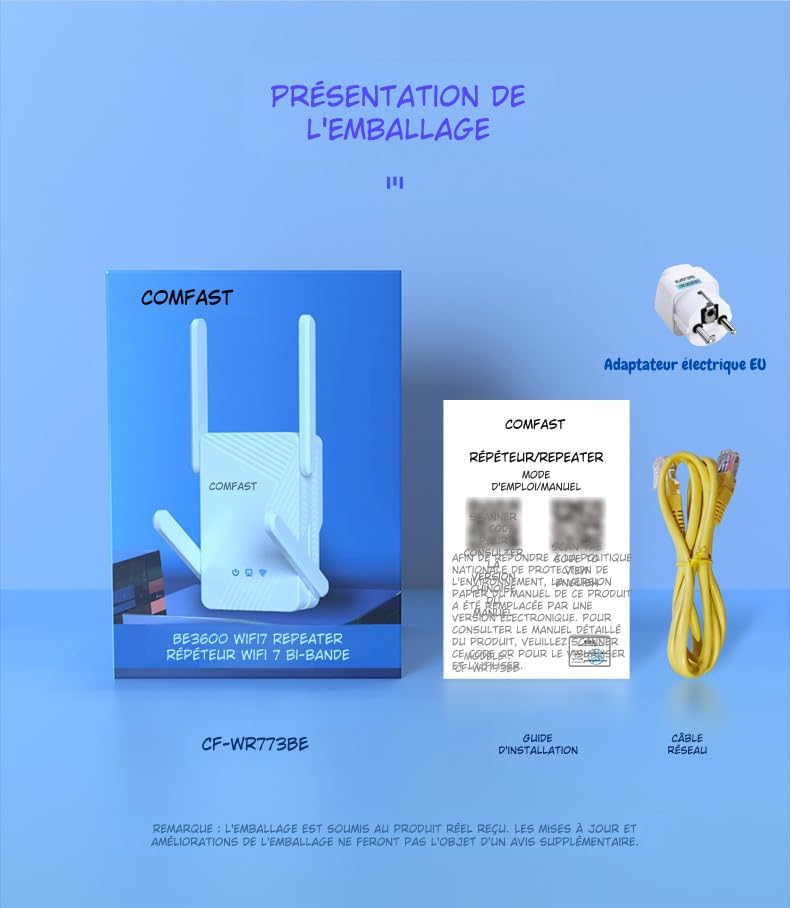
The package includes the COMFAST WR773BE WiFi 7 Repeater unit, a user manual, an RJ45 Ethernet cable, and an EU power adapter. Ensure all components are present upon unboxing.
2. Panduan Persediaan
Follow these steps to set up your COMFAST WR773BE WiFi 7 Repeater.
2.1 Pemasangan Asas
- Hidupkan kuasa: Plug the repeater into an electrical outlet near your main router. Wait for the Power LED to turn solid blue.
- Kedudukan: For optimal performance, place the repeater halfway between your router and the area where you want to improve WiFi coverage. Avoid obstacles like thick walls or large metal objects.
- Sambungan: The repeater can be configured via WPS or a web pelayar.
2.2 Configuration via WPS (Recommended)
WPS (Wi-Fi Protected Setup) is the easiest way to connect your repeater to your router.
- Plug the repeater into a power outlet.
- Tekan butang WPS pada penghala utama anda.
- Within two minutes, press the WPS button on the COMFAST WR773BE repeater.
- The WiFi Status LED on the repeater will blink during connection and turn solid blue when successfully connected.
2.3 Konfigurasi melalui Web pelayar
If your router does not support WPS, or if you prefer manual setup, use a web pelayar.
- Plug the repeater into a power outlet.
- Connect your computer or smartphone to the repeater's default WiFi network (e.g., "COMFAST_XXXX"). No password is required initially.
- Buka a web pelayar dan masukkan alamat IP lalai (biasanya 192.168.10.1 or repeater.net) in the address bar. Refer to the manual for the exact default IP.
- Log masuk menggunakan nama pengguna dan kata laluan lalai (biasanya pentadbir/pentadbir).
- Follow the on-screen instructions to select your router's WiFi network and enter its password.
- Configure the repeater's extended network name (SSID) and password.
- Save the settings and wait for the repeater to restart. The WiFi Status LED will turn solid blue upon successful connection.
3. Mod Operasi
The COMFAST WR773BE supports multiple operating modes to suit various network requirements.
3.1 Mod Pengulang
In Repeater Mode, the device extends the range of your existing WiFi network, eliminating dead zones. This is the most common mode for home users.
3.2 Mod Titik Akses (AP).
In AP Mode, the device connects to your wired network via an Ethernet cable and broadcasts a new wireless network. This is useful for adding WiFi capability to a wired-only network.
3.3 Mod Penghala
In Router Mode, the device acts as a primary router, connecting to your modem and creating a new private network. This mode is suitable for small offices or homes without an existing router.
4. Petunjuk LED
The LED indicators provide real-time status of the repeater's operation.
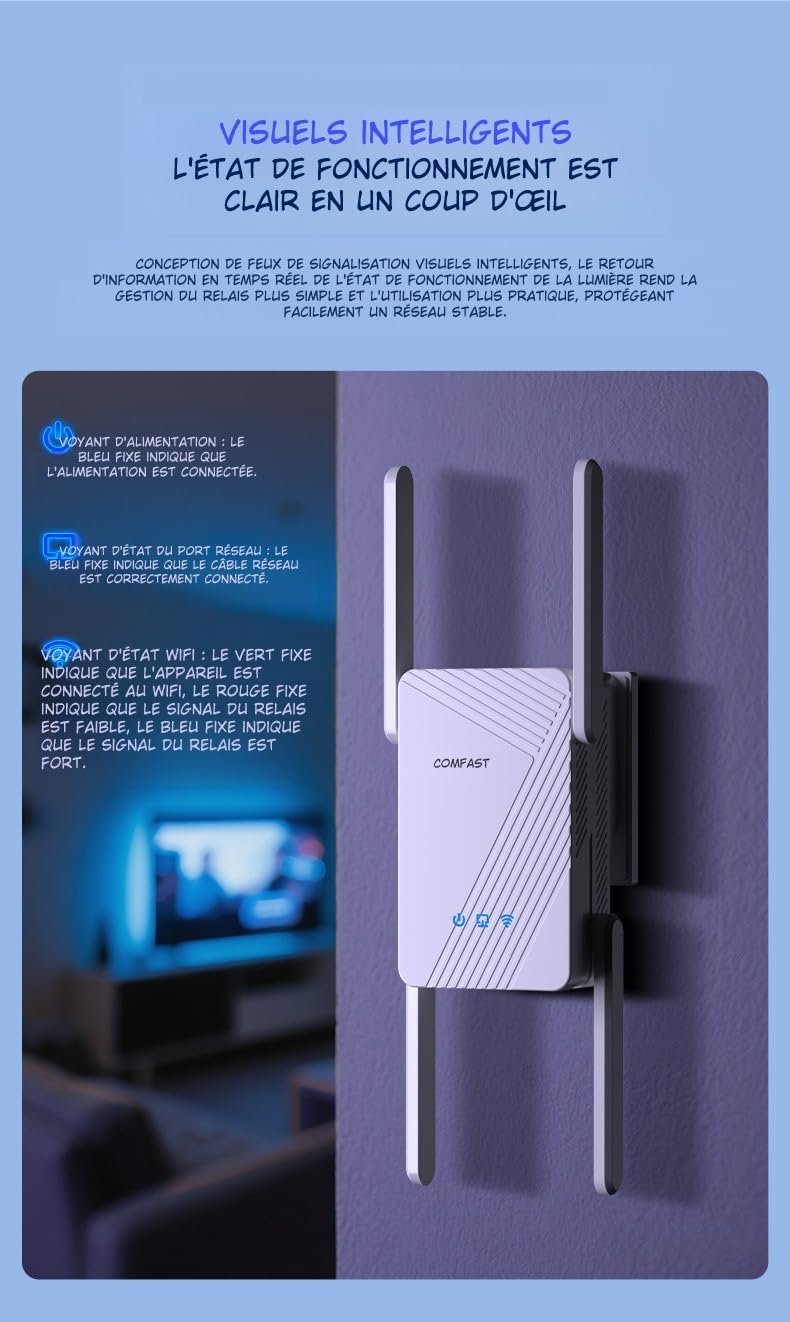
This image illustrates the LED indicators on the repeater. The Power LED (blue) indicates power status, the Network Port LED (blue) shows Ethernet cable connection, and the WiFi Status LED (red for weak, blue for strong) indicates signal strength.
| Penunjuk | Status | Penerangan |
|---|---|---|
| Kuasa LED | Biru Pepejal | The device is powered on and operating correctly. |
| Network Port LED | Biru Pepejal | An Ethernet cable is correctly connected to the RJ45 port. |
| WiFi Status LED | Merah Pejal | The WiFi signal from the main router is weak. Consider repositioning the repeater closer to the router. |
| WiFi Status LED | Biru Pepejal | The WiFi signal from the main router is strong, and the repeater is working optimally. |
5. Penyelenggaraan
Proper maintenance ensures the longevity and optimal performance of your repeater.
5.1 Penjagaan dan Pembersihan
- Pastikan peranti bersih dan bebas daripada habuk. Gunakan kain lembut dan kering untuk pembersihan.
- Jangan gunakan pembersih cecair atau aerosol, kerana ia boleh merosakkan peranti.
- Avoid exposing the repeater to extreme temperatures, humidity, or direct sunlight.
5.2 Pengudaraan
The COMFAST WR773BE is designed with efficient heat dissipation to maintain stable operation.

The repeater features an efficient heat dissipation design with ventilation openings to maintain stable operation and prevent overheating, ensuring long-term performance.
- Pastikan bukaan pengudaraan tidak disekat.
- Letakkan peranti di kawasan yang mempunyai pengudaraan yang baik untuk mengelakkan terlalu panas.
6. Penyelesaian masalah
If you encounter issues with your repeater, refer to the following common problems and solutions.
- Tiada Kuasa:
- Ensure the power adapter is securely plugged into the repeater and a working electrical outlet.
- Check if the Power LED is solid blue. If not, try a different outlet.
- Isyarat Lemah atau Tiada:
- Reposition the repeater closer to your main router.
- Check the WiFi Status LED. If it's red, the signal from the router is weak.
- Ensure there are no major obstructions (e.g., thick walls, metal objects) between the repeater and the router.
- Tidak Boleh Akses Web Halaman Pengurusan:
- Ensure your device is connected to the repeater's WiFi network.
- Verify that you are entering the correct IP address (e.g., 192.168.10.1) or domain name (e.g., repeater.net) in the browser.
- Kosongkan cache dan kuki penyemak imbas anda atau cuba penyemak imbas lain.
- Kata Laluan Terlupa:
- Perform a factory reset by pressing and holding the reset button (usually a small pinhole) for about 5-10 seconds until the LEDs flash. The device will revert to factory default settings.
7. Spesifikasi
Detailed technical specifications for the COMFAST WR773BE WiFi 7 Repeater.

The back of the repeater displays key technical specifications, including data rates, antenna gain, wireless speeds for 2.4GHz and 5GHz bands, power consumption, and supported functionalities like AP, Repeater, and Router modes.
| Ciri | Perincian |
|---|---|
| Nombor Model | WR773BE |
| Standard Tanpa Wayar | IEEE 802.11be (WiFi 7) |
| Kadar Pemindahan Data | Sehingga 3600 Mbps |
| Jalur Kekerapan | Jalur Dwi (2.4 GHz & 5 GHz) |
| 2.4 GHz Speed | Sehingga 688 Mbps |
| 5 GHz Speed | Sehingga 2882 Mbps |
| Antena | 4*5dBi High-Gain Antennas |
| Pelabuhan | 1 x 10/100/1000Mbps RJ45 WAN/LAN Port |
| Mod Pengendalian | Repeater, AP, Router |
| Penggunaan Kuasa | 18W |
| Dimensi (L x W x H) | 4.8P x 9.5p x 13T cm |
| warna | putih |
| Peranti Serasi | Surveillance Camera, Game Console, PC, Laptop, Smartphone, Tablet, Smart TV |
8. Waranti dan Sokongan
Information regarding spare parts availability and software updates for this product is not available at this time. For warranty claims or technical support, please refer to the purchase documentation or contact your retailer directly.