
1. Pengenalan
Thank you for choosing the THOMSON WS902DUO Cosy Bookshelf Speakers. These active stereo speakers deliver a powerful 150W audio experience with deep bass from two 10 cm woofers. They offer versatile connectivity options including Bluetooth 5.3, Optical, HDMI (ARC), RCA, and USB playback. The included remote control and side panel adjustments provide precise control over your audio. Please read this manual carefully before use to ensure proper operation and to maximize your listening experience.

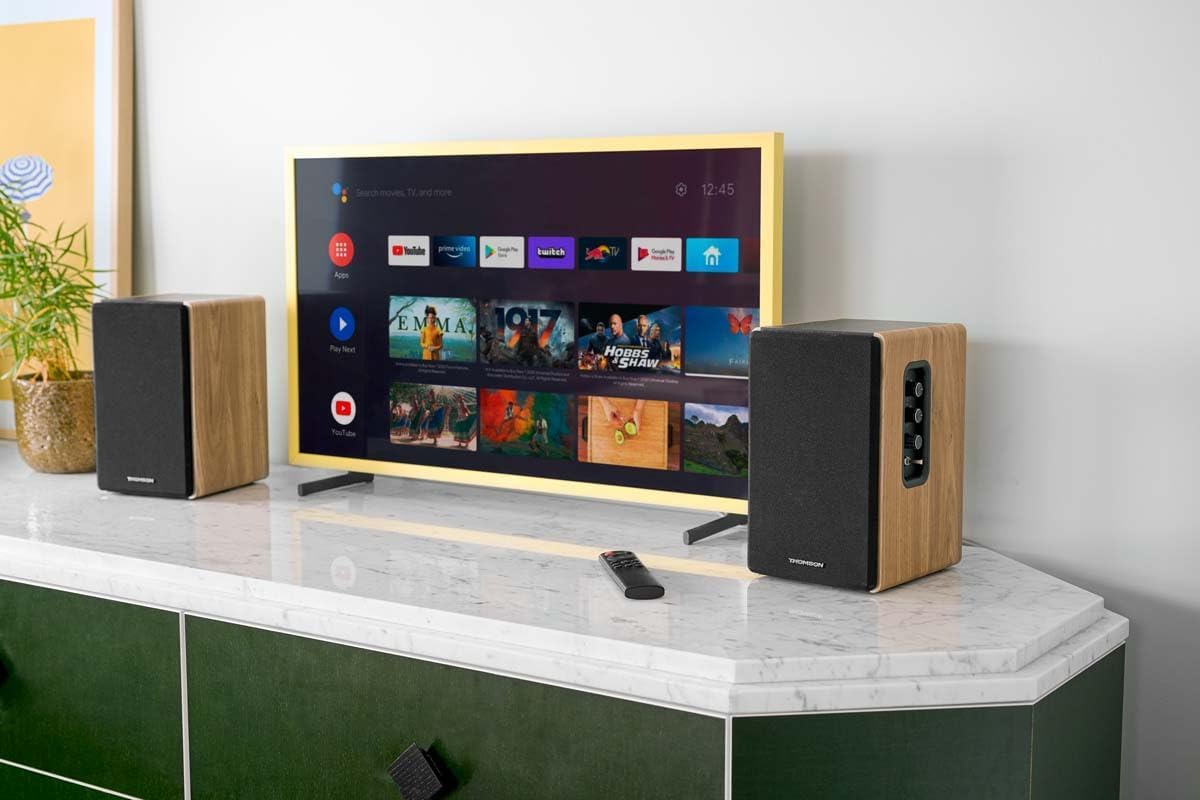
Image 1.1: THOMSON WS902DUO Bookshelf Speakers in a living space, showcasing their elegant wood finish.
2. Arahan Keselamatan Penting
- Baca arahan ini dengan teliti sebelum mengendalikan produk ini.
- Simpan arahan ini untuk rujukan masa hadapan.
- Patuhi semua amaran pada produk dan dalam arahan pengendalian.
- Ikut semua arahan.
- Jangan gunakan alat ini berhampiran air.
- Bersihkan hanya dengan kain kering.
- Jangan sekat sebarang bukaan pengudaraan. Pasang mengikut arahan pengilang.
- Jangan pasang berhampiran mana-mana sumber haba seperti radiator, daftar haba, dapur, atau radas lain (termasuk amppenghidup) yang menghasilkan haba.
- Jangan kalahkan tujuan keselamatan palam terkutub atau jenis pembumian. Palam terkutub mempunyai dua bilah dengan satu lebih lebar daripada yang lain. Palam jenis pembumian mempunyai dua bilah dan serampang pembumian ketiga. Bilah lebar atau serampang ketiga disediakan untuk keselamatan anda. Jika palam yang disediakan tidak sesuai dengan alur keluar anda, rujuk juruelektrik untuk menggantikan alur keluar usang.
- Lindungi kord kuasa daripada berjalan atau tersepit, terutamanya pada palam, bekas kemudahan dan tempat keluar dari radas.
- Hanya gunakan lampiran/aksesori yang ditentukan oleh pengilang.
- Gunakan hanya dengan troli, dirian, tripod, pendakap atau meja yang ditentukan oleh pengilang, atau dijual dengan radas. Apabila troli digunakan, berhati-hati apabila menggerakkan kombinasi troli/radas untuk mengelakkan kecederaan daripada terbalik.
- Cabut plag radas ini semasa ribut petir atau apabila tidak digunakan untuk jangka masa yang lama.
- Rujuk semua servis kepada kakitangan perkhidmatan yang berkelayakan. Servis diperlukan apabila radas telah rosak dalam apa jua cara, seperti kord bekalan kuasa atau palam rosak, cecair telah tertumpah atau objek jatuh ke dalam radas, radas telah terdedah kepada hujan atau lembapan, tidak beroperasi seperti biasa. , atau telah digugurkan.
3. Kandungan Pakej
Sila pastikan semua item yang disenaraikan di bawah disertakan dalam pakej anda:
- THOMSON WS902DUO Bookshelf Speakers (2 units)
- Alat Kawalan Jauh
- Kabel Kuasa
- Kabel Sambungan Pembesar Suara
- 3.5mm Jack to RCA Adapter Cable
- Manual Pengguna (dokumen ini)

Image 3.1: Packaging of the THOMSON WS902DUO Bookshelf Speakers.
4. Produk Lebihview
4.1. Side Control Panel (Active Speaker)
The active speaker features a side control panel for easy access to essential functions.

Image 4.1: Side control panel.
- Kawalan Bes: Melaraskan output frekuensi rendah.
- Kawalan Treble: Melaraskan output frekuensi tinggi.
- Kawalan Kelantangan: Melaraskan kelantangan bunyi keseluruhan.
- Suis kuasa: Turns the speakers on or off.
- Penunjuk LED: Shows the current status or selected input.
4.2. Rear Panel (Active Speaker)
The rear panel of the active speaker provides all necessary input and output connections.
Imej 4.2: Sambungan panel belakang.
- Input Optik: For connecting digital audio sources like TVs, game consoles, or Blu-ray players.
- Aux In (RCA): For connecting analog audio sources such as turntables, CD players, or PCs. A 3.5mm jack adapter is provided.
- TV Audio (HDMI ARC): For connecting to a TV's HDMI ARC port, allowing TV remote control of the speaker volume.
- Main USB: Untuk memainkan MP3 files terus daripada pemacu denyar USB.
- Sub Keluar: For connecting an external active subwoofer for enhanced bass.
- Output pembesar suara: Bersambung kepada pembesar suara pasif.
- Input Kuasa: Menyambung kepada bekalan kuasa utama.
4.3. Alat Kawalan Jauh
Alat kawalan jauh menyediakan akses mudah ke semua fungsi pembesar suara dari jauh.

Image 4.3: Remote control.
- Butang Kuasa: Turns the speakers on/off.
- Butang Bisukan: Membisukan/menyahredamkan bunyi.
- Jilid +/-: Melaraskan tahap kelantangan.
- Playback Controls (Play/Pause, Skip): Untuk main balik USB.
- Source Selection Buttons (OPT, BT, ARC, USB, LINE): Memilih sumber input audio.
- EQ Mode Buttons (MOVIE, MUSIC, DIALOG): Selects preset equalization modes.
5. Persediaan
5.1. Penempatan Speaker
Place the speakers on a stable, flat surface such as a bookshelf, desk, or speaker stands. For optimal stereo imaging, position the speakers equidistant from your listening position and at ear level. Ensure there is adequate space around the speakers for ventilation.
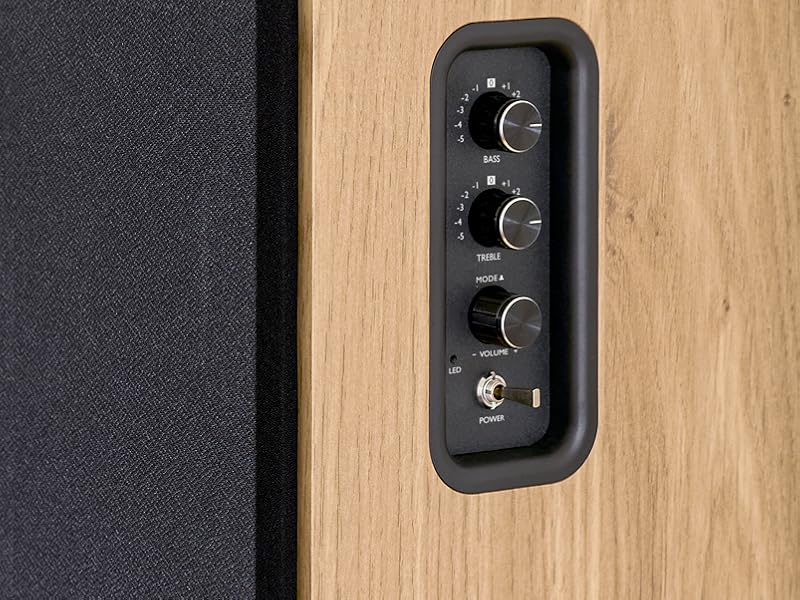
Image 5.1: Recommended speaker placement on a desk.
5.2. Menyambung Pembesar Suara
- Identify the active speaker (with controls and inputs) and the passive speaker.
- Connect the included speaker cable from the speaker output terminals on the active speaker to the input terminals on the passive speaker. Ensure correct polarity (+ to + and - to -).
5.3. Menyambung Sumber Audio
Connect your desired audio sources to the active speaker using the appropriate cables.
- Input Optik: Use an optical cable to connect your TV, game console, or Blu-ray player to the OPTICAL IN port.
- Input HDMI (ARC): Use an HDMI cable to connect your TV's HDMI ARC port to the TV AUDIO (HDMI) port on the speaker. This allows your TV remote to control the speaker volume.
- RCA (AUX) Input: Use an RCA cable (or the provided 3.5mm jack to RCA adapter) to connect devices like a turntable, CD player, or PC to the AUX IN (RCA) ports.
- Input USB: Masukkan pemacu kilat USB yang mengandungi MP3 files into the USB PLAY port.

Image 5.2: Speakers connected to a television via HDMI ARC.
5.4. Berpasangan Bluetooth
- Ensure the speakers are powered on.
- Press the 'BT' button on the remote control or the side panel to select Bluetooth input. The LED indicator will flash, indicating pairing mode.
- Pada telefon pintar, tablet atau komputer anda, dayakan Bluetooth dan cari peranti yang tersedia.
- Select "THOMSON WS902DUO" from the list of devices.
- Once paired, the LED indicator will stop flashing and remain solid. You can now stream audio wirelessly.
5.5. Sambungan Subwoofer (Pilihan)
If you wish to enhance bass further, connect an active subwoofer to the 'Sub Out' port on the rear panel of the active speaker using an RCA cable.
6. Arahan Operasi
6.1. Hidupkan/Mati Kuasa
Use the power switch on the side control panel or the power button on the remote control to turn the speakers on or off.
6.2. Pemilihan Sumber
Press the corresponding source button on the remote control (OPT, BT, ARC, USB, LINE) to switch between connected audio inputs. The LED indicator will change to reflect the selected source.
6.3. Kawalan Kelantangan
Adjust the volume using the 'Volume' knob on the side control panel or the 'VOL+/-' buttons on the remote control.
6.4. Pelarasan Audio
Fine-tune the sound to your preference:
- Bes/Trebel: Use the 'Bass' and 'Treble' knobs on the side control panel to adjust the low and high frequencies.
- Mod EQ: Press the 'MOVIE', 'MUSIC', or 'DIALOG' buttons on the remote control to select preset equalization settings optimized for different content types.
6.5. Main semula USB
When a USB flash drive with MP3 files is inserted and USB source is selected, the speakers will automatically begin playing. Use the playback control buttons on the remote control (Play/Pause, Skip) to manage your music.
6.6. Operasi Bluetooth
After successful pairing (see Section 5.4), you can stream audio from your Bluetooth device. Use your device's controls or the speaker's remote control for playback and volume adjustments.
7. Penyelenggaraan
Penyelenggaraan yang betul memastikan ketahanan dan prestasi pembesar suara anda.
- Pembersihan: Lap permukaan pembesar suara dengan kain lembut dan kering. Jangan gunakan pembersih cecair atau bahan kasar.
- Pengudaraan: Pastikan bukaan pengudaraan tidak disekat untuk mengelakkan terlalu panas.
- Storan: If storing the speakers for an extended period, unplug them from the power outlet and store them in a cool, dry place.
- Elakkan Kelembapan: Keep the speakers away from water and high humidity.
8. Penyelesaian masalah
Jika anda menghadapi sebarang isu, rujuk panduan penyelesaian masalah berikut:
| Masalah | Kemungkinan Punca | Penyelesaian |
|---|---|---|
| Tiada kuasa | Power cable not connected; Power switch off; Wall outlet not working. | Ensure power cable is securely connected. Turn on the power switch. Test the wall outlet with another device. |
| Tiada bunyi | Incorrect input source selected; Volume too low; Mute function active; Audio cable not connected properly. | Select the correct input source. Increase volume. Press Mute button on remote. Check all audio cable connections. |
| Penggandingan Bluetooth gagal | Speakers not in pairing mode; Device too far; Bluetooth disabled on source device. | Ensure speakers are in Bluetooth pairing mode (flashing LED). Move device closer to speakers. Enable Bluetooth on your source device. |
| Main balik USB tidak berfungsi | USB drive not formatted correctly; Files not MP3; USB drive not inserted properly. | Ensure USB drive is FAT32 formatted. Verify files are in MP3 format. Re-insert USB drive firmly. |
| Herotan bunyi | Volume too high; Source audio quality poor; Bass/Treble settings too extreme. | Lower the volume. Test with a different audio source. Adjust Bass and Treble controls. |
9. Spesifikasi
| Ciri | Spesifikasi |
|---|---|
| Jenama | THOMSON |
| Nombor Model | WS902DUO |
| Kuasa Output Pembesar Suara Maks | 150 Watt |
| Respons Kekerapan | 60 Hz |
| Teknologi Ketersambungan | Bluetooth, HDMI (ARC), Optical, RCA, USB |
| Versi Bluetooth | 5.3 |
| Mod Keluaran Audio | Stereo (2.0 channels) |
| Input Voltage | 230 Volt (AC) |
| Jenis Pemasangan | Pemasangan Rak |
| Jenis Pembesar Suara | Multimedia Bookshelf |
| Ciri Khas | Stereo Pairing, USB Port, Sub-Out, Remote Control, EQ Modes |
| Penggunaan yang Disyorkan | Smartphone, Tablet, PC, TV, Game Console, DVD Player, Turntable |
| warna | Kemasan Kayu Asli |
| Kaedah Kawalan | Remote Control, Side Panel Knobs |
| Saiz Woofer | 10 Sentimeter |
| Dimensi (H x W x D) | 28 cm x 24 cm x 47 cm (approximate, per speaker) |
| Berat badan | 5048 Grams (total for pair) |
| Bilangan Item | 2 |
| Negara Asal | China |
10. Maklumat Waranti
This THOMSON WS902DUO product comes with a Waranti terhad 1 tahun dari tarikh pembelian. Waranti ini meliputi kecacatan pembuatan dan mutu kerja di bawah penggunaan biasa. Ia tidak melindungi kerosakan yang disebabkan oleh penyalahgunaan, kemalangan, pengubahsuaian yang tidak dibenarkan atau haus dan lusuh biasa. Sila simpan bukti pembelian anda untuk tuntutan waranti.
11. Sokongan Pelanggan
For technical assistance, warranty claims, or any questions regarding your THOMSON WS902DUO speakers, please contact your retailer or visit the official THOMSON support website. Please have your model number (WS902DUO) and proof of purchase ready when contacting support.
Sokongan dalam talian: www.thomsonconsumer.com (Please check for regional support contacts)