
MUBVIEW Loceng J7
MUBVIEW Bell J7 2K Wireless Video Doorbell Camera with Chime User Manual
Model: Bell J7
1. Pengenalan
This manual provides detailed instructions for the installation, operation, and maintenance of your MUBVIEW Bell J7 2K Wireless Video Doorbell Camera with Chime. Please read this manual thoroughly before using the product to ensure proper function and safety. This device is designed to enhance your home security with advanced features like 2K video, motion detection, and two-way audio.
2. Apa yang ada di dalam Kotak
Sahkan bahawa semua komponen hadir sebelum meneruskan pemasangan:
- Camera Doorbell x1
- Chime x1
- Manual Pengguna x1
- Kabel Pengecasan x1
- Bateri x3
- Other Accessories (screws, anchors, screwdriver)

Image: Contents of the MUBVIEW Bell J7 package, including the doorbell, chime, and installation tools.
3. Produk Lebihview
Familiarize yourself with the main parts of your video doorbell and chime:
Kamera Loceng Pintu
- 2K Camera Lens: Captures high-resolution video.
- Sensor Gerakan PIR: Mengesan pergerakan manusia.
- mikrofon: Untuk komunikasi audio dua hala.
- Penceramah: For two-way audio communication and siren.
- Butang Bel: Activates the chime and sends notifications.
- Micro USB-C Port: Untuk mengecas bateri dalaman.
- Butang Tetapkan Semula: For device reset.
- Slot Kad Mikro SD: For local video storage (up to 128GB, card not included).
- Anti-Theft Button: Triggers an alarm if the doorbell is removed from its mount.
Loceng Tanpa Wayar
- Penceramah: Emits doorbell sound.
- Kawalan Kelantangan: Adjusts chime volume.
- Pemilih Nada: Changes chime melody.
- Sumber Kuasa: Dikuasakan bateri untuk penempatan yang fleksibel.

Imej: Depan view of the MUBVIEW Bell J7 doorbell and chime.
4. Persediaan
Follow these steps to set up your MUBVIEW Bell J7 doorbell camera:
4.1 Mengecas Loceng Pintu
- Before first use, fully charge the doorbell camera using the provided USB charging cable.
- The charging port is located on the side of the doorbell, protected by a rubber flap.
- A full charge can last up to 180 days, depending on usage.
4.2 Pemasangan Apl dan Sambungan Wi-Fi
- Muat turun CloudEdge or MUBVIEW app from your smartphone's app store (Apple App Store or Google Play Store).
- Daftar akaun atau log masuk jika anda sudah mempunyai akaun.
- Pastikan telefon pintar anda disambungkan ke a Rangkaian Wi-Fi 2.4GHz. The doorbell is not compatible with 5GHz Wi-Fi.
- In the app, select "Add Device" and choose "Smart Video Doorbell".
- Follow the on-screen prompts to connect the doorbell to your Wi-Fi network. This typically involves scanning a QR code displayed on your phone with the doorbell camera.
- Setelah disambungkan, anda boleh menamakan peranti anda dan menyelesaikan persediaan.
4.3 Memasang Loceng Pintu
The doorbell can be mounted using screws or strong adhesive tape (not included for all mounting types).
- Attach the mounting bracket to your desired location on the wall or door frame. Ensure it is at an appropriate height for optimal viewing.
- Secure the bracket using the provided screws and anchors.
- Slide the doorbell camera into the mounting bracket until it clicks securely into place.
- For added security, a small screw can be inserted from the bottom of the bracket into the doorbell to prevent easy removal.

Image: Installation of the MUBVIEW Bell J7 doorbell camera onto its mounting bracket.
5. Arahan Operasi
5.1 Langsung View dan Audio Dua Hala
- Buka MUBVIEW app to access the live video feed from your doorbell camera.
- Use the microphone icon in the app to enable two-way audio and speak with visitors at your door.
- The voice changer feature can be activated for added privacy and security.

Image: Demonstrating two-way audio and voice message functionality via the app.
5.2 Pengesanan Gerakan dan Makluman
- The doorbell features advanced PIR motion and human detection to minimize false alarms.
- When motion is detected, you will receive instant push notifications on your smartphone.
- Adjust motion detection sensitivity and set custom motion zones within the app to suit your environment.

Image: Smartphone notification for human detection from the doorbell camera.
5.3 Penglihatan Malam
- The doorbell camera automatically switches to IR night vision in low-light conditions.
- Enhanced night vision provides clear images up to 33 feet.
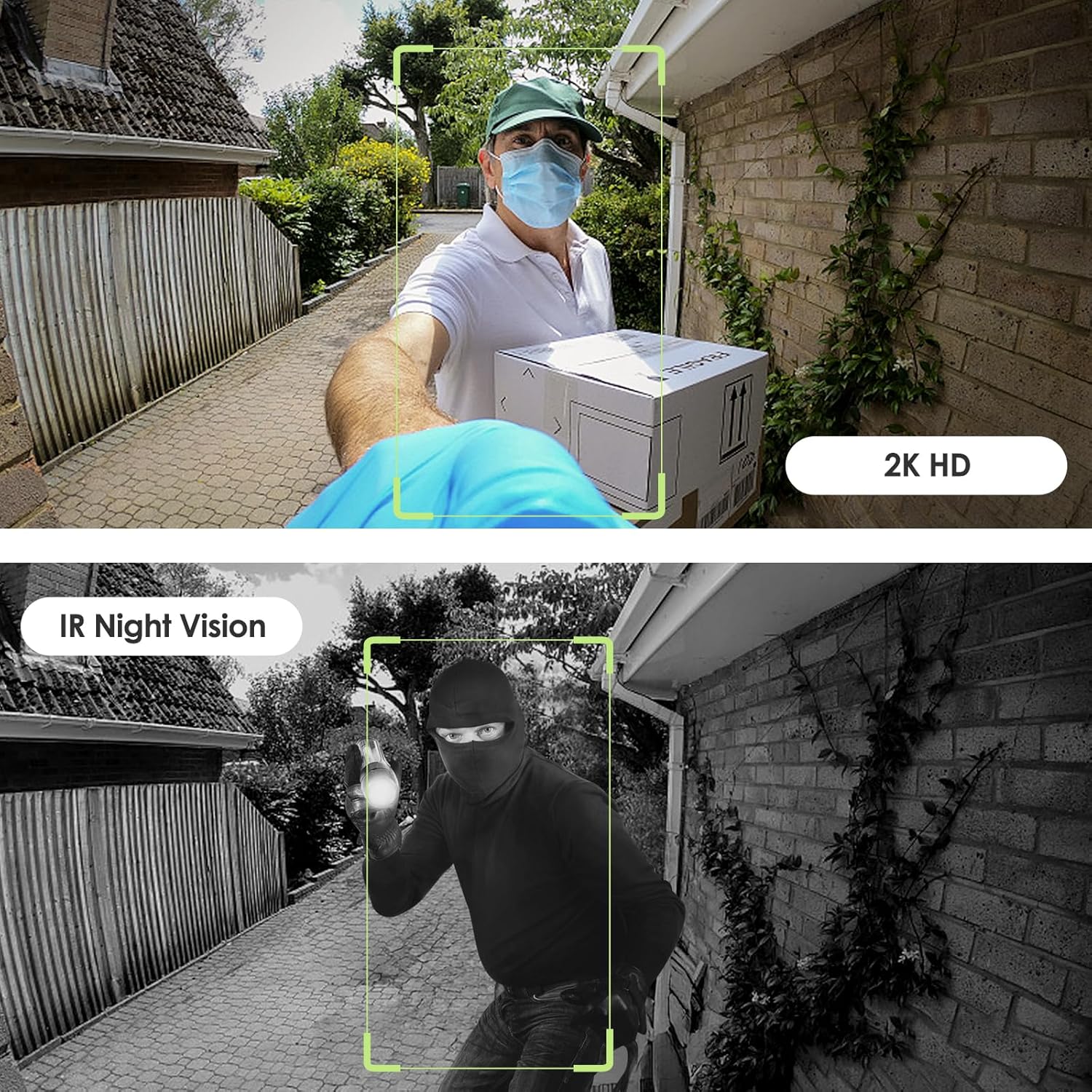
Image: Day and night vision capabilities of the MUBVIEW Bell J7 doorbell.
5.4 Penyimpanan Video
- Kad SD mikro: Insert a micro SD card (up to 128GB, not included) into the designated slot for local storage of recorded footage.
- Storan Awan: Enjoy 7-day free cloud loop storage. Optional premium cloud storage plans are available for extended storage and features.

Image: Multiple storage options: local Micro SD card and cloud service.
6. Ciri-ciri
- Resolusi HD Penuh 2K: Provides clear and detailed video.
- Kanta Sudut Lebar 145°: Offers a broad view dari depan pintu rumah anda.
- Dikuasakan Bateri: Ensures easy, wire-free installation.
- Kesambungan Wi-Fi 2.4GHz: Stable and reliable wireless connection.
- Rintangan Cuaca IP65: Built to withstand various outdoor conditions (rain, heat, hail, sun, dust).
- Penggera Anti Kecurian: Siren sounds if the doorbell is tampered dengan.
- Penukar Suara: Enhances privacy during two-way audio.
- Pre-Recorded Voice Messages: Respond quickly with custom messages.
- Perkongsian Keluarga: Supports up to 15 online users and 20 user accounts.
- Keserasian: Bekerja dengan Alexa dan Google Assistant.

Imej: Selesaiview of MUBVIEW Bell J7 features.
7. Penyelenggaraan
7.1 Pengecasan Bateri
The doorbell is powered by rechargeable batteries. Monitor the battery level through the app and recharge as needed. The battery life can extend up to 180 days on a single charge, depending on activity and settings.
7.2 Pembersihan
Wipe the camera lens and the doorbell's exterior with a soft, damp cloth to remove dust and debris. Avoid using harsh chemicals or abrasive materials that could damage the device.
7.3 Rintangan Cuaca
MUB ituVIEW Bell J7 is IP65 weather-resistant, designed to endure various outdoor conditions. However, extreme weather conditions may still impact performance or battery life.

Image: IP65 Weather Resistance of the MUBVIEW Bell J7 doorbell.
8. Penyelesaian masalah
| Isu | Penyelesaian yang Mungkin |
|---|---|
| Loceng pintu tidak bersambung ke Wi-Fi | Ensure your Wi-Fi is 2.4GHz. Move the doorbell closer to your router during setup. Reset the doorbell and try again. |
| Penggera gerakan palsu yang kerap | Adjust the motion detection sensitivity in the app. Set custom motion zones to exclude busy areas or moving foliage. |
| Kualiti video yang teruk | Check your Wi-Fi signal strength in the app. Ensure the camera lens is clean and free from obstructions. |
| Hayat bateri pendek | Reduce motion detection sensitivity or frequency of live view access. Ensure the doorbell is fully charged. |
| Anti-theft alarm not working | Ensure the anti-theft feature is enabled in the app settings. Check if the doorbell is properly seated in its mounting bracket, activating the tampbutang er. |
9. Spesifikasi
- Nama Model: Loceng J7
- Resolusi Tangkapan Video: 2K
- Teknologi Ketersambungan: Tanpa Wayar (Wi-Fi 2.4GHz)
- Sumber Kuasa: Dikuasakan oleh Bateri (3 bateri A disertakan)
- Penggunaan Dalaman/Luar: Luar
- Tahap Rintangan Air: IP65 Kalis Air
- Ciri Khas: 2-Way Audio, Built-In Light, HD Resolution, Image Sensor, Motion Sensor, Voice Changer, Anti-Theft Alarm
- Peranti Serasi: Smartphone (via CloudEdge/MUBVIEW aplikasi)
- Dimensi Produk: 1.37 x 5.27 x 2.2 inci
- Berat Barang: 15.4 auns
10. Waranti dan Sokongan
MUBVIEW is committed to providing quality products and customer satisfaction. For any inquiries or support needs, please refer to the following:
- Perkhidmatan Pelanggan: Available via Call Service (9AM-5PM EST) and Online Email.
- Pulangan: 30-day Amazon return policy applies.
- Pelan Perlindungan: Pelan perlindungan pilihan 2 Tahun dan 3 Tahun tersedia untuk pembelian.
For detailed contact information, please visit the official MUBVIEW website or refer to the contact details provided in the product packaging.

Image: MUBVIEW Customer Service details.