
1. Pengenalan
Thank you for choosing the MOJOGEAR NovaMag All-in-1 Power Bank. This device is designed to provide convenient and versatile charging for your mobile devices, featuring 10,000 mAh capacity, Qi2 wireless fast charging, and integrated USB-C and Lightning cables. Please read this manual carefully before use to ensure optimal performance and safety.
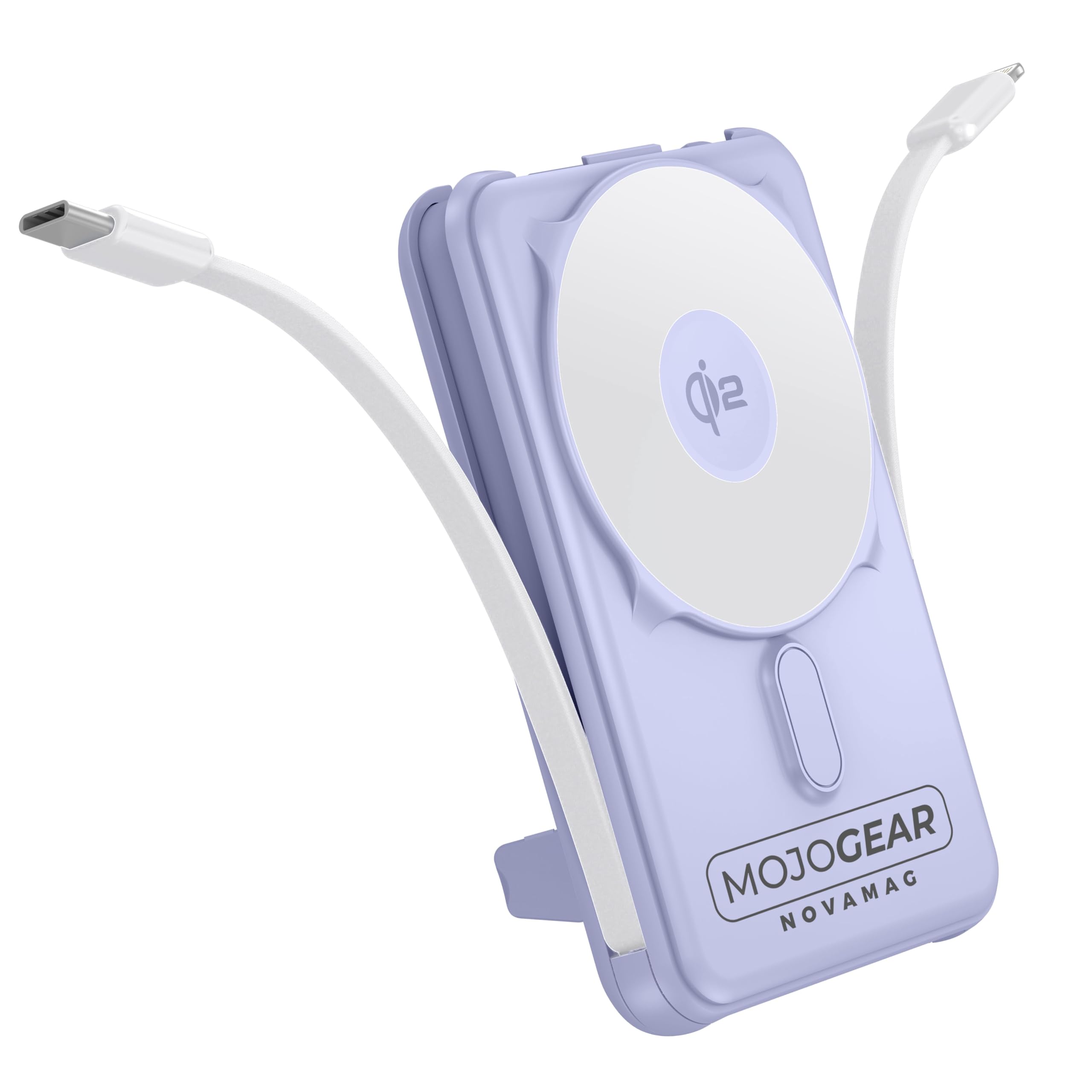
Image 1.1: MOJOGEAR NovaMag All-in-1 Power Bank with connected devices.
2. Maklumat Keselamatan
- Do not expose the power bank to extreme temperatures (above 45°C or below -10°C), direct sunlight, or fire.
- Do not disassemble, modify, or repair the device yourself. Contact qualified service personnel for repairs.
- Keep the power bank away from water, moisture, and corrosive substances.
- Elakkan daripada menjatuhkan atau meletakkan bank kuasa kepada kesan yang kuat.
- Jangan gunakan bank kuasa jika ia rosak, bengkak atau bocor.
- Jauhkan daripada kanak-kanak.
- Gunakan hanya kabel pengecasan dan penyesuai yang diperakui.
- Lupuskan bank kuasa secara bertanggungjawab mengikut peraturan tempatan.
3. Kandungan Pakej
Sila semak pakej untuk item berikut:
- 1x MOJOGEAR NovaMag All-in-1 Power Bank (MG-PB10)
- 1x Manual Pengguna (dokumen ini)
- 1x Mag Safe Qi2 Ring (integrated)
- 1x Integrated USB-C Cable
- 1x Integrated Lightning Cable

Image 3.1: Power Bank and its packaging.
4. Produk Lebihview
The MOJOGEAR NovaMag Power Bank features a compact design with multiple charging options.
- Qi2 Wireless Charging Pad: For fast wireless charging of compatible devices (e.g., iPhone 12 and newer).
- Kabel USB-C Bersepadu: For charging Android devices, other USB-C accessories, or recharging the power bank itself.
- Kabel Kilat Bersepadu: For charging Apple devices (iPhone, AirPods).
- Port USB-C (Input/Output): For charging devices or recharging the power bank with your own cable.
- Paparan led: Menunjukkan percen bateritage dan status pengecasan.
- Butang Kuasa: Activates the LED display and initiates charging.
- Kickstand boleh lipat: Allows you to prop up your smartphone while charging.

Image 4.1: Power Bank attached to a smartphone, highlighting its compact form.

Image 4.2: Dimensions and various views of the power bank.
5. Persediaan
5.1 Pengecasan Awal Bank Kuasa
Before first use, fully charge your NovaMag Power Bank. This ensures optimal battery performance.
- Connect the integrated USB-C cable from the power bank to a USB-C power adapter (not included).
- Alternatively, use your own USB-C to USB-C cable and connect it to the USB-C port on the bottom of the power bank and a USB-C power adapter.
- The LED display will show the charging progress, indicating the battery percentage. A green flash symbol confirms the charging process.
- The power bank is fully charged when the LED display shows 100%.

Image 5.1: LED display showing battery percentage.
6. Arahan Operasi
6.1 Charging Devices Wirelessly (Qi2 / MagSafe)
The NovaMag supports Qi2 wireless fast charging and MagSafe compatibility for iPhone 12 and newer models.
- Tekan butang kuasa sekali untuk mengaktifkan bank kuasa.
- Align your MagSafe-compatible iPhone (or other Qi2-compatible device) with the wireless charging pad on the power bank. The strong magnet will ensure a secure connection.
- Wireless charging will begin automatically. The LED display may show a charging indicator.

Image 6.1: Attaching a smartphone for wireless charging.
6.2 Charging Devices via Integrated Cables
The power bank includes built-in USB-C and Lightning cables for convenient wired charging.
- Gently pull out the integrated USB-C or Lightning cable from its storage slot.
- Sambungkan kabel yang sesuai ke peranti anda.
- Charging will start automatically. Press the power button once if charging does not initiate.
6.3 Charging Devices via USB-C Port
An additional USB-C port is available for charging devices with your own cable.
- Connect your device to the USB-C port on the power bank using a compatible USB-C to USB-C cable (not included).
- Press the power button once to begin charging.
6.4 Mengecas semula Power Bank
You can recharge the power bank using its integrated USB-C cable or the dedicated USB-C input port.
- Using Integrated USB-C Cable: Connect the integrated USB-C cable to a USB-C power adapter.
- Menggunakan Port USB-C: Connect a USB-C to USB-C cable from a power adapter to the USB-C port on the power bank.
- Paparan LED akan menunjukkan status pengecasan dan peratusan bateritage.
6.5 Using the Foldable Kickstand
The integrated kickstand allows for hands-free viewing while your device charges.
- Locate the kickstand on the back of the power bank.
- Gently pull it out until it locks into position.
- Place your wirelessly charging smartphone onto the power bank, utilizing the kickstand to prop it up.

Image 6.2: Power Bank with kickstand in use.
6.6 Pengecasan Laluan
The NovaMag supports pass-through charging, allowing you to charge your devices while the power bank itself is being recharged.
- Connect the power bank to a power source for recharging (as described in 6.4).
- Simultaneously connect your device(s) to the power bank using wireless charging, integrated cables, or the USB-C output port.
- The power bank will intelligently manage power distribution to charge both itself and your connected devices.
7. Penyelenggaraan
- Pembersihan: Wipe the power bank with a soft, dry cloth. Do not use harsh chemicals or abrasive cleaners.
- Storan: Store the power bank in a cool, dry place away from direct sunlight and extreme temperatures. For long-term storage, it is recommended to charge the power bank to about 50-70% every three months to preserve battery health.
- Penjagaan Kabel: Ensure integrated cables are properly stored when not in use to prevent damage.
8. Penyelesaian masalah
| Masalah | Kemungkinan Punca | Penyelesaian |
|---|---|---|
| Bank kuasa tidak mengecas peranti. | Bateri power bank dah kehabisan kuasa. Power bank is not activated. Sambungan kabel tidak betul. Device is not compatible with wireless charging. |
Cas semula bank kuasa. Press the power button once to activate. Pastikan kabel disambungkan dengan selamat. Check device compatibility for Qi2/MagSafe. |
| Bank kuasa tidak mengecas. | Kabel pengecas atau penyesuai rosak. Isu sumber kuasa. |
Cuba kabel USB-C dan penyesuai kuasa yang berbeza. Pastikan salur keluar kuasa berfungsi. |
| Pengecasan tanpa wayar adalah perlahan atau terputus-putus. | Penjajaran peranti. Sarung telefon tebal. Device not Qi2 compatible. |
Pastikan peranti berada di tengah-tengah pad pengecas. Remove thick phone cases. Confirm device supports Qi2 for optimal speed. |
| Paparan LED dimatikan. | Power bank is in standby mode. | Tekan butang kuasa sekali untuk mengaktifkan paparan. |
9. Spesifikasi
| Nombor Model | MG-PB10 |
| Kapasiti | 10,000 mAh (37 Wj) |
| Output Tanpa Wayar | 15W (Qi2) |
| Output USB-C | 20W |
| Input USB-C | 18W |
| Output Kabel Kilat | 12W |
| Output Kabel USB-C | 20W |
| Kecekapan | 85% |
| Dimensi (L x W x H) | 10.62 x 6.96 x 1.86 cm |
| Berat badan | 202 gram |
| Jenis Bateri | Litium-ion |
| warna | Ungu |
| bahan | plastik |
| Ciri Keselamatan | Overcharge protection, tested safety |
| Syarikat Penerbangan Diluluskan | Yes (10,000 mAh / 37 Wh meets carry-on requirements) |
Catatan: Spesifikasi boleh berubah tanpa notis.
10. Waranti & Sokongan
The MOJOGEAR NovaMag All-in-1 Power Bank comes with a Waranti 2 tahun dari tarikh pembelian. Waranti ini meliputi kecacatan pembuatan dan mutu kerja di bawah penggunaan biasa.
Waranti tidak meliputi:
- Kerosakan yang disebabkan oleh salah guna, penyalahgunaan, kemalangan atau pengabaian.
- Pembaikan atau pengubahsuaian tanpa kebenaran.
- Haus dan lusuh biasa.
For warranty claims or technical support, please contact MOJOGEAR customer service through the retailer where you purchased the product or visit the official MOJOGEAR webtapak untuk maklumat hubungan.