
pengenalan
This manual provides detailed instructions for the installation, operation, and maintenance of the eufy Pole Mount Bracket (Model T870C). This bracket is designed to offer a versatile and secure mounting solution for compatible eufy security cameras on various pole-like structures. Please read this manual thoroughly before installation to ensure correct setup and optimal performance.
Produk Selesaiview
The eufy Pole Mount Bracket (T870C) is a robust metal adapter engineered for outdoor use. It allows for the secure attachment of eufy PoE cameras and select eufy Wi-Fi outdoor cameras to vertical poles, such as lamp posts, pipes, and tree trunks. Its design eliminates the need for wall or building structure mounting, providing increased flexibility in camera placement for expanded surveillance coverage.
- Universal Pole Mounting: Designed for secure attachment to various vertical poles.
- Tali boleh laras: Includes a stainless steel strap for poles with diameters ranging from 50 mm to 150 mm.
- Pembinaan Tahan Lama: Manufactured from premium metal with electrophoretic treatment and a rust-resistant white powder coating for all-weather durability.
- Keserasian Luas: Compatible with all eufy PoE cameras and specific eufy Wi-Fi outdoor cameras.
- Pemasangan Mudah: Engineered for quick and stable setup.
Apa yang ada dalam Kotak
Pakej mengandungi item berikut:
- eufy Pole Mount Bracket (T870C) x 1
- Adjustable Stainless Steel Straps (pre-attached or separate, depending on packaging)
- Mounting Screws (for attaching camera to bracket)
Persediaan dan Pemasangan
Follow these steps to install your eufy Pole Mount Bracket and attach a compatible eufy camera.
Step 1: Select a Mounting Location
Choose a vertical pole with a diameter between 50 mm and 150 mm. Ensure the location provides a clear view for your camera and is within range of power and network connectivity if required.

Image: eufy camera securely mounted on a street light pole, demonstrating a typical installation scenario for the pole mount bracket.

Image: An eufy camera attached to a tree trunk with the pole mount bracket, showcasing flexible placement options in a garden setting.
Step 2: Attach the Bracket to the Pole
- Position the pole mount bracket against the chosen pole at the desired height. Ensure the "UP" arrow on the bracket faces upwards.
- Thread the adjustable stainless steel straps through the designated slots on the bracket.
- Wrap the straps around the pole and tighten them securely using a flathead screwdriver or appropriate tool until the bracket is firmly fixed and does not rotate or slide.

Imej: Terperinci view of the eufy pole mount bracket, showing its dimensions (64mm height, 90.5mm width, 49mm depth) and the stainless steel straps for pole attachment.
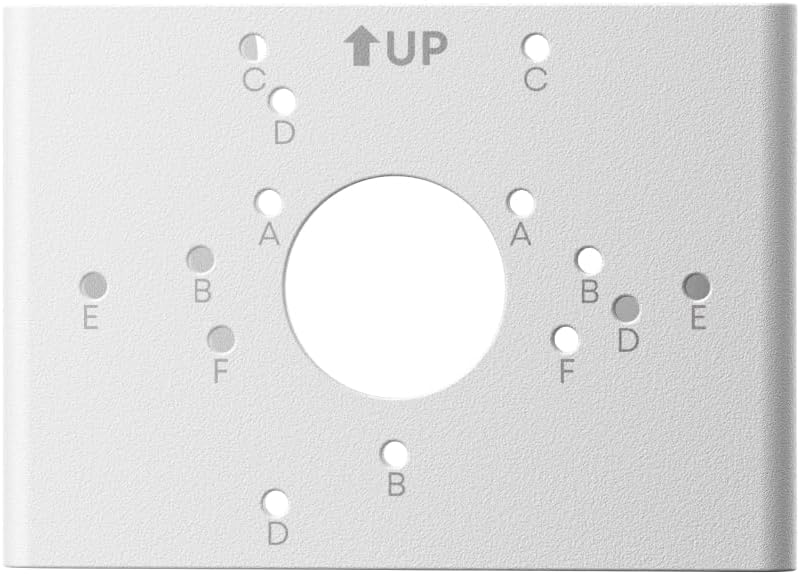
Image: A close-up of the mounting surface of the eufy pole mount bracket, highlighting the various screw holes (labeled A, B, C, D, E, F) for different camera models and the "UP" indicator.
Step 3: Attach the Camera to the Bracket
- Align the mounting holes on your eufy camera with the corresponding holes on the pole mount bracket. The bracket offers multiple hole patterns (A, B, C, D, E, F) to accommodate various eufy camera models.
- Use the provided mounting screws to securely fasten the camera to the bracket. Do not overtighten.
- Adjust the camera's angle as needed for optimal surveillance coverage.

Image: An eufy camera with a solar panel accessory mounted on a white fence post using the pole mount bracket, illustrating a common home installation.

Image: A eufy bullet-style camera mounted on a tree trunk with the pole mount bracket, demonstrating compatibility with different camera form factors.

Image: A visual representation of the eufy pole mount bracket's compatibility with several eufy camera models, including eufyCam S40, eufyCam S340, eufyCam S4, eufyCam C35, eufyCam S3 Pro, PoE Bullet Security Camera E40, and PoE Turret Security Camera E41.
Garis Panduan Penggunaan
While the eufy Pole Mount Bracket provides flexible camera placement, consider the following guidelines for optimal performance:
- Camera Orientation: Ensure your camera is oriented correctly to capture the desired field of view.
- Kestabilan: Periodically check the tightness of the straps and camera screws to maintain stability, especially after strong winds or environmental changes.
- Pengurusan Kabel: Route camera cables neatly and securely along the pole to prevent damage and maintain a clean appearance.
- Faktor Persekitaran: Position the camera to minimize direct exposure to harsh weather conditions where possible, even though the bracket is designed for outdoor use.
Penyelenggaraan
The eufy Pole Mount Bracket is designed for minimal maintenance. However, regular checks can prolong its lifespan and ensure continued security for your camera.
- Pembersihan: Occasionally wipe the bracket with a damp cloth to remove dirt, dust, or debris. Avoid abrasive cleaners.
- Pemeriksaan: Annually inspect the stainless steel straps for any signs of corrosion or wear. Check the tightness of the straps and camera mounting screws.
- Pencegahan Karat: The bracket features a rust-resistant powder coating. If any deep scratches expose the metal, consider touching up with outdoor-grade paint to prevent rust.
Menyelesaikan masalah
If you encounter issues with your eufy Pole Mount Bracket, refer to the following common solutions:
| Masalah | Kemungkinan Punca | Penyelesaian |
|---|---|---|
| Bracket is not stable on the pole. | Straps are not tightened sufficiently. Incorrect pole diameter. | Ensure straps are tightened firmly. Verify pole diameter is between 50-150 mm. |
| Camera wobbles on the bracket. | Camera mounting screws are loose. Incorrect screw holes used. | Tighten the screws securing the camera to the bracket. Ensure correct mounting holes are used for your camera model. |
| Bracket shows signs of rust. | Surface coating damage exposing metal. | Clean the rusted area and apply outdoor-grade rust-inhibiting paint. |
Spesifikasi
| Ciri | Perincian |
|---|---|
| Nombor Model | T870C |
| bahan | Logam, Keluli Tahan Karat |
| Jenis Selesai | Bersalut Serbuk |
| warna | putih |
| Jenis Pemasangan | Gunung Pole |
| Diameter Tiang Serasi | 50 mm – 150 mm (2 – 6 inches) |
| Keserasian | All eufy PoE cameras, Select eufy Wi-Fi outdoor cameras |
| Komponen yang Disertakan | Pole Mount Bracket x 1 |
Maklumat Waranti
The eufy Pole Mount Bracket (T870C) comes with a Waranti terhad 12 bulan from the date of purchase. This warranty covers manufacturing defects under normal use. It does not cover damage caused by misuse, accidents, unauthorized modifications, or natural disasters. Please retain your proof of purchase for warranty claims.
Sokongan Pelanggan
For technical assistance, warranty claims, or further inquiries regarding your eufy Pole Mount Bracket, please contact eufy customer support through their official webtapak atau maklumat hubungan yang diberikan bersama produk anda.
- Sokongan dalam talian: melawat eufylife.com/support
- e-mel: Refer to your product packaging for specific regional email addresses.
- telefon: Refer to your product packaging for specific regional phone numbers.