
1. Pengenalan
Thank you for choosing the Schneider 43A1 4K UHD LED TV. This television combines advanced display technology with smart features to provide an immersive viewing experience. Featuring a 4K Ultra High Definition display, QLED-LCD technology with Direct LED backlighting, and the VIDAA Smart TV platform, your new TV offers vibrant colors, deep blacks, and access to a wide range of entertainment.
This manual provides essential information for the safe and efficient use of your television. Please read it thoroughly before operating the device and retain it for future reference.
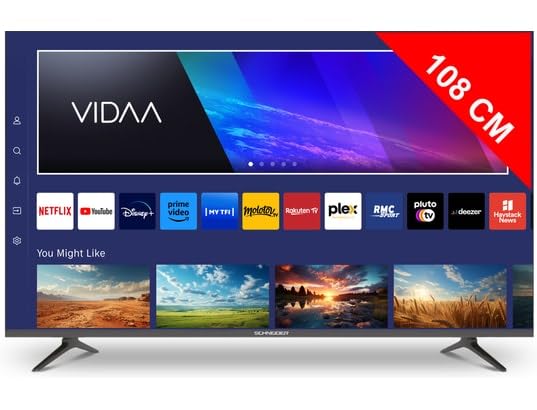
Imej 1.1: Depan view of the Schneider 43A1 TV with VIDAA interface.
2. Maklumat Keselamatan
Untuk memastikan operasi yang selamat dan mengelakkan kerosakan, sila patuhi langkah berjaga-jaga keselamatan berikut:
- penempatan: Position the TV on a stable, level surface. Avoid placing it in direct sunlight, near heat sources, or in environments with high humidity or dust.
- Pengudaraan: Ensure adequate ventilation around the TV. Do not block ventilation openings. Maintain a minimum distance of 10 cm from walls or other objects.
- Bekalan Kuasa: Gunakan hanya bekalan kuasa yang dinyatakan voltage. Ensure the power cord is not pinched or walked on. Disconnect the power plug during lightning storms or when unused for extended periods.
- Pembersihan: Cabut plag TV sebelum membersihkan. Gunakan kain lembut dan kering. Jangan gunakan cecair atau pembersih aerosol.
- Cecair: Do not expose the TV to dripping or splashing liquids. Do not place objects filled with liquids, such as vases, on the TV.
- Kanak-kanak: Awasi kanak-kanak untuk memastikan mereka tidak memanjat TV atau perabot.
- Pemasangan Dinding: If wall-mounting, use a VESA compatible bracket (200 x 200 mm) and ensure proper installation by qualified personnel to prevent injury.
3. Kandungan Pakej
Sila pastikan semua item ada dan dalam keadaan baik:
- Schneider 43A1 4K UHD LED TV
- Alat Kawalan Jauh
- Kabel Kuasa
- Stand TV (2 keping)
- Skru untuk Kaki TV
- Manual Pengguna (dokumen ini)
4. Persediaan
4.1 Membongkar
Carefully remove the TV from its packaging. It is recommended to keep the original packaging for potential future transport or service needs.
4.2 Pemasangan Stand
If you are not wall-mounting the TV, attach the included stand pieces to the bottom of the TV using the provided screws. Ensure the stand is securely fastened before placing the TV upright.
4.3 Pemasangan Dinding (Pilihan)
The Schneider 43A1 is compatible with VESA 200 x 200 mm wall mounts. For safe installation, it is highly recommended to use a professional installer. Refer to your wall mount's instructions for specific details.
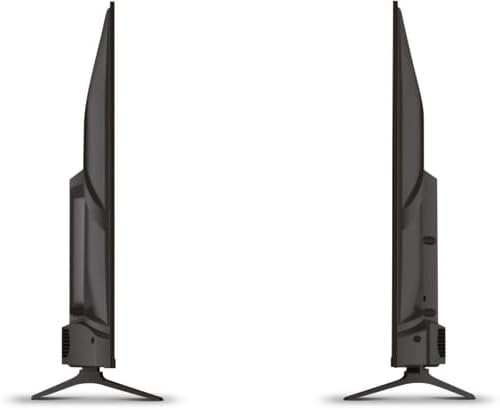
Imej 4.1: Sisi view of the Schneider 43A1 TV, illustrating its profile for placement or wall mounting.
4.4 Menyambung Peranti Luaran
TV anda menawarkan pelbagai pilihan sambungan:
- HDMI: Connect up to three HDMI 2.0 devices (e.g., Blu-ray player, game console, set-top box) to the HDMI ports.
- USB: Two USB ports are available for connecting USB storage devices to play media.
- AV/Audio Input: For older devices requiring composite video and stereo audio.
- Output sepaksi: Untuk menyambung ke sistem audio luaran.
- Input Antena/Kabel: Connect your antenna or cable TV signal for DVB-T/T2/C/S2 reception.
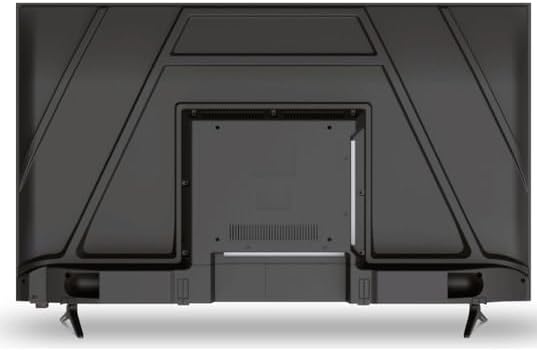
Imej 4.2: Belakang view of the Schneider 43A1 TV, highlighting connection ports.
4.5 Kuasa Penyambung
Plug the power cable into the TV's power input, then into a suitable wall outlet.
4.6 Wizard Persediaan Awal
Upon first power-on, the TV will guide you through an initial setup process. This includes selecting your language, connecting to a Wi-Fi network, and scanning for available channels (DVB-T/T2/C/S2).
5. Beroperasi
5.1 Fungsi Kawalan Jauh
Alat kawalan jauh membolehkan anda menavigasi ciri-ciri TV:
- Butang Kuasa: Menghidupkan atau mematikan TV.
- Kelantangan Naik/Turun: Melaraskan tahap bunyi.
- Saluran Atas/Bawah: Menukar saluran TV.
- Input/Sumber: Selects the input source (HDMI, USB, TV Tuner).
- Butang Navigasi: Untuk navigasi menu.
- Butang TV Pintar: Direct access to popular apps like Netflix, Prime Video, YouTube.
5.2 Smart TV (VIDAA)
The integrated VIDAA Smart TV platform provides access to a variety of applications and streaming services. Connect your TV to the internet via Wi-Fi to enjoy features like Netflix, Prime Video, and YouTube. Bluetooth connectivity allows for wireless connection to compatible audio devices.

Imej 5.1: Bahagian hadapan bersudut view of the Schneider 43A1 TV, displaying the VIDAA Smart TV interface.
5.3 Pemilihan Input
Press the 'Input' or 'Source' button on your remote control to switch between connected devices (HDMI 1, HDMI 2, HDMI 3, USB, AV, TV Tuner).
5.4 Tetapan Gambar dan Bunyi
Access the TV's menu to adjust picture and sound settings. The 4K UHD resolution, QLED-LCD technology, and Direct LED backlighting ensure a high-quality visual experience. The TV also features upscaling to enhance lower-resolution content. Audio is delivered via 2 x 8 W RMS stereo speakers with Dolby Audio support.
5.5 PC Monitor Mode
The TV can be used as a PC monitor by connecting your computer via an HDMI cable. This mode optimizes the display for computer use.
6. Penyelenggaraan
6.1 Membersihkan TV
Before cleaning, ensure the TV is unplugged from the power outlet.
- Skrin: Lap skrin perlahan-lahan dengan kain lembut yang tidak berbulu. Untuk tanda degil, ringankan dampen kain dengan air atau pembersih skrin khusus (jangan sembur terus ke skrin).
- Luaran: Gunakan kain lembut dan kering untuk mengelap TV casing. Elakkan pembersih atau pelarut yang melelas.
6.2 Kemas Kini Perisian
Your TV may receive software updates to improve performance and add new features. Ensure your TV is connected to the internet to receive these updates automatically or check for them manually through the settings menu.
7. Penyelesaian masalah
Jika anda menghadapi masalah dengan TV anda, rujuk masalah dan penyelesaian biasa berikut:
- Tiada Kuasa:
- Periksa sama ada kabel kuasa dipasang dengan selamat ke dalam TV dan salur keluar dinding.
- Pastikan alur keluar dinding berfungsi (uji dengan peranti lain).
- Tekan butang kuasa pada alat kawalan jauh atau pada TV itu sendiri.
- Tiada Gambar/Bunyi:
- Sahkan sumber input yang betul dipilih (cth, HDMI 1, TV).
- Periksa semua sambungan kabel antara TV dan peranti luaran.
- Pastikan kelantangan tidak diredamkan atau ditetapkan kepada minimum.
- Jika menggunakan antena, periksa sambungan antena dan lakukan imbasan saluran.
- Alat Kawalan Jauh Tidak Berfungsi:
- Gantikan bateri dalam alat kawalan jauh.
- Pastikan tiada halangan antara alat kawalan jauh dan penderia IR TV.
- Smart TV/Network Issues:
- Periksa penghala Wi-Fi dan sambungan internet anda.
- Go to the TV's network settings to re-connect to your Wi-Fi network.
- Mulakan semula TV dan penghala anda.
Jika masalah berterusan selepas mencuba penyelesaian ini, sila hubungi sokongan pelanggan.
8. Spesifikasi
| Ciri | Spesifikasi |
|---|---|
| Model | Schneider 43A1 |
| Saiz Paparan | 109 cm (43 inci) |
| Resolusi | 4K Ultra HD (3840 x 2160 piksel) |
| Teknologi Paparan | QLED-LCD with Direct LED Backlight |
| Nisbah Kontras | 1100:1 |
| Kecerahan | 200 cd/m² |
| Output Audio | 2 x 8 W RMS Stereo |
| Teknologi Audio | Audio Dolby |
| Port HDMI | 3 (HDMI 2.0) |
| Port USB | 2 |
| Input Lain | AV/Audio Input |
| Keluaran | Keluaran Koaksial |
| Penala | DVB-T/T2/C/S2 |
| Platform TV Pintar | VIDAA (Netflix, Prime Video, YouTube) |
| Kesambungan Wayarles | Wi-Fi, Bluetooth |
| Keserasian VESA | 200 x 200 mm |
| Berat badan | 7.5 Kilogram |