
1. Pengenalan
Thank you for choosing the Rollerhouse ZigBee Smart Motor. This motor is designed to automate your 2-inch (50mm) roller shades, integrating seamlessly with popular smart home systems like Amazon Alexa, Google Home, and the Tuya Smart Life App via a ZigBee 3.0 hub (sold separately). This manual provides detailed instructions for installation, setup, operation, and maintenance to ensure optimal performance and longevity of your device.
Sila baca manual ini dengan teliti sebelum pemasangan dan operasi. Simpan untuk rujukan masa hadapan.
2. Ciri-ciri Produk
- Keserasian Rumah Pintar: Seamlessly connects with Alexa, Google Home, and Tuya Smart Life App for voice control and scheduling via ZigBee 3.0 protocol (hub required, sold separately).
- Universal 2" Tube Fit: Designed for 50mm (2-inch) roller shade tubes, ideal for DIY smart blinds upgrades.
- Powerful & Quiet Operation: High torque (6N·m) motor supports shades up to 30 lbs (14 kg) with ultra-smooth and low-noise operation.
- Pemasangan Mudah: No complex wiring needed; includes 50mm rubber drive fittings. Works with most standard roller blinds (verify tube size before purchase).
- Group Control & Automation: Create custom scenes (e.g., "Good Morning" tilt) or group multiple motors for synchronized shade control via the Tuya/ZigBee hub.
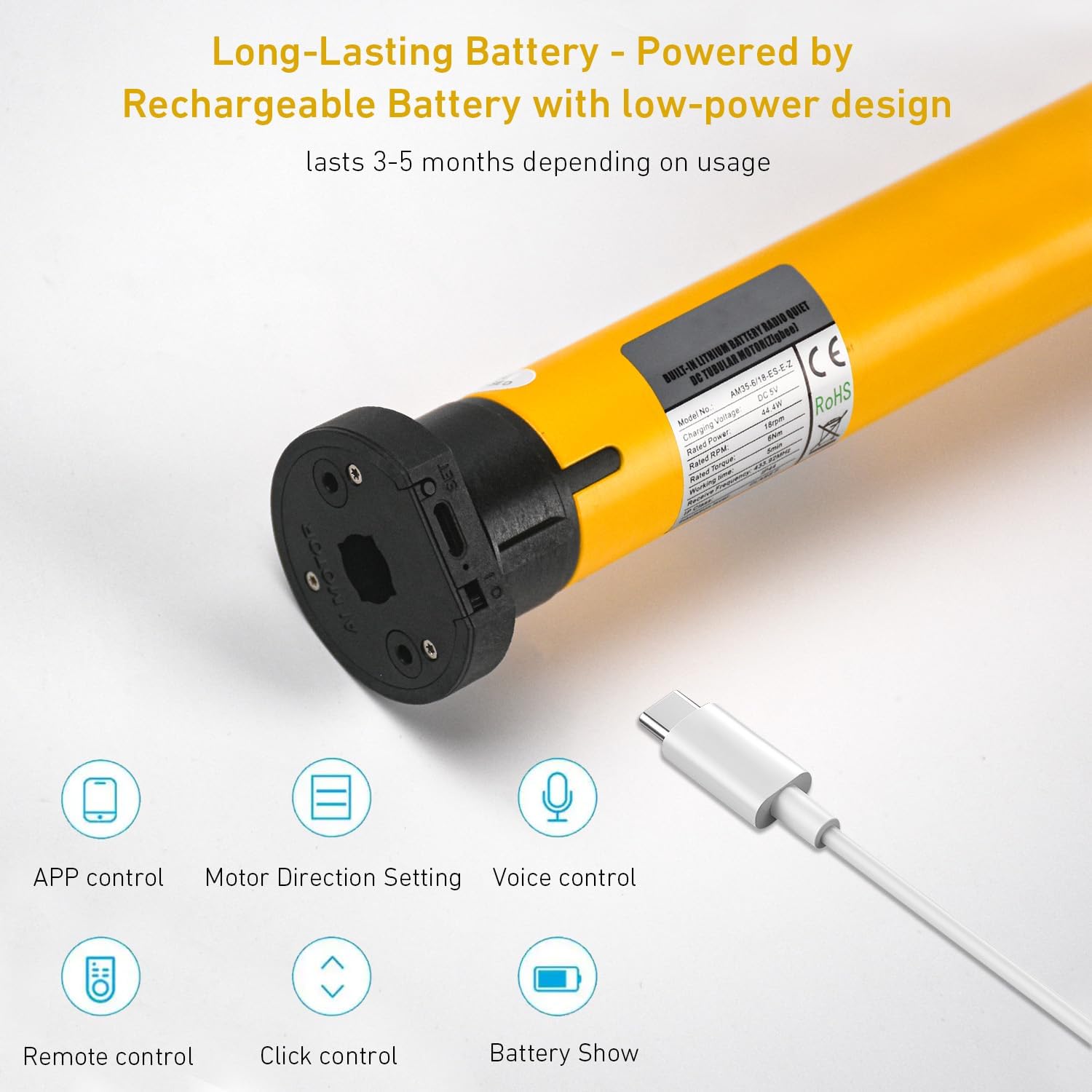
- Bateri Tahan Lama: Powered by a rechargeable battery with a low-power design, lasting 3-5 months depending on usage.
3. Spesifikasi

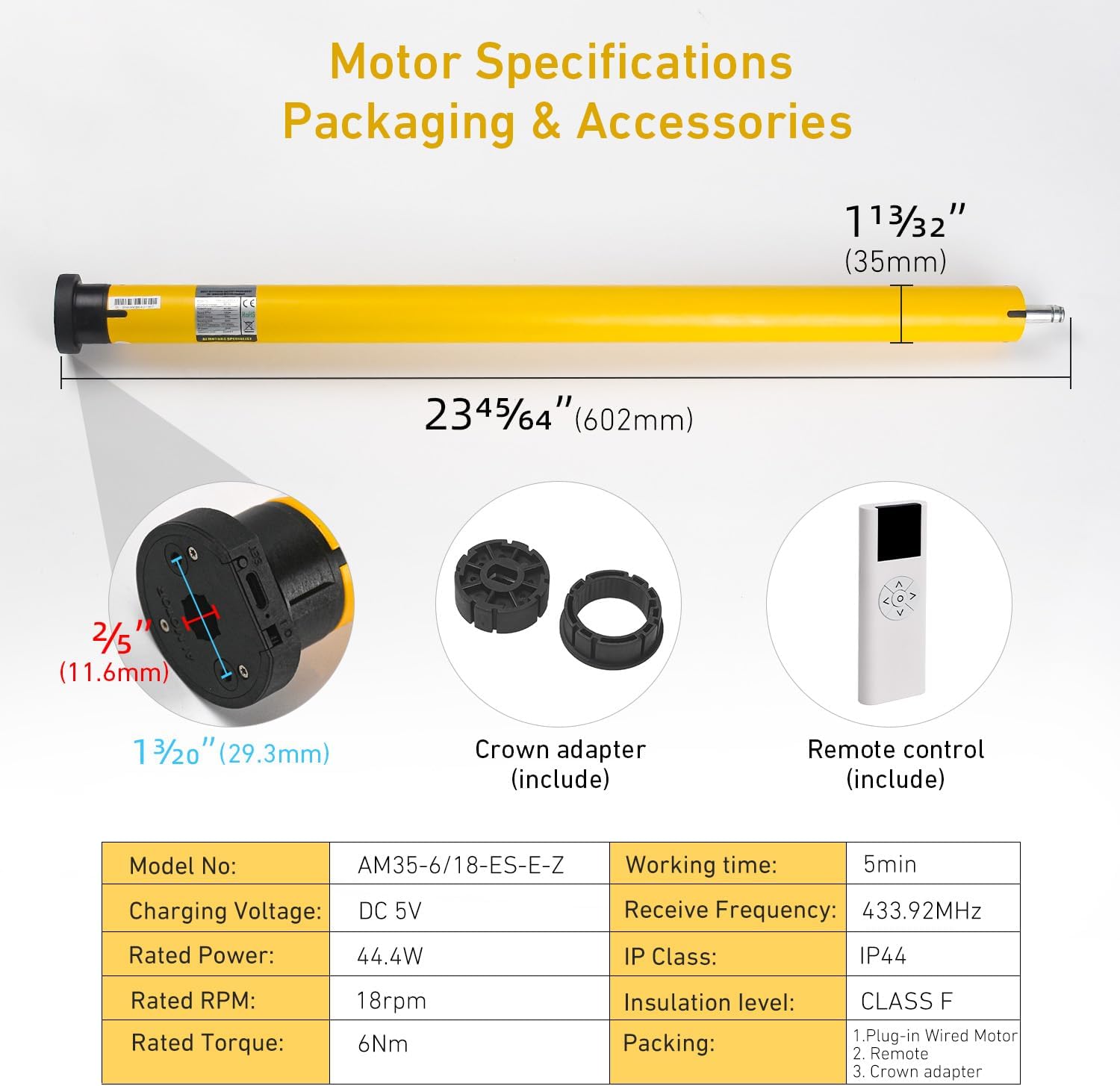
| Parameter | Nilai |
|---|---|
| Model No. | AM35-6/18-ES-E-Z |
| Mengecas Voltage | DC 5V |
| Kuasa Dinilai | 44.4W |
| RPM yang dinilai | 18rpm |
| Tork Dinilai | 6Nm |
| Masa Bekerja | 5min |
| Terima Kekerapan | 433.92MHz |
| Kelas IP | IP44 |
| Tahap Penebat | KELAS F |
| bahan | Logam, Plastik |
| Dimensi Produk | 17"L x 4"W (Motor length: 23.7"/602mm, Diameter: 1.4"/35mm) |
| Berat Barang | 1.64 paun |
4. Kandungan Pakej
Sahkan bahawa semua komponen terdapat dalam pakej:
- ZigBee Smart Motor (AM35-6/18-ES-E-Z)
- Battery Tube/Wand
- Removable End Caps
- Battery Wand Clips
- Crown Adapter (for 2"/50mm tube)
- Remote Control (may vary by package)
- Kabel Pengecas USB
5. Panduan Pemasangan
5.1. Measure Your Shade Tube
Ensure your roller shade tube has an outer diameter (OD) of 2 inches (50mm) for proper fitment of the motor and crown adapter.

5.2. Insert Motor into Shade Tube
- Attach the crown adapter to the motor head.
- Slide the motor, with the crown adapter, into one end of your 2-inch roller shade tube. Ensure it fits snugly.
- Secure the other end of the shade tube with the appropriate end cap and mounting bracket.
5.3. Mounting the Shade
Mount the roller shade assembly to your wall or ceiling using suitable brackets. Ensure the motor's charging port is accessible if it's battery-powered and requires periodic charging.
6. Persediaan dan Berpasangan
6.1. Mengecas Motor
Before initial use, fully charge the motor using the provided USB charging cable. The charging port is typically located on the motor head.
6.2. Berpasangan dengan Hab ZigBee
This motor requires a ZigBee 3.0 compatible hub (e.g., Tuya ZigBee Hub) to connect to your smart home system. Follow the instructions provided with your ZigBee hub to add a new device.
- Ensure your ZigBee hub is powered on and in pairing mode.
- Refer to the motor's specific pairing button location (often a small button on the motor head or a sequence of remote presses). Press and hold the pairing button until the motor indicates pairing mode (e.g., LED flashes).
- Once detected by the hub, follow the on-screen prompts in your smart home app (e.g., Tuya Smart Life App) to complete the pairing process.
6.3. Integrating with Smart Home Platforms
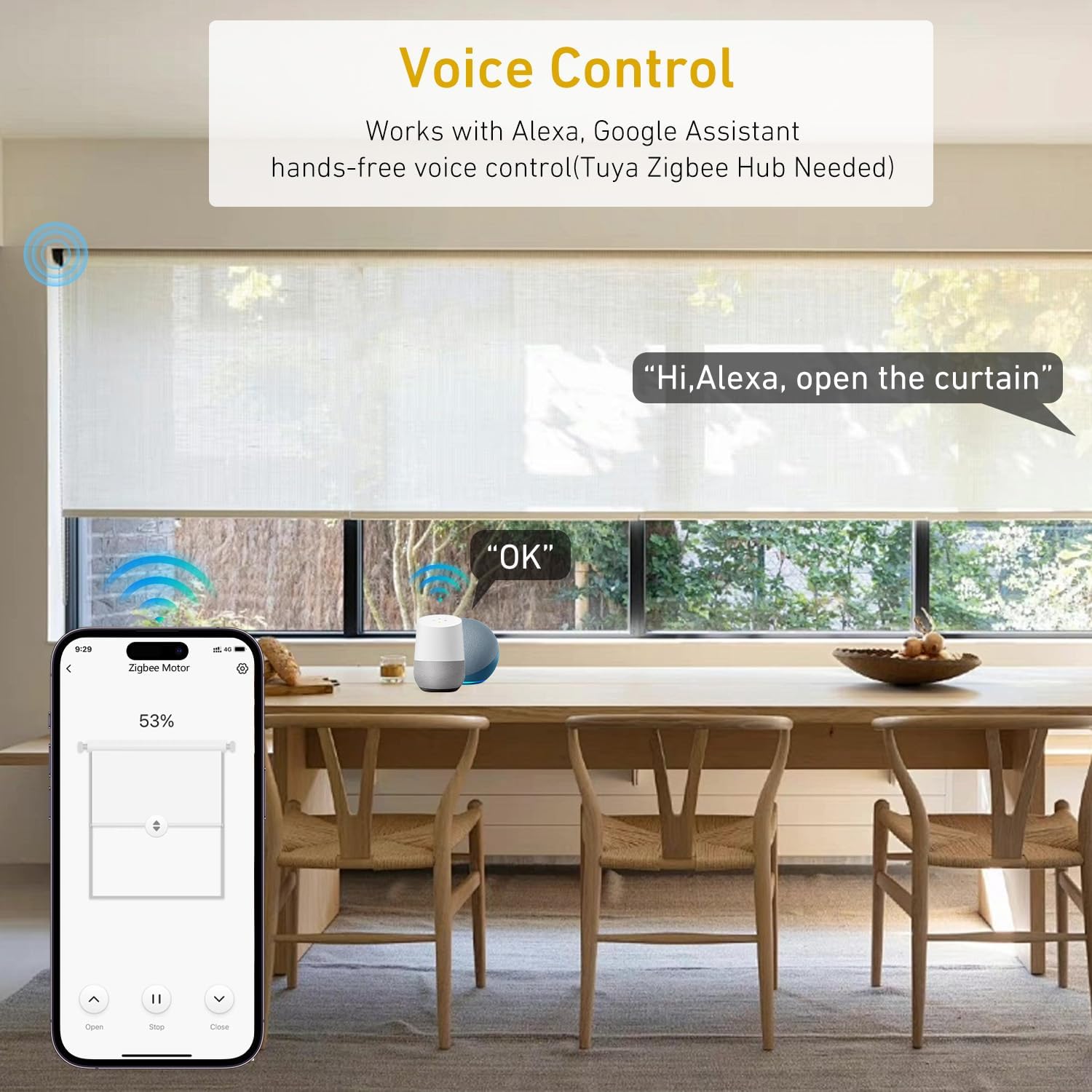
After pairing with your ZigBee hub, you can link your smart home app (e.g., Tuya Smart Life) to voice assistants like Amazon Alexa or Google Home.
- Untuk Alexa: Open the Alexa app, go to 'Skills & Games', search for 'Tuya Smart' or 'Smart Life', enable the skill, and link your account. Then, 'Discover Devices'.
- Untuk Google Home: Open the Google Home app, tap '+' > 'Set up device' > 'Works with Google', search for 'Tuya Smart' or 'Smart Life', link your account.
7. Arahan Operasi
7.1. Operasi Alat Kawalan Jauh
If your package includes a remote control, use it for direct operation:
- Butang Naik: Raises the shade.
- Butang Bawah: Lowers the shade.
- Butang Berhenti/Jeda: Menghentikan bayang-bayang pada kedudukan semasa.
- Butang Tetapan: Used for setting upper/lower limits or pairing (refer to remote's specific manual).
7.2. Kawalan Apl
Use the Tuya Smart Life App (or your preferred smart home app) for comprehensive control:
- Buka tutup: Full control over shade position.
- Peratustage Kawalan: Adjust the shade to a specific percentage open/closed.
- Tetapan Arah Motor: If the motor operates in the reverse direction, you can usually adjust this setting within the app.
- Status Bateri: Monitor the motor's battery level directly from the app.

7.3. Kawalan Suara
Once integrated with Alexa or Google Home, use voice commands:
- "Alexa, buka tirai ruang tamu."
- "Hey Google, close the kitchen shade."
- "Alexa, set bedroom shade to 50%."
7.4. Timer & Scheduling
Utilize the scheduling features in your smart home app to automate shade movements:
- Set daily routines, e.g., open shades at sunrise, close at sunset.
- Create custom schedules for specific days or times.
- Integrate with other smart home devices for scene automation (e.g., "Good Morning" scene opens shades and turns on lights).


8. Penyelenggaraan
8.1. Mengecas Bateri
The motor is battery-powered and requires periodic charging. When the battery level is low (indicated by the app or a motor LED), connect the motor to a DC 5V power source using the provided USB charging cable. A full charge typically lasts 3-5 months, depending on usage frequency.
8.2. Pembersihan
Clean the motor and exposed parts with a soft, dry cloth. Do not use abrasive cleaners or immerse the motor in water. Spot clean only.
9. Penyelesaian masalah
- Motor tidak bertindak balas:
- Periksa tahap bateri dan cas semula jika perlu.
- Ensure the motor is properly paired with the remote or ZigBee hub.
- Verify the ZigBee hub is powered on and connected to the internet.
- Shade bergerak ke arah yang salah:
- Adjust the motor direction setting within your smart home app.
- Kawalan suara tidak berfungsi:
- Ensure your smart home app is correctly linked to Alexa or Google Home.
- Periksa sambungan internet anda dan status peranti pembantu suara anda.
- Verify the device name in the smart home app matches the name you are using in voice commands.
- Motor makes unusual noise:
- Ensure the motor is securely installed within the shade tube and that the tube is properly mounted.
- Check for any obstructions preventing smooth shade movement.
10. Maklumat Keselamatan
- Do not attempt to disassemble or repair the motor yourself. Contact customer support for assistance.
- Keep the motor and accessories out of reach of children and pets.
- Gunakan hanya volum pengecasan yang dinyatakantage (DC 5V) and cable.
- Ensure the shade tube is securely mounted before operating the motor.
- Elakkan mendedahkan motor kepada suhu atau kelembapan yang melampau.
11. Waranti dan Sokongan
This product comes with a standard manufacturer's warranty. For specific warranty details, please refer to the product packaging or contact Rollerhouse customer support. If you encounter any issues or have questions not covered in this manual, please reach out to our support team for assistance.
Maklumat Hubungan: Please refer to the seller's information on the purchase platform or the official Rollerhouse weblaman web untuk mendapatkan butiran hubungan sokongan terkini.